iOS 16: How to Create Favorites Within a Safari Tab Group - MacRumorsOpen MenuShow RoundupsShow Forums menuVisit ForumsOpen Sidebar
Skip to Content

iOS 16: How to Create Favorites Within a Safari Tab Group

by

In iOS 16, Apple has made several enhancements to its Safari browser, including some new features when working within Tab Groups. One of these is the ability to select webpages from your bookmarks so that they appear as Favorites in the Start Page of any new tab that you open within a specific Tab Group. Here's how it works.
iOS 16 Safari Guide Feature
If you're unfamiliar with Tab Groups, they provide a handy a way to easily save and manage related tabs, such as those used when planning trips or shopping. Apple introduced the feature in iOS 15 and you can check out our dedicated how-to article for more information.

When it comes to adding Favorites to specific Tab Groups, you'll first need to have some webpages in your bookmarks, and have created at least one Tab Group. Then you can follow these steps.

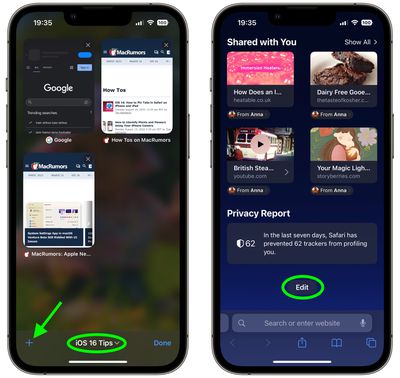
  1. In the Safari tab browser, make sure your Tab Group is active by tapping the middle of the tab bar at the bottom of the screen and then selecting its name.
  2. Next, tap the plus (+) icon in the bottom-left corner to open a new tab showing a Start Page.
  3. Scroll to the bottom of the Start Page and tap Edit.
    safari

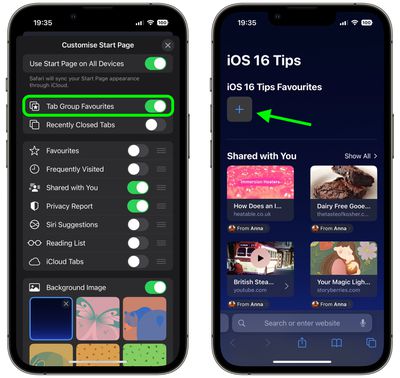
  4. Toggle on the switch next to Tab Group Favorites, then tap the X in the top-right corner to close the Customize Start Page menu.
  5. At the top of the Start Page, tap the plus (+) in the square to add a Tab Group favorite.
    safari

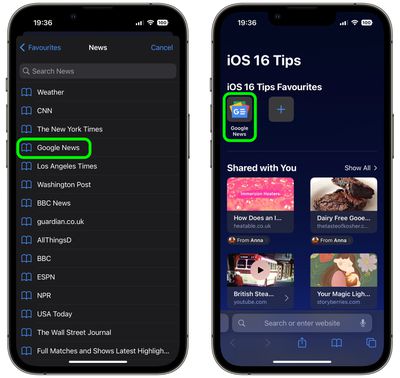
  6. Add a Favorite by tapping a webpage from your Bookmarks list.
  7. Repeat steps 5 and 6 to add more Favorites.
    safari

And now you're done. Your Tab Group favorites will now appear in the Start Page of every new tab that you open in the Tab Group.


Tag: Safari

Popular Stories

safari notify macos 27

New Safari Can Monitor a Webpage and Notify You of Updates

Monday June 8, 2026 11:04 am PDT by
Apple's new version of Safari browser in macOS 27 and iOS 27 can be tasked to monitor a webpage and notify you of any changes, thanks to a new built-in feature. With "Notify Me," Safari can keep checking a website on your behalf – such as a product you've been watching for when it comes back in stock – and alert you when a change occurs. In other upcoming feature additions, using the ...
safari tab groups apple intelligence

Apple Brings AI Tab Organization and AI-Generated Extensions to Safari

Monday June 8, 2026 1:18 pm PDT by
Apple today unveiled a raft of Safari upgrades powered by Apple Intelligence, including automatic tab organization, AI-generated custom extensions, and new privacy-first browsing tools. The centerpiece feature is automatic tab organization, which uses Apple Intelligence to group a user's open tabs into relevant topics without any manual intervention. If someone is planning a weekend trip,...
American Express Gold Apple Pay Feature

American Express Announces New Apple Pay Feature

Tuesday June 30, 2026 10:27 am PDT by
American Express today announced that you can now redeem Membership Rewards points when checking out with Apple Pay on the web and in apps on the iPhone and iPad. When checking out with Apple Pay on iOS 18 or iPadOS 18 or later, tap on your eligible American Express card (Platinum, Gold, Green, and others) and select the Membership Rewards points option. You can use points to cover all or...

🔗 Related Apple News & Rumors

Stay updated with the latest Apple ecosystem news and verified rumors