

How to Create an Archived iTunes Backup - MacRumorsOpen MenuShow RoundupsShow Forums menuVisit ForumsOpen Sidebar
Skip to Content

How to Create an Archived iTunes Backup

by

Regularly creating iCloud or iTunes backups should be routine for every iOS user, but if you want to upgrade to a beta version of iOS or if you think you might want to downgrade shortly after installing a new iOS update, you'll want to make sure create an archived iTunes backup beforehand.

An archived iTunes backup is essential because it saves the current state of your iOS device and prevents it from being accidentally overwritten by subsequent backups. Apple recommends all public beta testers create an archived backup before installing a beta in case something goes wrong and a restore is needed. Here's how to do it.

Create an Encrypted Backup
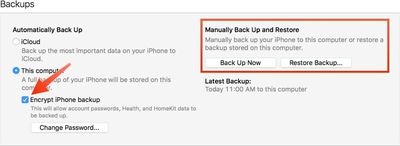
encryptedbackup

  1. Connect your iPhone or iPad to a Mac with the latest version of iTunes installed and click on the device icon in iTunes.
  2. Under backups, choose "This computer." Select "Encrypt iPhone backup" and set a password. An encrypted backup includes account passwords, Health, and HomeKit data. A non-encrypted backup will wipe all of this data if it's used for a restore.
  3. Click "Back Up Now" and wait for the backup process to finish. It will take approximately five minutes to complete depending on what's installed on your iPhone.

Archive the Backup
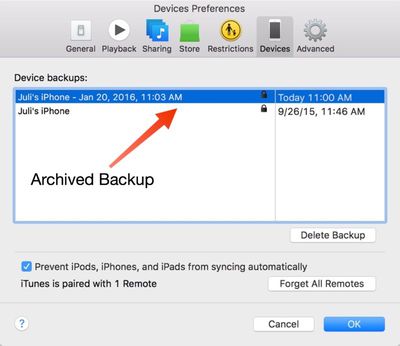
archivedbackup

  1. To archive the backup, choose "Preferences" from the iTunes menu and select the "Devices" tab. Choose the fresh backup and right click to bring up the "Archive" option.
  2. Once archived, a backup will be marked with the date and the exact time that it was archived.

Your archived backups are always visible in the Preferences section of iTunes, even when a device is not plugged in. Deleting one of your archived backups can be done from the same menu, by selecting a backup and choosing the "Delete Backup" option.

This guide is applicable to iTunes users on the Mac. Windows iTunes users are not able to create archived iTunes backups using the same method and will instead need to rename their iTunes backup folder or move it to another location to prevent it from being overwritten.

Creating an archived backup is one of the key steps in our how to that walks users through installing a beta version of iOS, which is available here.


Top Rated Comments

jclo Avatar
140 months ago
I realize this how to may be something that a lot of people already know and creating an archived backup is nothing new, but we're publishing it now to fill in some gaps in our existing how to coverage.

It'll be useful to people who aren't familiar with creating archived backups and it's specifically being added for future use in other how tos where an archived backup is a requirement, like this one: https://www.macrumors.com/how-to/how-to-download-ios-beta/

You'll see a few other how tos like this here and there with the same disclaimer.
Score: 5 Votes (Like | Disagree)
naeS1Sean Avatar
140 months ago
I realize this how to may be something that a lot of people already know and creating an archived backup is nothing new, but we're publishing it now to fill in some gaps in our existing how to coverage.

It'll be useful to people who aren't familiar with creating archived backups and it's specifically being added for future use in other how tos where an archived backup is a requirement, like this one: https://www.macrumors.com/how-to/how-to-download-ios-beta/

You'll see a few other how tos like this here and there with the same disclaimer.
I love this article and all the articles you do like it. Even though it's often basic stuff, it's nice to affirm and also see if I missed some obvious things. Thank you!
Score: 2 Votes (Like | Disagree)
jack daniels Avatar
140 months ago
Thanks for clarifying that the instructions don't work on a PC. However, at the beginning of the article it mentions that the instructions are for Mac adn PC, so could you please clear this up.

Could you please also give us more complete instructions on how to archive a backup on a PC? For example, the location of the backup folder and/or how to rename it (e.g. do you just rename the folder or change a setting in iTunes)?

I'm not entirely sure that archived backups aren't possible on a PC. I have an archived backup on my PC together with a date and time, and some non archived backups. Perhaps this happens automatically if you restore your device to an earlier state then back up (e.g. if you back up a new iPhone, then restore it from an older iPhone, does the new iPhone backup gets archived).
iTunes for Windows doesn't contain anything in the UI for archiving iTunes backups, which is why it's not included in this guide. You can manually archive backups on Windows by moving the backup itself to somewhere other than the default directory. Depending on your version of Windows, this varies.

Find and Manage your iTunes backups
https://support.apple.com/en-us/HT204215

The backups in the default directory will be named the UDID of the device that created them. Simply drag the folder to an external drive or wherever you back up your files, and when it's time to restore, move them back into the default directory and it will be available in iTunes to restore from.
Score: 2 Votes (Like | Disagree)
140 months ago
Thanks for clarifying that the instructions don't work on a PC. However, at the beginning of the article it mentions that the instructions are for Mac adn PC, so could you please clear this up.

Could you please also give us more complete instructions on how to archive a backup on a PC? For example, the location of the backup folder and/or how to rename it (e.g. do you just rename the folder or change a setting in iTunes)?

I'm not entirely sure that archived backups aren't possible on a PC. I have an archived backup on my PC together with a date and time, and some non archived backups. Perhaps this happens automatically if you restore your device to an earlier state then back up (e.g. if you back up a new iPhone, then restore it from an older iPhone, does the new iPhone backup gets archived).
Score: 1 Votes (Like | Disagree)
jclo Avatar
140 months ago
Is this something that can be used to revert back to the iOS version you archived at if you're subsequently unhappy with an upgrade?

e.g. My iPad 2 is on iOS 6. Can I archive backup now, upgrade to iOS 9, and then if I find the performance hit unacceptable revert back to iOS 6 via the archived backup?
Only so long as Apple is signing the update. Apple doesn't sign software for very long following a new version of iOS so the window for downgrading is pretty small.
Score: 1 Votes (Like | Disagree)
Carvensno Avatar
140 months ago
Is this something that can be used to revert back to the iOS version you archived at if you're subsequently unhappy with an upgrade?

e.g. My iPad 2 is on iOS 6. Can I archive backup now, upgrade to iOS 9, and then if I find the performance hit unacceptable revert back to iOS 6 via the archived backup?
Nope because Apple isn't signing iOS 6 anymore. Backup is only for your stuff on the phone, ie... Texting, contacts, music, pics, apps, and etc...not the OS.

Score: 1 Votes (Like | Disagree)

Popular Stories

iPhone Duo Display Cracking

Apple Alerts Stores to iPhone Duo's Display Cracking Issue

Friday October 30, 2026 3:20 pm PDT by
In a memo shared with Apple Stores and Apple Authorized Service Providers this week, and later obtained by MacRumors, Apple provided technicians with guidance on how to diagnose and address the iPhone Duo's inner display cracking issue. If a customer reports the issue, Apple advised technicians to inspect the iPhone Duo and repair or replace it in accordance with their standard procedures....


iPad mini OLED feature 1

Apple Executive Comments on New iPad Mini Lacking 120Hz Display

Thursday October 29, 2026 1:47 pm PDT by
While the new iPad mini has an OLED display, the device does not support ProMotion, meaning the display's refresh rate is limited to 60Hz instead of 120Hz. ProMotion support would have allowed for the iPad mini's refresh rate to automatically adjust from 10Hz to 120Hz depending on the content being displayed, but evidently Apple has kept the feature exclusive to the iPad Pro among iPad...
Pinched iPad Mini

Apple Avoids Showing Pinched Fingers on iPad Mini Page in South Korea

Thursday October 29, 2026 11:52 am PDT by
In the U.S. and most other countries, Apple's website shows the new iPad mini being held by pinched fingers, but this is not the case in South Korea. The new iPad mini shown with pinched fingers on Apple's website in the U.S. On its South Korean website, Apple simply shows an image of the iPad mini on its own. The new iPad mini shown without pinched fingers on Apple's website in South Korea ...
Latest Stories
Apple Watch Ultra 4 Hits All-Time Low Price With Amazon's $99 Discount
9 hours ago
Reminder: Apple's Big Discount on Beats 360 Ear Cushions Ends Today
9 hours ago
Here's a New Tour of Apple's HomeView Software
9 hours ago
Apple Reveals New iPad Mini's Battery Capacity
10 hours ago
Top Stories: Apple's Big MacBook Pro, iPad mini and iMac Updates
12 hours ago
'Pluribus' Season 2 Reportedly Starts Production Today
18 hours ago
iPhone 18 Pro Sales Surge in China, Offsetting Decline in U.S. and Japan
19 hours ago
HomeView Software 27.2: Wallpapers, Control Center, and More
1 day ago
Apple Alerts Stores to iPhone Duo's Display Cracking Issue
1 day ago
iOS 27.3 Will Enable These Apple Intelligence Features in China
1 day ago
Apple Says iOS 27.3 Beta Coming Next Week
1 day ago
Apple's Flash Storage Suppliers Are Finally 'Getting Their Revenge'
1 day ago
14 New Things Your iPhone Can Do in iOS 27.2
1 day ago
iPhone Duo Review: One Week Later
1 day ago
Samsung Mocks iPhone Duo Display Cracks in New Ad Campaign
1 day ago
The MacRumors Show: OLED MacBook Pro, iPad Mini 8, and More
1 day ago
MacBook Pro With Touch Display: 15 More Details Revealed
1 day ago
Russia Places Apple on State Surveillance Registry
1 day ago
Halloween Weekend Brings Discounts on Apple Accessories and Pre-Orders
1 day ago
Apple Has Released More Than 25 New Products in the Past Two Months
1 day ago
Local Code Launches as Free, Private AI Assistant Tool for Mac
1 day ago
Apple Acquires Ascend.io
2 days ago
HomePod Mini 2 Launches Today: All the New Features
2 days ago
AirTag 2 4-Pack Drops to New Low Price of $69.99
2 days ago
Rian Johnson's iPhone Camera App Goes Viral
2 days ago
Where Did All the iPhone Duos Go? Mostly to Apple's Stores
2 days ago
Apple's Touchscreen MacBook Pro Could Ship 1.5M Units in 2027
2 days ago
New Apple TV 4K and iPad Mini: RAM Amounts Revealed
2 days ago
Apple Executive Comments on New iPad Mini Lacking 120Hz Display
2 days ago
Here's a Hands-On Look at HomePod Mini 2's New Two-Tone Colors
2 days ago

🔗 Related Apple News & Rumors

Stay updated with the latest Apple ecosystem news and verified rumors









































