

How to Copy and Paste Edits to Photos in macOS - MacRumorsOpen MenuShow RoundupsShow Forums menuVisit ForumsOpen Sidebar
Skip to Content

How to Copy and Paste Edits to Photos in macOS

by

In macOS Ventura, Apple has brought some notable improvements to the Photos app, one of which is the ability to copy edits you make to an image and then paste them to other pictures. Keep reading to learn how it's done.

Ventura Macs Feature Yellow
If you have multiple photos that you want to edit in the same way, or if you've made changes to one photo that you want to replicate in another photo, you can use the new copy and paste edits tools in the ‌Photos‌ app in macOS 13.

To use the new option in the ‌Photos‌ app, first open an image, then click Edit and make the adjustments to it that you want. When you're finished, click Done, and then select Image -> Copy Edits from the menu bar.
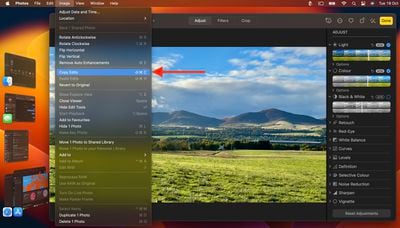
photos
Return to the main image library view, then select the image you want to paste them to. (Alternatively, select multiple images while holding down the Command key.) Finally, choose Image -> Paste Edits from the menu bar to apply the changes to all selected images.

Popular Stories

foldable iphone boards

Alleged Foldable iPhone Motherboard Photos Surface Online

Wednesday August 26, 2026 4:33 am PDT by
Images and video claiming to show circuitry from Apple's upcoming foldable iPhone are circulating on X and Chinese social media platforms. For example, on X, the user "LusiRoy7" posted a short video alongside an image, as well as a labeled composite image identifying components, purportedly depicting the motherboard of Apple's foldable iPhone. The image appears to show the CPU, a hinge...


General iCloud App Feature

iOS 27 Shared Albums Go Full Res at the Cost of Your iCloud Storage

Thursday August 20, 2026 5:48 am PDT by
In iOS 27, new Shared Albums you create in the Photos app retain full-resolution quality for the first time, but they now eat into your iCloud storage – and that includes any items added by other people invited to contribute. Currently, photos in a Shared Album are automatically reduced to 2,048 pixels on the long edge (except for panoramic photos, which can be up to 5,400 pixels wide)....
General iCloud App Feature

iCloud, Photos, Find My and More Experiencing Issues

Tuesday August 18, 2026 1:56 pm PDT by
Several iCloud services are experiencing issues, according to Apple's system status page. Find My, Game Center, Photos, iCloud Calendar, iCloud Mail, iCloud Contacts, iCloud Web Apps, and iWork for iCloud are all experiencing service interruptions. Apple says only some users may run into problems. The issue started at 3:33 p.m. Eastern Time and is...

🔗 Related Apple News & Rumors

Stay updated with the latest Apple ecosystem news and verified rumors










































