As the admin account holder on a Mac, you have the ability to create and manage other user accounts including whether they have restrictions imposed via parental controls.

When it comes to setting up multiple accounts with parental controls, you can save time by copying restrictions from one user account to another. Follow the steps to learn how it's done.
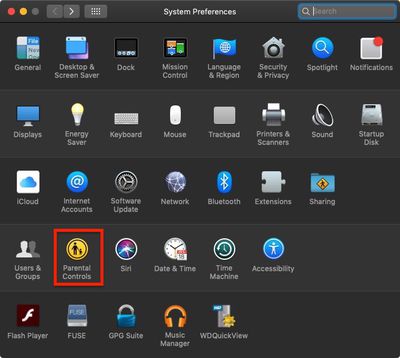
- Click the Apple () symbol in the top left corner of your Mac's screen and select System Preferences....

- Select the Parental Controls icon in the preference pane.
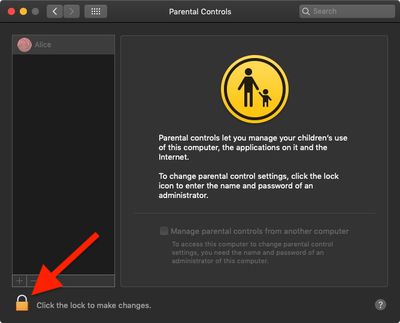
- Click the lock in the lower left corner of the window.
- Enter your admin password if prompted and click Unlock.
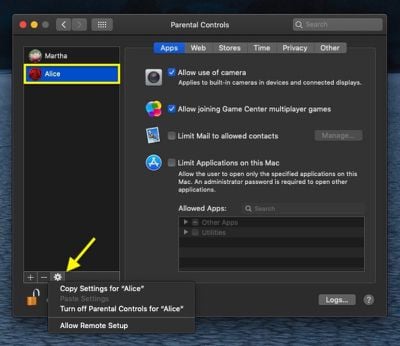
- Select the user account that you want to copy restrictions from.
- Next, click the cog icon at the bottom of the accounts column and then select Copy Settings for "[name of account]".
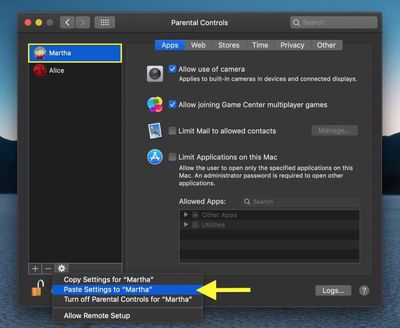
- Select the user account to whom you want to apply the copied settings.
- Now, click the cog icon again and select Paste Settings for "[name of account]".
- Lastly, click the lock in the lower left corner of the window to secure your changes and finish.
For managing parental controls and setting them up initially, make sure to check out our dedicated parental controls how to.