iOS 16: How to Convert Currencies, Time Zones, Temperatures, and More in Inline Text - MacRumorsOpen MenuShow RoundupsShow Forums menuVisit ForumsOpen Sidebar
Skip to Content

iOS 16: How to Convert Currencies, Time Zones, Temperatures, and More in Inline Text

by

In iOS 15, unit and currency conversions are handled by Spotlight, but in iOS 16 you can perform these and many other unit conversions anywhere in the operating system that you can select text. Keep reading to learn how it works.
ios 16 lock screen feature
Apple hasn't publicized this handy feature, but iOS 16 is capable of performing a range of unit conversions that appear in inline text on the fly. The built-in ability is on call across a range of stock apps like Messages, Mail, Calendar, Notes, Reminders, and more, and is available at a touch of the screen.

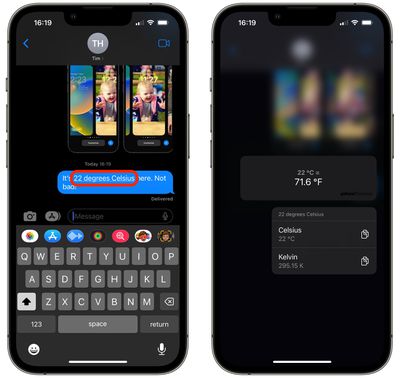
For example, say you're in the U.S. and you're chatting via Messages with someone in the United Kingdom, and they mention the temperature where they are in degrees Celsius.
messages
There's no need to exit the app or even ask Siri to convert it to Fahrenheit for you – simply long press the underlined temperature in the chat bubble, and you'll see a pop-over that gives you the conversion (along with Kelvin, in case you were wondering) along with the option to copy it to the clipboard.

Here's another example. Let's say you receive an email in the Mail app from someone based in the U.S. country, informing you of a product event announcement that is due to take place at 10:00 a.m. PT. All you have to do is long press on the underlined time and iOS will provide you with the equivalent time in the time zone that your iPhone is set to, along with the option to add a Calendar event.
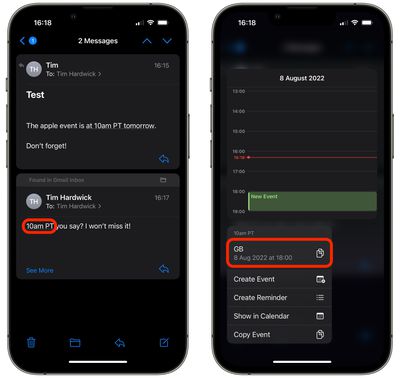
mail
In fact, iOS 16 can work its conversion magic on a range of units including the following:

  • Currency
  • Distance
  • Temperature
  • Time Zones
  • Volume
  • Weight

So whenever you see underlined units in Apple's latest mobile OS, remember that a long press will very likely give you the conversion that makes most sense to you. (Credit goes to MacStories editor in chief Federico Viticci for spotting the feature.)


Popular Stories

American Express Gold Apple Pay Feature

American Express Announces New Apple Pay Feature

Tuesday June 30, 2026 10:27 am PDT by
American Express today announced that you can now redeem Membership Rewards points when checking out with Apple Pay on the web and in apps on the iPhone and iPad. When checking out with Apple Pay on iOS 18 or iPadOS 18 or later, tap on your eligible American Express card (Platinum, Gold, Green, and others) and select the Membership Rewards points option. You can use points to cover all or...
Apple Acquires Award Winning App Play Feature

Apple Acquires Award-Winning App 'Play'

Monday June 29, 2026 7:39 am PDT by
In February, Apple notified the European Commission that it would be acquiring certain assets from and have the right to hire certain employees from Rabbit 3 Times, the company behind the award-winning app design tool Play. The notification was published on the European Commission's website this week, following a four-month waiting period. Play was a Mac and iPhone app that allowed designers ...
series 10 apple watch titanium digital crown

Report: Apple Watch Redesign Coming Next Year With New Band System

Tuesday June 30, 2026 8:45 am PDT by
A "major overhaul" of the Apple Watch's design is due to arrive next year with a new system for connecting bands, according to a known Weibo leaker. In a set of recent posts, the leaker known as "Instant Digital" linked the new claim to older rumors about an "Apple Watch X" model, which was said to introduce a fresh design and break compatibility with the existing watch band system. Citing...

🔗 Related Apple News & Rumors

Stay updated with the latest Apple ecosystem news and verified rumors