iOS 17: How to Control Which Apps Have Access to Your Photos - MacRumorsOpen MenuShow RoundupsShow Forums menuVisit ForumsOpen Sidebar
Skip to Content

iOS 17: How to Control Which Apps Have Access to Your Photos

by

In iOS 17, Apple offers much more control over what apps can see in terms of your photos. Keep reading to learn how to manage app access on a per-app basis.
icloud photos
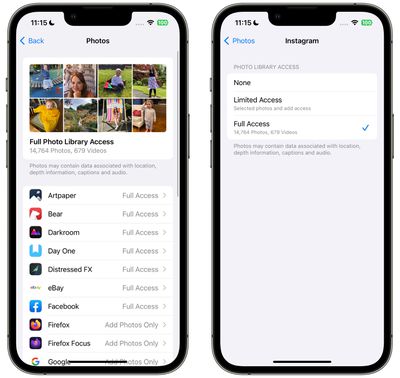
In iOS, Apple's in-app photos picker lets you share specific photos with apps while the rest of your Photo Library stays private. Apps must ask to access your entire photo library, and you can choose to give apps the following access:

  • Limited Access - Apps can see only the images that you can select, and you can review the selected images anytime either in the app or by going to Settings > Privacy & Security > ‌Photos‌.
  • Full Access - Apps can see all of the images and videos in your Photo Library, and your device will tell you exactly how many photos and videos you're giving access to.
  • None - No access to the Photo Library at all.
  • Add ‌Photos‌ Only - The app can add images to your library, but not view them. This setting depends on the app, and is not available for all apps.

In iOS 17, Apple has made managing app access to your photos a lot simpler by adding a settings menu where you can adjust permissions on a per-app basis. Here's how to get to it and manage individual apps.

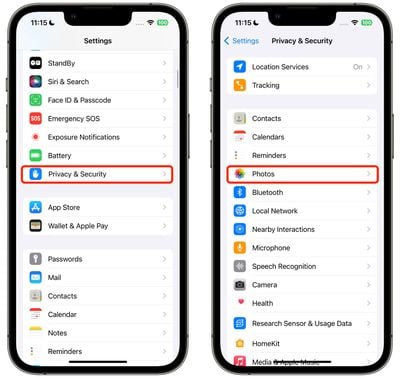
  1. Open the Settings app.
  2. Tap Privacy & Security.
  3. Tap Photos.
    settings

  4. Tap the app that you want to change access for.
  5. Choose from None, Add Photos Only (where applicable), Limited Access, and Full Access.
    settings

That's all there is to it. When you download a new app that wants Photo Library access, you will be prompted to choose from the same three options, and the app will be added to the same Photos list in Settings, allowing you to change access at any time in the future.

Your ‌iPhone‌ will also periodically remind you about apps that have access to your full Photo Library, offering up the option to change access to limited.

Popular Stories

meta ai

Meta's New AI Image Tool Can Use Your Public Instagram Photos by Default

Wednesday July 8, 2026 1:52 pm PDT by
Meta is rolling out a new feature that lets people use public Instagram posts and reels to generate AI content, and it's turned on by default. If you have an Instagram account that's not set to private, there is a setting allowing anyone to generate content on Meta AI using your images and videos. The option was added to support Meta's new image generation model, Muse Image. Muse Image is...

Apple Event Logo

Apple Working on All-New Operating System

Wednesday July 29, 2026 11:39 am PDT by
Apple is developing an all-new operating system that is essentially a mix of tvOS, watchOS, and iOS, according to Bloomberg's Mark Gurman. In a report this week, he said the operating system will feature a grid of icons, widgets, and apps, along with customizable clock faces. The new software platform is intended for Apple's long-rumored smart home hub. With built-in facial recognition,...
imac video apple feature

Apple Made Its Second-Biggest Acquisition Ever This Year

Wednesday July 29, 2026 12:03 pm PDT by
Apple this year acquired Israeli startup Q.ai for close to $2 billion, according to the Financial Times. That would make this Apple's second-biggest acquisition ever, after it paid $3 billion for the popular headphone maker Beats in 2014. This is also the largest known Apple acquisition since the company purchased Intel's smartphone modem business and patents for $1 billion in 2019. Q.ai...

🔗 Related Apple News & Rumors

Stay updated with the latest Apple ecosystem news and verified rumors