

How to Control the Transparency Feature on AirPods Max - MacRumorsOpen MenuShow RoundupsShow Forums menuVisit ForumsOpen Sidebar
Skip to Content

How to Control the Transparency Feature on AirPods Max

by

This article explains how to control the Transparency feature on Apple's AirPods Max headphones. Bear in mind that iOS devices need to be running iOS 14.3 or later in order to support ‌AirPods Max. You can check that your device is updated by launching the Settings app and going to General -> Software Update.

airpods max on head

What is the Transparency Feature on AirPods Max?

‌AirPods Max are Apple's first own-brand over-ear headphones with Active Noise Cancellation (ANC), which is designed to block out the outside world so you can focus on what you're listening to. Several microphones on the outside of the headphone listen to the noise around you and then create an inverse wave to reduce the volume of the incoming sound.

In contrast, Transparency mode allows you to simultaneously listen to music while still hearing the environment around you – whether that's to hear traffic during a walk or an important train announcement during the morning commute. It uses the same external microphones as ANC to monitor the sound, but that sound is then passed through the headphones just like any other audio, while advanced software ensures that your own voice sounds natural as your audio continues to play perfectly.

How to Control Transparency Mode on AirPods Max

There are three ways of controlling Transparency mode on ‌AirPods Max. The first method involves using a physical button on the ‌headphones themselves that offers default settings, while the second and third methods are accessed via onscreen menus on the connected iOS device.

Method 1:

  1. Allow your ‌AirPods‌ Max to connect to your iPhone or iPad in the usual way, by taking them out of the Smart Case and putting them over your ears.
  2. Press the noise control button on the top of the right ear cup to cycle between Noise Cancellation and Transparency, depending on your preference.
    airpods max digital crown

  3. You'll hear a tone when switching between the two functions.
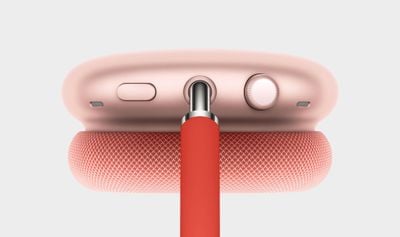
If you want, you can customize the noise control button on the ‌AirPods Max, and even use it to turn off the noise control features completely.

Method 2:

  1. Allow your ‌AirPods‌ Max to connect to your iPhone or ‌iPad‌ in the usual way, by taking them out of the Smart Case and putting them over your ears.
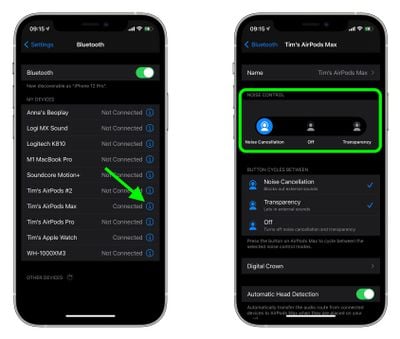
  2. Launch the Settings app on your iOS device.
  3. Tap Bluetooth.
    settings

  4. Under My Devices, tap the information icon (the circled "i") next to AirPods Max in the list.
  5. Under Noise Control, tap Noise Cancellation, Off, or Transparency, depending on your preference.
Method 3:

  1. Allow your AirPods Max to connect to your iPhone or ‌iPad‌ in the usual way, by taking them out of the Smart Case and putting them over your ears.
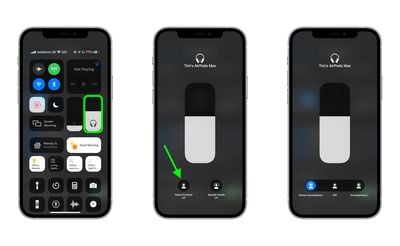
  2. Open Control Center on your iOS device: On an ‌iPad‌ with a Home button, double-tap the Home button; on iPhone 8 or earlier, swipe up from the bottom of the screen; and on a 2018 iPad Pro or iPhone X and later, swipe down from the upper right of the screen.

  3. Press and hold the Control Center volume bar (pair of earbuds will be visible inside of it to indicate the AirPods Max are connected.)
  4. Tap the Noise Control button.
    control center

  5. Use the strip of buttons to switch between Noise Cancellation, Off, or Transparency, depending on your preference.
How to Control Transparency Mode on Mac

If you've got your AirPods Max connected to a Mac running macOS Catalina or later, you can also control Transparency mode from the volume icon in the menu bar. Simply hover over your AirPods Max in the Output Device list to reveal a submenu, where you can click Transparency, Noise Cancellation, and Off.


Related Roundup: AirPods Max 2
Buyer's Guide: AirPods Max (Buy Now)
Related Forum: AirPods

Popular Stories

AirPods Pro Beta Firmware 2

Apple Releases New AirPods Firmware With iOS 27 Features

Monday September 14, 2026 11:42 am PDT by
Apple today released new firmware for the AirPods Pro 2, AirPods Pro 3, AirPods 4, and AirPods Max 2. The firmware is available for all of the above devices, and it will enable support for new iOS 27 features. The firmware has a build number of 9A348. In iOS 27, iPadOS 27, and macOS Golden Gate, Apple is adding a new AirPods interface, a slider for Adaptive mode, and support for custom EQ....

Home Hub Command Center with Dome Base Feature

Apple Smart Home Hub to Feature iMac G4-Style Design

Wednesday September 30, 2026 4:36 am PDT by
Apple's long-rumored smart home hub will have an iMac G4-style design and a host of unique features, Bloomberg's Mark Gurman reports. The smart home hub is said to feature a square 6-inch display, with variants that can be placed on a countertop or mounted on a wall. It features a single FaceTime camera on the front, with microphones and speakers in its connected base. Gurman described the...
HomePod minis on gradient feature 1 1

Three New Apple Smart Home Products Coming on October 13

Wednesday September 30, 2026 4:04 am PDT by
Apple plans to introduce a series of new smart home products on Tuesday, October 13, according to Bloomberg's Mark Gurman. Apple reportedly plans to debut its long-awaited smart home hub device, a new HomePod mini, and a new Apple TV on the date. The new HomePod mini and Apple TV are set to retain their existing designs, but tout faster chips to support Siri AI. The new HomePod mini will...
Latest Stories
Apple's Smart Home Hub: Everything We Know So Far
9 hours ago
Apple's Home Hub Borrows From the iPhone Duo's StandBy Mode
10 hours ago
Apple Invites App Updated With Three New Features
14 hours ago
Apple Event on October 13?
15 hours ago
Apple Watch SE 3 vs. Series 12 Buyer's Guide: Which Should You Buy?
17 hours ago
iPad Mini 8 to Offer These 10 New Features
17 hours ago
DoorDash Unveils AI Food Ordering Through Apple's Messages App
19 hours ago
Amazon Takes Up to $150 Off Select M5 MacBook Air Models
19 hours ago
Apple Still Plans to Release a New Full-Sized HomePod
20 hours ago
Apple Working to Expand HomeKit
21 hours ago
Apple Smart Home Hub to Feature iMac G4-Style Design
22 hours ago
Three New Apple Smart Home Products Coming on October 13
22 hours ago
Apple Pay Now Available in India With Axis Bank Cards
1 day ago
OpenAI Launches Always-On 'Dots' Agents to Rival Meta's Muse
1 day ago
AirPods 5 Teardown: Batteries Removable, Case Still Tough
1 day ago
iPhone 18 Pro Owners Complain of Speaker Crackling or Popping
2 days ago
You Can 'Get Ready' for iPhone Duo Pre-Orders on October 12
2 days ago
Apple Pay Reportedly Launching in India Today
2 days ago
Apple Releases New AirPods Beta Firmware
2 days ago
Apple Shares New Guide for Using iOS 27 Parental Controls
2 days ago
Apple Creator Studio and Final Cut Camera Get New Features
2 days ago
Apple Explains Why It Removed ICE Tracking Apps Last Year
2 days ago
Amazon Expands $779.99 Apple Watch Ultra 4 Deal to More Models
2 days ago
Switch Siri AI for ChatGPT on Your Mac
2 days ago
Apple Says Emergency SOS via Satellite Now Available in Norway
2 days ago
AppleCare Guide: Is it Worth Paying For?
2 days ago
Apple Reportedly Planned to Replace 5,000 Support Employees With AI
2 days ago
Apple Planning to Launch Products Faster and More Often
2 days ago
Amazon Discounting New Mac Mini and Mac Studio Alongside Early Prime Day Deals on Monitors
2 days ago
New Apple TV 4K Hinted at in Support Document
2 days ago

🔗 Related Apple News & Rumors

Stay updated with the latest Apple ecosystem news and verified rumors











































