How to Connect a Bluetooth Mouse or Trackpad to Your iPad - MacRumorsOpen MenuShow RoundupsShow Forums menuVisit ForumsOpen Sidebar
Skip to Content

How to Connect a Bluetooth Mouse or Trackpad to Your iPad

by

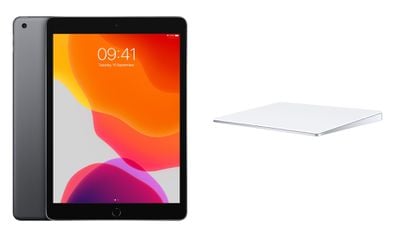
With the release of iPadOS 13.4, Apple brought official Bluetooth mouse and trackpad support to its iPads. This article explains how to connect your chosen input device from your iPad. To learn more about how to use a connected mouse or trackpad with ‌iPad‌, click here.


ipad trackpad
You can check that your device has been updated to iPadOS 13.4 by launching the Settings app and going to General -> Software Update. The update adds support for Magic Mouse, Magic Mouse 2, Magic Trackpad, Magic Trackpad 2, and third-party USB and Bluetooth mouse options.

How to Connect a Mouse or Trackpad to Your iPad

  1. Launch the Settings app on your ‌iPad‌.
  2. Tap Bluetooth.
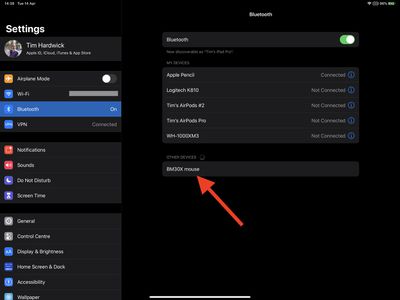
  3. Turn on your trackpad or mouse, then make sure it's in pairing mode and near your ‌iPad‌.
    settings

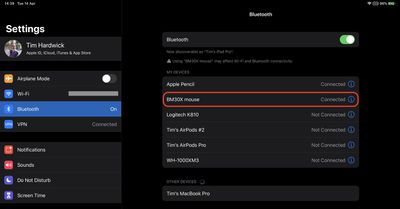
  4. Your trackpad or mouse should appear in Bluetooth settings under Other Devices. Tap its name to connect it to your ‌iPad‌.
    settings

Once connected, your input device will automatically appear in the My Devices list as long as it's powered on and in close proximity.

How to Disconnect a Mouse or Trackpad From Your iPad

  1. Launch the Settings app on your ‌iPad‌.
  2. Select Bluetooth.
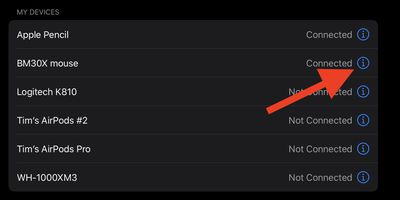
  3. Tap or click the Info button (the encircled "i" icon) next to your mouse or trackpad, which will be listed under My Devices.
    settings

  4. Select Disconnect.
    how to disconnect mouse trackpad from ipad 2

Note that you can alternatively select Forget This Device, but doing so means you'll have to manually re-pair your mouse or trackpad if you want to use it again with your ‌iPad‌.

Popular Stories

iOS 27 Next to iPhone

Here's When iOS 27 Rolls Out Today in Every Time Zone [Update: It's Out]

Sunday September 13, 2026 3:00 am PDT by
Update 10:04 a.m.: iOS 27 is rolling out now, though it may take a bit for all users to see it, so keep checking! Apple is about to release iOS 27, which will finally deliver more advanced Siri AI capabilities as well as a variety of other refinements, improvements, and new features to iPhones. It's Apple's biggest software update of the year, and Apple announced at Wednesday's iPhone event...
iOS 27 Icon iPhone

iOS 27 Available Today With These 8 New Features

Monday September 14, 2026 9:00 am PDT by
Update: Apple has released iOS 27. During its iPhone 18 Pro and iPhone Duo event last week, Apple announced that iOS 27 will be released widely on Monday, September 14. iOS 27 should be available around 10 a.m. Pacific Time / 1 p.m. Eastern Time today via the Settings app, under General → Software Update. Below, we have highlighted eight new features and changes coming with iOS...
deep black iphone 18 pro

Apple Says iPhone 18 Pro Max Sold in U.S. Differs in One Way

Saturday September 12, 2026 3:27 pm PDT by
As noted by Nicolas Lellouche, who writes for the French tech website Numerama, Apple has updated its tech specs pages for the iPhone 18 Pro and iPhone 18 Pro Max to clarify which models are equipped with its new C2 cellular modem and where. Apple now says the iPhone 18 Pro has a C2 modem worldwide, while the iPhone 18 Pro Max uses the chip in every country except for the U.S. According...

🔗 Related Apple News & Rumors

Stay updated with the latest Apple ecosystem news and verified rumors