How to Check for COVID Exposure Notifications on iPhone - MacRumorsOpen MenuShow RoundupsShow Forums menuVisit ForumsOpen Sidebar
Skip to Content

How to Check for COVID Exposure Notifications on iPhone

by

Apple in May 2020 introduced an Exposure Notification System, which lets public health authorities and governments worldwide help people figure out if they've been exposed to COVID-19, and if so, what steps to take next to minimize the spread of the virus.
exposure notification cartoon
Apple and Google developed the underlying APIs and Bluetooth functionality, and that technology has been incorporated into apps designed by public health authorities worldwide, which can use the tracking information to send notifications on exposure and follow up with recommended next steps.

The exposure notification feature is designed to automatically send you a notification if you've been in proximity to a person who is diagnosed with COVID-19. But if you're concerned that you've missed a notification or should have had one, you can manually check for them on your iPhone by following these steps.

  1. Open the Settings app.
  2. Scroll down and tap Exposure Notifications.
  3. Tap View Exposures in App at the top.
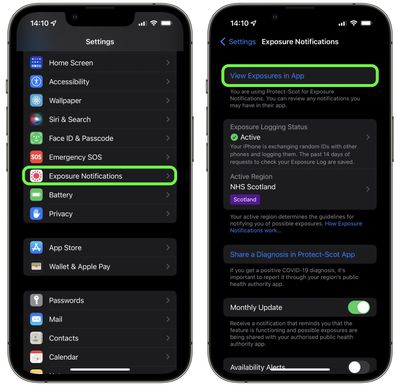
    settings

This will send you to the app that is using Exposure Notifications. Depending on your local health authority, these apps have different interfaces and the information is organized differently, but whichever app it is you're using, any exposure logs should be highlighted pretty prominently so that you don't miss them.

Some states and countries use an ‌Exposure Notification‌ "Express" system that does not rely on an app. In these cases, you won't be directed to an app, but will instead see an "Exposure Check Status" that will let you know if you've been exposed. To check the status, follow the first two steps listed above.
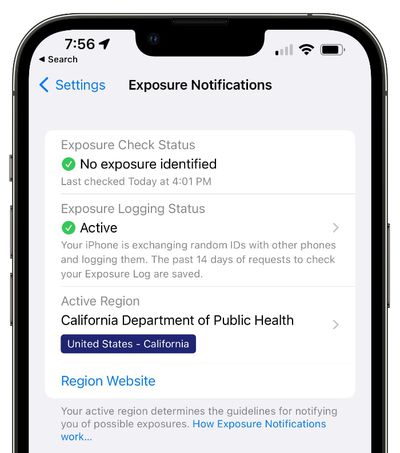
exposure notification exposure status
You can allay any concerns you may have in future by going into the Settings app on your iPhone and turning on Exposure Notifications -> Monthly Update. With the option enabled, you'll receive a monthly notification that reminds you that the feature is functioning and possible exposures are being shared with your authorized public health authority app.


Popular Stories

American Express Gold Apple Pay Feature

American Express Announces New Apple Pay Feature

Tuesday June 30, 2026 10:27 am PDT by
American Express today announced that you can now redeem Membership Rewards points when checking out with Apple Pay on the web and in apps on the iPhone and iPad. When checking out with Apple Pay on iOS 18 or iPadOS 18 or later, tap on your eligible American Express card (Platinum, Gold, Green, and others) and select the Membership Rewards points option. You can use points to cover all or...
Apple Acquires Award Winning App Play Feature

Apple Acquires Award-Winning App 'Play'

Monday June 29, 2026 7:39 am PDT by
In February, Apple notified the European Commission that it would be acquiring certain assets from and have the right to hire certain employees from Rabbit 3 Times, the company behind the award-winning app design tool Play. The notification was published on the European Commission's website this week, following a four-month waiting period. Play was a Mac and iPhone app that allowed designers ...
series 10 apple watch titanium digital crown

Report: Apple Watch Redesign Coming Next Year With New Band System

Tuesday June 30, 2026 8:45 am PDT by
A "major overhaul" of the Apple Watch's design is due to arrive next year with a new system for connecting bands, according to a known Weibo leaker. In a set of recent posts, the leaker known as "Instant Digital" linked the new claim to older rumors about an "Apple Watch X" model, which was said to introduce a fresh design and break compatibility with the existing watch band system. Citing...

🔗 Related Apple News & Rumors

Stay updated with the latest Apple ecosystem news and verified rumors