

How to Change Activity Goals on Apple Watch - MacRumorsOpen MenuShow RoundupsShow Forums menuVisit ForumsOpen Sidebar
Skip to Content

How to Change Activity Goals on Apple Watch

by

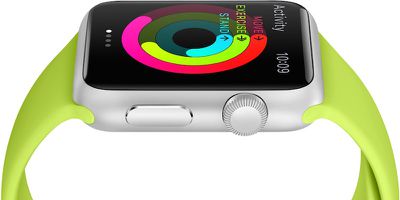
In watchOS 6 and earlier, you could change your daily "Move" goal (or calorie burn goal) in the built-in Activity app on Apple Watch, but your Exercise and Stand goals couldn't be edited.
apple watch activity side
In ‌watchOS 7 and later‌, however, you can customize all of the activity goals on Apple Watch. So if you want to make your goals more challenging or more realistic, now you can. Here's how.

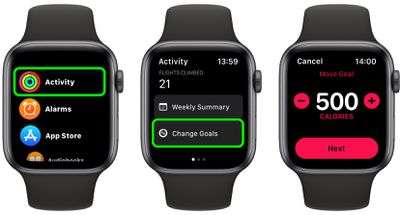
  1. Launch the Activity app on your Apple Watch.
  2. Swipe up, then tap Change Goals.
  3. Use the plus and minus buttons to increase or decrease the number of active calories for your daily Move goal, then tap Next.
  4. Do the same to increase or decrease the number of minutes for your daily Exercise goal, then tap Next.
  5. Do the same again to increase or decrease the number of hours for your daily Stand goal, then tap OK.
watch

That's all there is to it. You can check your activity progress for the day on your Apple Watch, or check your entire history using the Fitness app on your iPhone.

Related Roundups: watchOS 26, watchOS 27
Related Forum: Apple Watch

Popular Stories

watchos 27

Apple Seeds watchOS 27 Beta 3 to Developers

Monday July 6, 2026 10:23 am PDT by
Apple today seeded the third beta of watchOS 27 to developers, with the update coming two weeks after the launch of the second beta. The beta can be downloaded through the Watch app on the iPhone with a free developer account. The Apple Watch will need to be on the charger, connected to Wi-Fi, and have a battery level of 50 percent or above for new software to be installed. The beta is...

General visionOS watchOS and tvOS Betas Feature Redux

Apple Releases Fourth watchOS 26.6, tvOS 26.6 and visionOS 26.6 Betas

Monday July 6, 2026 10:16 am PDT by
Apple today provided developers with the fourth betas of upcoming watchOS 26.6, tvOS 26.6, and visionOS 26.6 betas for testing purposes. The software comes a week after Apple seeded the third betas. The software updates are available through the Settings app on each device, and because these are developer betas, a free developer account is required. There's no word on what's in the...
watchos 27

Siri AI Comes to Apple Watch in watchOS 27 Beta 3

Monday July 6, 2026 1:24 pm PDT by
With watchOS 27 beta 3, Apple added support for Siri AI and the Siri app, so Apple Watch users can now use the features right from their wrist. Apple said Siri AI would be coming to the watch back when watchOS 27 was first introduced, but the feature wasn't live until now. The Dynamic App Grid that pops up when the Digital Crown is pressed displays the Siri app in the center, and the...


🔗 Related Apple News & Rumors

Stay updated with the latest Apple ecosystem news and verified rumors








































