How to Change a File Type's Default App in macOS - MacRumorsOpen MenuShow RoundupsShow Forums menuVisit ForumsOpen Sidebar
Skip to Content

How to Change a File Type's Default App in macOS

by

macos finder iconEach document that you have on your Mac is associated with a default application which macOS uses to open the file whenever you double-click on its icon in Finder.

Sometimes you may have a legitimate reason for changing which app your Mac automatically launches when you open a common file type – when a newly installed app assumes control of it, or when you want to open AVI video files in VLC instead of QuickTime, for instance. The following steps show you how to do just that.

  1. In a Finder window, right-click (or Ctrl-click) the file whose default launch app you want to change.

  2. From the contextual menu, select Open With -> Other....
    change a files default app macos

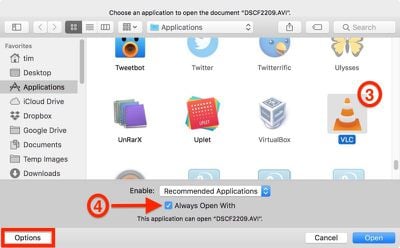
  3. A new navigation window will appear for you to select an alternative app to open the selected file. In our example, we're selecting the VLC media player app.
    change a files default app macos 2

  4. Tick the checkbox next to Always Open With to ensure your selection applies in future to all files with the same extension (AVI files, in our case). If you don't see the checkbox, click the Options button at the lower left of the window and it should appear.

  5. Click Open.

If the app that you want to use to open the file type is greyed out, it's because macOS doesn't think there's a valid association between the two. In most cases this is correct, but you can still override it by changing the Recommended Applications view to All Applications using the Enable: dropdown menu.

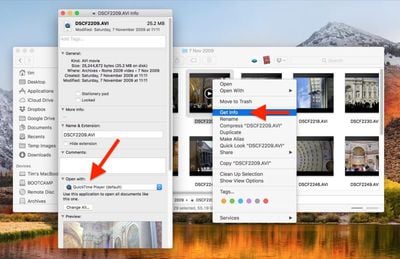
There's another way you can change a file type's associated app in macOS: Right-click (or Ctrl-click) on the file in a Finder window and select Get Info.
change a files default app macos1
In the information dialog that appears, you should see the Open with: section immediately below the Comments: section (click the chevron buttons to expand individual sections). Select Other... in the drop-down menu of apps to select one not already in the list, and then click Change All... to apply the association to all files with the same extension.


Top Rated Comments

106 months ago
How do you do this in iOS? Joke and jokes and jokes
Score: 4 Votes (Like | Disagree)
fairuz Avatar
106 months ago
How do you do this in iOS? Joke and jokes and jokes
The equivalent is when you press the share button to open something in another app, in which case it gives you the list.
[doublepost=1529430019][/doublepost]There's always that one app that has the audacity to change itself to the default for a ton of common extensions like mp4 and jpeg. macOS should really ask first before overriding those.
Score: 3 Votes (Like | Disagree)
nvmls Avatar
106 months ago
Funny you say MR, although these tips are appreciated, this particular functionality has been bugged for decades.
Score: 3 Votes (Like | Disagree)
Centris 650 Avatar
106 months ago
Is there really anyone who didn't know this already?
There’s always a newbie.
Score: 3 Votes (Like | Disagree)
106 months ago
Is there really anyone who didn't know this already?
Plenty of people don't know about plenty of things that plenty others know about.
Score: 2 Votes (Like | Disagree)
H3LL5P4WN Avatar
106 months ago
Easy, if you have an iPhone switch to Android, if you have an iPad switch to Windows 10.
Why would you downgrade?
Score: 2 Votes (Like | Disagree)

Popular Stories

Apple Event Logo

Apple Working on All-New Operating System

Wednesday July 29, 2026 11:39 am PDT by
Apple is developing an all-new operating system that is essentially a mix of tvOS, watchOS, and iOS, according to Bloomberg's Mark Gurman. In a report this week, he said the operating system will feature a grid of icons, widgets, and apps, along with customizable clock faces. The new software platform is intended for Apple's long-rumored smart home hub. With built-in facial recognition,...


imac video apple feature

Apple Made Its Second-Biggest Acquisition Ever This Year

Wednesday July 29, 2026 12:03 pm PDT by
Apple this year acquired Israeli startup Q.ai for close to $2 billion, according to the Financial Times. That would make this Apple's second-biggest acquisition ever, after it paid $3 billion for the popular headphone maker Beats in 2014. This is also the largest known Apple acquisition since the company purchased Intel's smartphone modem business and patents for $1 billion in 2019. Q.ai...
Dynamic Island iPhone 18 Pro Feature

iPhone 18 Pro: Twelve Changes Coming to Apple's Next Flagship

Thursday July 30, 2026 3:43 am PDT by
We're less than two months out from the launch of Apple's premium next-generation smartphone lineup, and while we're not expecting a dramatic change in terms of functionality, there are still several enhancements rumored to be coming to the iPhone 18 Pro and iPhone 18 Pro Max. One thing worth noting is that Apple is reportedly planning a major change to its iPhone release cycle this year,...

🔗 Related Apple News & Rumors

Stay updated with the latest Apple ecosystem news and verified rumors