iPhone 12 5G Settings: How to Save Data and Battery - MacRumorsOpen MenuShow RoundupsShow Forums menuVisit ForumsOpen Sidebar
Skip to Content

iPhone 12 5G Settings: How to Save Data and Battery

by

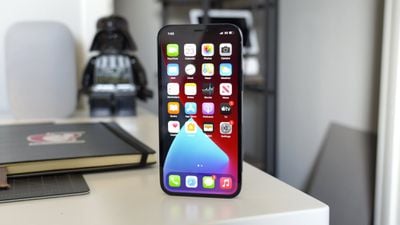
Apple's iPhone 12 and 12 Pro are the first iPhones to be released with 5G connectivity, and there are several new settings related to 5G that you should be aware of.
iphone12pro5g 1
By default, when you set up a new iPhone 12 or 12 Pro, it activates an Auto 5G mode that only turns on 5G data when it won't significantly reduce battery life. You can turn this off so that your iPhone uses 5G all the time, and there are also data modes to choose from. This how to shows you where the new settings are and explains what they mean.

Turn on 5G All the Time or Activate 4G

Getting to your specific cellular settings might look a bit different depending on your carrier, but these general steps should work for accessing your Voice and Data settings.

  1. Open up Settings.
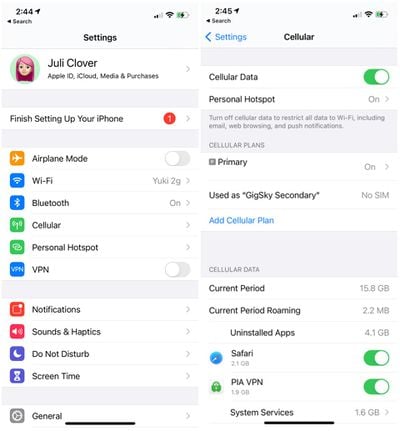
  2. Tap on "Cellular." iphone12cellularsettings
  3. Tap on your cellular plan or Cellular Data Options.
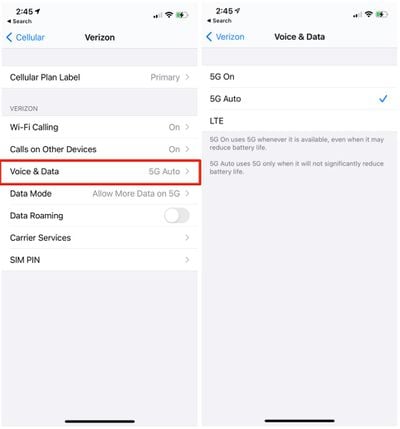
  4. Tap on Voice & Data. data5gsettingsiphone12

From the Voice & Data menu, you'll see three options: 5G On, 5G Auto, and LTE. 5G Auto, the default setting, uses 5G only when 5G won't significantly reduce battery life.

This appears to be Apple's Data Saver Mode that's meant to swap the iPhone's connection to LTE when 5G speeds aren't necessary. For example, when the iPhone is updating in the background, it uses LTE because super fast speeds aren't necessary, but in instances where speed does matter, such as downloading a show, the iPhone 12 models will swap over to 5G.

5G On ensures that 5G is activated all the time when a 5G network is available, and LTE disables 5G all together and lets you use an LTE connection instead of a 5G connection.

Data Mode

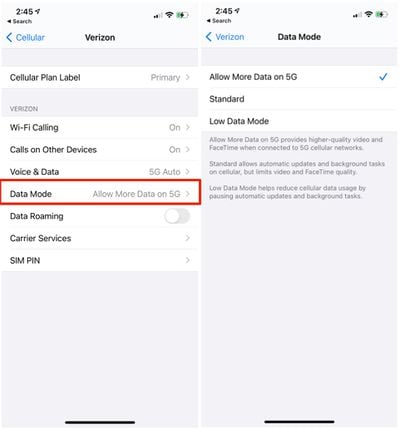
There are several data modes that you can adjust. By default, iPhone 12 models are set on "Allow More Data on 5G," which offers up higher-quality video and FaceTime when connected to 5G cellular networks.

Most people with unlimited data will want to leave this enabled, but if you're aiming to preserve data, you can change the settings to "Standard," which allows automatic updates and background tasks on cellular but limits video and ‌FaceTime‌ quality.

There's also a Low Data Mode that helps reduce cellular data usage by pausing automatic updates and background tasks when connected to a cellular network. Here's how to get to your data settings:

  1. Open up Settings.
  2. Tap on "Cellular." iphone12cellularsettings
  3. Tap on your cellular plan or Cellular Data Options.
  4. Tap on Data Mode. allowmoredataiphone125g

5G is still a new technology that carriers in the United States and other countries are rolling out, so many people may not have 5G connections available to them. Most U.S. carriers have widespread Sub-6GHz 5G networks that should give 5G connectivity that's a bit faster than LTE in most areas, but the fastest mmWave 5G is extremely limited. Make sure to check out our mmWave vs. Sub-6GHz guide for more info.

5G Connectivity Symbols

When you're connected to a 5G network, you'll see a few different symbols, all of which confirm that you're on a 5G network. 5G+ is AT&T's symbol when connected to a faster mmWave 5G network, and the 5G UW symbol shows up when you have a higher-speed mmWave connection on a Verizon device.
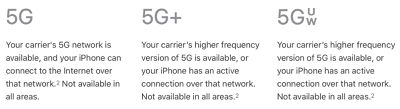
apple5gsymbols

Feedback

Have 5G questions or know of something we left out in this how to? Send us an email here.

Top Rated Comments

Mlrollin91 Avatar
79 months ago
I really wish AT&T would dump this 5Ge status bar icon. Now it's just confusing.
Score: 13 Votes (Like | Disagree)
79 months ago
I currently have AT&T, and only have the options for LTE and 4G. Any ideas why it won’t show 5G?
Score: 10 Votes (Like | Disagree)
tzm41 Avatar
79 months ago
Why do they feel the need to name mmWave 5G differently? Can’t they just call it the same 5G Ultra Wideband?

Hate all those AT&T gimmicky names, calling HSPA+ as 4G and better LTE as 5GE, and now mmWave is 5G+. Just call it what it is.
Score: 5 Votes (Like | Disagree)
TheYayAreaLiving 🎗️ Avatar
79 months ago

I currently have AT&T, and only have the options for LTE and 4G. Any ideas why it won’t show 5G?
Mine is not showing 5G either it only
shows 4G and LTE.
Score: 4 Votes (Like | Disagree)
4sallypat Avatar
79 months ago
I am amazed at how AT&T and VZW can charge extra for 5G service!

Glad TMO does not upcharge for 5G and has more 5G service (Sub 6 & mm Wave) compared to the other 2!


Attachment Image
Score: 3 Votes (Like | Disagree)
79 months ago
For those on AT&T who aren't seeing 5G options appear, there is likely one of three reasons for that:

* Your plan does not "support" or allow for 5G access. The only consumer plans that include 5G network access are:

* The highest end unlimited prepaid (I believe it is the "Unlimited Plus" plan)
* On postpaid

* Unlimited Starter
* Unlimited Extra
* Unlimited Elite

* If you are on one of these plans and still not able to choose 5G Auto or 5G On, you may need to contact AT&T to have the correct account codes reprovisioned to your account for 5G

* You need a new SIM

* Older SIMs may not support 5G NR. The iPhone 12 SKUs that include carrier activation (the $30 discounted models for iPhone 12 non-Pro) include a SIM in the box that will support 5G. If you bought the SIM-free model, you may need to contact AT&T to have a replacement SIM sent to you or pick up a replacement at an AT&T store

* You are using dual-SIM mode with an eSIM

* iPhone 12 (all models) do not currently support 5G when dual-SIM is active, except in China where you can install two physical SIMs into the device
* eSIM alone should still support 5G, as long as a physical SIM is not also in use. However, some people are finding that they have had to contact AT&T to have the correct account codes for 5G reprovisioned onto their account before the 5G options would appear

Score: 3 Votes (Like | Disagree)

Popular Stories

Apple MacBook Pro with PROLED XDR Display family lineup feature

Apple Announces OLED MacBook Pro With Touch Display

Wednesday October 28, 2026 10:11 am PDT by
Apple today announced a new high-end MacBook Pro, which is available in 14-inch and 16-inch sizes. The new device has a PROLED XDR display that supports touch gestures, and a glowing rear Apple logo. Pricing on the MacBook Pro starts at $2,899 for the 14-inch model and $3,399 for the 16-inch model. Apple says the MacBook Pro has the "world's best display in a pro laptop." The PROLED...

iPhone Duo Display Cracking

Apple Alerts Stores to iPhone Duo's Display Cracking Issue

Friday October 30, 2026 3:20 pm PDT by
In a memo shared with Apple Stores and Apple Authorized Service Providers this week, and later obtained by MacRumors, Apple provided technicians with guidance on how to diagnose and address the iPhone Duo's inner display cracking issue. If a customer reports the issue, Apple advised technicians to inspect the iPhone Duo and repair or replace it in accordance with their standard procedures....
iPad mini OLED feature 1

Apple Executive Comments on New iPad Mini Lacking 120Hz Display

Thursday October 29, 2026 1:47 pm PDT by
While the new iPad mini has an OLED display, the device does not support ProMotion, meaning the display's refresh rate is limited to 60Hz instead of 120Hz. ProMotion support would have allowed for the iPad mini's refresh rate to automatically adjust from 10Hz to 120Hz depending on the content being displayed, but evidently Apple has kept the feature exclusive to the iPad Pro among iPad...
Latest Stories
Apple Watch Ultra 4 Hits All-Time Low Price With Amazon's $99 Discount
8 hours ago
Reminder: Apple's Big Discount on Beats 360 Ear Cushions Ends Today
8 hours ago
Here's a New Tour of Apple's HomeView Software
8 hours ago
Apple Reveals New iPad Mini's Battery Capacity
9 hours ago
Top Stories: Apple's Big MacBook Pro, iPad mini and iMac Updates
11 hours ago
'Pluribus' Season 2 Reportedly Starts Production Today
17 hours ago
iPhone 18 Pro Sales Surge in China, Offsetting Decline in U.S. and Japan
18 hours ago
HomeView Software 27.2: Wallpapers, Control Center, and More
1 day ago
Apple Alerts Stores to iPhone Duo's Display Cracking Issue
1 day ago
iOS 27.3 Will Enable These Apple Intelligence Features in China
1 day ago
Apple Says iOS 27.3 Beta Coming Next Week
1 day ago
Apple's Flash Storage Suppliers Are Finally 'Getting Their Revenge'
1 day ago
14 New Things Your iPhone Can Do in iOS 27.2
1 day ago
iPhone Duo Review: One Week Later
1 day ago
Samsung Mocks iPhone Duo Display Cracks in New Ad Campaign
1 day ago
The MacRumors Show: OLED MacBook Pro, iPad Mini 8, and More
1 day ago
MacBook Pro With Touch Display: 15 More Details Revealed
1 day ago
Russia Places Apple on State Surveillance Registry
1 day ago
Halloween Weekend Brings Discounts on Apple Accessories and Pre-Orders
1 day ago
Apple Has Released More Than 25 New Products in the Past Two Months
1 day ago
Local Code Launches as Free, Private AI Assistant Tool for Mac
1 day ago
Apple Acquires Ascend.io
1 day ago
HomePod Mini 2 Launches Today: All the New Features
1 day ago
AirTag 2 4-Pack Drops to New Low Price of $69.99
1 day ago
Rian Johnson's iPhone Camera App Goes Viral
1 day ago
Where Did All the iPhone Duos Go? Mostly to Apple's Stores
2 days ago
Apple's Touchscreen MacBook Pro Could Ship 1.5M Units in 2027
2 days ago
New Apple TV 4K and iPad Mini: RAM Amounts Revealed
2 days ago
Apple Executive Comments on New iPad Mini Lacking 120Hz Display
2 days ago
Here's a Hands-On Look at HomePod Mini 2's New Two-Tone Colors
2 days ago

🔗 Related Apple News & Rumors

Stay updated with the latest Apple ecosystem news and verified rumors