How to Cancel App Store Subscriptions - MacRumorsOpen MenuShow RoundupsShow Forums menuVisit ForumsOpen Sidebar
Skip to Content

How to Cancel App Store Subscriptions

by

apple music icon ios 15Several TV and music services and other apps offer free trials through the App Store that automatically renew to become paid subscriptions after the trial period ends.

If you want to prevent an ‌App Store‌ subscription from running beyond the trial period or cancel a subscription you're currently paying for, then read on. This article explains how to cancel any ‌App Store‌ subscription on iOS, Mac, and Apple TV.

How to Cancel App Store Subscriptions on iOS

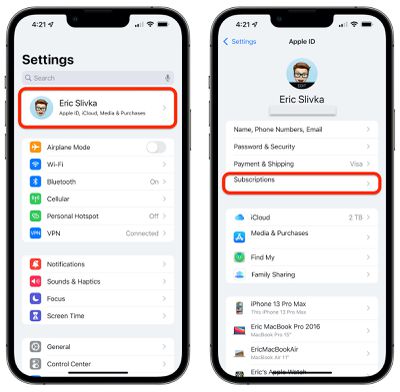
  1. Open Settings on your iPhone or iPad.
  2. Tap your Apple ID at the top of the page.
    ios cancel subscriptions 1
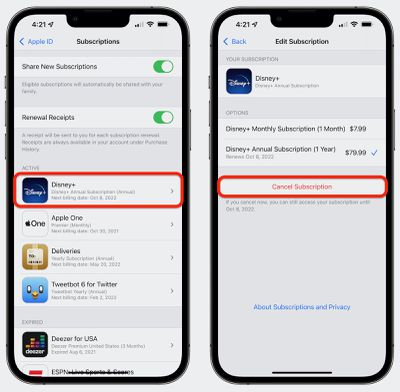
  3. Tap Subscriptions.
  4. Tap on the subscription in the list that you wish to cancel.
    ios cancel subscriptions 2
  5. Tap Cancel Subscription at the bottom.
How to Cancel App Store Subscriptions on Mac

  1. Launch the ‌App Store‌ application.
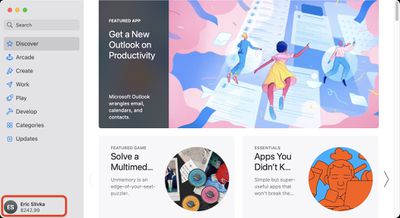
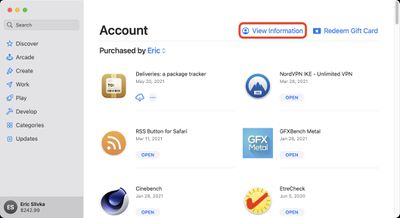
  2. At the bottom left corner, click on your name to load your account and previous purchases.
    mac cancel subscriptions 1
  3. Near the top right of the window, click View Information. Enter your ‌Apple ID‌ credentials if required.
    mac cancel subscriptions 2
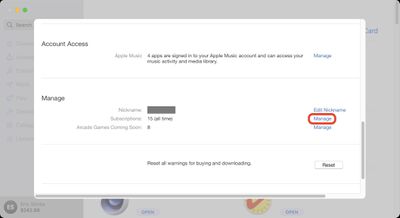
  4. Scroll down to the Manage section and on the Subscriptions line, click Manage.
    mac cancel subscriptions 3
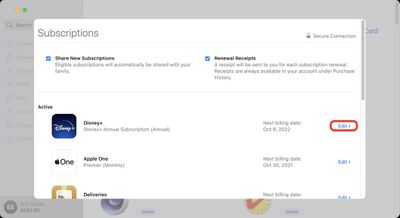
  5. In the Active section, click Edit next to the subscription that you want to cancel.
    mac cancel subscriptions 4
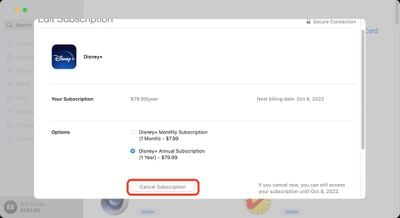
  6. Click the Cancel Subscription button.
    mac cancel subscriptions 5

How to Cancel Subscriptions on Apple TV

  1. Open Settings on your ‌Apple TV‌.
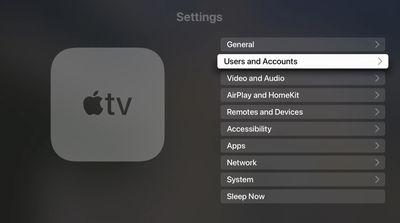
  2. Select Users and Accounts.
    tvos cancel subscriptions 1
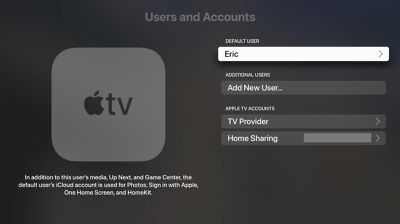
  3. Select the user you wish to manage subscriptions for.
    tvos cancel subscriptions 2
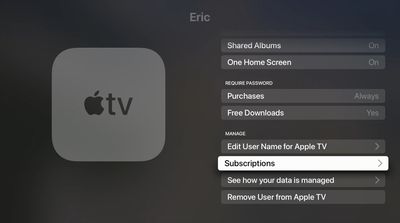
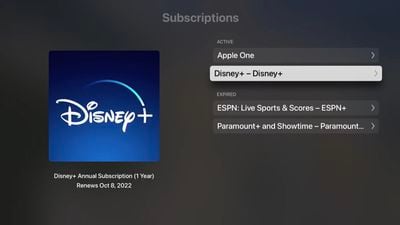
  4. Scroll down and select Subscriptions. Enter your ‌Apple ID‌ credentials if requested.
    tvos cancel subscriptions 3
  5. Choose the subscription that you want to end.
    tvos cancel subscriptions 4
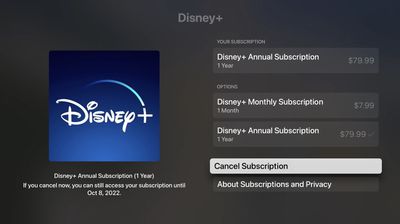
  6. Select Cancel Subscription.
    tvos cancel subscriptions 5
  7. Confirm that you want to cancel.

How to Change a Subscription or Re-subscribe to a Canceled Service

Apple keeps a record of your subscription history, which makes it easy to re-subscribe to a service you previously canceled. (Note that after re-subscribing to a service, your subscription will automatically renew until you cancel it again.) You can also change an existing subscription from the same screens. The following steps relate to iOS and are largely similar to the ones for canceling a subscription.

  1. Open Settings on your iPhone or ‌iPad‌.
  2. Tap your ‌Apple ID‌ at the top of the page.
  3. Tap Subscriptions.
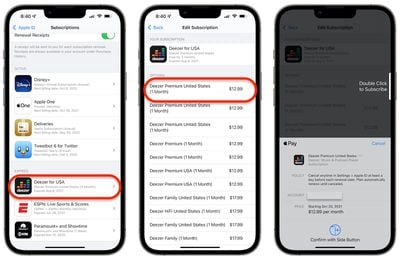
  4. Under the Expired section, tap on the service that you wish to re-subscribe to, or tap an active subscription to change it.
    ios change resubscribe
  5. Tap the in-app purchase payment method you want to use to purchase the new subscription and authorize with Touch ID or Face ID.
How to Change or Re-subscribe to a Service on Mac

  1. Launch the ‌App Store‌ application.

  2. At the bottom left corner, click on your name to load your account and previous purchases.
  3. Near the top right of the window, click View Information. Enter your ‌Apple ID‌ credentials if required.
  4. Scroll down to the Manage section and on the Subscriptions line, click Manage.
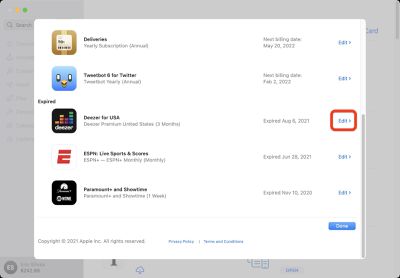
  5. In the Expired section, click Edit next to the service that you want to re-subscribe to, or click Edit next to an active subscription to change it.
    mac change resubscribe 1
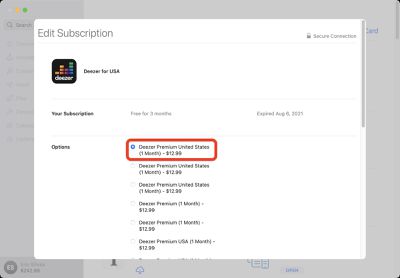
  6. Select your desired subscription option.
    mac change resubscribe 2
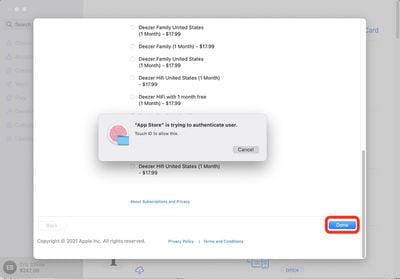
  7. Click the Done button at the bottom of the page and authorize with your credentials or ‌Touch ID‌.
    mac change resubscribe 3

Top Rated Comments

star-affinity Avatar
112 months ago
It's seems to be difficult (impossible?) to manage subscriptions when not having an Apple device or iTunes around.

My friend who has an Android phone wanted to manage his daughter's subscription (she has an iPhone) and when clicking the link in an email from Apple to do so, it seems he was directed to the Android Music app which he didn't have installed. There was no mention about that app being required to manage the subscription.

I think this is something that should be manageable by logging into one's Apple ID in a web browser.
Score: 4 Votes (Like | Disagree)
nburwell Avatar
112 months ago
For me, managing subscriptions is a breeze on my iOS devices. I don't have to call anyone to cancel a subscription. I can simply just go into my Apple ID and cancel any of the services I'm subscribed to.

I really do loath calling to cancel service (I'm looking at you SiriusXM) only to have the phone rep go over "other packages" that I might be interested in.
Score: 2 Votes (Like | Disagree)
Plutonius Avatar
112 months ago
The best way to never get stuck paying on a trial subscription (when you don't cancel in time) is to not subscribe to the trial offer unless you actually plan on getting the service and you want to check it out (i.e. don't subscribe just because the trial is free). :).
Score: 2 Votes (Like | Disagree)
Aluminum213 Avatar
112 months ago
Why would I do such a sinful thing?
Score: 2 Votes (Like | Disagree)

Popular Stories

Apple Creator Studio iWork suite

Apple Pulls Keynote, Pages and Numbers From App Store [Update: Back]

Thursday October 22, 2026 11:01 am PDT by
Apple has temporarily removed Keynote, Pages, and Numbers from the App Store, just after releasing an update that added iPhone Duo support and a new Intelligent Assistant. It is not clear if the apps were removed intentionally, or if it is a bug. Apple has not said when the apps will be reinstated, but if it was in error, they should return soon. Update: The Mac versions are back without...
iPhone Duo Apps feature

Apple Reveals More Than 50 Apps That Will Be Updated for iPhone Duo

Thursday October 22, 2026 6:04 am PDT by
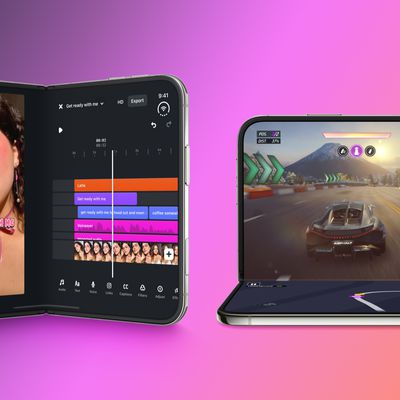
Apple today highlighted more than 50 third-party App Store apps that are or will soon be fully optimized for the iPhone Duo and its various layouts and poses. You can hold the iPhone Duo and set it down in a number of ways, such as partially folded like a book, placed down on a surface, or standing on its edges: With the Netflix app, for example, Apple said iPhone Duo users can scroll...
iPhone Duo Slack

Apple Announces iPhone Duo Apps Can Now Be Submitted to App Store

Monday October 5, 2026 7:15 pm PDT by
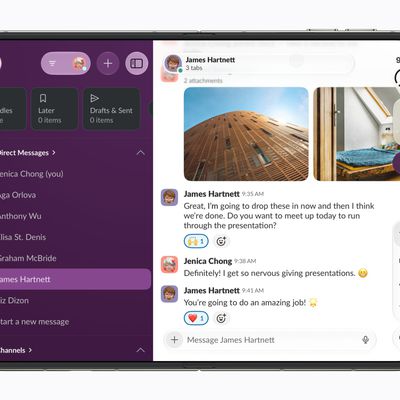
Apple today announced that apps optimized for the iPhone Duo can now be submitted for App Store approval, ahead of the foldable device launching on Friday, October 23. While existing App Store apps will automatically run on the iPhone Duo, only apps built with the iOS 27.1 SDK or later can dynamically resize to fill the entire space of the inner display, whereas unoptimized apps will have...
Latest Stories
Apple Watch Ultra 4 Hits All-Time Low Price With Amazon's $99 Discount
16 hours ago
Reminder: Apple's Big Discount on Beats 360 Ear Cushions Ends Today
16 hours ago
Here's a New Tour of Apple's HomeView Software
16 hours ago
Apple Reveals New iPad Mini's Battery Capacity
17 hours ago
Top Stories: Apple's Big MacBook Pro, iPad mini and iMac Updates
19 hours ago
'Pluribus' Season 2 Reportedly Starts Production Today
1 day ago
iPhone 18 Pro Sales Surge in China, Offsetting Decline in U.S. and Japan
1 day ago
HomeView Software 27.2: Wallpapers, Control Center, and More
1 day ago
Apple Alerts Stores to iPhone Duo's Display Cracking Issue
1 day ago
iOS 27.3 Will Enable These Apple Intelligence Features in China
1 day ago
Apple Says iOS 27.3 Beta Coming Next Week
1 day ago
Apple's Flash Storage Suppliers Are Finally 'Getting Their Revenge'
1 day ago
14 New Things Your iPhone Can Do in iOS 27.2
2 days ago
iPhone Duo Review: One Week Later
2 days ago
Samsung Mocks iPhone Duo Display Cracks in New Ad Campaign
2 days ago
The MacRumors Show: OLED MacBook Pro, iPad Mini 8, and More
2 days ago
MacBook Pro With Touch Display: 15 More Details Revealed
2 days ago
Russia Places Apple on State Surveillance Registry
2 days ago
Halloween Weekend Brings Discounts on Apple Accessories and Pre-Orders
2 days ago
Apple Has Released More Than 25 New Products in the Past Two Months
2 days ago
Local Code Launches as Free, Private AI Assistant Tool for Mac
2 days ago
Apple Acquires Ascend.io
2 days ago
HomePod Mini 2 Launches Today: All the New Features
2 days ago
AirTag 2 4-Pack Drops to New Low Price of $69.99
2 days ago
Rian Johnson's iPhone Camera App Goes Viral
2 days ago
Where Did All the iPhone Duos Go? Mostly to Apple's Stores
2 days ago
Apple's Touchscreen MacBook Pro Could Ship 1.5M Units in 2027
2 days ago
New Apple TV 4K and iPad Mini: RAM Amounts Revealed
2 days ago
Apple Executive Comments on New iPad Mini Lacking 120Hz Display
2 days ago
Here's a Hands-On Look at HomePod Mini 2's New Two-Tone Colors
3 days ago

🔗 Related Apple News & Rumors

Stay updated with the latest Apple ecosystem news and verified rumors