

With watchOS 5, Apple has added support for WebKit, which is designed to allow you to view content from the web right on your wrist, something that's entirely new to the Apple Watch.
There's no full web browser so you're not going to see a Safari app for Apple Watch anytime soon, but you can now click on and open web links in apps like Mail and Messages.
WebKit in Messages
If someone sends you a link to your Apple Watch in the Messages app, you can tap on it to open up a little mini web browser right in the Messages app.
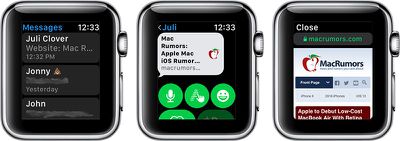
You can open all kinds of webpages, from restaurant menus to airline flight information. Webpages are interactive and you can click on links and browse as you normally would.
WebKit in Mail
Just like Messages, if you get an email with a web link in it, you can open it up using the Mail app. You can also view HTML emails on the Apple Watch for the first time thanks to the WebKit integration.
Using Google and Other Websites on Apple Watch
As we mentioned earlier, there's no built-in Safari app on the Apple Watch for browsing the web, but you can cheat. Here's how:
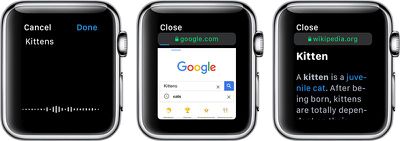
- From your iPhone or Mac, send yourself an iMessage with a link to Google.com (or any other search engine).
- On the Apple Watch, open up the Messages app.
- Tap on your name, and then tap on the Google.com link that you sent yourself.
- Wait for the Google site to load on the Apple Watch.
- Tap on the search field.
- Speak or spell out whatever you want to search for.
- Tap the search button.
You can load all kinds of websites on the Apple Watch, from Wikipedia to restaurant sites for finding menus, to airline check-in sites to websites like MacRumors.com. It's essentially a full browser that's been miniaturized for the wrist.
Some content will not load on the Apple Watch. You can't watch YouTube videos, for example, nor will other types of video content load. Complicated websites with a lot of content, such as news sites, can take awhile to load or can refuse to load all together, so simple browsing is best on the Apple Watch.
Where possible, the little Apple Watch browser will use Reader Mode for text heavy websites, so you will see simple, easy-to-view sites with no ads. Mobile optimized sites work the best on the Apple Watch.
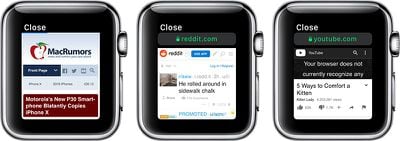
Using Google in the Messages app for browsing the web isn't something that you're going to want to do all the time because it's slow and tedious on such a small screen, not to mention it eats up a lot of battery, but it's useful for an emergency where you need to look something up and don't have an iPhone handy.
For browsing the web on the Apple Watch, you will always need to use the search cheat because Apple doesn't allow access to the URL bar. You can tap it, but there's no way to enter a web address.
WebKit Gestures
WebKit on Apple Watch supports several gestures, which are outlined below.
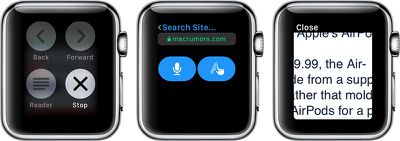
- Use the Digital Crown or a finger on the screen to scroll.
- Double tap to zoom in and double tap again to zoom out.
- Long press to access options for Back, Forward, Reload, and Reader Mode.
- Swipe to move forwards or backwards through different sites.
- Tap a text field to speak or spell out text.
How to Clear Website Data on Apple Watch
Being able to browse the web on the Apple Watch through Mail and Messages means that your Apple Watch is storing some website data. You can delete all of this data in the Settings app. Here's how:
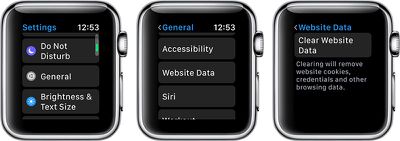
- Open the Settings app on Apple Watch.
- Choose General.
- Scroll down to Website Data.
- Select "Clear Website Data."
Using this option will remove all website cookies, credentials, and browsing data. It does not appear that Apple Watch stores any browsing history in a viewable format, so there's no option to clear just history.
Availability
According to Apple, WebKit integration is limited to Apple Watch Series 3 models. WebKit and websites will not load on the Apple Watch Series 1 and Series 2 models.




















Top Rated Comments
nted to read par-
agraphs that are
hyphenated ev-
ery fourth word!
With a bigger screen, however...
You know, for private stuff.