iOS 16: How to Make Your iPhone Switch Lock Screens Based on Time or Location - MacRumorsOpen MenuShow RoundupsShow Forums menuVisit ForumsOpen Sidebar
Skip to Content

iOS 16: How to Make Your iPhone Switch Lock Screens Based on Time or Location

by

Apple has introduced several improvements to Focus modes in iOS 16, and one of them is the ability to link a custom Lock Screen to a particular Focus mode. With the wealth of personalization options that can now be applied to Lock Screens, this means you can customize them specifically to better reflect your focus.
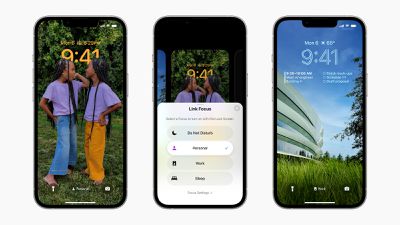
ios 16 focus lock screens
One of the great things about iOS 16 is that it allows you to make Lock Screens more informative or functional, and then switch to your preferred one when you need to. For example, when you're at the office you might have a Lock Screen featuring work-focused widgets and a family photo. Or in the evening when you're winding down before bed, you might prefer a minimal Lock Screen with fewer widgets and a soothing sunset wallpaper.

The great thing is that by linking a Lock Screen to a Focus mode, you can make the switch to your custom Lock Screen happen automatically at a set time, or even a set location. As the image above shows, you can link Lock Screens to existing Focus modes by tapping the Focus button that appears in the Lock Screen gallery, which is accessed from your iPhone's currently active Lock Screen with a long press.

You can also select a Lock Screen in the course of creating a new Focus mode in Settings. Here's how it works in iOS 16.

Creating a Scheduled Focus With a Custom Lock Screen

In this example, we've already customized a Lock Screen that we want to become active when the work day is done, and now we're going to create a Focus mode to link it to by following the steps below.

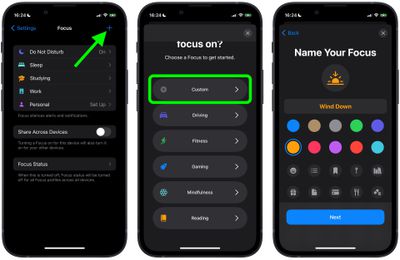
  1. On iPhone, go to Settings -> Focus, and tap the + icon in the top-right corner of the screen to create a new Focus.
  2. Tap Custom in the next screen, proceed to give your Focus a name and related icon, then tap Next.
    1link lock screen focus mode ios

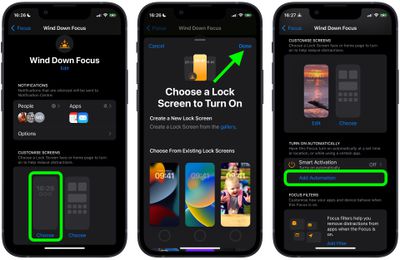
  3. Set any notification silence options for people and apps when your Focus is active, then under "Customize Screens," choose the Lock Screen option.
  4. Create a New Lock Screen from the gallery, or Choose From Existing Lock Screens.
  5. With your Lock Screen linked, tap Add Automation under "Turn on Automatically."
    2link lock screen focus mode ios

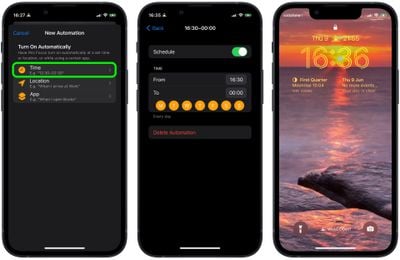
  6. In the New Automation screen, select Time.
  7. Toggle on Schedule and choose the time that you want your Focus to become active and on which days of the week.
    3link lock screen focus mode ios

With your new Focus mode now scheduled, your associated Lock Screen will also become active at the same time.
Related Forum: iOS 16

Top Rated Comments

adrianlondon Avatar
53 months ago
It's a pity it's still not possible to have Focus modes associated with Calendar events.
Score: 7 Votes (Like | Disagree)
53 months ago

I want to be able to ‘select all’ contact in a focus so i don’t miss any calls.

Until you can do this, focus modes are a hack.. You should be able to change your Lock Screen and Home Screen without the need to set up a focus first.
Now you can:)
Instead of selection "Allow notifications from" you can Select "Silence Notifications From". Basically creating a blacklist instead of a whitelist.


Attachment Image
Score: 5 Votes (Like | Disagree)
53 months ago
Good article. Love that we can personalise the lock screen.
Score: 3 Votes (Like | Disagree)
53 months ago

It's a pity it's still not possible to have Focus modes associated with Calendar events.
That’s a really good point.

I’m wondering if Apple can tweak this with an update, possibly adding calendar events to be integrated. Seems like that’s totally doable.
Score: 2 Votes (Like | Disagree)
53 months ago
I can't wait to try this out!
Score: 1 Votes (Like | Disagree)
adrianlondon Avatar
53 months ago
Don't worry. From my memory of iOS 14 widgets, Macrumors posted all about them when the development beta came out, then all about them again when the public beta came out, and then all about them again when the public release came.

And in between that, they published widget articles each time some third party app, however rubbish, released something with the word "widget" in it.

So you'll be fine :)
Score: 1 Votes (Like | Disagree)

Popular Stories

Apple Acquires Award Winning App Play Feature

Apple Acquires Award-Winning App 'Play'

Monday June 29, 2026 7:39 am PDT by
In February, Apple notified the European Commission that it would be acquiring certain assets from and have the right to hire certain employees from Rabbit 3 Times, the company behind the award-winning app design tool Play. The notification was published on the European Commission's website this week, following a four-month waiting period. Play was a Mac and iPhone app that allowed designers ...
American Express Gold Apple Pay Feature

American Express Announces New Apple Pay Feature

Tuesday June 30, 2026 10:27 am PDT by
American Express today announced that you can now redeem Membership Rewards points when checking out with Apple Pay on the web and in apps on the iPhone and iPad. When checking out with Apple Pay on iOS 18 or iPadOS 18 or later, tap on your eligible American Express card (Platinum, Gold, Green, and others) and select the Membership Rewards points option. You can use points to cover all or...
series 10 apple watch titanium digital crown

Report: Apple Watch Redesign Coming Next Year With New Band System

Tuesday June 30, 2026 8:45 am PDT by
A "major overhaul" of the Apple Watch's design is due to arrive next year with a new system for connecting bands, according to a known Weibo leaker. In a set of recent posts, the leaker known as "Instant Digital" linked the new claim to older rumors about an "Apple Watch X" model, which was said to introduce a fresh design and break compatibility with the existing watch band system. Citing...

🔗 Related Apple News & Rumors

Stay updated with the latest Apple ecosystem news and verified rumors