All Apple Watch models running watchOS 7 or later include a Battery Health feature called Optimized Battery Charging that extends the total battery life of your Apple Watch by learning from your habits and waiting to finish charging all the way up until you need your ‌Apple Watch.

Apple Watch Ultra 3up hero 220907 Full Bleed Image
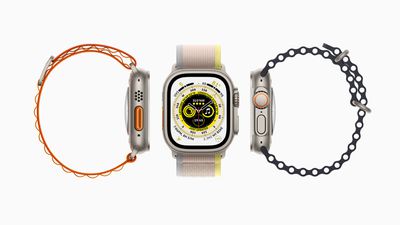
Apple Watch Ultra can last up to 36 hours on a single charge – the longest battery life of any Apple Watch – and to extend battery life even further, Apple Watch Ultra offers even more intelligent battery charge optimization with something called Optimized Charge Limit.

On by default when you set up your Apple Watch, Optimized Charge Limit use on-device machine learning to analyze your daily usage and determine when to charge to an optimized limit and when to allow a full charge. The feature changes dynamically depending on how you use your Apple Watch Ultra. For example, based on usage patterns, your watch might charge to 100% on some days, and less on others.

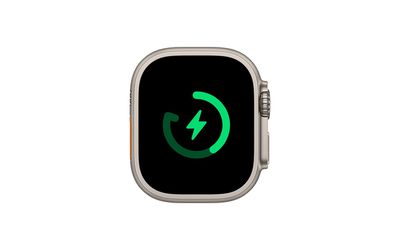
When Optimized Charge Limit is active, an open charge ring is displayed when you connect your Apple Watch Ultra to its charger. It's possible to charge your watch beyond the optimized limit by following the steps below.
watch

How to Charge Apple Watch Ultra Beyond the Optimized Charge Limit

  1. Make sure that your Apple Watch Ultra is connected to its charger.
  2. Tap the watch display to wake the charging screen, then tap the circle with the green or yellow charging icon.
  3. Tap Charge to Full Now.

How to Disable Optimized Charge Limit

If you want your Apple Watch Ultra to fully charge every time its placed on the charge, disable Optimized Battery Charging by following these simple steps.

  1. Open the Settings app on your Apple Watch Ultra.
  2. Scroll down and tap Battery.
  3. Tap Battery Health.
  4. Toggle off the switch next to Optimized Charge Limit.
  5. Choose Turn Off Until Tomorrow or Turn Off.

Help Optimized Charging Identify Locations

Optimized charging is designed to activate only in locations where you spend the most time, such as your home and place of work. The feature doesn't turn on when your usage habits are more variable, such as when you travel.

To help your Apple Watch Ultra identify situations where Optimized Charge Limit shouldn't be used, turn on the following location settings in the Settings app on your Apple Watch Ultra:

  • Privacy -> Location Services -> Location Services
  • Privacy > Location Services > System Services > System Customization
  • Privacy > Location Services > System Services > Significant Locations > Significant Locations

The location information for this feature remains on your watch and none of it is sent to Apple.

Related Roundup: Apple Watch Ultra 3
Related Forum: Apple Watch

Top Rated Comments

AMagicianNamedJOBs Avatar
44 months ago
It would be great if Apple could just give us an option “don’t charge above 80%” and leave it there. I use Al Dente on the Mac but “optimized” charging has never worked consistently for me on Watch or iOS.
Score: 10 Votes (Like | Disagree)
jclardy Avatar
44 months ago

My experience with this feature on iPhone and Mac is that, at least for me, it does nothing. I always find my devices charge to 100% as soon as I plug-in and stay fully charged all night. I have left my MacBook plugged-in for a month straight and charge was limited to 80% after week at fully charged but it only lasted a night and next morning the laptop was at 100% for another week.
I now use Aldente on MacBook, have setup automations on iPhone to manage this and disabled optimised charging on both devices.
This is a different feature (on the Ultra.) Optimized battery charging should never give you 80% battery in the morning...it just changes charging time so that it charges straight to 80%, then waits until an hour or so before it thinks you will need the device, then charges the last 20%. It'll only work if you have a semi-fast charger (Otherwise on a 5w charger you need all night to charge.) It also needs a decent amount of time to figure out your schedule (For example, my new iPhone isn't doing it yet as I've only had it for a week) because the primary objective is for you to have a full battery in the morning, the secondary objective is to improve battery performance in the long run.

On the Ultra, this new feature will only charge to 80%, since the battery life already lasts 2 days. Basically, Apple Watch users are already accustomed to charging every night, so this feature should greatly increase the longevity of the Ultra battery since those users may never need the full 100% charge.
Score: 5 Votes (Like | Disagree)
Jim Lahey Avatar
44 months ago
If the vanilla optimised charging is any indication of what to expect from this, it will break the second you dare deviate from any routine. A welcome addition but I don’t know why they can’t also give users the option to rigidly cap their maximum charge in the sprit of AlDente. We don’t all need ‘machine learning’ to babysit our decision making.
Score: 3 Votes (Like | Disagree)
richie510 Avatar
44 months ago
I welcome this new feature, and hope that Apple extends it to other products, the first targets should be the high battery capacity iPhones. These "machine learning" battery features a great for a large number of users who really don't pay that much attention to these kinds of things.

Still, there should be a power setting to not charge past 80% on all Apple devices, and a setting to not charge past 80% at "this" location. Typically, I think "this" location should be my home, but let me choose.
Score: 1 Votes (Like | Disagree)
xkam1x Avatar
44 months ago
My experience with this feature on iPhone and Mac is that, at least for me, it does nothing. I always find my devices charge to 100% as soon as I plug-in and stay fully charged all night. I have left my MacBook plugged-in for a month straight and charge was limited to 80% after week at fully charged but it only lasted a night and next morning the laptop was at 100% for another week.
I now use Aldente on MacBook, have setup automations on iPhone to manage this and disabled optimised charging on both devices.
Score: 1 Votes (Like | Disagree)
M33-1 Avatar
44 months ago
Another feature by a company in a blackout state trying to control your power charging that best fits their viewpoint. Turn it off asap if it’s on.
Score: 1 Votes (Like | Disagree)

Popular Stories

Aston Martin CarPlay Ultra Screen

Apple's CarPlay Ultra to Expand to These Vehicle Brands Later This Year

Sunday February 1, 2026 10:08 am PST by
Last year, Apple launched CarPlay Ultra, the long-awaited next-generation version of its CarPlay software system for vehicles. Nearly nine months later, CarPlay Ultra is still limited to Aston Martin's latest luxury vehicles, but that should change fairly soon. In May 2025, Apple said many other vehicle brands planned to offer CarPlay Ultra, including Hyundai, Kia, and Genesis. In his Powe...
Apple Logo Black

Apple's Next Launch is 'Imminent'

Sunday February 1, 2026 12:31 pm PST by
The calendar has turned to February, and a new report indicates that Apple's next product launch is "imminent," in the form of new MacBook Pro models. "All signs point to an imminent launch of next-generation MacBook Pros that retain the current form factor but deliver faster chips," Bloomberg's Mark Gurman said on Sunday. "I'm told the new models — code-named J714 and J716 — are slated...
iOS 26

iOS 26.3 and iOS 26.4 Will Add These New Features to Your iPhone

Tuesday February 3, 2026 7:47 am PST by
We are still waiting for the iOS 26.3 Release Candidate to come out, so the first iOS 26.4 beta is likely still at least a week or two away. Following beta testing, iOS 26.4 will likely be released to the general public in March or April. Below, we have recapped known or rumored iOS 26.3 and iOS 26.4 features so far. iOS 26.3 iPhone to Android Transfer Tool iOS 26.3 makes it easier...
Apple MacBook Pro M4 hero

New MacBook Pros Reportedly Launching Alongside macOS 26.3

Sunday February 1, 2026 5:42 am PST by
Apple is planning to launch new MacBook Pro models with M5 Pro and M5 Max chips alongside macOS 26.3, according to Bloomberg's Mark Gurman. "Apple's faster MacBook Pros are planned for the macOS 26.3 release cycle," wrote Gurman, in his Power On newsletter today. "I'm told the new models — code-named J714 and J716 — are slated for the macOS 26.3 software cycle, which runs from...
iOS 26 Home Feature

Apple Gives Final Warning to Home App Users

Tuesday February 3, 2026 8:55 am PST by
In 2022, Apple introduced a new Apple Home architecture that is "more reliable and efficient," and the deadline to upgrade and avoid issues is fast approaching. In an email this week, Apple gave customers a final reminder to upgrade their Home app by February 10, 2026. Apple says users who do not upgrade may experience issues with accessories and automations, or lose access to their smart...