How to Use Control Center's Apple TV Remote in iOS - MacRumorsOpen MenuShow RoundupsShow Forums menuVisit ForumsOpen Sidebar
Skip to Content

How to Use Control Center's Apple TV Remote in iOS

by

ios10 apple tv remote app iconIn iOS 11 and later, it's possible to add an Apple TV Remote interface to the Control Center that will allow you to quickly navigate and control playback on your 4K Apple TV or fourth-generation Apple TV using your iPhone or iPad. It's a great solution if you just can't get on with Apple's Siri Remote, and doesn't require you to install an app. In this article, we'll show you how to set up the Apple TV Remote on your iOS device and explain how to use it once you've done so.

Before continuing, make sure that your iPhone, iPad, or iPod touch is updated to the latest version of iOS: Open the Settings app, tap General -> About, and look for the version number. If you need to update, tap back to Settings, select Software Update, and follow the onscreen instructions, then meet us back here when installation is complete.

How to Set Up Apple TV Remote in iOS Control Center

  1. Turn on your Apple TV and the TV/monitor connected to it, and make sure your iOS device and Apple TV are connected to the same Wi-Fi network.

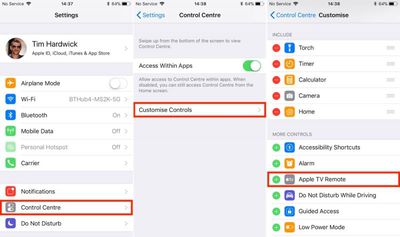
  2. Launch the Settings app on your iOS device.
    Apple TV Remote iOS 1

  3. Select Control Center from the options list.

  4. Tap Customize Controls.

  5. In the More Controls list, tap the entry called Apple TV Remote.

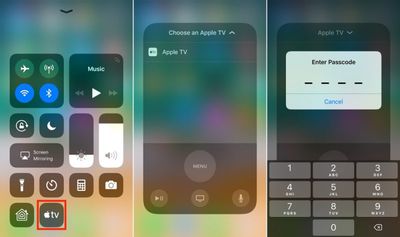
  6. Next, launch the Control Center on your iOS device in the following manner: On iPad, double-tap the Home button; on iPhone 8 or earlier, swipe up from the bottom of the screen; or on iPhone X, swipe down from the upper right "ear".
    TV Remote Control Center 1

  7. Tap the Apple TV button that now appears in the Control Center grid of options.

  8. In the Remote overlay that appears, choose the Apple TV that you want to connect to from the list.

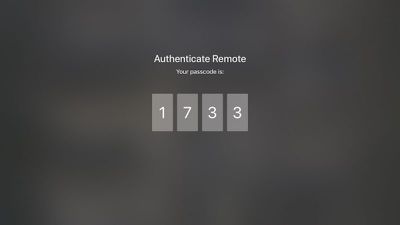
  9. Enter the four-digit passcode that appears on your Apple TV's display to connect.
    6b

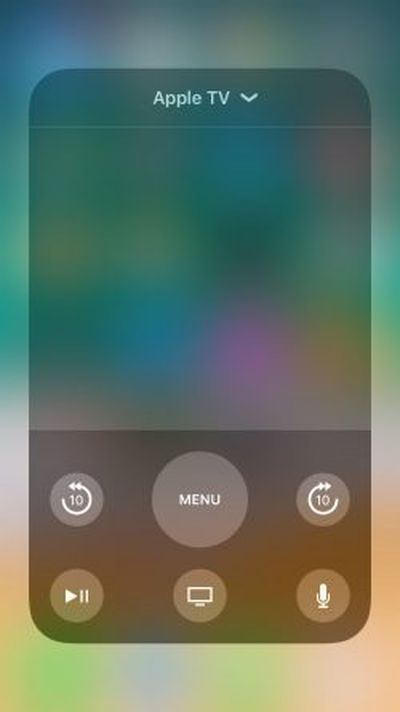
The touch interface that appears on your iPhone or iPad screen will replicate the function of the original Apple TV Remote. If your Apple TV is set up to stream audio to an AirPlay/Bluetooth speaker or headset, you can use the volume buttons on your iOS device to adjust the output volume. Otherwise, you'll have to continue to adjust sound levels using the dedicated remote, your television, or any hi-fi equipment your Apple TV is connected to. With that in mind, here's a quick breakdown of the touchscreen controls that are available to you.

How to Use the Apple TV Remote in iOS Control Center

    7

  • The large gray space in the middle of the onscreen interface acts as the touchpad. You can swipe it to move through Apple TV menus, tap it to select items, and use both actions to rewind and fast-forward media during playback.

  • The big Menu button can be used to go back a level in menu screens. A quick double tap on it will also activate the Apple TV screensaver.

  • During playback, two buttons will appear on either side of the Menu button that allow you to jump forward and back 10 seconds.

  • The Play/Pause button in the lower left of the interface can be used to start the selected item straight away, bypassing any associated content info screens.

  • The Home button (the one with the TV icon) takes you to the Home screen where all your installed Apple TV apps live in a grid formation. It may also take you to the TV app, depending on your settings.

  • The Microphone button activates Siri input, allowing you to perform a variety of voice commands from anywhere in the system. Activating a search field will also bring up a pop-up window that lets you either type using your iOS device's keyboard or dictate your search term. Either of these options is significantly easier than navigating the Apple TV's onscreen keyboard.
For more details on the functions you can perform using the Apple TV Remote's controls, be sure to check out our dedicated tips and tricks guide.


Related Roundup: Apple TV
Buyer's Guide: Apple TV (Buy Now)

Top Rated Comments

iParis Avatar
113 months ago
Ayee might wanna add this to the article -

It actually DOES have a volume control. If you can control your TV’s volume with the Siri remote, you’re using AirPods, connected to a Bluetooth speaker, or AirPlay speaker, you can change the volume using the physical volume buttons on your device. Super nifty.


Score: 5 Votes (Like | Disagree)
113 months ago
Ayee might wanna add this to the article -

It actually DOES have a volume control. If you can control your TV’s volume with the Siri remote, you’re using AirPods, connected to a Bluetooth speaker, or AirPlay speaker, you can change the volume using the physical volume buttons on your device. Super nifty.
Literally the only thing useful in this article was this comment.
Score: 2 Votes (Like | Disagree)
113 months ago
Not true.

The new Remote app for iOS (icon with gray text on black field) works fine with my 3rd gen AppleTV.

I know because I’ve been running it due to the horrible new TV remote and the screwed up nature of the new Netflix/Prime/Hulu/YouTube “apps” vs the old “channels” on the 3rd gen TV.
That's exactly what they said. You need to use the dedicated *app* and not the control center widget. So, true.
Score: 1 Votes (Like | Disagree)
bruinsrme Avatar
113 months ago
Absolutely, but actually this is Apple's job to push this knowledge to it's customers somehow more transparent, as most features are hidden and not used by the broad public at all.
i agree. However, my take in the overall tech gadget market is, there needs to be a balance of technology and advertised usability.
let's use the flick feature in regards to the ipad. Timesaver, keystroke saver.
Who knows about this? out of hundreds of people i have asked, the kids know about it and adults are amazed by it.

I have questioned why apple doesn't touted such gems.

another gem.
Apple support videos on youtube
type in common questions into google
how to set up an apple watch
set up activities on an apple watch
set up music on apple watch

people are amazed at how much info apple has posted. They just never knew it was all there.
Score: 1 Votes (Like | Disagree)
113 months ago
I'm being serious here....how is this more convenient than using the Apple TV Remote app. I don't get it. I have this app on my home screen. I tap the icon, and there is the remote.
Is there something that I'm missing?
Control centre is available anywhere, even when using other apps. That’s my thought anyway.
Score: 1 Votes (Like | Disagree)
113 months ago
I'm being serious here....how is this more convenient than using the Apple TV Remote app. I don't get it. I have this app on my home screen. I tap the icon, and there is the remote.
Is there something that I'm missing?
Score: 1 Votes (Like | Disagree)

Popular Stories

Apple TV 4K HomeView HomePod Mini tweaked

New Apple TV 4K, HomeView, and HomePod Mini: 16 Details Just Leaked

Sunday October 11, 2026 12:56 pm PDT by
Just two days before Apple's "Welcome home" experience in New York, Bloomberg's Mark Gurman has leaked several details about the new products set to be unveiled, including an all-new smart home hub, a HomePod mini 2, and a new Apple TV 4K. Here is an all-in-one summary of the details shared by Gurman:Apple's home hub with a touch-enabled display will be named HomeView, seemingly confirming a ...
Apple TV 4K 4th Generation Top View5

New Apple TV 4K Announced With A19 Chip, Updated Siri Remote, More

Tuesday October 13, 2026 6:08 am PDT by
Apple today announced the fourth-generation Apple TV 4K, with key features including an A19 chip, Siri AI support, an updated Siri Remote that has Find My support with Precision Finding, built in far-field microphones, support for surround sound with four HomePods in front and rear pairs, and more. The A19 chip in the new Apple TV 4K delivers up to 50% faster CPU performance and up to twice...
iPad mini 7 Review Thumb 1 sans text

Apple Expected to Release New Products on Next Four Fridays

Sunday October 18, 2026 11:01 am PDT by
Apple likely plans to release MacBook Pro models with OLED displays, 14-inch MacBook Pro and iMac models with M6 chips, and/or an iPad mini 8 with an OLED display on Friday, November 6, according to Bloomberg's Mark Gurman. The devices are expected to be announced on Tuesday, October 27 or Wednesday, October 28. If this timeframe proves to be accurate, then Apple will be releasing new...
Latest Stories
Apple Watch Ultra 4 Hits All-Time Low Price With Amazon's $99 Discount
11 hours ago
Reminder: Apple's Big Discount on Beats 360 Ear Cushions Ends Today
11 hours ago
Here's a New Tour of Apple's HomeView Software
11 hours ago
Apple Reveals New iPad Mini's Battery Capacity
13 hours ago
Top Stories: Apple's Big MacBook Pro, iPad mini and iMac Updates
14 hours ago
'Pluribus' Season 2 Reportedly Starts Production Today
20 hours ago
iPhone 18 Pro Sales Surge in China, Offsetting Decline in U.S. and Japan
21 hours ago
HomeView Software 27.2: Wallpapers, Control Center, and More
1 day ago
Apple Alerts Stores to iPhone Duo's Display Cracking Issue
1 day ago
iOS 27.3 Will Enable These Apple Intelligence Features in China
1 day ago
Apple Says iOS 27.3 Beta Coming Next Week
1 day ago
Apple's Flash Storage Suppliers Are Finally 'Getting Their Revenge'
1 day ago
14 New Things Your iPhone Can Do in iOS 27.2
1 day ago
iPhone Duo Review: One Week Later
1 day ago
Samsung Mocks iPhone Duo Display Cracks in New Ad Campaign
1 day ago
The MacRumors Show: OLED MacBook Pro, iPad Mini 8, and More
1 day ago
MacBook Pro With Touch Display: 15 More Details Revealed
1 day ago
Russia Places Apple on State Surveillance Registry
2 days ago
Halloween Weekend Brings Discounts on Apple Accessories and Pre-Orders
2 days ago
Apple Has Released More Than 25 New Products in the Past Two Months
2 days ago
Local Code Launches as Free, Private AI Assistant Tool for Mac
2 days ago
Apple Acquires Ascend.io
2 days ago
HomePod Mini 2 Launches Today: All the New Features
2 days ago
AirTag 2 4-Pack Drops to New Low Price of $69.99
2 days ago
Rian Johnson's iPhone Camera App Goes Viral
2 days ago
Where Did All the iPhone Duos Go? Mostly to Apple's Stores
2 days ago
Apple's Touchscreen MacBook Pro Could Ship 1.5M Units in 2027
2 days ago
New Apple TV 4K and iPad Mini: RAM Amounts Revealed
2 days ago
Apple Executive Comments on New iPad Mini Lacking 120Hz Display
2 days ago
Here's a Hands-On Look at HomePod Mini 2's New Two-Tone Colors
2 days ago

🔗 Related Apple News & Rumors

Stay updated with the latest Apple ecosystem news and verified rumors