

Apple TV: How to Customize the Clickpad on the New Siri Remote (2nd Gen) - MacRumorsOpen MenuShow RoundupsShow Forums menuVisit ForumsOpen Sidebar
Skip to Content

Apple TV: How to Customize the Clickpad on the New Siri Remote (2nd Gen)

by

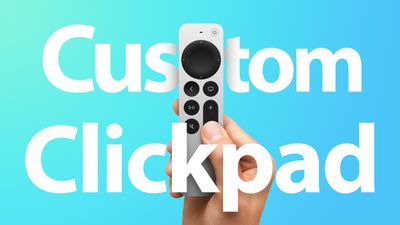
Apple's second-generation redesigned Siri Remote features a touch-sensitive clickpad that can be used to navigate menus as well as fast-forward and rewind video.
siri remote 2 clickpad settings feature
When you first start using the ‌Siri‌ Remote, touch surface tracking is on by default, but if you can't get on with the sensitivity or you're just not comfortable using touch controls on a remote, you can always customize it or turn it off.
apple tv remote settings

Change Siri Remote Clickpad Functionality

  1. Launch the Settings app on your Apple TV.
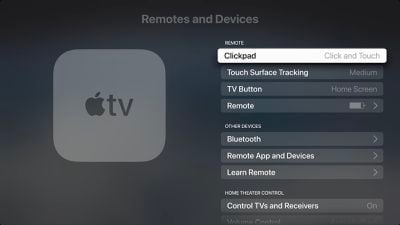
  2. Select Remotes and Devices.
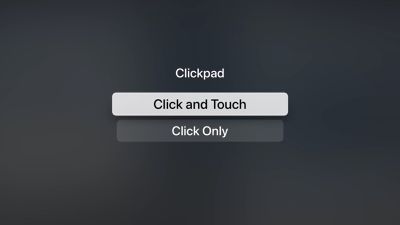
  3. Select ClickPad.
  4. Select Click and Touch to allow both clicking and touch surface tracking, or Click Only to turn off touch surface tracking.
apple tv siri remote clickpad settings

Change Siri Remote Tracking Sensitivity

  1. Launch the Settings app on your ‌Apple TV‌.
  2. Select Remotes and Devices.
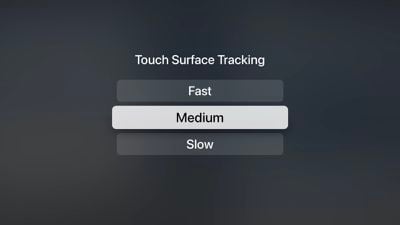
  3. Select Touch Surface Tracking.
  4. Select Fast to make smaller thumb movements move farther on the ‌Apple TV‌ screen, or Slow to reduce tracking sensitivity.
apple tv siri remote tracking settings
If you're having trouble scrubbing through video when playback is paused, check our mini guide to make sure you're using the correct clickpad gesture.

Related Roundup: Apple TV
Buyer's Guide: Apple TV (Don't Buy)

Top Rated Comments

mikeyteh Avatar
69 months ago
This thread will be full of complaints by people who don’t have the remote, just like the last remote article. I have 3 new ones and they are a huge improvement from the first Siri Remote and work very well. The scrubber feature is fantastic
Score: 3 Votes (Like | Disagree)
CarlJ Avatar
69 months ago

I honestly thought Mac Rumors is/was frequented by readers who are tech savvy.

But after reading complaints on this remote like “can’t skip forward 10 seconds”, when the the new action to do that function seems like the obvious action (click the right arrow); I now feel like it’s just the general public in here. Lol

Yeah, try that in the YouTube app and tell us how well it works. But keep patting yourself on the back for being smarter than everyone else.

(YouTube seems to have swapped out their “smart tv” codebase for their “game console” codebase - it gains a few other features but loses the skip forward/back 10 seconds ability - clicking the left/right arrows will pause the video and move the cursor, and leave it sitting there with the video paused, not at all what someone used to the old function wants. The “skip forward/back 10 seconds while the video continues to run” feature seems to be heavily dependent on the underlying software.)

Score: 2 Votes (Like | Disagree)
69 months ago

Is using this remote intuitive? Or does a person need an online class on operating the remote? I don't own one yet but wondering why in the world scrubbing isn't intuitive.
I felt comfortable using it in about a minute. Just a matter of summoning some curiosity.

Still not used to the Mic button being on the side. But that's mice nuts and have pretty much adapted.

Overall it's a huge improvement.
Score: 2 Votes (Like | Disagree)
69 months ago

It’s a good remote, but it continually bugs me that the pause and mute buttons are in their current locations instead of swapped - mute is on the corner of the array in the spot that’s easier to get to without looking, but the ATV is fundamentally a streaming box, and the majority of streaming is on-demand, not live. Generally, no one wants to hurriedly mute a movie while letting it run, they want to pause the movie. Without looking, the pause button requires sliding your finger over the button above it or below it to get to the right place, while the mite button is immediately locatable by sliding your finger up from the bottom, which is a shame. They’ve made the more useful button harder to get to, and the less useful button easier to get to. Oh well, it’s still a good remote.
I would honestly like the play/pause button to be above the volume, the home/tv button to be top left, back button below it, and mute where it is.

I see it similar to how you do that most people pause instead of mute, and when watching stuff I’m really only going to use volume up/down and play/pause during viewing and prefer them stacked so they are near.

I feel the home/tv and back buttons are similar enough to be next to each other and then the mute button to me is fine where it is, mainly because I wont use it much and it’s next to the volume down button, resulting in basically what you are going for if you happen to hit the wrong button.

This is a lot of thought I’ve put into a remote with hardly any buttons lol and I’ll memorize them in the next day or so and never think about it again, but that’s how I would have preferred the remote setup.
Score: 1 Votes (Like | Disagree)
69 months ago
My only complaint with the new remote is just simply that the mute button and play/pause button should be swapped.
That’s it though, everything else is perfect.
I mean, except for the obvious, no find my integration
Score: 1 Votes (Like | Disagree)
69 months ago

Is using this remote intuitive? Or does a person need an online class on operating the remote? I don't own one yet but wondering why in the world scrubbing isn't intuitive.
Until reading previous posts about people losing and not knowing how to use remotes, I thought the remote(as in any remote) was one of the simplest items out there that most can understand relatively easily, and wow was I wrong.

I just got the new Apple TV yesterday and the scrubbing feature was exactly as easy as I expected any remote to be, but maybe that is not the case for everyone.
Score: 1 Votes (Like | Disagree)

Popular Stories

Where is the New Apple TV Feature

Next Apple TV's Chip Revealed in Latest Leak

Tuesday September 8, 2026 10:19 am PDT by
The next Apple TV 4K will be equipped with an A19 or A19 Pro chip, according to evidence in Apple's code uncovered by MacRumors contributor Aaron Perris. In particular, the device's model identifier points towards the A19 generation of chips. Accordingly, the next Apple TV would have 8GB or 12GB of RAM, up from 4GB in the current 2022 model with the A15 Bionic chip. Other rumored upgrades for...
iOS 27 Feature Cool

Apple Releases New iOS 27, iPadOS 27, macOS 27, and tvOS 27 Public Betas

Monday August 31, 2026 2:13 pm PDT by
Apple today released the sixth public betas of iOS 27, iPadOS 27, tvOS 27, and macOS Golden Gate, allowing anyone with a compatible device to download and test the new software. The sixth betas come a week after Apple seeded the fifth betas and a few hours after the eighth developer betas. You can get started by signing up on Apple's beta website and then opting in to the public beta by...
Apple TV Remote Icon

iOS 27 to Upgrade Apple TV Remote App in Two Ways

Thursday September 10, 2026 2:33 am PDT by
Apple has updated the design of the virtual Apple TV Remote for the iOS 27 Release Candidate, which was released yesterday, and there are two new features that have been added to the iPhone app's interface. First up, Apple has added a new button to the top-right corner of the Remote UI with a glyph showing four squares. Pressing the button pops out an app menu similar to the Apple TV home...

🔗 Related Apple News & Rumors

Stay updated with the latest Apple ecosystem news and verified rumors











































