

How to Use the App Store on Apple TV - MacRumorsOpen MenuShow RoundupsShow Forums menuVisit ForumsOpen Sidebar
Skip to Content

How to Use the App Store on Apple TV

by

The fourth-generation Apple TV has a lot of new features, one of them being the addition of the Apple TV App Store. On the surface, the App Store on Apple TV seems similar to that of the iOS or OS X version. There are, however, some aspects of the tvOS App Store that are are a little different and might need some explaining.

For example, some apps, like Lumino City, are available on iOS and Apple TV, while others such as Beat Sports are only available on Apple TV, and can therefore be a little harder to find. Apple has gradually been adding features such as categories to the Apple TV App Store, so things are definitely still a work in progress. We've got a few tips on how to navigate the App Store, and maybe even discover new apps worth downloading.

App Discovery
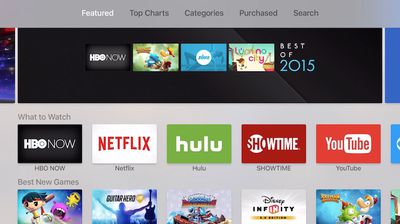
apple_tv_app_store_main
Probably the most frustrating aspect of the Apple TV App Store is finding cool new content. Since the Apple TV's debuted, Apple has added Top Charts and Categories, which have greatly improved our ability to discover content.

Top Charts shows the top 50 – 75 (or so) paid, free, and grossing apps. Currently there is no way to filter the lists by category. However, with more content being added daily, it is likely that Apple will at some point add category filter options so we can search for, say, Top Paid Games or Top Free Entertainment apps.
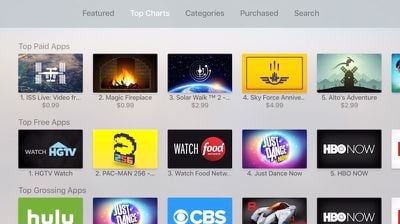
apple_tv_app_store_charts
When you visit the Categories section, you'll be able to select from a few major classifications, like Games, Education, Entertainment, Sports, and more. Within a category, you'll see a list of spotlighted apps, like "What to Play" or "What to Watch," plus a few more lists. The category sections are somewhat limited right now.

One glaring omission from Apple's app discovery mechanic is the "Customers Also Bought" section. Hopefully, Apple will implement this in a future update, when more content becomes available.
pandora_apple_tv_app_listing

Buying Apps on iOS and Downloading on Apple TV

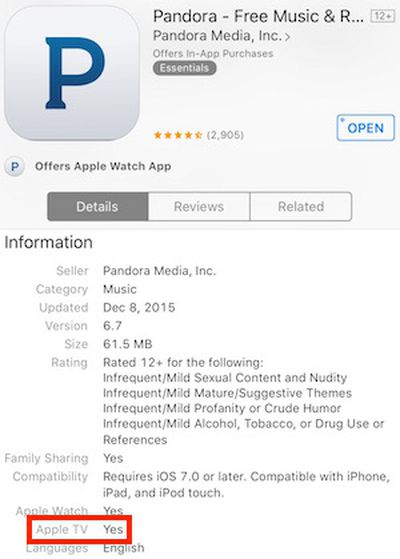
Apple recently added the Apple TV identifier for universal apps to iTunes on iOS, which makes it easier to figure out which iOS apps are compatible with Apple TV. The identifier is not yet available in iTunes on desktop computers, but will likely be added later.

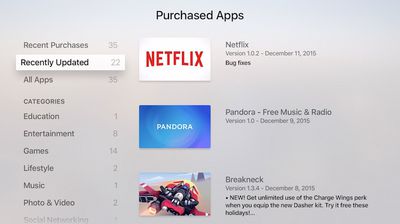
If you download an iOS game that is also available on tvOS, it will automatically appear in the Purchased section of Apple TV's App Store. Any tvOS-compatible apps or games that you've downloaded or purchased in the past will also be available in the Purchased section.

In the Purchased section, you can filter your apps by recently added or updated, or by category.

Currently, there is still no way to view Apple TV-exclusive apps in iTunes.

Auto Update Feature
apple_tv_app_store_purchased
Just like on iOS, you can set up Apple TV to automatically update apps when new versions are available. To enable automatic updates:

  1. Open the Settings app on Apple TV.
  2. Select "Apps" from the list of options.
  3. Click Automatically Update Apps to turn the feature on. Click it again to turn it off.

When enabled, apps will automatically update in the background similar to the feature on iOS. To view recently updated apps, visit the Purchased section of the Apple TV App Store and click on "Recently Updated."

Searching for Apps

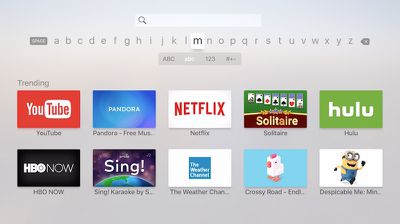
The Apple TV App Store includes a dedicated Search pane to allow you to look for apps. Unfortunately, Siri voice search within the store is not currently supported, so you must enter text to search the store. The onscreen search mechanism is cumbersome, with a single line of letter that must be navigated with the Apple TV's remote. Fortunately, the recent tvOS 9.1 update added compatibility with the iOS Remote app, meaning you can now enter text in the Apple TV's search field and elsewhere by typing on your iOS device's keyboard.
apple_tv_app_store_search
When you first enter the Search screen, it shows a list of trending apps you might be interested in, and then as you type, automatic suggestions based on what you've typed so far begin showing up on the screen.

Rearranging and Deleting Apps

As with iOS, you can customize the arrangement of your apps on the main screen of the Apple TV. To move an app, move the cursor to the app you want to move, and click and hold on the remote trackpad until the app icon starts jiggling. At that point, you can swipe on the trackpad to move the app to its new location on the screen, and the other icons will adjust to make room for it. When you're done, click on the trackpad to exit the rearrange mode.

If you want to delete an app from your Apple TV, follow the same procedure to highlight the app and enter the rearrange mode. From there, press the play/pause button on your remote and it will bring up a confirmation screen to make sure you want to delete the app and all of its data.

Switching Apps

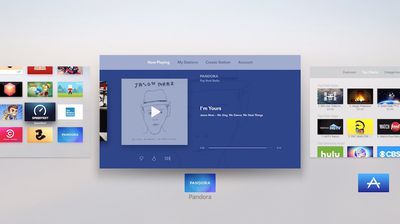
While you can always exit and an app and head back to the main home screen in order to access a different app, tvOS has an app switcher similar to that found on iOS. Double clicking the home button on the remote (the button with the TV icon on it) will bring up the app switcher, where you can swipe left and right among recently used apps.
apple_tv_app_switcher

Playing Music in the Background While in Another App

You can play music in the background while using another app as long as that app is not playing any audio. Music will continue playing while you are searching for movies in Hulu or Netflix, or if you are watching a slideshow in Photos or 500px. However, as soon as you play content that has audio, the music will stop.

This feature does not work with games, as games usually have their own soundtracks and your music will stop playing as soon as you open one. Even if you turn all audio settings off for the game, your iTunes music will not play.

Now that you know a little bit more about Apple TVs App Store, you might have more success finding the best apps and games for your family from Apple's growing content.


Related Roundup: Apple TV
Buyer's Guide: Apple TV (Buy Now)

Top Rated Comments

HiRez Avatar
142 months ago
The fact that this article even needs to exist is a bad sign.

Yeah, I'm grumpy today.
Score: 9 Votes (Like | Disagree)
npmacuser5 Avatar
142 months ago
All I want for Christmas; Universal App Store, using my Macbook or iPad to select, have the App Store deliver to my Apple TV or TV's and devices for universal Apps. Others are already doing this. Example Amazon, use your web browser, tablet or phone app, search for what you want using a real search machine, add to cart, select devices to deliver App, open up devices the Apps are there. Works for all universal Apps. If an App does not work on a device the device is grayed out. Now compare the way Apple approaches the Apps. Totally Old School and in No way up with the times. The Apple TV is still a hobby hack developed back in the garage. Very incomplete for an Apple product.


Score: 4 Votes (Like | Disagree)
utazdevl Avatar
142 months ago
The fact that I can't sit at my computer or on my phone and review and select apps that are then installed on my AppleTV is the biggest indictment I could offer on the AppleTV App store experience. Can't wait until Apple introduces this feature as a "new and innovative" was to use the App Store, despite it being available on virtually every other streaming device that has apps for years.
Score: 2 Votes (Like | Disagree)
142 months ago
I can't find anything on it. I have to come to forums on sites like this just to find out what new apps/games have been released. That should tell you all you need to know.
Score: 1 Votes (Like | Disagree)
142 months ago
I have several iTunes account for different countries (Canada, us and uk). Is is possible to download apps from multiple countries like you can on an iOS device? Eg. iPlayer from Uk, and some us only apps.
Yes, it works the same way as on iPhone
Score: 1 Votes (Like | Disagree)

Popular Stories

Apple TV 4K HomeView HomePod Mini tweaked

New Apple TV 4K, HomeView, and HomePod Mini: 16 Details Just Leaked

Sunday October 11, 2026 12:56 pm PDT by
Just two days before Apple's "Welcome home" experience in New York, Bloomberg's Mark Gurman has leaked several details about the new products set to be unveiled, including an all-new smart home hub, a HomePod mini 2, and a new Apple TV 4K. Here is an all-in-one summary of the details shared by Gurman:Apple's home hub with a touch-enabled display will be named HomeView, seemingly confirming a ...
Apple TV 4K 4th Generation Top View5

New Apple TV 4K Announced With A19 Chip, Updated Siri Remote, More

Tuesday October 13, 2026 6:08 am PDT by
Apple today announced the fourth-generation Apple TV 4K, with key features including an A19 chip, Siri AI support, an updated Siri Remote that has Find My support with Precision Finding, built in far-field microphones, support for surround sound with four HomePods in front and rear pairs, and more. The A19 chip in the new Apple TV 4K delivers up to 50% faster CPU performance and up to twice...
iPad mini 7 Review Thumb 1 sans text

Apple Expected to Release New Products on Next Four Fridays

Sunday October 18, 2026 11:01 am PDT by
Apple likely plans to release MacBook Pro models with OLED displays, 14-inch MacBook Pro and iMac models with M6 chips, and/or an iPad mini 8 with an OLED display on Friday, November 6, according to Bloomberg's Mark Gurman. The devices are expected to be announced on Tuesday, October 27 or Wednesday, October 28. If this timeframe proves to be accurate, then Apple will be releasing new...
Latest Stories
Apple Offers Steps to Fix Daylight Saving Time Bug on Apple Watch
2 hours ago
Apple Watch Ultra 4 Hits All-Time Low Price With Amazon's $99 Discount
20 hours ago
Reminder: Apple's Big Discount on Beats 360 Ear Cushions Ends Today
21 hours ago
Here's a New Tour of Apple's HomeView Software
21 hours ago
Apple Reveals New iPad Mini's Battery Capacity
22 hours ago
Top Stories: Apple's Big MacBook Pro, iPad mini and iMac Updates
23 hours ago
'Pluribus' Season 2 Reportedly Starts Production Today
1 day ago
iPhone 18 Pro Sales Surge in China, Offsetting Decline in U.S. and Japan
1 day ago
HomeView Software 27.2: Wallpapers, Control Center, and More
2 days ago
Apple Alerts Stores to iPhone Duo's Display Cracking Issue
2 days ago
iOS 27.3 Will Enable These Apple Intelligence Features in China
2 days ago
Apple Says iOS 27.3 Beta Coming Next Week
2 days ago
Apple's Flash Storage Suppliers Are Finally 'Getting Their Revenge'
2 days ago
14 New Things Your iPhone Can Do in iOS 27.2
2 days ago
iPhone Duo Review: One Week Later
2 days ago
Samsung Mocks iPhone Duo Display Cracks in New Ad Campaign
2 days ago
The MacRumors Show: OLED MacBook Pro, iPad Mini 8, and More
2 days ago
MacBook Pro With Touch Display: 15 More Details Revealed
2 days ago
Russia Places Apple on State Surveillance Registry
2 days ago
Halloween Weekend Brings Discounts on Apple Accessories and Pre-Orders
2 days ago
Apple Has Released More Than 25 New Products in the Past Two Months
2 days ago
Local Code Launches as Free, Private AI Assistant Tool for Mac
2 days ago
Apple Acquires Ascend.io
2 days ago
HomePod Mini 2 Launches Today: All the New Features
2 days ago
AirTag 2 4-Pack Drops to New Low Price of $69.99
2 days ago
Rian Johnson's iPhone Camera App Goes Viral
2 days ago
Where Did All the iPhone Duos Go? Mostly to Apple's Stores
2 days ago
Apple's Touchscreen MacBook Pro Could Ship 1.5M Units in 2027
2 days ago
New Apple TV 4K and iPad Mini: RAM Amounts Revealed
3 days ago
Apple Executive Comments on New iPad Mini Lacking 120Hz Display
3 days ago

🔗 Related Apple News & Rumors

Stay updated with the latest Apple ecosystem news and verified rumors










































