

How to Get the Most Out of Sharing on Apple TV 4 - MacRumorsOpen MenuShow RoundupsShow Forums menuVisit ForumsOpen Sidebar
Skip to Content

How to Get the Most Out of Sharing on Apple TV 4

by

The newest version of Apple's set-top box has a lot of features that were not available in previous models, and while some things are fairly easy to figure out, other features are somewhat hidden and harder to find.

One great feature Apple has included with its fourth-generation Apple TV is a new App Store and the ability to have multiple accounts connected to the set-top box. Some sharing features connect automatically, but others take more work. We've got a guide for setting up various account and device sharing options so you can access the most content in the easiest way possible on the new Apple TV.

Home Sharing

With Home Sharing enabled, you can access your movies, music, TV shows, audiobooks, and more stored on a Mac or PC from any device that has the feature turned on and is on the same local network. If you haven't already turned on Home Sharing from your various Mac, PC, and iOS devices, here's how.
Home Sharing iTunes
PC or Mac

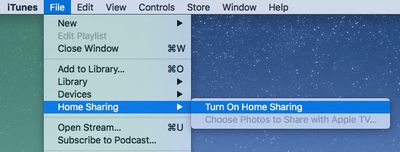
  1. On Mac, open iTunes and select File from the Menu Bar in the upper left corner of the screen. On PC, press the Alt key to access the menu bar and select File from the list.
  2. Click Home Sharing and choose "Turn on Home Sharing." Enter your Apple ID and password, and then click Turn on Home Sharing.
Home Sharing iOSiOS

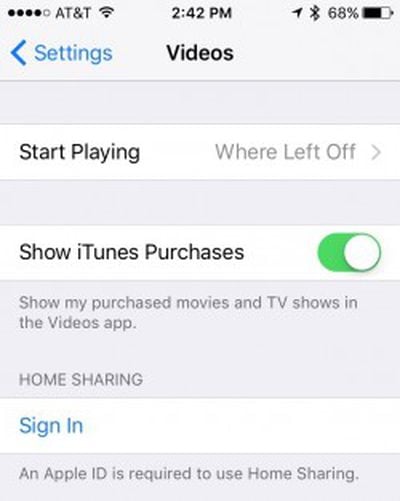
  1. Open the Settings app and select Videos or Music.
  2. Tap Home Sharing.
  3. Enter your Apple ID and password and tap Sign In.

Apple TV 4

  1. Open the Settings app and click Accounts.
  2. Select Home Sharing.
  3. Enter your Apple ID and password and click Sign In.

To access content from your computers, open the Computers app on Apple TV. Content from all shared computers is accessible from the menu.

Family Sharing

If you have Family Sharing enabled for multiple users in your home, shared apps and content will automatically appear on Apple TV 4. You don't have to follow any steps. However, if you don't already have Family Sharing enabled and you are ready to do so, follow our previous instruction guide here.

Sharing With Multiple Users

In addition to viewing content from multiple devices and sharing media from your family's accounts, you can set up multiple iTunes, iCloud, and Game Center users for each family member.

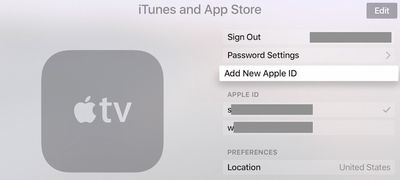
  1. Open the Settings app on Apple TV 4 and select Accounts.
  2. Select iCloud, iTunes and App Store, or Game Center and log in with your Apple ID and password.

You can use a different Apple ID for each section, but it might not make sense to use one account for Game Center and another for the App Store.
apple_tv_accounts
Once logged in, you can quickly switch between iTunes and App Store accounts without having to reenter your Apple IDs. To do so, open the Settings app and select Accounts. Then select iTunes and App Store and select the Apple ID you wish to switch to.

With all family devices and accounts connected to Apple TV 4, each of the members of your household will have quick and easy access to their content on the new Apple TV for the best possible media experience.


Related Roundup: Apple TV
Buyer's Guide: Apple TV (Buy Now)

Top Rated Comments

142 months ago
Maybe you've already downloaded it, think of it as a way of caching or such, but you're on a data cap.
"But why would you download it, if you know you'll play it somewhere else?"

Why would Apple need to take that flexibility and vertical integration away from me?

meh, more half-bakedness and another moment eventually where you'll go "oooh... I thought this should work." in an ecosystem that's supposed to "just work". (oops, did I say the bad phrase and hold Apple to former valid standards they advertised? I should be fairer, they USED to run that slogan, not anymore, so... I guess I should lower my expectations?)

Glassed Silver:mac
I don't think I've ever seen a post from you that wasn't a complaint. Your relationship with Apple seems unhealthy.
Score: 4 Votes (Like | Disagree)
Glassed Silver Avatar
142 months ago
I don't think I've ever seen a post from you that wasn't a complaint. Your relationship with Apple seems unhealthy.
Maybe the ratio leans towards negative criticism, but I try to highlight what they could do better instead of merely saying they goof up, which could be considered mere trolling or unthoughtful rambling.

My internet connection is uncapped by the way, but I like to think of use cases beyond my own ones or ones that I might not have now, but later potentially. (especially with net neutrality in the EU being practically dead soon enough)

What you find unhealthy I find a reflected view on an overhyped, over-glorified, but overall not bad-all-around company.
Unhealthy to me would be to troll and yell without being affected or caring for those who might be affected (= fanboys, of other camps, just as much as there are these sorts of fanboys in our camp who love to troll and non-constructively yell at Apple's competition)

Yeah, Home Sharing has always seemed an utter mess to me whenever I've tried to use it. I gave up on it a long time ago.
It's a shame, because it's a lovely concept and the only pressing reason besides AirPlay I would buy an Apple TV for, but not without H.265.

Glassed Silver:mac
Score: 2 Votes (Like | Disagree)
nimbusthegreat Avatar
142 months ago
I'm still waiting for them to address the ABSOLUTELY ABYSMAL USER EXPERIENCE WHEN TYPING IN PASSWORDS! No remote app for my phone, no way to pair a keyboard. Just a dozen apps that require 30 character passwords. If this is the new Apple, dude, I'm getting a Dell.
Score: 1 Votes (Like | Disagree)
142 months ago
i think the whole segment on home sharing is very badly worded. it suggests you can access media on any device from any device (ie i could play a video stored on my iphone on an ipad or even a pc with home sharing enabled). you even talk about accessing "content from your computers and iOS devices, open the Computers app on Apple TV. Content from all shared devices is accessible". Come on guys, the clue is in the menu name - Computers. iOS devices can access other content, they cannot share their own.

only a computer can share it's content.

it'd be nice if your writers knew how to do something so basic, say, as to access apple's support website on the topic for some easy fact checking (https://support.apple.com/en-us/HT202190)
Score: 1 Votes (Like | Disagree)
freediverx Avatar
142 months ago
The article neglects to mention that Home Sharing on the Apple TV 4 shares the same anemic, list-based user interface we've been stuck with for years. No beautiful grid of poster art, no Siri universal search.

If you have a library of movies and/or TV shows (non-DRM'd) at home, get Plex server and the Plex app for Apple TV. It's Home Sharing on steroids, with a slick interface and streaming for all your iOS devices as well.
Score: 1 Votes (Like | Disagree)
Glassed Silver Avatar
142 months ago
Why would they need to? You've rented it, just play it on your Apple TV.
Maybe you've already downloaded it, think of it as a way of caching or such, but you're on a data cap.
"But why would you download it, if you know you'll play it somewhere else?"

Why would Apple need to take that flexibility and vertical integration away from me?

meh, more half-bakedness and another moment eventually where you'll go "oooh... I thought this should work." in an ecosystem that's supposed to "just work". (oops, did I say the bad phrase and hold Apple to former valid standards they advertised? I should be fairer, they USED to run that slogan, not anymore, so... I guess I should lower my expectations?)

Glassed Silver:mac
Score: 1 Votes (Like | Disagree)

Popular Stories

Apple TV 4K HomeView HomePod Mini tweaked

New Apple TV 4K, HomeView, and HomePod Mini: 16 Details Just Leaked

Sunday October 11, 2026 12:56 pm PDT by
Just two days before Apple's "Welcome home" experience in New York, Bloomberg's Mark Gurman has leaked several details about the new products set to be unveiled, including an all-new smart home hub, a HomePod mini 2, and a new Apple TV 4K. Here is an all-in-one summary of the details shared by Gurman:Apple's home hub with a touch-enabled display will be named HomeView, seemingly confirming a ...
Apple TV 4K 4th Generation Top View5

New Apple TV 4K Announced With A19 Chip, Updated Siri Remote, More

Tuesday October 13, 2026 6:08 am PDT by
Apple today announced the fourth-generation Apple TV 4K, with key features including an A19 chip, Siri AI support, an updated Siri Remote that has Find My support with Precision Finding, built in far-field microphones, support for surround sound with four HomePods in front and rear pairs, and more. The A19 chip in the new Apple TV 4K delivers up to 50% faster CPU performance and up to twice...


iPad mini 7 Review Thumb 1 sans text

Apple Expected to Release New Products on Next Four Fridays

Sunday October 18, 2026 11:01 am PDT by
Apple likely plans to release MacBook Pro models with OLED displays, 14-inch MacBook Pro and iMac models with M6 chips, and/or an iPad mini 8 with an OLED display on Friday, November 6, according to Bloomberg's Mark Gurman. The devices are expected to be announced on Tuesday, October 27 or Wednesday, October 28. If this timeframe proves to be accurate, then Apple will be releasing new...
Latest Stories
Apple Watch Ultra 4 Hits All-Time Low Price With Amazon's $99 Discount
16 hours ago
Reminder: Apple's Big Discount on Beats 360 Ear Cushions Ends Today
16 hours ago
Here's a New Tour of Apple's HomeView Software
16 hours ago
Apple Reveals New iPad Mini's Battery Capacity
18 hours ago
Top Stories: Apple's Big MacBook Pro, iPad mini and iMac Updates
19 hours ago
'Pluribus' Season 2 Reportedly Starts Production Today
1 day ago
iPhone 18 Pro Sales Surge in China, Offsetting Decline in U.S. and Japan
1 day ago
HomeView Software 27.2: Wallpapers, Control Center, and More
1 day ago
Apple Alerts Stores to iPhone Duo's Display Cracking Issue
1 day ago
iOS 27.3 Will Enable These Apple Intelligence Features in China
1 day ago
Apple Says iOS 27.3 Beta Coming Next Week
1 day ago
Apple's Flash Storage Suppliers Are Finally 'Getting Their Revenge'
1 day ago
14 New Things Your iPhone Can Do in iOS 27.2
2 days ago
iPhone Duo Review: One Week Later
2 days ago
Samsung Mocks iPhone Duo Display Cracks in New Ad Campaign
2 days ago
The MacRumors Show: OLED MacBook Pro, iPad Mini 8, and More
2 days ago
MacBook Pro With Touch Display: 15 More Details Revealed
2 days ago
Russia Places Apple on State Surveillance Registry
2 days ago
Halloween Weekend Brings Discounts on Apple Accessories and Pre-Orders
2 days ago
Apple Has Released More Than 25 New Products in the Past Two Months
2 days ago
Local Code Launches as Free, Private AI Assistant Tool for Mac
2 days ago
Apple Acquires Ascend.io
2 days ago
HomePod Mini 2 Launches Today: All the New Features
2 days ago
AirTag 2 4-Pack Drops to New Low Price of $69.99
2 days ago
Rian Johnson's iPhone Camera App Goes Viral
2 days ago
Where Did All the iPhone Duos Go? Mostly to Apple's Stores
2 days ago
Apple's Touchscreen MacBook Pro Could Ship 1.5M Units in 2027
2 days ago
New Apple TV 4K and iPad Mini: RAM Amounts Revealed
2 days ago
Apple Executive Comments on New iPad Mini Lacking 120Hz Display
2 days ago
Here's a Hands-On Look at HomePod Mini 2's New Two-Tone Colors
3 days ago

🔗 Related Apple News & Rumors

Stay updated with the latest Apple ecosystem news and verified rumors










































