

Adjust TV App Video Download Settings on iPhone - MacRumorsOpen MenuShow RoundupsShow Forums menuVisit ForumsOpen Sidebar
Skip to Content

Adjust TV App Video Download Settings on iPhone

by

If you have an Apple TV+ subscription or you've rented or purchased movies via iTunes, you can download the videos to your iPhone and iPad over Wi-Fi or cellular using Apple's TV app, which allows you to watch them offline.

Apple TV Plus Black Banner
Apple gives iPhone and iPad users granular control of TV app video download settings. So if you want, you can choose high quality video if you don't mind them taking longer to download and taking up more storage space. Alternatively, you can prioritize faster downloads that take up less storage, but at the price of video quality.

You can adjust these settings independently for when you're downloading over Wi-Fi or cellular, which is particularly handy if you don't have an unlimited data plan or you don't want to hog your household's bandwidth. Simply follow the series of steps below to adjust the download quality over the data connection that applies to you.

Adjusting Video Download Settings Over Cellular

  1. Launch the Settings app on your iPhone.
  2. Scroll to the bottom and tap Apps, then tap TV.
  3. Under "Download Options," tap Cellular (or Mobile Data).
  4. Select High Quality (slower download, uses more storage) or Fast Downloads (lower quality, uses less storage).
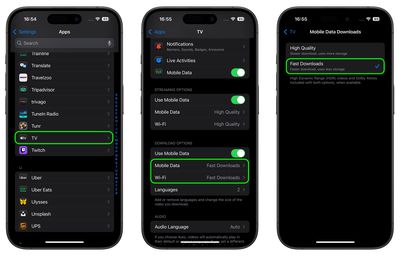
settings

Adjusting Video Download Settings Over Wi-Fi

  1. Launch the Settings app on your iPhone.
  2. Scroll to the bottom and tap Apps, then tap TV.
  3. Under "Download Options," tap Wi-Fi.
  4. Select High Quality (slower download, uses more storage) or Fast Downloads (lower quality, uses less storage).

Note that selecting High Quality allows High Dynamic Range (HDR) video to be downloaded to your device when available.


Popular Stories

Apple Event Logo

Apple Working on All-New Operating System

Wednesday July 29, 2026 11:39 am PDT by
Apple is developing an all-new operating system that is essentially a mix of tvOS, watchOS, and iOS, according to Bloomberg's Mark Gurman. In a report this week, he said the operating system will feature a grid of icons, widgets, and apps, along with customizable clock faces. The new software platform is intended for Apple's long-rumored smart home hub. With built-in facial recognition,...

imac video apple feature

Apple Made Its Second-Biggest Acquisition Ever This Year

Wednesday July 29, 2026 12:03 pm PDT by
Apple this year acquired Israeli startup Q.ai for close to $2 billion, according to the Financial Times. That would make this Apple's second-biggest acquisition ever, after it paid $3 billion for the popular headphone maker Beats in 2014. This is also the largest known Apple acquisition since the company purchased Intel's smartphone modem business and patents for $1 billion in 2019. Q.ai...
Dynamic Island iPhone 18 Pro Feature

iPhone 18 Pro: Twelve Changes Coming to Apple's Next Flagship

Thursday July 30, 2026 3:43 am PDT by
We're less than two months out from the launch of Apple's premium next-generation smartphone lineup, and while we're not expecting a dramatic change in terms of functionality, there are still several enhancements rumored to be coming to the iPhone 18 Pro and iPhone 18 Pro Max. One thing worth noting is that Apple is reportedly planning a major change to its iPhone release cycle this year,...

🔗 Related Apple News & Rumors

Stay updated with the latest Apple ecosystem news and verified rumors











































