With the debut of watchOS 9, Apple introduced new workout features that aim to take your personal fitness to the next level. For example, you can now display running form metrics to your Apple Watch display during running workouts. This article explains what the new metrics are and how you can enable them.
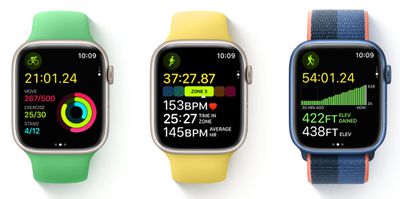
watchos 9 workout app
Apple has leaned further into fitness with the release of each new version of watchOS, and the latest version, ‌watchOS 9‌, adds more metrics to your wrist than ever before on Apple Watch.

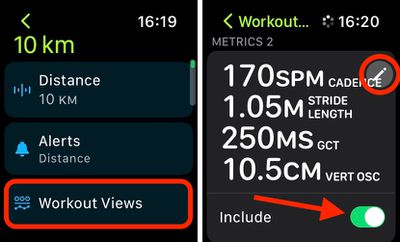
In particular, Apple Watch Series 6 and later models can now measure and display additional elements of your running form in real time, including vertical oscillation, running stride length, and ground contact time.

  • Vertical oscillation is the amount your torso moves vertically with each step while running. Taken in centimeters, this measurement can give you a sense of how much energy you're using to drive upward versus forward.
  • Running stride length is an estimate of how much distance you cover from one step to the next while running in metres. Along with cadence, stride length determines your overall running speed.
  • Ground contact time is an estimate of the time each foot spends touching the ground whitle running in milliseconds.

How to View Running Form Metrics for Completed Runs

If you've already completed a running workout, you can view these new running form metrics in the Fitness app on your iPhone. Under "Workouts," simply tap the run you completed, then tap Show More alongside "Workout Details."
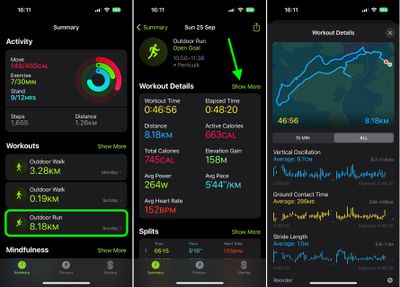
fitness

How to Add Running Form Metrics to Your Apple Watch Workout Display

The following steps show you how to add all three metrics to your Workout Views when creating a new custom running workout, enabling you to switch to them freely when you're on the move.

  1. On Apple Watch, launch the Workout app, then select the ellipsis (three dots) button on the Outdoor Run card.
  2. Tap the edit (pen) button on the workout card you want to add running form metrics to.
    workout

  3. Tap Workout Views, then tap Edit Views.
  4. Under "Metrics 2," toggle on the switch next to Include. (You can also optionally tap the Edit button to change the individual metrics displayed.)
  5. When you're done, tap the Back arrow twice, then tap Start Workout. Alternatively, exit the Workout app with a press of the Digital Crown – your running workout will be ready to use when you are.
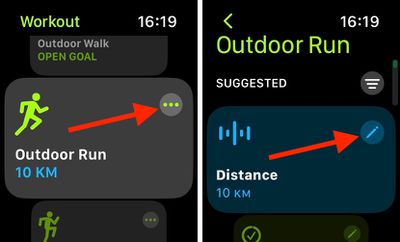
    workout

To view the new metrics while you're out running, simply turn the Digital Crown on your Apple Watch to switch to the second Workout View that you added to your custom run.


Related Forum: Apple Watch

Popular Stories

Aston Martin CarPlay Ultra Screen

Apple's CarPlay Ultra to Expand to These Vehicle Brands Later This Year

Sunday February 1, 2026 10:08 am PST by
Last year, Apple launched CarPlay Ultra, the long-awaited next-generation version of its CarPlay software system for vehicles. Nearly nine months later, CarPlay Ultra is still limited to Aston Martin's latest luxury vehicles, but that should change fairly soon. In May 2025, Apple said many other vehicle brands planned to offer CarPlay Ultra, including Hyundai, Kia, and Genesis. In his Powe...
Apple Logo Black

Apple Just Made Its Second-Biggest Acquisition Ever After Beats

Thursday January 29, 2026 10:07 am PST by
Apple today confirmed to Reuters that it has acquired Q.ai, an Israeli startup that is working on artificial intelligence technology for audio. Apple paid close to $2 billion for Q.ai, according to sources cited by the Financial Times. That would make this Apple's second-biggest acquisition ever, after it paid $3 billion for the popular headphone and audio brand Beats in 2014. Q.ai has...
Apple Logo Black

Apple's Next Launch is 'Imminent'

Sunday February 1, 2026 12:31 pm PST by
The calendar has turned to February, and a new report indicates that Apple's next product launch is "imminent," in the form of new MacBook Pro models. "All signs point to an imminent launch of next-generation MacBook Pros that retain the current form factor but deliver faster chips," Bloomberg's Mark Gurman said on Sunday. "I'm told the new models — code-named J714 and J716 — are slated...
14 inch MacBook Pro Keyboard

Apple Changes How You Order a Mac

Saturday January 31, 2026 10:51 am PST by
Apple recently updated its online store with a new ordering process for Macs, including the MacBook Air, MacBook Pro, iMac, Mac mini, Mac Studio, and Mac Pro. There used to be a handful of standard configurations available for each Mac, but now you must configure a Mac entirely from scratch on a feature-by-feature basis. In other words, ordering a new Mac now works much like ordering an...
Apple MacBook Pro M4 hero

New MacBook Pros Reportedly Launching Alongside macOS 26.3

Sunday February 1, 2026 5:42 am PST by
Apple is planning to launch new MacBook Pro models with M5 Pro and M5 Max chips alongside macOS 26.3, according to Bloomberg's Mark Gurman. "Apple's faster MacBook Pros are planned for the macOS 26.3 release cycle," wrote Gurman, in his Power On newsletter today. "I'm told the new models — code-named J714 and J716 — are slated for the macOS 26.3 software cycle, which runs from...