How to Access Controls for USB Restricted Mode in iOS 12 - MacRumorsOpen MenuShow RoundupsShow Forums menuVisit ForumsOpen Sidebar
Skip to Content

How to Access Controls for USB Restricted Mode in iOS 12

by

iOS 12 includes a new feature called USB Restricted Mode, which is designed to make your iPhone and iPad immune to certain hacking techniques used by law enforcement and other potentially malicious entities to gain access to an iOS device.

There are some iPhone access methods that use a USB connection, downloading data from your iPhone (or iPad) through the Lightning connector to crack the passcode.
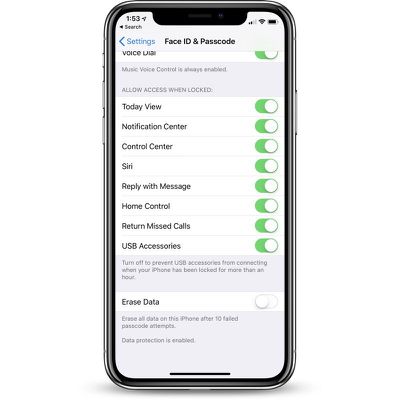
usbrestrictedmodedefault
iOS 12 prevents this by disabling data access to the Lightning port if it's been more than an hour since your iOS device was last unlocked.

This feature is enabled by default, but there are some situations where you might want to turn it off, such as when using CarPlay to drive long distances when you might not be able to unlock your iPhone for a few hours. Here's how to access the setting:

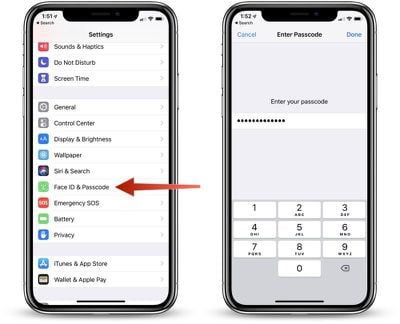
  1. Open the Settings app.
  2. Choose Touch ID & Passcode or Face ID & Passcode, depending on the device.
  3. Enter your passcode to access the settings. usbrestrictedmodepasscode
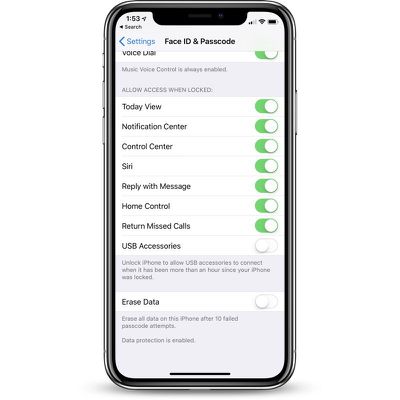
  4. Scroll down to the bottom of the app where it says "USB Accessories."
  5. Leave it toggled off to disable access to your iOS device if you want it to refuse USB connections if it's been more than an hour since the iPhone or iPad was unlocked.
  6. Toggle it on if you want USB accessories to be able to connect even if it's been more than an hour since the iPhone or iPad was unlocked. usbrestrictedmodedeactivated
Most people are going to want to leave this toggle in its default off position for extra protection.

In normal usage, most of us unlock our iPhones every hour or two, and if you do need to plug your iPhone or iPad into a computer to access it, you can just enter your passcode to allow data access if it's been over an hour since the iPhone was last unlocked.

Right now, in the iOS 12 beta, these USB restrictions do appear to shut down access to a wired CarPlay interface after an hour, so that's one exception where people might want to turn this setting on to disable the restrictions on the USB port. From the iOS 12 beta notes:

"If you use iPod Accessory Protocol (iAP) USB accessories over the Lightning connector (such as CarPlay, assistive devices, charging accessories, or storage carts) or you connect to a Mac or PC you might need to unlock your device to recognize the accessory."

Note: Even if data access to USB port has been disabled because it's been over an hour since an iPhone was last unlocked, it continues to be able to charge through a standard Lightning cable because the power connection is not disabled.


Related Forum: iOS 12

Top Rated Comments

Porco Avatar
109 months ago
This is good, but why an hour? Why not a user-definable time period, or at least a few options? Hopefully Apple will offer more options in a future update.
Score: 9 Votes (Like | Disagree)
109 months ago
This is great, but I would love an option to have USB Restricted mode enabled all the time, even when the device is unlocked.

When travelling I see people charging their phones off random USB ports all the time - in stores, shopping centre charging stations, hostels, buses, trains etc. Providing a USB port or even a lighting connector is becoming more and more common (as opposed to a power outlet). And I know of at least one person who has had malware installed on their device in SE Asia from connecting their device to an untrustworthy USB port.

I guess this is a pretty niche issue, but still, would be nice to prevent anything from establishing a connection to my phone even when it's unlocked. Or perhaps something like what happens when you plug your phone into a new computer and it asks you if you want to trust it, but in this case, it would ask the same question for any new accessory if it attempts to do anything other than provide power.


For now I'll continue to charge via a power outlet for peace of mind.
Score: 7 Votes (Like | Disagree)
109 months ago
It’s a shame that there can’t be trusted devices that can get around the lock, like our own computers or cars.
Score: 5 Votes (Like | Disagree)
B4U Avatar
109 months ago
Please kindly re-post these tips again when iOS 12 is actually released.
Score: 4 Votes (Like | Disagree)
CarlJ Avatar
109 months ago
I guess this is a pretty niche issue, but still, would be nice to prevent anything from establishing a connection to my phone even when it's unlocked. Or perhaps something like what happens when you plug your phone into a new computer and it asks you if you want to trust it, but in this case, it would ask the same question for any new accessory if it attempts to do anything other than provide power.

For now I'll continue to charge via a power outlet for peace of mind.
Agreed that it would be nice to disallow any data interaction with any device not previously used, unless/until the user has confirmed via password. A settable time limit for locking down the port would also be useful. In the meantime, if you need to charge from random USB sources, something like this could help ('http://syncstop.com').
Score: 3 Votes (Like | Disagree)
109 months ago
“law enforcement and other potentially malicious entities”


I see what you did there. And I LOLed.
Score: 2 Votes (Like | Disagree)

Popular Stories

iPhone Duo Display Cracking

Apple Alerts Stores to iPhone Duo's Display Cracking Issue

Friday October 30, 2026 3:20 pm PDT by
In a memo shared with Apple Stores and Apple Authorized Service Providers this week, and later obtained by MacRumors, Apple provided technicians with guidance on how to diagnose and address the iPhone Duo's inner display cracking issue. If a customer reports the issue, Apple advised technicians to inspect the iPhone Duo and repair or replace it in accordance with their standard procedures....
iPad mini OLED feature 1

Apple Executive Comments on New iPad Mini Lacking 120Hz Display

Thursday October 29, 2026 1:47 pm PDT by
While the new iPad mini has an OLED display, the device does not support ProMotion, meaning the display's refresh rate is limited to 60Hz instead of 120Hz. ProMotion support would have allowed for the iPad mini's refresh rate to automatically adjust from 10Hz to 120Hz depending on the content being displayed, but evidently Apple has kept the feature exclusive to the iPad Pro among iPad...
Pinched iPad Mini

Apple Avoids Showing Pinched Fingers on iPad Mini Page in South Korea

Thursday October 29, 2026 11:52 am PDT by
In the U.S. and most other countries, Apple's website shows the new iPad mini being held by pinched fingers, but this is not the case in South Korea. The new iPad mini shown with pinched fingers on Apple's website in the U.S. On its South Korean website, Apple simply shows an image of the iPad mini on its own. The new iPad mini shown without pinched fingers on Apple's website in South Korea ...
Latest Stories
Apple Watch Ultra 4 Hits All-Time Low Price With Amazon's $99 Discount
14 hours ago
Reminder: Apple's Big Discount on Beats 360 Ear Cushions Ends Today
14 hours ago
Here's a New Tour of Apple's HomeView Software
14 hours ago
Apple Reveals New iPad Mini's Battery Capacity
16 hours ago
Top Stories: Apple's Big MacBook Pro, iPad mini and iMac Updates
17 hours ago
'Pluribus' Season 2 Reportedly Starts Production Today
1 day ago
iPhone 18 Pro Sales Surge in China, Offsetting Decline in U.S. and Japan
1 day ago
HomeView Software 27.2: Wallpapers, Control Center, and More
1 day ago
Apple Alerts Stores to iPhone Duo's Display Cracking Issue
1 day ago
iOS 27.3 Will Enable These Apple Intelligence Features in China
1 day ago
Apple Says iOS 27.3 Beta Coming Next Week
1 day ago
Apple's Flash Storage Suppliers Are Finally 'Getting Their Revenge'
1 day ago
14 New Things Your iPhone Can Do in iOS 27.2
1 day ago
iPhone Duo Review: One Week Later
2 days ago
Samsung Mocks iPhone Duo Display Cracks in New Ad Campaign
2 days ago
The MacRumors Show: OLED MacBook Pro, iPad Mini 8, and More
2 days ago
MacBook Pro With Touch Display: 15 More Details Revealed
2 days ago
Russia Places Apple on State Surveillance Registry
2 days ago
Halloween Weekend Brings Discounts on Apple Accessories and Pre-Orders
2 days ago
Apple Has Released More Than 25 New Products in the Past Two Months
2 days ago
Local Code Launches as Free, Private AI Assistant Tool for Mac
2 days ago
Apple Acquires Ascend.io
2 days ago
HomePod Mini 2 Launches Today: All the New Features
2 days ago
AirTag 2 4-Pack Drops to New Low Price of $69.99
2 days ago
Rian Johnson's iPhone Camera App Goes Viral
2 days ago
Where Did All the iPhone Duos Go? Mostly to Apple's Stores
2 days ago
Apple's Touchscreen MacBook Pro Could Ship 1.5M Units in 2027
2 days ago
New Apple TV 4K and iPad Mini: RAM Amounts Revealed
2 days ago
Apple Executive Comments on New iPad Mini Lacking 120Hz Display
2 days ago
Here's a Hands-On Look at HomePod Mini 2's New Two-Tone Colors
2 days ago

🔗 Related Apple News & Rumors

Stay updated with the latest Apple ecosystem news and verified rumors