What You Need to Know About Traveling With Apple Vision Pro

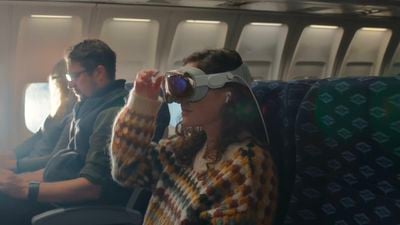
Traveling is perhaps one of the best uses of the Apple Vision Pro headset, as it can be used on airplanes and has a specific Travel Mode. Apple today published several support documents that provide some important details on traveling with the Vision Pro, activating the built-in Travel Mode, and storing it when it's not in use.
Apple Vision Pro Travel Mode

How to Travel With Vision Pro

The cover that comes with the Vision Pro should be placed on it to protect the glass before it is packed up, but Apple says users should also make sure there are no loose objects like keys or coins nearby that could scratch the internal displays.

Apple recommends the ‌Apple Vision Pro‌ Travel Case, which is $200, a soft padded bag, or a "similar protective solution" to protect the Vision Pro from impacts and "excessive vibration." Apple's Travel Case is rather large, so it might be difficult to bring as a carry-on because of the space that it takes up.

If the Vision Pro won't be used for an extended period, it should be disconnected from the battery, and Apple says that the ZEISS Optical Inserts should be packed separately so they don't accidentally detach.

How to Use Vision Pro in Travel Mode

Travel Mode is specifically designed for using the Vision Pro while on a flight. It can be activated from the Control Center by following these steps:

  1. Look up and then tap on the arrow near the top of the display to open Control Center.
  2. Tap on the Control Center button to see more options.
  3. Tap on the Travel Mode button.
  4. Tap Turn on Travel Mode to confirm.

Exiting Travel Mode can be done by going back to Control Center and tapping "Turn Off."

Apple says that the Vision Pro cannot be set up on an airplane, and also Personas are not available when Travel Mode is turned on.

Travel Mode Tips

Apple says that users should follow these guidelines when using Travel Mode:

  • Remain seated while Travel Mode is on, and remove the Vision Pro before standing up. Features that help you stay aware of your surroundings are disabled when Travel Mode is activated.
  • Take off the Vision Pro during taxiing, takeoff, and landing. Also remove it if there is turbulence on the flight.
  • Avoid looking out the airplane's windows, because it can impact the Vision Pro's ability to detect your surroundings.
  • If content appears tilted or off-center, long-press on the Digital Crown to re-center the view.

Storing Vision Pro

If the Vision Pro is not going to be in use for a while, Apple recommends taking these steps:

  • Attach the cover to the Vision Pro to prevent dust accumulation or damage, but make sure the cover is clean and free of debris first.
  • Disconnect the battery.
  • Place the Vision Pro on a stable, flat surface with the cover glass facing forward. Do not put the Vision Pro facing downward. Alternatively, place it in the Vision Pro Travel Case.
  • The Vision Pro can withstand temperatures ranging from -4º to 113º F. It should not be stored in areas that exceed this range.
  • Do not leave the Vision Pro in a car because temperatures in parked cars can get too warm.
  • Do not leave the Vision Pro in direct sunlight for any length of time.
  • Make sure the relative humidity of where the Vision Pro is stored is between 0 percent and 95 percent.

In day to day usage, Apple also suggests that users put the cover back on the Vision Pro whenever it's not being worn. Apple also warns against placing the Vision Pro with the glass facing downward, and says to put it on the polishing cloth rather than any rough or abrasive surface.

Picking up the Vision Pro should always be done with two hands, and it should never be picked up by the Light Seal or Audio Straps.


Related Roundup: Apple Vision Pro
Buyer's Guide: Vision Pro (Buy Now)
Related Forum: Apple Vision Pro

Popular Stories

Aston Martin CarPlay Ultra Screen

Apple's CarPlay Ultra to Expand to These Vehicle Brands Later This Year

Sunday February 1, 2026 10:08 am PST by
Last year, Apple launched CarPlay Ultra, the long-awaited next-generation version of its CarPlay software system for vehicles. Nearly nine months later, CarPlay Ultra is still limited to Aston Martin's latest luxury vehicles, but that should change fairly soon. In May 2025, Apple said many other vehicle brands planned to offer CarPlay Ultra, including Hyundai, Kia, and Genesis. In his Powe...
Apple Logo Black

Apple's Next Launch is 'Imminent'

Sunday February 1, 2026 12:31 pm PST by
The calendar has turned to February, and a new report indicates that Apple's next product launch is "imminent," in the form of new MacBook Pro models. "All signs point to an imminent launch of next-generation MacBook Pros that retain the current form factor but deliver faster chips," Bloomberg's Mark Gurman said on Sunday. "I'm told the new models — code-named J714 and J716 — are slated...
Apple MacBook Pro M4 hero

New MacBook Pros Reportedly Launching Alongside macOS 26.3

Sunday February 1, 2026 5:42 am PST by
Apple is planning to launch new MacBook Pro models with M5 Pro and M5 Max chips alongside macOS 26.3, according to Bloomberg's Mark Gurman. "Apple's faster MacBook Pros are planned for the macOS 26.3 release cycle," wrote Gurman, in his Power On newsletter today. "I'm told the new models — code-named J714 and J716 — are slated for the macOS 26.3 software cycle, which runs from...
iOS 26

iOS 26.3 and iOS 26.4 Will Add These New Features to Your iPhone

Tuesday February 3, 2026 7:47 am PST by
We are still waiting for the iOS 26.3 Release Candidate to come out, so the first iOS 26.4 beta is likely still at least a week or two away. Following beta testing, iOS 26.4 will likely be released to the general public in March or April. Below, we have recapped known or rumored iOS 26.3 and iOS 26.4 features so far. iOS 26.3 iPhone to Android Transfer Tool iOS 26.3 makes it easier...
14 inch MacBook Pro Keyboard

Apple Changes How You Order a Mac

Saturday January 31, 2026 10:51 am PST by
Apple recently updated its online store with a new ordering process for Macs, including the MacBook Air, MacBook Pro, iMac, Mac mini, Mac Studio, and Mac Pro. There used to be a handful of standard configurations available for each Mac, but now you must configure a Mac entirely from scratch on a feature-by-feature basis. In other words, ordering a new Mac now works much like ordering an...

Top Rated Comments

timborama Avatar
26 months ago

Or even worse, there is an emergency and you need to get past them ?
Not an issue, you rip it off of their head.
Score: 21 Votes (Like | Disagree)
wikiverse Avatar
26 months ago
It might just be me, but I get the impression that people who would use this on a plane aren't going to do so because it's better/easier/more convenient.

They seem like the kind of people who just want to be seen owning and using an AVP.
Score: 16 Votes (Like | Disagree)
Steve Jobs Turtleneck Avatar
26 months ago
it gave me a loose stool after using it, would not recommend walking with this
Score: 15 Votes (Like | Disagree)
dannyyankou Avatar
26 months ago

Many reports online of people getting sick from using this
Not surprised. It seems very disorienting and lonely. I imagine it's a very similar feeling to using your phone for an extended amount of time when riding in a car, those with motion sickness know what I'm talking about.
Score: 15 Votes (Like | Disagree)
Fuzzball84 Avatar
26 months ago
H

It might just be me, but I get the impression that people who would use this on a plane aren't going to do so because it's better/easier/more convenient.

They seem like the kind of people who just want to be seen owning and using an AVP.
my most important concern when traveling is having an awareness of my surroundings.

Therefore I’d never wear any device like this while traveling by train, plane or vehicle.

There’s just too much crazy stuff happening these days to put yourself at risk of intentional or unintentional harm by someone else for the sake of a movie etc

I’ll stick to a good book ?
Score: 13 Votes (Like | Disagree)
timborama Avatar
26 months ago

I wonder if they would use AI to intelligently allow emergency announcements and other unexpected events to override what you’re doing and pass through video and audio of said event or announcement.
You’re overthinking it… it’s no different than anyone wearing a sleep mask and earplugs.
Score: 12 Votes (Like | Disagree)