M4 MacBook Air vs. M5 MacBook Pro Buyer's Guide

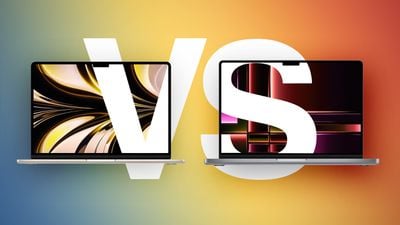
Apple has refreshed both tiers of its MacBook lineup in 2025, first updating the MacBook Air with the M4 chip and now introducing the MacBook Pro with the new M5 chip, so how do the latest models compare?
M2 MBA vs M2 MacBook Pro Buyers Guide Feature
While the 13- and 15-inch ‌MacBook Air‌ continue to start at $999 and $1,199 respectively, moving to the 14-inch ‌MacBook Pro‌ requires spending at least $400 more. For some buyers, the extra cost is unnecessary; for others, the Pro's hardware advantages meaningfully change the experience in ways the Air cannot match even with higher configurations. Our guide helps to answer the question of how to decide which of these two popular laptops is best for you. Beyond their chips, the key differences are as follows:

‌MacBook Air‌ ‌MacBook Pro‌
13.6- or 15.3-inch display 14.2-inch display
Slimmer borders around the display
LCD Liquid Retina display Mini-LED Liquid Retina XDR display
60hz refresh rate ProMotion for refresh rates up to 120Hz
Up to 500 nits brightness Up to 1,000 nits brightness and 1,600 nits peak HDR brightness
Nano-texture display option
Passive cooling Active cooling
Two Thunderbolt 4 (USB-C) ports Three Thunderbolt 4 (USB-C) ports
HDMI 2.1 port with support for multichannel audio output
SDXC card slot
13-Inch: Four-speaker sound system
15-Inch: Six-speaker sound system with force-canceling woofers
High-fidelity six-speaker sound system with force-cancelling woofers
Three-mic array with directional beamforming Studio-quality three-mic array with high signal-to-noise ratio and directional beamforming
256GB, 512GB, 1TB, or 2TB of storage 512GB, 1TB, 2TB, or 4TB storage
13-Inch: 53.8-watt-hour lithium-polymer battery
15-Inch: 66.5-watt-hour lithium-polymer battery
14-Inch: 72.4-watt-hour lithium-polymer battery
18-hour battery life 24-hour battery life
30W, 35W, or 70W USB-C Power Adapter 70W or 96W USB-C Power Adapter
Silver, Sky Blue, Starlight, or Midnight color options Silver or Space Black color options
13-Inch: Starts at $999
15-Inch: Starts at $1,199
Starts at $1,599

Dimensions are also a key area of difference between the ‌MacBook Air‌ and ‌MacBook Pro‌. The ‌MacBook Pro‌ is noticeably thicker and heavier than both ‌MacBook Air‌ models:

‌MacBook Air‌ (13-Inch) ‌MacBook Air‌ (15-Inch) ‌MacBook Pro‌ (14-Inch)
Height 0.44 inches (1.13 cm) 0.45 inch (1.15 cm) 0.61 inches (1.55 cm)
Width 11.97 inches (30.41 cm) 13.40 inches (34.04 cm) 12.31 inches (31.26 cm)
Depth 8.46 inches (21.5 cm) 9.35 inches (23.76 cm) 8.71 inches (22.12 cm)
Weight 2.7 pounds (1.24 kg) 3.3 pounds (1.51 kg) 3.4 pounds (1.55 kg)

With the latest version of the ‌MacBook Pro‌, Apple is touting the power of the M5 chip. Compared to the M4, it says the M5 is:

  • Up to 15% faster multithreaded CPU performance
  • Up to 30% faster overall graphics performance
  • Up to 45% faster ray tracing performance
  • 27.5% higher unified memory bandwidth

In addition to general performance claims, Apple published a set of specific real-world workload results showing measurable gains in AI-driven applications:

  • 4×+ peak GPU compute performance for AI
  • 3.6× faster time to first token (LLM)
  • 1.8× faster Topaz Video Enhance AI processing
  • 1.7× faster Blender ray-traced rendering
  • 2.9× faster AI speech enhancement in Premiere Pro

Other notable changes compared to the M4 chip in the ‌MacBook Air‌ include:

M4 Chip M5 Chip
Made with TSMC's second-generation 3nm process (N3E) Made TSMC's third-generation ‌3nm‌ process (N3P)
Based on A18 Pro chip from iPhone 16 Pro Based on A19 Pro chip from iPhone 17 Pro
No integrated Neural Accelerators Integrated Neural Accelerator in every GPU core
Metal 3 developer APIs Metal 4 developer APIs with Tensor APIs to program GPU Neural Accelerators
Second-generation ray tracing engine Third-generation ray tracing engine
First-generation dynamic caching Second-generation dynamic caching
Shader cores Enhanced shader cores
120 GB/s unified memory bandwidth 153 GB/s unified memory bandwidth

Taken as a whole, the M4 ‌MacBook Air‌ continues to represent the most suitable choice for users whose workloads are light to moderate and who value portability and an affordable price over sustained performance. Its starting price of $999, which is frequently reduced further through Apple education pricing and third-party promotions, places it within reach for the majority of buyers. For daily tasks like email, light productivity, browsing, and media consumption, it delivers performance that is effectively indistinguishable from more expensive models. Its thinner chassis, lower weight, and selection of color options also remain important advantages for many.

By contrast, the M5 ‌MacBook Pro‌ exists for those whose work or expected longevity justifies the premium. The combination of a more advanced chip, mini-LED XDR display with ProMotion, active cooling for sustained performance headroom, a dedicated HDMI port with multichannel audio support, an SDXC card slot, a third Thunderbolt port, higher memory ceilings, larger storage options, improved speakers and microphones, and materially longer battery life produces a machine with materially different capabilities. If you expect to perform extended tasks in video editing, 3D workloads, software development, or AI-driven tasks, the ‌MacBook Pro‌ is designed to avoid the thermal and bandwidth constraints that the Air will encounter.

A notable exception arises at the upper end of the Air's pricing. The 15-inch ‌MacBook Air‌ at $1,299, and especially when configured to 512GB of storage at $1,399, approaches the 14-inch ‌MacBook Pro‌'s $1,599 entry point closely enough that the trade-off changes. For an increment of $200–300, the Pro substitutes a significantly more advanced display, active cooling, six additional hours of battery life, superior speakers and microphones, an additional Thunderbolt port, and integrated HDMI and SDXC. In that specific pricing band, the Pro will likely constitute the stronger long-term purchase for the majority of buyers unless screen size or minimal weight are the overriding priorities.


Related Roundups: MacBook Air, MacBook Pro
Related Forums: MacBook Air, MacBook Pro

Popular Stories

Aston Martin CarPlay Ultra Screen

Apple's CarPlay Ultra to Expand to These Vehicle Brands Later This Year

Sunday February 1, 2026 10:08 am PST by
Last year, Apple launched CarPlay Ultra, the long-awaited next-generation version of its CarPlay software system for vehicles. Nearly nine months later, CarPlay Ultra is still limited to Aston Martin's latest luxury vehicles, but that should change fairly soon. In May 2025, Apple said many other vehicle brands planned to offer CarPlay Ultra, including Hyundai, Kia, and Genesis. In his Powe...
Apple Logo Black

Apple's Next Launch is 'Imminent'

Sunday February 1, 2026 12:31 pm PST by
The calendar has turned to February, and a new report indicates that Apple's next product launch is "imminent," in the form of new MacBook Pro models. "All signs point to an imminent launch of next-generation MacBook Pros that retain the current form factor but deliver faster chips," Bloomberg's Mark Gurman said on Sunday. "I'm told the new models — code-named J714 and J716 — are slated...
iOS 26

iOS 26.3 and iOS 26.4 Will Add These New Features to Your iPhone

Tuesday February 3, 2026 7:47 am PST by
We are still waiting for the iOS 26.3 Release Candidate to come out, so the first iOS 26.4 beta is likely still at least a week or two away. Following beta testing, iOS 26.4 will likely be released to the general public in March or April. Below, we have recapped known or rumored iOS 26.3 and iOS 26.4 features so far. iOS 26.3 iPhone to Android Transfer Tool iOS 26.3 makes it easier...
Apple MacBook Pro M4 hero

New MacBook Pros Reportedly Launching Alongside macOS 26.3

Sunday February 1, 2026 5:42 am PST by
Apple is planning to launch new MacBook Pro models with M5 Pro and M5 Max chips alongside macOS 26.3, according to Bloomberg's Mark Gurman. "Apple's faster MacBook Pros are planned for the macOS 26.3 release cycle," wrote Gurman, in his Power On newsletter today. "I'm told the new models — code-named J714 and J716 — are slated for the macOS 26.3 software cycle, which runs from...
iOS 26 Home Feature

Apple Gives Final Warning to Home App Users

Tuesday February 3, 2026 8:55 am PST by
In 2022, Apple introduced a new Apple Home architecture that is "more reliable and efficient," and the deadline to upgrade and avoid issues is fast approaching. In an email this week, Apple gave customers a final reminder to upgrade their Home app by February 10, 2026. Apple says users who do not upgrade may experience issues with accessories and automations, or lose access to their smart...

Top Rated Comments

Happy_John Avatar
15 weeks ago
Lighter and silent vs better ports, better cooling, better screen and speakers,( but noisier and heavier).

The price difference isn’t significant when both have the same amount of storage.

So Apple is offering a fair enough choice: it comes down to whether you prioritise silence and portability or slightly better sound and vision. ( that said, both are portable, quiet and have great sound and vision, it’s just one is slightly better on one side and the other is better at the other)

I’d go for the air, but I don’t use a laptop as a desktop replacement / the heart of a workstation.

The 13” MBA is, in my opinion, the best laptop on the market in 2025 if you want a laptop to be “just a laptop” - a highly portable but fully capable computer you will carry around but won’t often have external devices physically connected to it.
Score: 8 Votes (Like | Disagree)
Happy_John Avatar
15 weeks ago

I have started using my MBA M3 docked to a larger display 8 hours a day (and as a laptop away from my desk), I’m thinking the Pro with its fan might be better for this in the longterm. But then so would a mini…
Just my experience - I used Mac Book Pros from 2009 onward as both a laptop and a desktop - as a desktop it had multiple monitors, a DAS and other peripherals.

I wouldn’t do that anymore. When my 2017 MBP ( a very temperamental machine) annoyed me one too many times, I switched to a Mac Mini M2 Pro - a much better experience.

If you already have the peripherals, even a base level M4 Mac mini will give you a far better experience than a MBA used as “the heart of a workstation”. The M4 minis are shockingly performant boxes. Given their price, I’d strongly recommend getting the mini as a desktop and keep the Air as a portable machine rather than using a MBP for both. You’ll save money and won’t have to plug and unplug devices all the time.
Score: 7 Votes (Like | Disagree)
d3vilsadvocate Avatar
15 weeks ago
I'm not going to upgrade from my M3 MBA anytime soon. But if I do, I'll consider the pro.

However, fan noise and lack thereof is absolutely crucial. I love the fanlessness of the MBA.

The MBP will have to be silent in 99% of all daily activities for me to even consider it, akin to the Mac mini for example. I can deal with noise when exporting Lightroom images. Otherwise, not so much.
Score: 6 Votes (Like | Disagree)
Happy_John Avatar
15 weeks ago

Now, do M1 Air < M2 Air < M3 Air < M4 Air < M5 Pro. :)

I'm not - really - due for an upgrade, my 2020 M1 Air is still doing everything I need.

Only worry: The camera just stopped working a few weeks ago. Don't know if it's hardware or software failure, but if it's the former it could be the first signs on impending doom... and need for an upgrade... And if so, a "baby" Pro could very well be my preferred option.
Obviously though, choosing between M4 air vs M5 pro is only the main choice until early next year, then it’ll be M5 air vs M5 pro. So, if you can wait, you might as well choose between the same processor in either air or pro cases.
Score: 6 Votes (Like | Disagree)
Mitthrawnuruodo Avatar
15 weeks ago
Now, do M1 Air < M2 Air < M3 Air < M4 Air < M5 Pro. :)

I'm not - really - due for an upgrade, my 2020 M1 Air is still doing everything I need.

Only worry: The camera just stopped working a few weeks ago. Don't know if it's hardware or software failure, but if it's the former it could be the first signs on impending doom... and need for an upgrade... And if so, a "baby" Pro could very well be my preferred option.
Score: 3 Votes (Like | Disagree)
dubhe Avatar
15 weeks ago
I have started using my MBA M3 docked to a larger display 8 hours a day (and as a laptop away from my desk), I’m thinking the Pro with its fan might be better for this in the longterm. But then so would a mini…
Score: 2 Votes (Like | Disagree)