

Get Ready for the New Year With These iPhone Maintenance Tips - MacRumorsOpen MenuShow RoundupsShow Forums menuVisit ForumsOpen Sidebar
Skip to Content

Get Ready for the New Year With These iPhone Maintenance Tips

December is coming to an end and 2023 will be upon us in just a couple of weeks. With holiday breaks and vacations coming up, the end of the month is a great time to sit down and do a little bit of iPhone maintenance to get ready for the new year.

New Years iPhone Maintenance Feature
If you're like many of us here at MacRumors, you have a lot of cruft in the form of photos that need to be cleaned up, old apps to be deleted, contacts to clear out, and more, so we thought we'd round up some useful suggestions on iPhone organization and optimization that can save space and make your device feel less cluttered.

Clear Out Old Photos

I bought a house this year, and I have about a thousand photos of peeling paint on the ceiling, marks on the floor, downed trees, efflorescence in the crawl space, rain gutters overflowing, and dozens of other little home issues that one photographs. If you're in the same situation, now's a good time to organize those images into albums, pull them off of the iPhone into a dedicated album on your Mac or other device, or delete them.
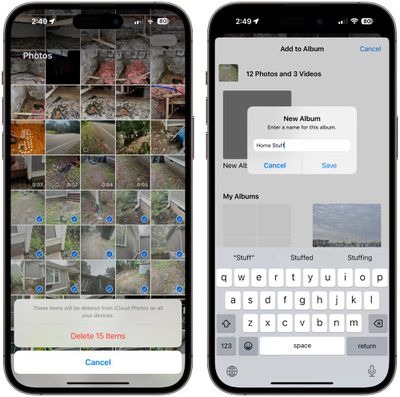
delete organize photos ios
On iPhone, just open up the Photos app, select everything that's unnecessary, and add it to an album with the Share Sheet or delete it. You can also move it over to something like the Files app to keep a copy that doesn't clutter your ‌Photos‌ app, which is what I'm going to do.

Get Rid of Old/Duplicate Contacts

iOS 16 added a handy feature for merging contacts if you have duplicates. Just open up the Contacts app and it will let you know right at the top if there are duplicates, which can be merged with a tap.
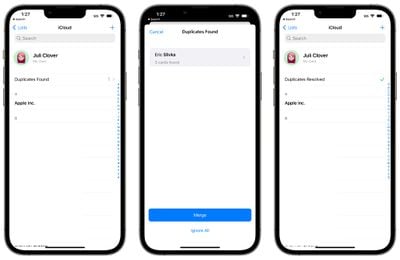
ios 16 merge duplicate contacts
If you have old contacts you no longer talk with, this is also a good time to go through and delete anything that's irrelevant to clean up your Contacts list.

Delete Unused Apps

Apple gives you a bunch of ways to get rid of apps you're no longer using, but perhaps the most efficient way is to simply open up the Settings app, go to General, and choose iPhone Storage. From there, you can see what's taking up a lot of room and you can get rid of what you're no longer using to save both Home Screen space on your iPhone and storage space.
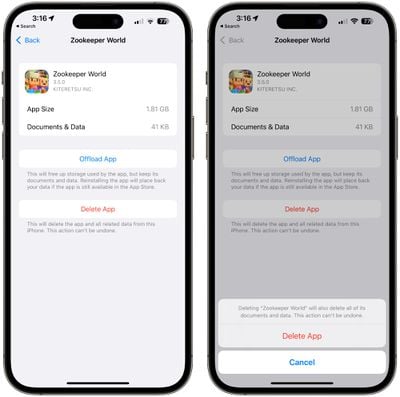
ios delete unused apps

Delete Old Messages

Old iMessages, especially those with a lot of images, can take up a surprising amount of space. While you're deleting apps, check out Settings > General > iPhone Storage > Messages to see what's eating up the most space in the app. From there, tap into a category like photos or videos to delete old content.
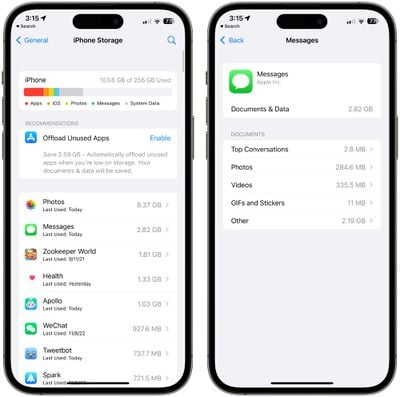
manage app storage messages
Note that it can take some time to load your photos and videos.

Clean Up Old Reminders and Notes

While going through photos, messages, and unused apps, it's probably also a good idea to clear out old Notes and Reminders from those apps, respectively.
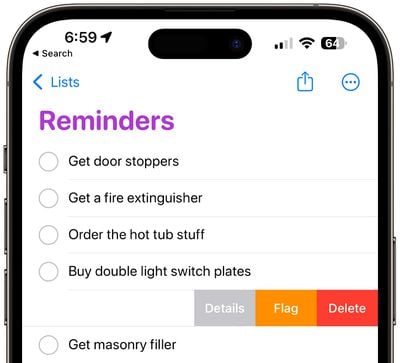
manage reminders ios
I'm not good at keeping on top of Notes in particular, and it can get cluttered with content that I no longer need. It's not a big deal, but it feels refreshing to empty it out every now and then. Deleting notes is as simple as opening up the Notes app and swiping to the left, and the same is true of Reminders.

Review Your Notification Settings

Over the course of the year, it's easy to download apps, forget about them, and brush off the excess notifications you start receiving that you don't really need. Deleting apps solves the problem, but you may have apps you want to keep that you don't need notifications from.
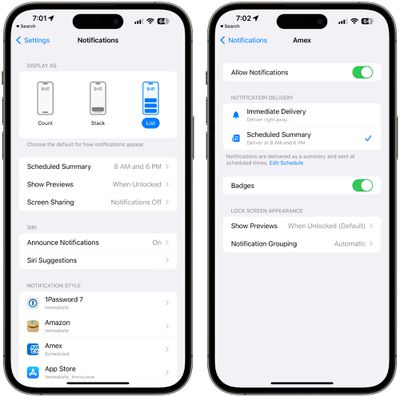
ios manage notifications
In Settings > Notifications, you can manage all of your apps, deciding which can send notifications and which can't. Clearing out notifications can lead to less distraction, and it's also useful to add apps to App Summary so you only hear from them once a day.

Check Up on Battery Usage

It's a good idea to look in on your battery usage every now and then so you can see what apps are eating battery life and where you're spending your time to see if there are areas where changes can be made.
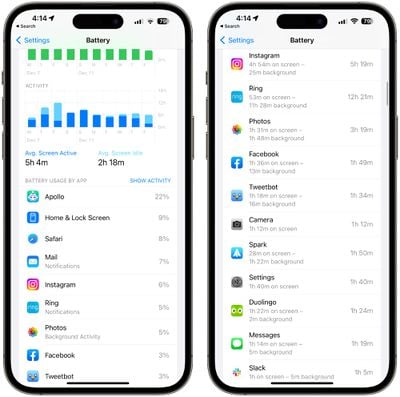
ios battery usage info
Under Settings > Battery you can see the last 24 hours and the last 10 days of app usage, with a breakdown of which apps used the most battery life. It lets you know if battery was drained through active use or background activity, which can be helpful if you're looking to maximize battery.

If you have apps like ‌Photos‌ or Weather that are updating in the background when you don't really need them to, you can turn off background updates. Go to General > Background App Refresh to toggle on background refresh on a per app basis.

More Tips

There are plenty more management categories you can delve into, with some suggestions for organization and updating below.

  • Go through your files in iCloud Drive, Dropbox, Box, or any other cloud service that you use.
  • Clean up your email inbox, deleting old emails to save space and to get to inbox zero.
  • Do a checkup on 1Password or your password management app to update any old passwords, close out old accounts, or get rid of data you no longer need.
  • Rearrange apps into folders for a more organized ‌Home Screen‌.
  • Go through your ‌Home Screen‌ and Lock Screen widgets to make sure everything is still relevant and nothing is there that's not in use.
  • Update locations in the Weather app to clear out old vacation spots or other weather information you don't need.
  • Update your Favorites in Maps.
  • Update your Apple Music playlists.
  • Update all your apps and make sure software updates are installed on all devices.
  • Install HomeKit firmware updates on any devices that need updating.

Have a Suggestion?

What's on your list for year-end iPhone maintenance and updating? Let us know in the comments below.


Popular Stories

Home Hub Command Center with Dome Base Feature

Apple Smart Home Hub to Feature iMac G4-Style Design

Wednesday September 30, 2026 4:36 am PDT by
Apple's long-rumored smart home hub will have an iMac G4-style design and a host of unique features, Bloomberg's Mark Gurman reports. The smart home hub is said to feature a square 6-inch display, with variants that can be placed on a countertop or mounted on a wall. It features a single FaceTime camera on the front, with microphones and speakers in its connected base. Gurman described the...

Apple TV Sans Remote Feature

New Apple TV 4K Leaked

Friday September 25, 2026 8:16 am PDT by
MacRumors contributor Aaron Perris has uncovered an image file from Apple for an unreleased Apple TV 4K, suggesting that a new model will finally be released soon. The image is specifically for an "Apple TV 4K (4th generation)" model. Apple TV 4K (4th generation) image (on a gradient) The image reveals that the Apple TV will have the same external design as the current model, with all of its...
HomePod minis on gradient feature 1 1

Three New Apple Smart Home Products Coming on October 13

Wednesday September 30, 2026 4:04 am PDT by
Apple plans to introduce a series of new smart home products on Tuesday, October 13, according to Bloomberg's Mark Gurman. Apple reportedly plans to debut its long-awaited smart home hub device, a new HomePod mini, and a new Apple TV on the date. The new HomePod mini and Apple TV are set to retain their existing designs, but tout faster chips to support Siri AI. The new HomePod mini will...

Top Rated Comments

50 months ago
Or buy a 512GB iPhone and hoard everything under the sun
Score: 24 Votes (Like | Disagree)
RedTheReader Avatar
50 months ago
I'd personally never delete old messages, but that's just me. Even those old verification texts are on my phone.
Score: 20 Votes (Like | Disagree)
bradbomb Avatar
50 months ago
If someone has either "iCloud Photo Library" or "Messages in the Cloud" on, the tips on photos and messages can do more harm than good as deletions sync to all devices.
Score: 13 Votes (Like | Disagree)
japanime Avatar
50 months ago

If you're like many of us here at MacRumors, you have a lot of cruft in the form of photos that need to be cleaned up, old apps to be deleted, contacts to clear out, and more
None of those things are the definition of "cruft."
Score: 9 Votes (Like | Disagree)
TheYayAreaLiving 🎗️ Avatar
50 months ago
Excellent tips! I will just buy a new iPhone in the Spring of 2023. I'm a hoarder. :rolleyes:
Score: 6 Votes (Like | Disagree)
50 months ago
How about a physical clean up too?

My microphone was barely working for months, until I found that I needed to clean out the microphone (and speaker) grille at the bottom of my iPhone. It was clogged with dirt after 3 years of use.

Also, it’s a great idea to carefully clean out the fluff from the lightning port every now and then. I’ve found that if you regularly plug a physical cable in, it slowly compacts over time fluff that accumulates in the lightening port, especially if you generally keep your phone in your pocket.
Score: 6 Votes (Like | Disagree)
Latest Stories
Apple's Smart Home Hub: Everything We Know So Far
2 hours ago
Apple's Home Hub Borrows From the iPhone Duo's StandBy Mode
3 hours ago
Apple Invites App Updated With Three New Features
7 hours ago
Apple Event on October 13?
9 hours ago
Apple Watch SE 3 vs. Series 12 Buyer's Guide: Which Should You Buy?
10 hours ago
iPad Mini 8 to Offer These 10 New Features
11 hours ago
DoorDash Unveils AI Food Ordering Through Apple's Messages App
12 hours ago
Amazon Takes Up to $150 Off Select M5 MacBook Air Models
12 hours ago
Apple Still Plans to Release a New Full-Sized HomePod
13 hours ago
Apple Working to Expand HomeKit
15 hours ago
Apple Smart Home Hub to Feature iMac G4-Style Design
15 hours ago
Three New Apple Smart Home Products Coming on October 13
15 hours ago
Apple Pay Now Available in India With Axis Bank Cards
1 day ago
OpenAI Launches Always-On 'Dots' Agents to Rival Meta's Muse
1 day ago
AirPods 5 Teardown: Batteries Removable, Case Still Tough
1 day ago
iPhone 18 Pro Owners Complain of Speaker Crackling or Popping
1 day ago
You Can 'Get Ready' for iPhone Duo Pre-Orders on October 12
1 day ago
Apple Pay Reportedly Launching in India Today
1 day ago
Apple Releases New AirPods Beta Firmware
1 day ago
Apple Shares New Guide for Using iOS 27 Parental Controls
1 day ago
Apple Creator Studio and Final Cut Camera Get New Features
1 day ago
Apple Explains Why It Removed ICE Tracking Apps Last Year
1 day ago
Amazon Expands $779.99 Apple Watch Ultra 4 Deal to More Models
1 day ago
Switch Siri AI for ChatGPT on Your Mac
1 day ago
Apple Says Emergency SOS via Satellite Now Available in Norway
1 day ago
AppleCare Guide: Is it Worth Paying For?
1 day ago
Apple Reportedly Planned to Replace 5,000 Support Employees With AI
1 day ago
Apple Planning to Launch Products Faster and More Often
1 day ago
Amazon Discounting New Mac Mini and Mac Studio Alongside Early Prime Day Deals on Monitors
2 days ago
New Apple TV 4K Hinted at in Support Document
2 days ago

🔗 Related Apple News & Rumors

Stay updated with the latest Apple ecosystem news and verified rumors










































