iOS 27 Weather App: All the New Features - MacRumorsOpen MenuShow RoundupsShow Forums menuVisit ForumsOpen Sidebar
Skip to Content

iOS 27 Weather App: All the New Features

There are no new AI features in the iOS 27 Weather app, but Apple did make improvements to the layout. It's now easier to see at-a-glance information for weather conditions.
apple weather app icon

Highlights

The top of the Weather app now has a Highlights section that shows you need-to-know weather information for the day.
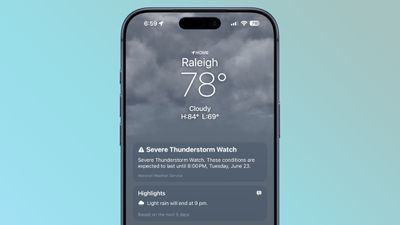
ios 27 weather highlights

Conditions

There are new views for the Conditions section of the main Weather app interface. In addition to viewing temperature and current condition on an hourly basis, you can toggle over to a precipitation or wind view.
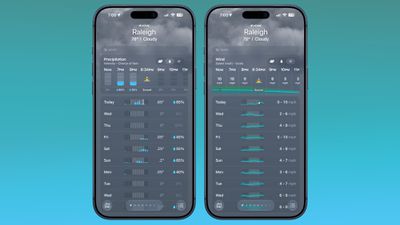
ios 27 weather app conditions
Precipitation shows you an hour-by-hour chance of rain forecast, while wind displays a breakdown of wind speed.

10-Day View

The 10-day view also changes when you swap between the different condition options so you can see precipitation and wind overviews for the next 10 days without having to tap into a more detailed view.

Widgets

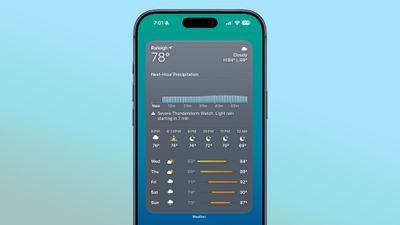
There's a new extra large size available for Home Screen widgets, which is applicable to the Weather app. You can set the Weather app to take up an entire app page.
ios 27 weather app widget

More iOS 27 Features

There are a long list of new features in ‌iOS 27‌, with details available in our iOS 27 roundup.

Related Roundups: iOS 27, iPadOS 27

Popular Stories

Mostly Screen iPhone Purple Feature 2027

Why iOS 28 Is Already Overshadowing iOS 27

Monday June 1, 2026 9:59 am PDT by
We're only a week away from Apple unveiling its first preview of iOS 27, and yet the rumor cycle is already talking up next year's iOS 28. Writing in his latest Power On newsletter over the weekend, Bloomberg's Mark Gurman said that iOS 28 is shaping up to be "far more significant" than the upcoming iOS 27 release, which is expected to roll out this coming September. Apple has reportedly...
Apple Cash banner

Apple Cash in iOS 27 Will Help You Split Bills With Just a Photo

Monday June 1, 2026 11:15 am PDT by
iOS 27 will include a nice quality-of-life improvement for those who frequently split bills with friends and family, allowing them to easily take a photo of a receipt and generate payment requests for different people, according to Bloomberg's Mark Gurman. The feature will be tied to the peer-to-peer Apple Cash feature in the Wallet app, which lets users easily send money to other people and ...
Apple Wallet

iOS 27 Will Add Two New Apple Wallet Features to Your iPhone

Monday June 1, 2026 12:15 pm PDT by
Apple is set to unveil iOS 27 during its WWDC 2026 keynote on Monday, June 8, and the update will reportedly include two new Apple Wallet features. First, iOS 27 will reportedly let users create their own digital passes by scanning items like movie tickets, concert passes, and gym membership cards. Many apps already offer Apple Wallet passes, but now users will be able to create a custom...

Top Rated Comments

1 week ago

I wish the sun inside the app icon turned into the moon in dark mode.
That makes no sense.
Score: 16 Votes (Like | Disagree)
jz0309 Avatar
1 week ago
What about better accuracy?
Score: 15 Votes (Like | Disagree)
1 week ago
The radar still sucks.
Score: 13 Votes (Like | Disagree)
1 week ago
Apple weather app is still consistently the worst weather app around! Nothing new to see here.
Score: 11 Votes (Like | Disagree)
DocMultimedia Avatar
1 week ago
Alas, many still miss Dark Sky due to the lack of contrast/clarity in the Apple version. I use Carrot and Acme as my primary weather apps.
Score: 10 Votes (Like | Disagree)
Reason077 Avatar
1 week ago
I’m frustrated by the direction of the weather app in recent years. Yes, they’ve added a lot more features and data, but it’s just not as good as it used to be as a basic weather app. Everything tiny sized, grey-on-grey design lacking contrast and making everything hard to read (see screenshot above).

On WatchOS it’s even worse. I really wish we could go back to the Weather app from WatchOS 9 or so when you could see conditions throughout the day (not just the current temperature) at a glance. Now you have to scroll through pages and pages of similar-looking data which is all quite difficult and slow to interpret. Sometimes it’s hard to even figure out what screen you’re looking at. Is this wind, humidity, UV??! By adding more data and features, they made the basic functionality worse!
Score: 10 Votes (Like | Disagree)

🔗 Related Apple News & Rumors

Stay updated with the latest Apple ecosystem news and verified rumors