iOS 27: All the New Safari Features - MacRumorsOpen MenuShow RoundupsShow Forums menuVisit ForumsOpen Sidebar
Skip to Content

iOS 27: All the New Safari Features

Safari is one of the apps that Apple focused on in iOS 27, and it includes multiple new Apple Intelligence features. From automatically organizing tab groups to custom extensions, Safari is getting useful new capabilities.
Whats New in Safari on iOS 27 Feature

Automatic Tab Organization

Safari uses ‌Apple Intelligence‌ to organize your open tabs into relevant topics, grouping like concepts together to make it easier to browse your open tabs.
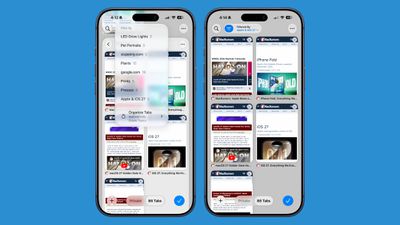
ios 27 safari tab grouping
If you're searching for a new couch while also planning a weekend trip, websites that you open for each topic are grouped together. Automatic sorting can be enabled by tapping on the icon with three lines in the upper right of the display while in tab view and turning on the Automatically Create Topics setting.

This same Safari menu also lets you see all of the groups and filter by topic so you can open just the tabs related to a specific topic while avoiding the other tabs.

There is a new "Resume Browsing" section of the Start Page that lets you continue browsing topics you recently closed or topics you have open on other devices.

You can also group pages you've saved to Bookmarks and Reading List by topic.

Custom Extensions

You can use AI to create Safari Extensions in ‌iOS 27‌ with Apple's new Create an Extension option.
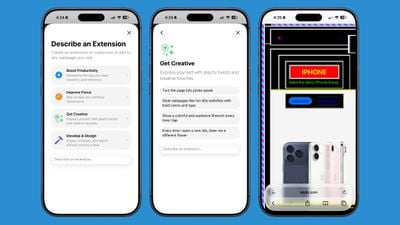
ios 27 safari describe extension
In the Safari settings accessible from the left of the URL bar, tapping into Create an Extension brings you to an interface where you can type in whatever you want an extension to do. Apple also includes suggestions in categories that include Boost Productivity, Improve Focus, Get Creative, and Develop and Design. Some of Apple's extension suggestions:

  • Create a citation for the current webpage and copy it to my clipboard
  • Create a 3-minute focus timer for the page
  • Set the minimum font size to 14pt
  • Turn the page into pirate speak
  • Style websites like 90s websites with bold colors and type
  • Every time I open a new tab, draw me a different flower
  • Highlight and show the dimensions of webpage elements when I tap on them
  • Enter the design mode for a website so that I can edit the contents

Notify Me

Safari can monitor a website for changes and alert you when new information is detected. Apple says it's useful for monitoring when concert tickets go on sale or watching for a product to be restocked.
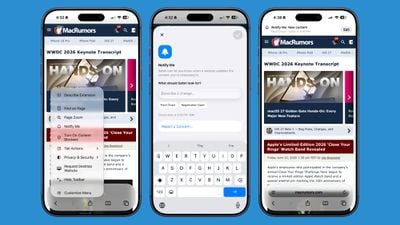
ios 27 safari notify me
To use it, navigate to a website, then tap on the settings icon to the left of the URL bar, and choose the Notify Me option. You can type in what you want Safari to watch for and set a frequency and a time.

At most, Safari will check websites once per day at a set time, with weekly and monthly checks also available.

Passwords

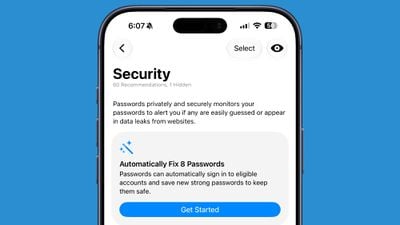
The Passwords app can use Safari to automatically change flagged weak and compromised passwords, turning them into strong passwords.
ios 27 passwords auto fix
The feature uses ‌Apple Intelligence‌ to automatically navigate to eligible websites, sign in, and update your password with a tap.

Ask to Browse

Apple added new parental controls in iOS 27, including an "Ask to Browse" feature that requires children to get parental approval before visiting a new website.

Performance Improvements

Apple says Safari's power efficiency has improved, so it will drain less battery. Web apps and start page content load faster, JavaScript handling is faster, and animations and graphics are smoother.

Compatibility

Safari features like automatic tab grouping, custom extensions, and custom notifications require ‌Apple Intelligence‌. ‌Apple Intelligence‌ is available on the iPhone 15 Pro and later.

Availability

‌iOS 27‌ is in beta, and it is set to launch in fall 2026 alongside new iPhone models.

Related Roundups: iOS 27, iPadOS 27

Popular Stories

Mostly Screen iPhone Purple Feature 2027

Why iOS 28 Is Already Overshadowing iOS 27

Monday June 1, 2026 9:59 am PDT by
We're only a week away from Apple unveiling its first preview of iOS 27, and yet the rumor cycle is already talking up next year's iOS 28. Writing in his latest Power On newsletter over the weekend, Bloomberg's Mark Gurman said that iOS 28 is shaping up to be "far more significant" than the upcoming iOS 27 release, which is expected to roll out this coming September. Apple has reportedly...
Apple Cash banner

Apple Cash in iOS 27 Will Help You Split Bills With Just a Photo

Monday June 1, 2026 11:15 am PDT by
iOS 27 will include a nice quality-of-life improvement for those who frequently split bills with friends and family, allowing them to easily take a photo of a receipt and generate payment requests for different people, according to Bloomberg's Mark Gurman. The feature will be tied to the peer-to-peer Apple Cash feature in the Wallet app, which lets users easily send money to other people and ...
Apple Wallet

iOS 27 Will Add Two New Apple Wallet Features to Your iPhone

Monday June 1, 2026 12:15 pm PDT by
Apple is set to unveil iOS 27 during its WWDC 2026 keynote on Monday, June 8, and the update will reportedly include two new Apple Wallet features. First, iOS 27 will reportedly let users create their own digital passes by scanning items like movie tickets, concert passes, and gym membership cards. Many apps already offer Apple Wallet passes, but now users will be able to create a custom...

Top Rated Comments

goobot Avatar
3 weeks ago
What’s the point to notify me if it only updates once a day max. Oh thanks for letting me know that restock happened 12 hours ago and is out again
Score: 9 Votes (Like | Disagree)
3 weeks ago

MacRumours’ Safari icon looks better than the one we’ve been stuck with since iOS 7. Too bad it’s not one of the what’s new features.
Hard disagree. I don’t understand why macrumors makes these wack-ass graphics. Why not just use the real app icon? The drop shadow makes no sense, needle cut out of the compass, and the glass is bringing the blurred bg into focus, which is the opposite of what the glass effect does in the OSes. I don’t get what macrumors is trying to accomplish with these designs. Working hard to make it look worse
Score: 8 Votes (Like | Disagree)
3 weeks ago
I am very doubtful on whether I would want AI or anyone moving around my tabs, but when—I guess—there is not any more real innovation to announce..

I guess this is what we get 🤷‍♂️
Score: 8 Votes (Like | Disagree)
tyr2 Avatar
3 weeks ago
Fortunately the Safari team put a huge focus on the core of the browser this time around. Fixing defects and improving compatibility where Safari was starting to significantly lag behind and becoming a pain to develop for.

A interesting talk at WWDC with the details.
Score: 7 Votes (Like | Disagree)
3 weeks ago
I just want an option to remove my history without deleting my cookies. I don't need to see dozens of history or search queries when I'm trying to look for something
Score: 6 Votes (Like | Disagree)
macfacts Avatar
2 weeks ago
Can't innovate, my ass: "Turn the page into pirate speak".
Score: 4 Votes (Like | Disagree)

🔗 Related Apple News & Rumors

Stay updated with the latest Apple ecosystem news and verified rumors