

Here's What's New With Visual Intelligence in iOS 26 - MacRumorsOpen MenuShow RoundupsShow Forums menuVisit ForumsOpen Sidebar
Skip to Content

Here's What's New With Visual Intelligence in iOS 26

Visual Intelligence, an Apple Intelligence feature that Apple introduced last year, has some new capabilities in iOS 26 that make it more useful and better able to compete with the functionality available through some Android smartphones.
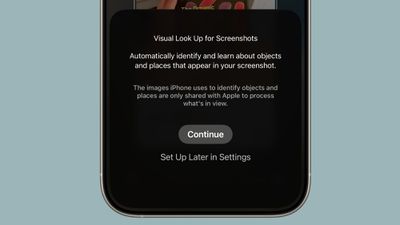
visual lookup ios 26

Onscreen Awareness

In iOS 18, ‌Visual Intelligence‌ only works with the camera, but in ‌iOS 26‌, it also works with what's on your device. You can capture a screenshot of what's on your screen and then use ‌Visual Intelligence‌ on it to identify what you're looking at, find images, and get more information through ChatGPT.

How to Get Use Onscreen Awareness for Visual Intelligence

‌Visual Intelligence‌ for screenshots works about the same as ‌Visual Intelligence‌ with the camera app, but it's located in the screenshot interface. Take a screenshot (hold down the volume up button and the side button), and then tap out of the Markup interface if it's showing.

To get out of Markup (which is the default view), tap on the little pen icon at the top of the display. From there, you should see the ‌Visual Intelligence‌ options.

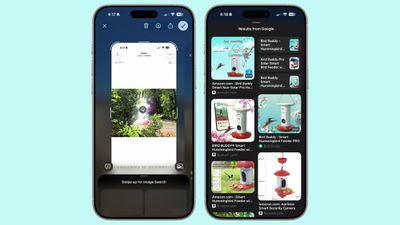
With Highlight to Search for ‌Visual Intelligence‌ onscreen content awareness, you can use a finger to draw over the object in the screenshot that you want to look up. It's similar to Android's Circle to Search feature.
visual intelligence screenshot ios 26
Highlight to Search lets you conduct an image search for a specific object in a screenshot, even if there are multiple things in the picture. It uses Google Image search by default, but Apple showed off the feature working with other apps like Etsy during its keynote event. Apps will likely need to add support for the feature.

In some cases, ‌Visual Intelligence‌ will identify individual objects in an image on its own, and you can tap without needing to use Highlight to Search. This is similar to the object identification feature in the Photos app, but it still leads to an image search.

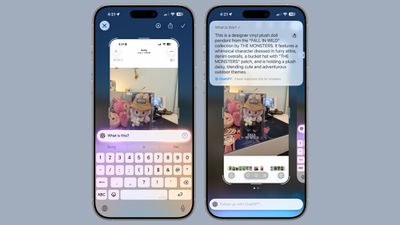
If you don't need to isolate one object in your screenshot, you can simply tap on the Ask button to ask questions about what you're seeing. Questions will be relayed to ChatGPT, and ChatGPT will provide the information. The Search button queries Google Search for more information.
visual intelligence ios 26 screenshots
As with the standard Visual Search, if your screenshot includes dates, times, and related information for an event, it can be added directly to your calendar.

New Object Identification

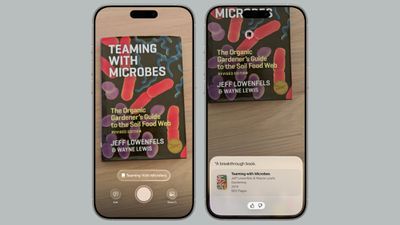
Apple didn't mention it, but ‌Visual Intelligence‌ adds support for quick identification of new types of objects. It can now identify art, books, landmarks, natural landmarks, and sculptures, in addition to the animals and plants it was able to provide information on before.
visual lookup books ios 26
If you use ‌Visual Intelligence‌ on an object that it is able to recognize, you'll see a small glowing icon pop up. Tapping on it reveals information about what's in view. What's neat about this aspect of ‌Visual Intelligence‌ is that it works with the live camera view or with a snapped photo.

For standard Ask and Search requests using ‌Visual Intelligence‌, you have to take a photo so that it can be relayed to sources like ChatGPT or Google Image Search. Art, books, landmarks, natural landmarks, sculptures, plants, and animals can be identified on-device without contacting another service.

Compatibility

‌Visual Intelligence‌ is limited to devices that support ‌Apple Intelligence‌, which includes the iPhone 15 Pro models and the iPhone 16 models. It is activated by a long press on the Camera Control button on devices that have Camera Control, or using the Action Button or a Control Center toggle.

Launch Date

‌iOS 26‌ is in beta testing right now, but it will launch to the public in September.

Related Roundups: iOS 26, iPadOS 26
Related Forum: iOS 26

Popular Stories

iOS 26 6 2

Apple Releases iOS 26.6.2

Tuesday September 8, 2026 10:47 am PDT by
Apple today released iOS 26.6.2 with a fix for "an issue that prevents downloading a software update over a cellular connection." The minor software update is rolling out now for the iPhone 11 series and newer. To update your iPhone, open the Settings app and tap on General → Software Update. It might take a few minutes for the update to be visible to everyone. iOS 26.6.2 arrives...


ios 26 7

Apple Releases iOS 26.7 With Security Fixes

Monday September 14, 2026 10:32 am PDT by
Alongside iOS 27, Apple today released iOS 26.7, an update to the existing iOS 26 software. Users who check for new software will see iOS 26.7 as the default update, with iOS 27 listed as an option at the bottom of the Software Update interface. According to Apple's release notes, iOS 26.7 includes security fixes, but it does not have any other features. Apple will eventually show iOS 27 ...
apple lock security bug vulnerability fix privacy

iOS 27 and iOS 26.7 Fix More Than 100 Security Bugs

Monday September 14, 2026 11:36 am PDT by
Today's iOS 27 update addresses over 100 security vulnerabilities, which is a good reason to install the new software. If you don't want to update to iOS 27 yet, Apple also released iOS 26.7 with over 80 security fixes. 75 of the fixes are shared across both updates, so iOS 26.7 addresses many of the same issues. There are multiple kernel fixes, including one that could allow a malicious...

Top Rated Comments

16 months ago

More like Onscreenshot Awareness.
Yeah, really bad that you have to litter your device with screenshots when you should be able to hold down on a picture or circle something like the photos clean up tool. When they demoed it at wwdc, I knew they missed the mark…too many extra steps.
Score: 9 Votes (Like | Disagree)
16 months ago
the fact that you have to screenshot (with the screenshot sound and everything) is the dumbest design i never thought I'd see
Score: 8 Votes (Like | Disagree)
klasma Avatar
16 months ago

Onscreen Awareness
More like Onscreenshot Awareness.
Score: 8 Votes (Like | Disagree)
klasma Avatar
16 months ago

I don’t mean to sound ungrateful after all the stuff that’s already coming to my iPad this fall but it sure would be nice if this wasn’t fenced off by product differentiation.
In particular since Apple Intelligence is a mix of on-device and online functions, it would really make sense to offer a cloud fallback for devices that lack the resources to do it on-device. They can still upsell to newer hardware for on-device privacy, offline capability and lower latency.
Score: 7 Votes (Like | Disagree)
It’s always something Avatar
16 months ago

My 16 pro max can’t run last years AI features without constantly crashing safari due to memory issues. So there’s no way older phones have a chance
The fine article says that the new Visual Intelligence features in iOS 26 offload at least some of the work to ChatGPT. There’s no reason they couldn’t offload *all* the work. I can use Google’s Gemini for the same stuff today on my iPad, so there’s no reason Apple can’t do it too.
Score: 5 Votes (Like | Disagree)
ipedro Avatar
16 months ago
Discoverability: 0.00pts

Hopefully this also works if you ask Siri about what's on your screen. "Hey Siri, tell me about this bird feeder". Siri assumes it's about something you're looking at on screen (and if not, it asks you to point your camera at it) and runs through the actions outlined above: screenshot, circling, Ask button.
Score: 4 Votes (Like | Disagree)

🔗 Related Apple News & Rumors

Stay updated with the latest Apple ecosystem news and verified rumors











































