iOS 26 Photos App: Everything That's Changed - MacRumorsOpen MenuShow RoundupsShow Forums menuVisit ForumsOpen Sidebar
Skip to Content

iOS 26 Photos App: Everything That's Changed

The Photos app was redesigned in iOS 18, and in iOS 26, Apple has adjusted some of those original design changes and update the navigation. ‌iOS 26‌ also includes new 3D image features and a few other useful updates.
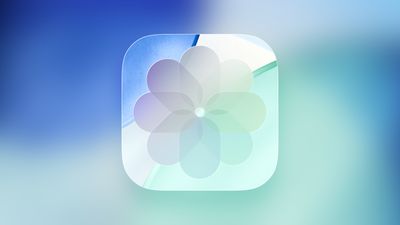
iOS 26 Glass Photos Feature

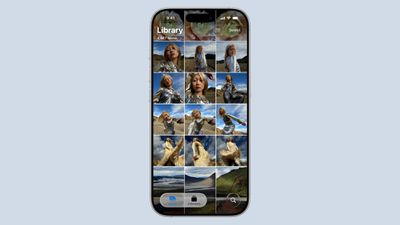
In iOS 18, Apple introduced a unified ‌Photos‌ app view that did away with tabs. The Tab bar is back in ‌iOS 26‌, with buttons to swap between the newly separated Library and Collections sections in the ‌Photos‌ app.

ios 26 photos app
Apple also added a separate Search button that's at the bottom of the ‌Photos‌ app, relocating it from the top.

The Library view offers an overview of all the images and screenshots that you've taken, much like the iOS 17 ‌Photos‌ app. There is a larger Select button at the top of the ‌Photos‌ interface, along with a clearly visible button for accessing filters and view options for zooming in, zooming out, and excluding things like screenshots and Shared With You images.

Filters were available in iOS 18, but the button was hidden unless you started scrolling through the ‌Photos‌ Library, which could be confusing. The new layout makes it easier to find all of the different options in the ‌Photos‌ app.

ios 26 collections photos
Scrolling in the Library View continues to bring up the options to swap to Years and Months, with buttons for returning to the tab bar or launching a search.

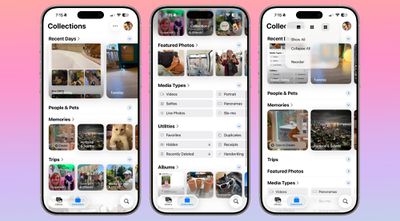
In the Collections tab, you'll see all of the different viewing options that used to be included in the unified view. Recent Days is at the top of the app, along with dedicated views like People and Pets, Pinned, Memories, Trips, Albums, and Featured ‌Photos‌.

The dedicated view means you can see more of your Collections on one screen. The Media Types and Utilities sections under Collections have larger, more distinct buttons that make it clearer you can swipe or tap to get to more options.

Liquid Glass Design

As with all ‌iOS 26‌ apps, ‌Photos‌ has a Liquid Glass redesign. It's one of the apps where the Liquid Glass look is the most noticeable.
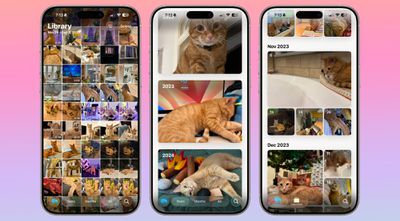
ios 26 photos app interface
The two-button tab bar uses translucency to show the photos that are behind it, and when it expands into the larger navigation bar that has options for months and years, it remains clear. With the more transparent look, focus is on the photos while buttons fade into the background.

The tab bar, the search button, the select button, and other buttons in the ‌Photos‌ app have the same translucency, and use the more rounded look that Apple adopted this year.

Spatial Scenes

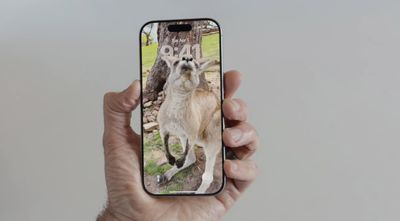
‌iOS 26‌ includes a Spatial Scenes feature that adds extra depth and realism to any image. It separates the subject from the background, introducing slight motion when you move your phone back and forth.
spatial scenes 1
Spatial Scenes works with all photos, even those that have been in your Photo Library for years.

To use Spatial Scenes in the ‌Photos‌ app, tap into an image and tap on the small hexagon icon on the upper right side of the display. Once enabled, if you move your phone, you will see the depth effect.

Spatial Scenes uses generative AI to add depth to flat images, but it does not require Apple Intelligence. The feature is available on the iPhone 12 and newer.

Collections Customization

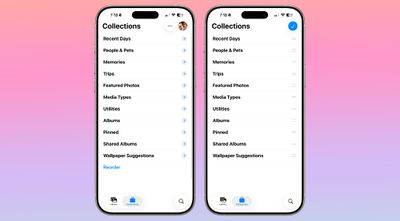
There's a more noticeable Reorder button in the Collections section, making easier to see that you can rearrange what you see. You can still grab and drag to reorder, but there is no longer an option to exclude certain types of collections.
ios 26 collections rearrange
Collections can be collapsed down until you tap into them, which is a new interface option. When collapsed, you'll only see the name of the collection rather than a thumbnail preview of what it includes.

There's a quick access interface option at the top where you can collapse all collections, show all collections, reorder, or choose a different view.

You can see collections in a view that makes the top collection thumbnails larger than the others, a view with all larger thumbnails, or a view with all smaller thumbnails.

Read More

We have a dedicated iOS 26 roundup that goes into detail on all of the new features that are available in the update.


Related Roundups: iOS 26, iPadOS 26
Related Forum: iOS 26

Popular Stories

iOS 27 Feature Dark

Apple Now Pushing iPhone Users Still on iOS 26 to Install iOS 27

Thursday October 8, 2026 1:17 pm PDT by
Starting today, iPhone users still running iOS 26 will see iOS 27.0.1 as the prominent software update in the Settings app under General → Software Update, with iOS 26.7.1 now relegated to a smaller "Also Available" section at the bottom. iOS 27 was released on September 14, but until now that update and later iOS 27.0.1 were shown under the "Also Available" section, with iOS 26.7 and...
bug security vulnerability issue fix larry

Apple Fixes Possibly Exploited CoreGraphics Flaw on Older iPhones

Tuesday October 27, 2026 5:16 am PDT by
Among the flurry of iOS 27.2 releases on Monday, Apple also pushed a wave of software updates for its older operating systems, including a fix for a CoreGraphics vulnerability that Apple says may have been exploited in targeted attacks. The releases include iOS 26.7.2, iPadOS 26.7.2, iOS 18.7.11, iPadOS 18.7.11, macOS Tahoe 26.7.2, macOS Sequoia 15.8.2, and tvOS 26.6.1. iOS 18.7.11 and...
Apple MacBook Pro with PROLED XDR Display family lineup feature

Apple Announces OLED MacBook Pro With Touch Display

Wednesday October 28, 2026 10:11 am PDT by
Apple today announced a new high-end MacBook Pro, which is available in 14-inch and 16-inch sizes. The new device has a PROLED XDR display that supports touch gestures, and a glowing rear Apple logo. Pricing on the MacBook Pro starts at $2,899 for the 14-inch model and $3,399 for the 16-inch model. Apple says the MacBook Pro has the "world's best display in a pro laptop." The PROLED...

Top Rated Comments

SilmarilFinder Avatar
16 months ago
Their motto when they redesigned the Photos app in iOS 18 seemed to be: “If it’s not broken, let’s break it.”

Hopefully this time they have undone some of the damage.

Score: 30 Votes (Like | Disagree)
fatTribble Avatar
16 months ago

You can still grab and drag to reorder, but there is no longer an option to exclude certain types of collections.

Collections can be collapsed down until you tap into them, which is a new interface option.
I’m surprised they eliminated the option to exclude certain types of Collections.
The ability to collapse Collections is nice, but there are some I’d still rather exclude just to reduce clutter.
Score: 13 Votes (Like | Disagree)
TVreporter Avatar
16 months ago
Changes to Photos is why I still haven’t updated to 18… hopefully 26 cleans up the mess.
Score: 12 Votes (Like | Disagree)
midkay Avatar
16 months ago
Spatial Scenes are incredible. Can't wait for everyone to get to try it.
Score: 11 Votes (Like | Disagree)
16 months ago

Their motto when they redesigned the Photos app in iOS 18 seemed to be: “If it’s not broken, let’s break it.”

Hopefully this time they have undone some of the damage.
The iOS 18 redesign was indeed horrible. I truly hate what was once a nice app. What were they thinking killing the bottom tab bar.

They invented that iconic bottom row with 5 functions. There was even a time where you could customize it. Most apps followed this design, with good reason.
Score: 8 Votes (Like | Disagree)
16 months ago
Wtf is that app icon?
Score: 8 Votes (Like | Disagree)
Latest Stories
Apple Watch Ultra 4 Hits All-Time Low Price With Amazon's $99 Discount
6 hours ago
Reminder: Apple's Big Discount on Beats 360 Ear Cushions Ends Today
6 hours ago
Here's a New Tour of Apple's HomeView Software
6 hours ago
Apple Reveals New iPad Mini's Battery Capacity
7 hours ago
Top Stories: Apple's Big MacBook Pro, iPad mini and iMac Updates
9 hours ago
'Pluribus' Season 2 Reportedly Starts Production Today
15 hours ago
iPhone 18 Pro Sales Surge in China, Offsetting Decline in U.S. and Japan
16 hours ago
HomeView Software 27.2: Wallpapers, Control Center, and More
23 hours ago
Apple Alerts Stores to iPhone Duo's Display Cracking Issue
23 hours ago
iOS 27.3 Will Enable These Apple Intelligence Features in China
1 day ago
Apple Says iOS 27.3 Beta Coming Next Week
1 day ago
Apple's Flash Storage Suppliers Are Finally 'Getting Their Revenge'
1 day ago
14 New Things Your iPhone Can Do in iOS 27.2
1 day ago
iPhone Duo Review: One Week Later
1 day ago
Samsung Mocks iPhone Duo Display Cracks in New Ad Campaign
1 day ago
The MacRumors Show: OLED MacBook Pro, iPad Mini 8, and More
1 day ago
MacBook Pro With Touch Display: 15 More Details Revealed
1 day ago
Russia Places Apple on State Surveillance Registry
1 day ago
Halloween Weekend Brings Discounts on Apple Accessories and Pre-Orders
1 day ago
Apple Has Released More Than 25 New Products in the Past Two Months
1 day ago
Local Code Launches as Free, Private AI Assistant Tool for Mac
1 day ago
Apple Acquires Ascend.io
1 day ago
HomePod Mini 2 Launches Today: All the New Features
1 day ago
AirTag 2 4-Pack Drops to New Low Price of $69.99
1 day ago
Rian Johnson's iPhone Camera App Goes Viral
1 day ago
Where Did All the iPhone Duos Go? Mostly to Apple's Stores
2 days ago
Apple's Touchscreen MacBook Pro Could Ship 1.5M Units in 2027
2 days ago
New Apple TV 4K and iPad Mini: RAM Amounts Revealed
2 days ago
Apple Executive Comments on New iPad Mini Lacking 120Hz Display
2 days ago
Here's a Hands-On Look at HomePod Mini 2's New Two-Tone Colors
2 days ago

🔗 Related Apple News & Rumors

Stay updated with the latest Apple ecosystem news and verified rumors