

iOS 26: Every Change to the Messages App - MacRumorsOpen MenuShow RoundupsShow Forums menuVisit ForumsOpen Sidebar
Skip to Content

iOS 26: Every Change to the Messages App

The Messages app has the Liquid Glass redesign that's been introduced throughout iOS 26, but Apple also added several long-desired features that make for a better experience in both one-to-one and group chats, such as custom backgrounds and group typing indicators.

iOS 26 Messages Feature 2 1

Message Backgrounds

In any conversation in the Messages app, you can set a custom background, a feature that's available in many third-party messaging apps.
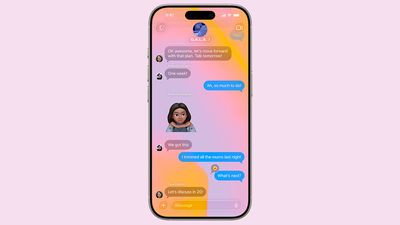
ios 26 messages backgrounds
To set a custom background, tap on the name of the person or group at the top, and choose the "Backgrounds" option. There are pre-set options like sky, water, and aurora, or you can choose a solid color.

You can also opt to select a photo from your Photo Library, or generate an image with Image Playground. Backgrounds are changed for every participant in the conversation, but you need to have ‌iOS 26‌, iPadOS 26, or macOS Tahoe. Custom backgrounds can only be set for iMessage conversations at the current time, and there won't be an option to set a custom background in a chat with someone who has an Android device.

If you don't want to see custom backgrounds that people set, you can turn off the option in the Messages section of the Settings app. Just go to Settings > Apps > Messages and toggle off Conversation Backgrounds.

Regardless of the background that you choose, message bubbles will still be blue, and bubble color can't be changed.

Polls

For conversations where you're asking people to choose one of multiple options, you can now create a poll. If you tap on the "+" button next to the Messages text, there's a poll option.
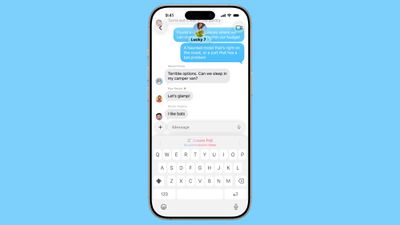
ios 26 messages poll suggestions
You can add up to 12 choices in a poll, and then send it to people in a conversation to vote on. If you send a poll and someone thinks an option is missing, they can edit it and add in another choice.

On devices that support Apple Intelligence, the Messages app will suggest a poll in relevant conversations. If you're asking the group whether to get pizza, burgers, or pasta, for example, you might see a suggestion to create a poll.

Live Translation

‌iOS 26‌ supports a live translate feature in Messages on devices with ‌Apple Intelligence‌. If you're conversing with someone that speaks another language, you can turn on translate. What they type will be translated to your language, and what you type will be translated to their language. Translations are near instantaneous and don't slow down text conversations.
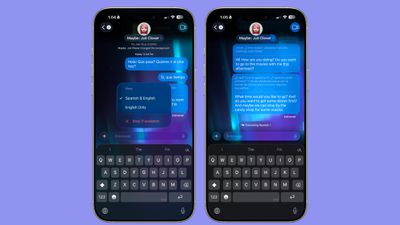
messages live translation
Languages that are supported include Chinese (Mandarin, Simplified), French, German, Italian, English, Japanese, Korean, Portuguese (Brazil), and Spanish (Spain).

To opt in to automatic translate, tap on the person's name, scroll down, and toggle on the Automatically Translate option. You will need to select a language to translate from, and download that language pack if you don't already have it installed (they're around 900MB).
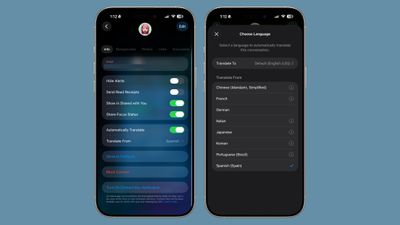
ios 26 select language messages
Messages that you send will show up in both your language and the translated language on your own phone, but the person on the other end will only see the message in their language. Messages they respond with will show their language and the translated language.
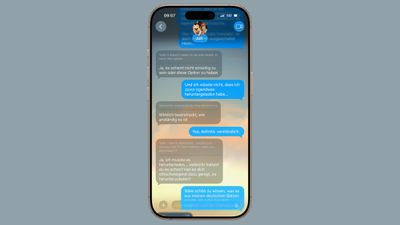
messages ios 26 live translation 2
Live Translation is an ‌Apple Intelligence‌ feature, and it works best when both participants have ‌iOS 26‌, ‌iPadOS 26‌, or ‌macOS Tahoe‌. You can use Live Translation with someone who has an older device or an Android device, and it will translate their text on your end, but your responses are not translated to their language.

Group Chat Improvements

When you're in a group chat, you'll see typing indicators for people who are typing a response.

Apple Cash is also now supported in group chats, so members of the group can send money to one another without having to split out into separate conversations.

If you're in a group chat and there's a person that you don't know, there's now an option to add that person to your Contacts app with a tap.

Copy/Paste

If you want to copy just a part of a message, such as an address or a package tracking number, there's an option in ‌iOS 26‌ to do so. Long press on the message that you want to copy and then tap on the "Select" option.
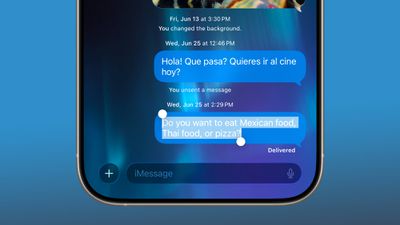
ios 26 messages select copy paste

Message Filtering

Apple separated spam messages and messages from unknown senders into two categories in ‌iOS 26‌, and both can be filtered out if you prefer.
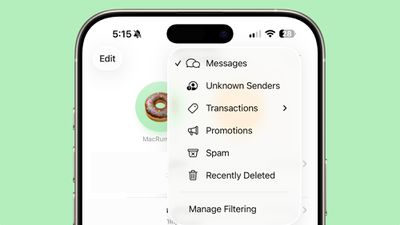
ios 26 messages filtering
There's a Filter section that you can access by tapping the icon at the top right of the Messages app interface that will let you see messages with specific content. Options include Unknown Senders, Transactions, Promotions, Spam, and Recently Deleted.

You can have messages from unknown senders (aka not saved in your Contacts) sent directly to the Unknown Senders list, and you won't get notifications. You'll see a badge in the filter section of the Messages app so you know the message is there, but you won't be bothered by it.

There's an exception you can turn on for Time Sensitive notifications, so you won't miss something like a food delivery person sending you a message. Messages classified as spam will be sent to the spam box, and you won't see a notification or a badge.

You can also turn on filtering notifications for messages that are classified as Personal (not from businesses), Transactions (order receipts and confirmations), and Promotions.

Messages supports natural language search, so you can use conversational words when looking for a text thread or something specific in a conversation.

Low Data Photo Sharing

Apple added a "Send Low Quality Photo Previews" setting that can be enabled in the Messages section of the Settings app. When it's turned on, Messages will send a lower quality preview of an image if your iPhone is in Low Data Mode. The full version of the photo is sent at a later time when you have a Wi-Fi connection.
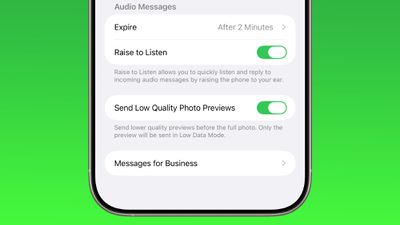
ios 26 messages low quality previews

Genmoji

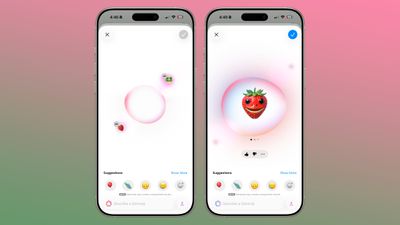
In Messages, the Genmoji feature has been updated to support mixing two or more existing emoji characters together to create a new emoji.
ios 26 genmoji
In a conversation, tap on ‌Genmoji‌ to make a custom emoji character. Once in the ‌Genmoji‌ interface, tap on the smile icon with a "+" next to it, and you can select the emoji characters that you want to add from the emoji menu. You can add two emoji, or even more if you want.

Combined emoji can be further edited with text-based descriptions, and if someone sends you a combo emoji, you can long press on it and choose "New Emoji" to tweak it further.

CarPlay

When you're driving, you can now respond to an incoming message with a quick Tapback response. Plus you can pin conversations to the Messages app in CarPlay so you can access your favorite contacts quickly.

CarPlay Messages Tapbacks

EU Changes

In the European Union, there's a new EU-only API for developers that will allow third-party messages apps to send and receive RCS/MMS/SMS messages by default instead of the built-in Messages app.

End-to-End RCS Encryption

Apple is planning to bring end-to-end encryption to ‌RCS‌ conversations between iPhone and Android users in a future software update, but the functionality is not implemented yet.

Read More

We have a complete iOS 26 roundup that covers all of the new features that are available in the update.


Related Roundups: iOS 26, iPadOS 26
Related Forum: iOS 26

Popular Stories

iOS 27 Feature Dark

Apple Now Pushing iPhone Users Still on iOS 26 to Install iOS 27

Thursday October 8, 2026 1:17 pm PDT by
Starting today, iPhone users still running iOS 26 will see iOS 27.0.1 as the prominent software update in the Settings app under General → Software Update, with iOS 26.7.1 now relegated to a smaller "Also Available" section at the bottom. iOS 27 was released on September 14, but until now that update and later iOS 27.0.1 were shown under the "Also Available" section, with iOS 26.7 and...
bug security vulnerability issue fix larry

Apple Fixes Possibly Exploited CoreGraphics Flaw on Older iPhones

Tuesday October 27, 2026 5:16 am PDT by
Among the flurry of iOS 27.2 releases on Monday, Apple also pushed a wave of software updates for its older operating systems, including a fix for a CoreGraphics vulnerability that Apple says may have been exploited in targeted attacks. The releases include iOS 26.7.2, iPadOS 26.7.2, iOS 18.7.11, iPadOS 18.7.11, macOS Tahoe 26.7.2, macOS Sequoia 15.8.2, and tvOS 26.6.1. iOS 18.7.11 and...
Apple MacBook Pro with PROLED XDR Display family lineup feature

Apple Announces OLED MacBook Pro With Touch Display

Wednesday October 28, 2026 10:11 am PDT by
Apple today announced a new high-end MacBook Pro, which is available in 14-inch and 16-inch sizes. The new device has a PROLED XDR display that supports touch gestures, and a glowing rear Apple logo. Pricing on the MacBook Pro starts at $2,899 for the 14-inch model and $3,399 for the 16-inch model. Apple says the MacBook Pro has the "world's best display in a pro laptop." The PROLED...

Top Rated Comments

17 months ago
I can't believe it took us 18 years to be able to copy part of a text message.
Score: 11 Votes (Like | Disagree)

Flamingdeathbolts Avatar
17 months ago
It drove me insane for years not being able to copy/paste a portion of a text. Glad that is finally doable
Score: 10 Votes (Like | Disagree)
jclo Avatar
17 months ago

On the iOS 26 Beta right now I can only assign backgrounds to iMessage conversations. This article mentions it works with green bubbles. Does anyone know if that is planned or a mistake?
I shouldn't have said green bubbles. I'll update. This only works in iMessage conversations and I can't set a background for an Android convo.


As soon as I saw the feature in the keynote about setting backgrounds I wondered “Who gets to set the background?”

Will there be background battles? Maybe just the person who first started the chat can control this. What if it is an offensive background? Can you block it? Now I get so many junk messages, I wonder if they will start including backgrounds?
You sure can have background battles where you just swap back and forth. I would not be surprised to see spam messages start to include them, and while I haven't tried an NSFW picture, it seems to be possible to just choose whatever you want. Hopefully we get per-conversation options for this setting, because right now it's all or nothing.


Great to see!
Thank You @jclo for providing these summaries for us, it is very helpful for me as I would not install beta SW on my iPhone but like to see the summaries of the changes. Excellent job!
I'm really glad to hear they're helpful! More to come. I'm trying to get through every feature and app before September so there's a nice knowledge base for the people who will be installing it then.


Question: In iOS 26, does anyone know if group chats show when someone has their notifications silenced? As in, does the message “... has notifications silenced...” appear at the bottom of the chat like it does in one-on-one conversations? It’s kind of a bummer that group chats don’t show that right now.
I don't think this shows up.
Score: 5 Votes (Like | Disagree)
ritmomundo Avatar
17 months ago
Cool. It only took like 17 years for Apple to add a proper copy/paste function in Messages.
Score: 3 Votes (Like | Disagree)
ApAx Avatar
17 months ago
I would like to see delivery and read receipts in group messages. Right now, it behaves like an individual message that didn't send so I never know it was seen until the first reply. Maybe just a counter?

"Read by 4 people"
Score: 3 Votes (Like | Disagree)
17 months ago
“Graphic design is my passion”


Attachment Image
Score: 3 Votes (Like | Disagree)
Latest Stories
Apple Watch Ultra 4 Hits All-Time Low Price With Amazon's $99 Discount
1 hour ago
Reminder: Apple's Big Discount on Beats 360 Ear Cushions Ends Today
1 hour ago
Here's a New Tour of Apple's HomeView Software
1 hour ago
Apple Reveals New iPad Mini's Battery Capacity
3 hours ago
Top Stories: Apple's Big MacBook Pro, iPad mini and iMac Updates
4 hours ago
'Pluribus' Season 2 Reportedly Starts Production Today
10 hours ago
iPhone 18 Pro Sales Surge in China, Offsetting Decline in U.S. and Japan
11 hours ago
HomeView Software 27.2: Wallpapers, Control Center, and More
18 hours ago
Apple Alerts Stores to iPhone Duo's Display Cracking Issue
19 hours ago
iOS 27.3 Will Enable These Apple Intelligence Features in China
19 hours ago
Apple Says iOS 27.3 Beta Coming Next Week
19 hours ago
Apple's Flash Storage Suppliers Are Finally 'Getting Their Revenge'
21 hours ago
14 New Things Your iPhone Can Do in iOS 27.2
21 hours ago
iPhone Duo Review: One Week Later
22 hours ago
Samsung Mocks iPhone Duo Display Cracks in New Ad Campaign
1 day ago
The MacRumors Show: OLED MacBook Pro, iPad Mini 8, and More
1 day ago
MacBook Pro With Touch Display: 15 More Details Revealed
1 day ago
Russia Places Apple on State Surveillance Registry
1 day ago
Halloween Weekend Brings Discounts on Apple Accessories and Pre-Orders
1 day ago
Apple Has Released More Than 25 New Products in the Past Two Months
1 day ago
Local Code Launches as Free, Private AI Assistant Tool for Mac
1 day ago
Apple Acquires Ascend.io
1 day ago
HomePod Mini 2 Launches Today: All the New Features
1 day ago
AirTag 2 4-Pack Drops to New Low Price of $69.99
1 day ago
Rian Johnson's iPhone Camera App Goes Viral
1 day ago
Where Did All the iPhone Duos Go? Mostly to Apple's Stores
1 day ago
Apple's Touchscreen MacBook Pro Could Ship 1.5M Units in 2027
1 day ago
New Apple TV 4K and iPad Mini: RAM Amounts Revealed
2 days ago
Apple Executive Comments on New iPad Mini Lacking 120Hz Display
2 days ago
Here's a Hands-On Look at HomePod Mini 2's New Two-Tone Colors
2 days ago

🔗 Related Apple News & Rumors

Stay updated with the latest Apple ecosystem news and verified rumors











































