

iOS 26: What's Changed With the iPhone's Home Screen - MacRumorsOpen MenuShow RoundupsShow Forums menuVisit ForumsOpen Sidebar
Skip to Content

iOS 26: What's Changed With the iPhone's Home Screen

Apple's new Liquid Glass design is noticeable on the Home Screen right when you unlock your iPhone, though the degree of change is customizable. We've rounded up everything that's changed with the iPhone's main interface.
iOS 26 Home Screen Features

Liquid Glass Design

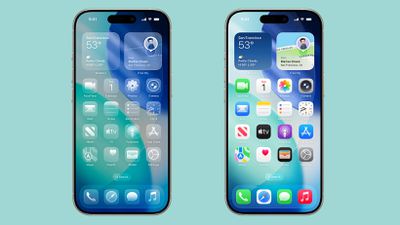
By default, app icons have a layered look with subtle depth, essentially appearing as multiple sheets of glass stacked on one another to create a glass-like translucent look.
ios 26 home screen
Apple created Liquid Glass app icons for apps like Safari, Maps, Photos, the App Store, Mail and more. Third-party app icons are adopting the same aesthetic, and for apps with a simple design on a solid background, no update is needed. Icons like this already have a Liquid Glass look.

The dock is transparent and blends into the background behind it, and the same goes for the search button. App folders have a frosted glass design that also changes tint based on your wallpaper. When you edit your ‌Home Screen‌, the buttons that you interact with are also transparent.

Interface elements like the dock, folders, and the search button have a lighting effect that changes when you move your iPhone, making them look like real glass.

Light, Dark and Tinted Modes

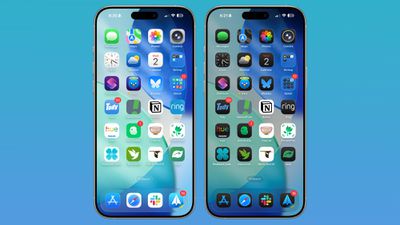
The Liquid Glass effect is apparent in both Light Mode and Dark Mode, with icons continuing to feature the same stacked glass look, just with a lighter or darker background.
ios 26 home screen standard
Apple technically changed Light Mode to "Default Mode" in the customization settings where you can adjust color (long press on the display and tap on customize).

There are new "Always" and "Auto" toggles for enabling permanent Light or Dark styles or adjusting them based on time, and the Small and Large buttons for changing icon size have been relocated to the upper right of the customization interface.

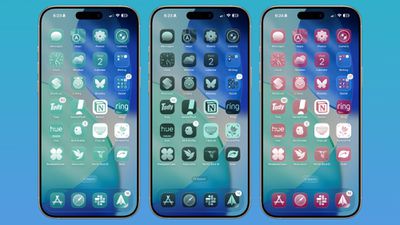
Tinted mode looks different in iOS 26 than it did in iOS 18. Rather than icons featuring a black background with colored graphics, icons adopt the full color that you select with white graphics in Light Mode. In ‌Dark Mode‌, backgrounds are a much darker shade of the color you choose, but aren't entirely black.
ios 26 home screen icon tint
With Tinted icons, the layered glass look isn't as obvious, but it's still present.

Clear Icons

Apple added a "Clear" icon option in ‌iOS 26‌ that's available alongside Default, Dark, and Tinted. As the name suggests, Clear has a dramatic Liquid Glass look with icons that are entirely transparent. The icons adopt the color of your wallpaper, with white text and designs.
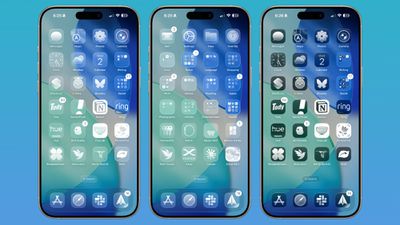
ios 26 home screen clear icons
There are Light and Dark options for the Clear setting. Light looks like frosted glass, while Dark looks like tinted glass. If you want to go all-in on Liquid Glass and have your iPhone look notably different, Clear is the option to choose.

Widgets

Widgets have some of the same aesthetic as icons, but on the whole, they don't look too much different from how they looked in iOS 18 in the Default mode.
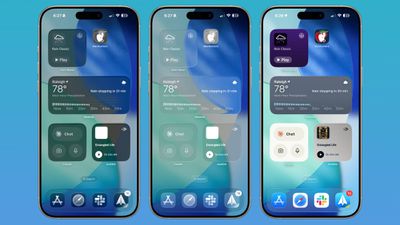
ios 26 widgets
With the Clear option turned on, widgets are transparent and have a more cohesive design that matches with your wallpaper.

Wallpaper

You can edit your wallpaper directly from the ‌Home Screen‌ in ‌iOS 26‌. Long press on the display and then tap on the new "Edit Wallpaper" option.
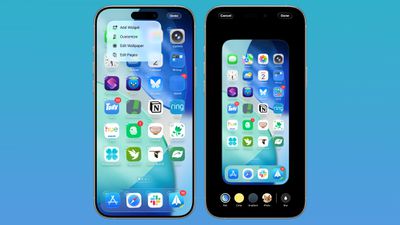
ios 26 wallpaper home screen
The wallpaper interface lets you change the image that you're using on the ‌Home Screen‌, but it doesn't affect the Lock Screen. If you have a photo set as a wallpaper, for example, you can change the color, select a gradient, or choose a photo, plus you can turn blurring for images off or on.

Wallpaper takes a starring role in ‌iOS 26‌ because it affects the color of the dock, folders, and icons, depending on your settings.

Control Center

Control Center adopts Liquid Glass, so while the functionality is the same, the general look is different. Compared to the iOS 18 Control Center, the ‌iOS 26‌ version has depth for the icons with the Liquid Glass shifting light effect.
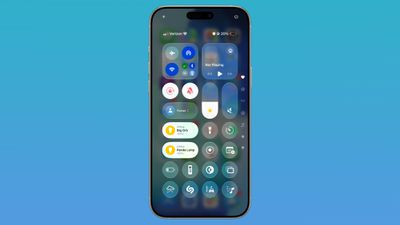
ios 26 control center
The icons are tinted to look like frosted glass, and some of the underlying buttons for adjusting Control Center have been tweaked with the updated look. Icons are a little larger, and some of the bar-shaped icons for volume, brightness, and other settings are rounder.

Other Home Screen Elements

The Dynamic Island, Notification Center, long press gestures, and App Library have not changed beyond aesthetics. App Library folders are translucent and the search bar is rounded, and for widgets, there is a glass look of varying intensity depending on your icon color choice.
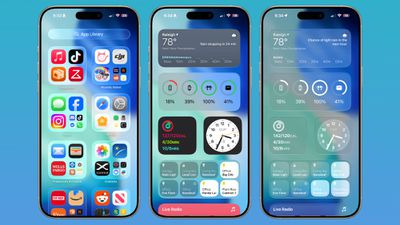
ios 26 home screen features
App Library icons are also slightly larger, with less padding between them.

Web Apps

When you add a website to your ‌Home Screen‌ in ‌iOS 26‌, it always opens as a web app. Web apps were available on the ‌Home Screen‌ in iOS 18, but web developers needed to configure them to operate as web apps.
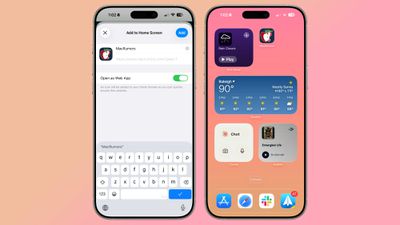
ios 26 web apps
If websites weren't configured properly, they would open in Safari when added to the ‌Home Screen‌. Now a website will open as a dedicated web app, even if it hasn't been explicitly set up to work that way.

There is an Open as Web App option that can be toggled off when adding a website to a ‌Home Screen‌ if you prefer that websites open up in Safari.

Read More

We have a dedicated iOS 26 roundup that goes into detail on all of the new features that are available in the update.


Related Roundups: iOS 26, iPadOS 26
Related Forum: iOS 26

Popular Stories

iOS 27 Feature Dark

Apple Now Pushing iPhone Users Still on iOS 26 to Install iOS 27

Thursday October 8, 2026 1:17 pm PDT by
Starting today, iPhone users still running iOS 26 will see iOS 27.0.1 as the prominent software update in the Settings app under General → Software Update, with iOS 26.7.1 now relegated to a smaller "Also Available" section at the bottom. iOS 27 was released on September 14, but until now that update and later iOS 27.0.1 were shown under the "Also Available" section, with iOS 26.7 and...
bug security vulnerability issue fix larry

Apple Fixes Possibly Exploited CoreGraphics Flaw on Older iPhones

Tuesday October 27, 2026 5:16 am PDT by
Among the flurry of iOS 27.2 releases on Monday, Apple also pushed a wave of software updates for its older operating systems, including a fix for a CoreGraphics vulnerability that Apple says may have been exploited in targeted attacks. The releases include iOS 26.7.2, iPadOS 26.7.2, iOS 18.7.11, iPadOS 18.7.11, macOS Tahoe 26.7.2, macOS Sequoia 15.8.2, and tvOS 26.6.1. iOS 18.7.11 and...
iPhone Duo Display Cracking

Apple Alerts Stores to iPhone Duo's Display Cracking Issue

Friday October 30, 2026 3:20 pm PDT by
In a memo shared with Apple Stores and Apple Authorized Service Providers this week, and later obtained by MacRumors, Apple provided technicians with guidance on how to diagnose and address the iPhone Duo's inner display cracking issue. If a customer reports the issue, Apple advised technicians to inspect the iPhone Duo and repair or replace it in accordance with their standard procedures....


Top Rated Comments

antonrg Avatar
17 months ago
It's absolutely mind-blowing to me that there are people who think that the Clear option is useable. It's an absolute insanity to me. And I don't have any issues with my eyesight, thank God.
Score: 40 Votes (Like | Disagree)
pdaholic Avatar
17 months ago
I used clear icons for a few hours, then questioned why I wanted to make life harder for myself.
Score: 27 Votes (Like | Disagree)
17 months ago
Surely Im not the only one who primarily identifies icons by their colour?
Score: 21 Votes (Like | Disagree)
Sputman99 Avatar
17 months ago
Please have an option to turn off the Windows Aero Liquid Glass please
Score: 21 Votes (Like | Disagree)
17 months ago
Apple is completely lost in the woods - they have basically dumped their hitherto pioneering UI guidelines into the trash. Tim Spindler has to go.
Score: 20 Votes (Like | Disagree)
CharlesShaw Avatar
17 months ago
To me, Liquid Glass does for the Home Screen what LED does for Christmas lights.

To paraphrase what my favorite YT host (TechnologyConnections) said of LED Christmas lights, "this is not what Christmas looks like, it's what a vape shop looks like."
Score: 16 Votes (Like | Disagree)
Latest Stories
Apple Watch Ultra 4 Hits All-Time Low Price With Amazon's $99 Discount
10 hours ago
Reminder: Apple's Big Discount on Beats 360 Ear Cushions Ends Today
10 hours ago
Here's a New Tour of Apple's HomeView Software
11 hours ago
Apple Reveals New iPad Mini's Battery Capacity
12 hours ago
Top Stories: Apple's Big MacBook Pro, iPad mini and iMac Updates
13 hours ago
'Pluribus' Season 2 Reportedly Starts Production Today
20 hours ago
iPhone 18 Pro Sales Surge in China, Offsetting Decline in U.S. and Japan
20 hours ago
HomeView Software 27.2: Wallpapers, Control Center, and More
1 day ago
Apple Alerts Stores to iPhone Duo's Display Cracking Issue
1 day ago
iOS 27.3 Will Enable These Apple Intelligence Features in China
1 day ago
Apple Says iOS 27.3 Beta Coming Next Week
1 day ago
Apple's Flash Storage Suppliers Are Finally 'Getting Their Revenge'
1 day ago
14 New Things Your iPhone Can Do in iOS 27.2
1 day ago
iPhone Duo Review: One Week Later
1 day ago
Samsung Mocks iPhone Duo Display Cracks in New Ad Campaign
1 day ago
The MacRumors Show: OLED MacBook Pro, iPad Mini 8, and More
1 day ago
MacBook Pro With Touch Display: 15 More Details Revealed
1 day ago
Russia Places Apple on State Surveillance Registry
1 day ago
Halloween Weekend Brings Discounts on Apple Accessories and Pre-Orders
2 days ago
Apple Has Released More Than 25 New Products in the Past Two Months
2 days ago
Local Code Launches as Free, Private AI Assistant Tool for Mac
2 days ago
Apple Acquires Ascend.io
2 days ago
HomePod Mini 2 Launches Today: All the New Features
2 days ago
AirTag 2 4-Pack Drops to New Low Price of $69.99
2 days ago
Rian Johnson's iPhone Camera App Goes Viral
2 days ago
Where Did All the iPhone Duos Go? Mostly to Apple's Stores
2 days ago
Apple's Touchscreen MacBook Pro Could Ship 1.5M Units in 2027
2 days ago
New Apple TV 4K and iPad Mini: RAM Amounts Revealed
2 days ago
Apple Executive Comments on New iPad Mini Lacking 120Hz Display
2 days ago
Here's a Hands-On Look at HomePod Mini 2's New Two-Tone Colors
2 days ago

🔗 Related Apple News & Rumors

Stay updated with the latest Apple ecosystem news and verified rumors










































