

iOS 26: Everything New With FaceTime - MacRumorsOpen MenuShow RoundupsShow Forums menuVisit ForumsOpen Sidebar
Skip to Content

iOS 26: Everything New With FaceTime

All of Apple's communication apps received updates with iOS 26, including FaceTime. There's a redesigned interface that puts more emphasis on your contacts, new translation features, and more.

iOS 26 Glass FaceTime Feature

Live Translation

Along with the Phone and Messages apps, ‌FaceTime‌ supports Live Translation as long as you have a phone that works with Apple Intelligence.

ios 26 live translation facetime
With Live Translation, you can video chat with someone who speaks a different language than you do. The ‌FaceTime‌ app displays live captions that are translated into your language as the person speaks. Your response can also be translated back into their language as long as they also have a device that supports ‌Apple Intelligence‌ and runs ‌iOS 26‌, iPadOS 26, or macOS 26.

You'll need to download language packs to use Live Translation, and it works with a limited number of languages. ‌FaceTime‌'s Live Translation feature works with English, French, German, Portuguese (Brazil), and Spanish (Spain).

To use Live Translation on a ‌FaceTime‌ call, initiate the call and then tap on the button with three dots. From there, tap on the Live Translation option and select the to and from languages. Everything spoken will be translated and displayed in the same way Live Captions are displayed. To stop a translation, just tap on the Stop button.

Interface Updates

Apple updated the ‌FaceTime‌ interface in ‌iOS 26‌. Rather than a list of names of recent and suggested contacts, you'll see a card-style view that includes a full image of your contact that they've shared, if one is available. If they've sent you a video message, that will automatically play in the background as you scroll for an animated look. You can tap on one of the cards to place a ‌FaceTime‌ Audio or ‌FaceTime‌ Video call, depending on how you last contacted them.
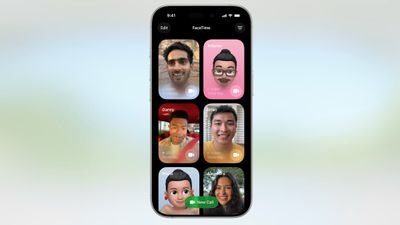
ios 26 facetime interface
Long pressing on a card brings up an option to delete it.

The "New Call" button is at the bottom of the ‌FaceTime‌ app rather than at the top, and filtering options can be accessed by tapping on the menu button at the top right. When you're on a call, the buttons are now at the bottom right of the display.
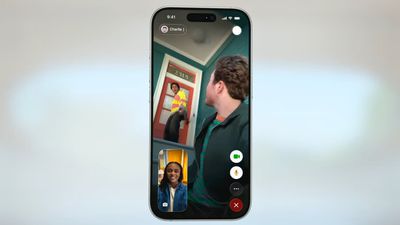
ios 26 facetime on call
Like all of Apple's other apps, ‌FaceTime‌ adopts the Liquid Glass aesthetic. Contact cards feature rounded corners, buttons have a rounded design, and the New Call button and some of the other interface buttons have a glass-like design.

Call Screening

Like the Phone app, ‌FaceTime‌ has new call filtering options. There's still a Silence Unknown Callers toggle, but missed calls and voicemails from unsaved numbers will now be sorted into an Unknown Callers list that's hidden from view unless you select it.
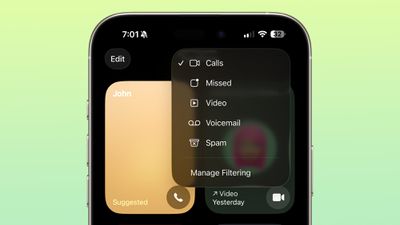
ios 26 facetime call filtering
Calls that are identified as spam will be silenced and automatically added to a new Spam list.

Call filtering is opt-in, so if you often get calls from unknown numbers, you can turn it on. If you don't want to miss any calls, you can leave it off. The toggle for spam and unknown callers can be found in the ‌FaceTime‌ section of the Settings app under Call Filtering.

In the ‌FaceTime‌ app, you can get to the different filtered sections by tapping on the menu button in the upper right of the app. Sections include Calls, Missed, Video, Voicemail, Unknown Callers, and Spam.

Sensitive Content Blocking

In ‌iOS 26‌, the Sensitive Content Warning and Communication Safety features are available for ‌FaceTime‌ video calls. When nudity is detected, the ‌FaceTime‌ video will pause and a warning about nude content will be displayed.
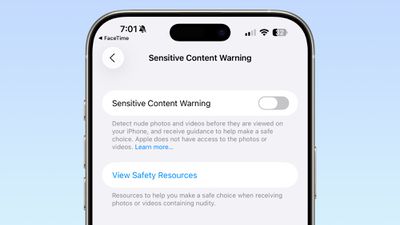
ios 26 facetime sensitive content
Communication Safety is a feature that is designed for the accounts of children and teens, and it provides warnings if images and videos of nudity are detected. Communication Safety is on by default for accounts created for children up to age 17.

Adults can use Communication Safety features too, in the form of Sensitive Content Warnings. Sensitive Content Warnings are an opt-in feature that prevents users of all ages from being subject to unwanted nude photos and videos.

Both options blur nudity in the Messages app and pause video in ‌FaceTime‌. There is no situation where an adult will see their ‌FaceTime‌ calls paused for nudity unless they have turned on the Sensitive Content Warning feature.

Sensitive Content Warnings can be turned on in the Privacy and Security section of the Settings app. Adults can also opt to turn on Communication Safety in the Screen Time section of the Settings app.

Sensitive Content Warnings and Communication Safety use on-device machine learning to analyze photos and videos. Apple does not receive an alert that nudity was detected, and does not have access to any photos or videos.

Read More

We have a dedicated iOS 26 roundup that goes into detail on all of the new features that are available in the update.


Related Roundups: iOS 26, iPadOS 26
Related Forum: iOS 26

Popular Stories

iOS 27 Feature Dark

Apple Now Pushing iPhone Users Still on iOS 26 to Install iOS 27

Thursday October 8, 2026 1:17 pm PDT by
Starting today, iPhone users still running iOS 26 will see iOS 27.0.1 as the prominent software update in the Settings app under General → Software Update, with iOS 26.7.1 now relegated to a smaller "Also Available" section at the bottom. iOS 27 was released on September 14, but until now that update and later iOS 27.0.1 were shown under the "Also Available" section, with iOS 26.7 and...
bug security vulnerability issue fix larry

Apple Fixes Possibly Exploited CoreGraphics Flaw on Older iPhones

Tuesday October 27, 2026 5:16 am PDT by
Among the flurry of iOS 27.2 releases on Monday, Apple also pushed a wave of software updates for its older operating systems, including a fix for a CoreGraphics vulnerability that Apple says may have been exploited in targeted attacks. The releases include iOS 26.7.2, iPadOS 26.7.2, iOS 18.7.11, iPadOS 18.7.11, macOS Tahoe 26.7.2, macOS Sequoia 15.8.2, and tvOS 26.6.1. iOS 18.7.11 and...
Apple MacBook Pro with PROLED XDR Display family lineup feature

Apple Announces OLED MacBook Pro With Touch Display

Wednesday October 28, 2026 10:11 am PDT by
Apple today announced a new high-end MacBook Pro, which is available in 14-inch and 16-inch sizes. The new device has a PROLED XDR display that supports touch gestures, and a glowing rear Apple logo. Pricing on the MacBook Pro starts at $2,899 for the 14-inch model and $3,399 for the 16-inch model. Apple says the MacBook Pro has the "world's best display in a pro laptop." The PROLED...

Top Rated Comments

ipedro Avatar
16 months ago
The only new feature I want in FaceTime is for it to detect that someone is out in public and insist that they turn off their mutha****in speakerphone. 😒

Score: 16 Votes (Like | Disagree)
fizzyfizz Avatar
16 months ago
Wish they'd include an option to swipe away my own face when chatting. I mean, why do I need to see a little video of myself?!

Score: 10 Votes (Like | Disagree)
cybercommand Avatar
16 months ago
Apple needs to hurry up and get their act together when it comes to languages. It’s been years.
Score: 10 Votes (Like | Disagree)
16 months ago

The only new feature I want in FaceTime is for it to detect that someone is out in public and insist that they turn off their mutha****in speakerphone. 😒
Amen bro. the absolute worst of the worst. people have no manners
Score: 8 Votes (Like | Disagree)
16 months ago
Why not Spanish spoken in Mexico
Score: 6 Votes (Like | Disagree)
16 months ago

“‌FaceTime‌ supports Live Translation as long as you have a phone that works with Apple Intelligence ('https://www.macrumors.com/guide/apple-intelligence/').”

Interesting. Yesterday, I was driving to town in a no service area, and asked Siri, “Siri, shuffle playlist 90’s favourites.”

She replied, “To do that you’ll need to be online.”

😟
Other greatest hits from useless Siri:

"To do that, you'll need to unlock your phone"

"Here is what I found on the internet (for whatever you asked)"

Siri is beaten by Google Assistant on a 5-year-old Android 12 $99 Budget phone. it's embarrassing and terrible
Score: 4 Votes (Like | Disagree)
Latest Stories
Apple Watch Ultra 4 Hits All-Time Low Price With Amazon's $99 Discount
5 hours ago
Reminder: Apple's Big Discount on Beats 360 Ear Cushions Ends Today
5 hours ago
Here's a New Tour of Apple's HomeView Software
5 hours ago
Apple Reveals New iPad Mini's Battery Capacity
6 hours ago
Top Stories: Apple's Big MacBook Pro, iPad mini and iMac Updates
8 hours ago
'Pluribus' Season 2 Reportedly Starts Production Today
14 hours ago
iPhone 18 Pro Sales Surge in China, Offsetting Decline in U.S. and Japan
15 hours ago
HomeView Software 27.2: Wallpapers, Control Center, and More
21 hours ago
Apple Alerts Stores to iPhone Duo's Display Cracking Issue
22 hours ago
iOS 27.3 Will Enable These Apple Intelligence Features in China
23 hours ago
Apple Says iOS 27.3 Beta Coming Next Week
23 hours ago
Apple's Flash Storage Suppliers Are Finally 'Getting Their Revenge'
1 day ago
14 New Things Your iPhone Can Do in iOS 27.2
1 day ago
iPhone Duo Review: One Week Later
1 day ago
Samsung Mocks iPhone Duo Display Cracks in New Ad Campaign
1 day ago
The MacRumors Show: OLED MacBook Pro, iPad Mini 8, and More
1 day ago
MacBook Pro With Touch Display: 15 More Details Revealed
1 day ago
Russia Places Apple on State Surveillance Registry
1 day ago
Halloween Weekend Brings Discounts on Apple Accessories and Pre-Orders
1 day ago
Apple Has Released More Than 25 New Products in the Past Two Months
1 day ago
Local Code Launches as Free, Private AI Assistant Tool for Mac
1 day ago
Apple Acquires Ascend.io
1 day ago
HomePod Mini 2 Launches Today: All the New Features
1 day ago
AirTag 2 4-Pack Drops to New Low Price of $69.99
1 day ago
Rian Johnson's iPhone Camera App Goes Viral
1 day ago
Where Did All the iPhone Duos Go? Mostly to Apple's Stores
1 day ago
Apple's Touchscreen MacBook Pro Could Ship 1.5M Units in 2027
1 day ago
New Apple TV 4K and iPad Mini: RAM Amounts Revealed
2 days ago
Apple Executive Comments on New iPad Mini Lacking 120Hz Display
2 days ago
Here's a Hands-On Look at HomePod Mini 2's New Two-Tone Colors
2 days ago

🔗 Related Apple News & Rumors

Stay updated with the latest Apple ecosystem news and verified rumors










































