

iOS 26 Camera App: New Features and Design Changes - MacRumorsOpen MenuShow RoundupsShow Forums menuVisit ForumsOpen Sidebar
Skip to Content

iOS 26 Camera App: New Features and Design Changes

The Camera app received some of the most noticeable design updates in iOS 26, with Apple simplifying the interface to make it easier to get to various controls. Most of what's new focuses on design, but there are a couple other notable changes.
iOS 26 Camera Features

Liquid Glass Design

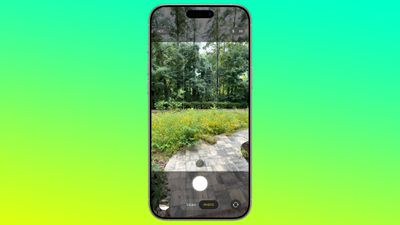
Like all of the ‌iOS 26‌ apps, the Camera app has adopted the Liquid Glass look. Buttons are more rounded and "float" over the background of the app thanks to a new depth effect.
ios 26 camera app
The area behind the camera shutter and control buttons is a touch more see-through than before, so you can see the areas outside of your image more clearly. There's also no bar behind the toggles to change focal length, so the interface looks a bit cleaner.

Two-Tab Layout

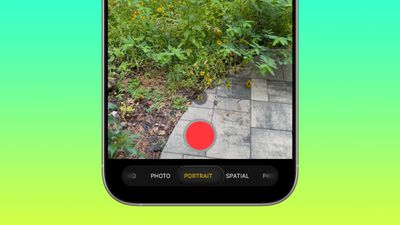
The navigation bar at the bottom of the Camera app has been overhauled in ‌iOS 26‌. Rather than the option to swipe between all of the photo and video modes, there are now just two main options that you see: Photo and Video.
ios 26 camera app nav bar
While it's only the Photo and Video buttons that are visible, you can actually still swipe in the same way to get to the other options like Portrait, Panorama, Slo-Mo, Cinematic, and more.

For multi-lens cameras, the small buttons to change focal length are still in the same position, and the buttons to view the photo you just snapped or change to the front camera haven't changed location. The button to view photos is now round instead of square, in line with the Liquid Glass update, and Apple has shifted the controls down on the display.

The Photo and Video buttons are below the shutter button, when they used to be above. The shutter button itself no longer has a bright white ring around it, with Apple instead opting for a more subtle Liquid Glass ring. Bezel size for the top and bottom bars hasn't changed.

Pop Out Menus

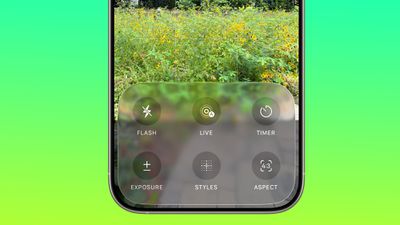
Some of the controls that used to be located at the top of the Camera app are now tucked inside pop out menus. When you select a mode like Photo, you can then tap on the Photo button to get more options.
ios 26 camera app menu
The menu has a Liquid Glass design and it offers large buttons for accessing Flash, Live Photo settings, Timer, Exposure, Styles, Aspect, and Night Mode. Tapping one gives you further options for that setting. So if you tap Exposure, you'll get a slider where you can quickly adjust the exposure setting before you take a photo.

In Video mode, you can tap to access Flash, Exposure, and Action. Most of the other modes also have at least one option that's accessed through this new menu. These menu options are also accessible by tapping on the menu icon at the top right of the display.
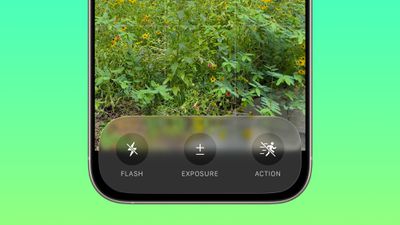
ios 26 camera app video nav bar
There are still some quick access buttons at the top of the Photos app, so you can swap to RAW mode, tap into Styles, or adjust flash and ‌Night Mode‌ settings without having to open the menu. Context-specific settings like the Macro mode toggle also still pop up in the same way as before when applicable.

There are toggles to see the Flash, Live Photo and Action Mode indicators in the Camera section of the Settings app.

Remote AirPods Shutter

The AirPods Pro 2 and AirPods 4 can be used as a camera shutter in ‌iOS 26‌, so you can take a photo by pressing on the stem of the AirPods. To get this to work, connect your AirPods to your iPhone, open the Camera app, and then press and hold on the AirPods stem.

You can take a photo using this method, or continue to hold to start a video. When you're finished recording, press and hold again to stop the video.

Using this feature requires ‌iOS 26‌ and the new AirPods firmware that accompanies ‌iOS 26‌. Using the AirPods as a remote shutter button works with the Camera app and with third-party photo apps.

Cleaning Warning

If your camera lens is dirty, your iPhone can detect that it needs to be cleaned and will send you a notification letting you know you should clean it.
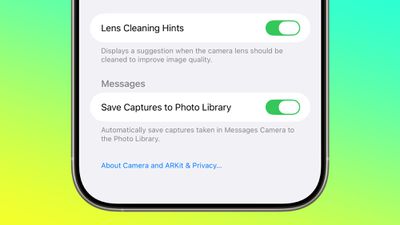
ios 26 camera app lens cleaning

Developer APIs

Developers have access to a new Cinematic mode API in ‌iOS 26‌ that allows third-party apps to capture Cinematic mode video, just like the built-in Camera app.
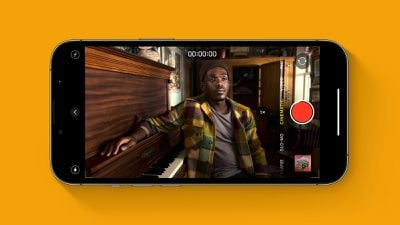
Cinematic Mode iPhone Feature
Cinematic mode supports recording video with a shallow depth of field and automatic focus changes between subjects. Apple uses rack focus to quickly swap the focus from one subject to another, for a movie-like recording experience.

Apple is also providing developers with an Audio Mix API for adjusting sound after a video is captured. Third-party video recording apps can offer the same Audio Mix controls that are available in the Camera app. Options include In-Frame for reducing sounds and voices from sources outside of the frame, Studio for reducing background sounds and reverb, and Cinematic for putting voices into a front-facing track while leaving environmental noises in surround, similar to movie audio.
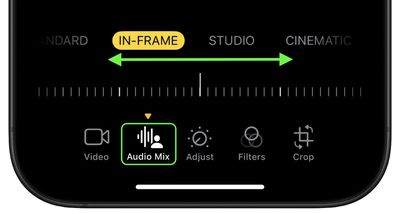
photos

Mac Accessibility

With macOS 26 and ‌iOS 26‌, your Mac can connect to your iPhone to use your iPhone's Camera app as a magnifying glass. A Magnifier on Mac feature uses the iPhone's zoom capabilities, with the iPhone's video feed showing up on a connected Mac through Continuity Camera.

Apple showed a student with vision issues using an iPhone to zoom in on a blackboard in a college class, with the feed coming through to her Mac so she could view what was going on while also taking notes.

Read More

We have a complete iOS 26 roundup that covers all of the new features that are available in the update.


Related Roundups: iOS 26, iPadOS 26
Related Forum: iOS 26

Popular Stories

iOS 27 Feature Dark

Apple Now Pushing iPhone Users Still on iOS 26 to Install iOS 27

Thursday October 8, 2026 1:17 pm PDT by
Starting today, iPhone users still running iOS 26 will see iOS 27.0.1 as the prominent software update in the Settings app under General → Software Update, with iOS 26.7.1 now relegated to a smaller "Also Available" section at the bottom. iOS 27 was released on September 14, but until now that update and later iOS 27.0.1 were shown under the "Also Available" section, with iOS 26.7 and...
bug security vulnerability issue fix larry

Apple Fixes Possibly Exploited CoreGraphics Flaw on Older iPhones

Tuesday October 27, 2026 5:16 am PDT by
Among the flurry of iOS 27.2 releases on Monday, Apple also pushed a wave of software updates for its older operating systems, including a fix for a CoreGraphics vulnerability that Apple says may have been exploited in targeted attacks. The releases include iOS 26.7.2, iPadOS 26.7.2, iOS 18.7.11, iPadOS 18.7.11, macOS Tahoe 26.7.2, macOS Sequoia 15.8.2, and tvOS 26.6.1. iOS 18.7.11 and...
iPhone Duo Display Cracking

Apple Alerts Stores to iPhone Duo's Display Cracking Issue

Friday October 30, 2026 3:20 pm PDT by
In a memo shared with Apple Stores and Apple Authorized Service Providers this week, and later obtained by MacRumors, Apple provided technicians with guidance on how to diagnose and address the iPhone Duo's inner display cracking issue. If a customer reports the issue, Apple advised technicians to inspect the iPhone Duo and repair or replace it in accordance with their standard procedures....

Top Rated Comments

17 months ago
Thanks for the roundup! I hate this redesign.

It hides too many frequently used options. The Photo/Video switching to other options is too finicky and it's easy to pass over what you wanted to select, and finding the pop-out menu is not intuitive whatsoever.

Add to it that overlaying UI on top of content is something I fundamentally disagree with. I do not want my content to be obstructed, it proactively reduces usability.
Score: 13 Votes (Like | Disagree)

klasma Avatar
17 months ago
This is very low contrast. They should at least make the round buttons opaque. But the labels also need more contrast, they are below WCAG AA level in that screenshot.

Attachment Image
Score: 12 Votes (Like | Disagree)
antiprotest Avatar
17 months ago
Apple used to be good at design. It was one of several major reasons why I switched from Android to iPhone 3GS, and then from Windows to Mac soon after. Everything was well thought out and looked good, while products from others felt like they were made by people who never used them.

In recent years, I have been getting this same bad feeling from Apple that made me leave the others. They used to think of details that I never thought of, but that pleasantly surprised me once I found out how useful they were, but these years they have missed even obvious, glaring things, and they create pain points rather than solve or remove them.
Score: 11 Votes (Like | Disagree)
bcortens Avatar
17 months ago
These controls take up so much more space than the current design. Currently I can see my photo framed in the centre of the screen and then at the bottom I can swipe up and adjust exposure, contrast, timer, all without obstructing my viewfinder. Why would anyone be excited about this new design. I mean sure if you just open the camera to look at the controls it might be nicer but it doesn’t look like it makes taking pictures easier. Which I rather thought was the point of a camera…
Score: 9 Votes (Like | Disagree)
ThomasJL Avatar
17 months ago
Apple, please rehire the Steve Jobs-like visionary Scott Forstall so he can completely purge every last bit of user-unfriendly flat design (including flat design variants like neumorphism and glassmorphism) and bring back user-friendly iOS 6-style skeuomorphism.
Score: 7 Votes (Like | Disagree)
17 months ago
Who greenlit this crap? Seriously, this must be the worst design choices ever. Imagine how this will be for those with bad eye sight.
Score: 3 Votes (Like | Disagree)
Latest Stories
Apple Watch Ultra 4 Hits All-Time Low Price With Amazon's $99 Discount
15 hours ago
Reminder: Apple's Big Discount on Beats 360 Ear Cushions Ends Today
15 hours ago
Here's a New Tour of Apple's HomeView Software
15 hours ago
Apple Reveals New iPad Mini's Battery Capacity
17 hours ago
Top Stories: Apple's Big MacBook Pro, iPad mini and iMac Updates
18 hours ago
'Pluribus' Season 2 Reportedly Starts Production Today
1 day ago
iPhone 18 Pro Sales Surge in China, Offsetting Decline in U.S. and Japan
1 day ago
HomeView Software 27.2: Wallpapers, Control Center, and More
1 day ago
Apple Alerts Stores to iPhone Duo's Display Cracking Issue
1 day ago
iOS 27.3 Will Enable These Apple Intelligence Features in China
1 day ago
Apple Says iOS 27.3 Beta Coming Next Week
1 day ago
Apple's Flash Storage Suppliers Are Finally 'Getting Their Revenge'
1 day ago
14 New Things Your iPhone Can Do in iOS 27.2
1 day ago
iPhone Duo Review: One Week Later
2 days ago
Samsung Mocks iPhone Duo Display Cracks in New Ad Campaign
2 days ago
The MacRumors Show: OLED MacBook Pro, iPad Mini 8, and More
2 days ago
MacBook Pro With Touch Display: 15 More Details Revealed
2 days ago
Russia Places Apple on State Surveillance Registry
2 days ago
Halloween Weekend Brings Discounts on Apple Accessories and Pre-Orders
2 days ago
Apple Has Released More Than 25 New Products in the Past Two Months
2 days ago
Local Code Launches as Free, Private AI Assistant Tool for Mac
2 days ago
Apple Acquires Ascend.io
2 days ago
HomePod Mini 2 Launches Today: All the New Features
2 days ago
AirTag 2 4-Pack Drops to New Low Price of $69.99
2 days ago
Rian Johnson's iPhone Camera App Goes Viral
2 days ago
Where Did All the iPhone Duos Go? Mostly to Apple's Stores
2 days ago
Apple's Touchscreen MacBook Pro Could Ship 1.5M Units in 2027
2 days ago
New Apple TV 4K and iPad Mini: RAM Amounts Revealed
2 days ago
Apple Executive Comments on New iPad Mini Lacking 120Hz Display
2 days ago
Here's a Hands-On Look at HomePod Mini 2's New Two-Tone Colors
2 days ago

🔗 Related Apple News & Rumors

Stay updated with the latest Apple ecosystem news and verified rumors











































