iOS 26 Liquid Glass Design Drama: Beta 2 vs. Beta 3 Changes in Every App - MacRumorsOpen MenuShow RoundupsShow Forums menuVisit ForumsOpen Sidebar
Skip to Content

iOS 26 Liquid Glass Design Drama: Beta 2 vs. Beta 3 Changes in Every App

Apple has been refining Liquid Glass during the developer beta testing process, and both beta two and beta three have introduced some major tweaks. There was little outcry over the updates that Apple made in the second beta, but the third beta's design updates have frustrated some users who feel that Apple is removing too much of the Liquid Glass aesthetic.
iOS 26 Beta 2 vs Beta 3 Dawn of Justice
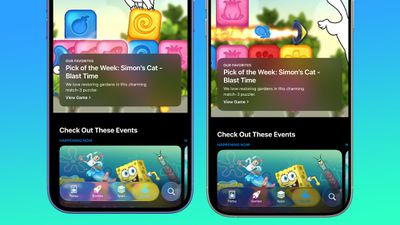
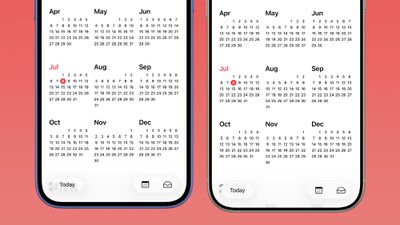
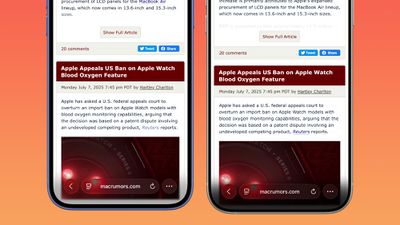
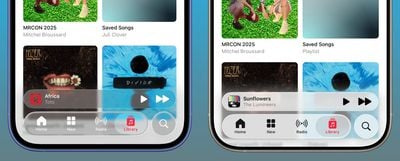
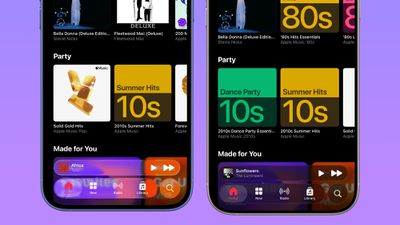
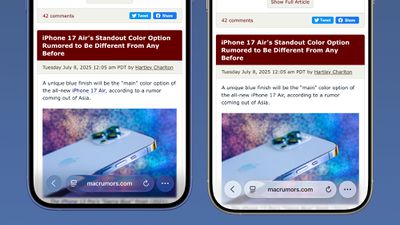
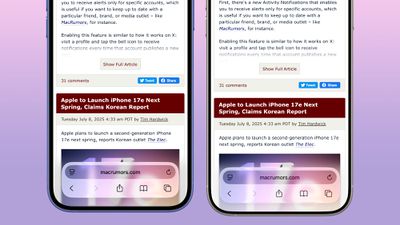
For context, Apple made navigation bars more opaque across many apps in iOS 26 beta 3, and we've got a series of side-by-side comparisons that demonstrate what's different. In all of the comparison images, beta 2 is on the left and beta 3 is on the right.

Apple Music

Apple Music's bottom navigation bar is more opaque, and it has the frosted glass look that Apple is now favoring. The change is most noticeable when scrolling over a background that has color. In beta 2, the navigation bar was almost translucent, allowing much of the background color to shine through. That effect is significantly reduced in beta 3.
ios 26 nav bar transparency beta 3

apple music dark mode ios 26 beta 3

Safari

The changes in Safari vary depending on what you're doing, the background color of the website, and which Tab View design you're using. In general, the URL bar is more opaque and less prone to notable shifts in color. Less of the background comes through.
safari ios 26 beta 3
The URL bar will still change from light to dark if the content you're scrolling over is predominantly dark, but there's a higher threshold for that to kick on.
safari bottom tab ios 26 beta 3
It's easiest to see the difference with the Compact View, because it was the most translucent view to begin with.

App Store

The App Store's navigation bar has one of the most noticeable changes, and it's almost entirely opaque now.
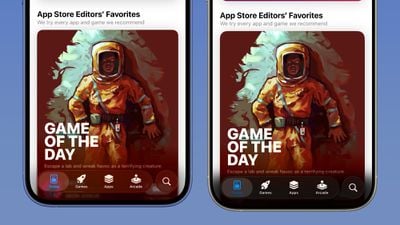
ios 26 beta 3 app storeLight Mode

Podcasts

As with ‌Apple Music‌, translucency has been almost entirely eliminated in the Podcasts navigation bar. The change is easiest to see with backgrounds that have color.
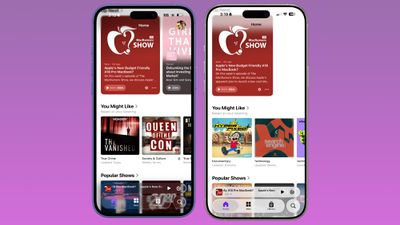
ios 26 beta 3 podcasts

Apple TV

The Apple TV app has a darker background and the change is more subtle. The overlaying navigation bar is a darker glass color, but transparency appears to be similar.
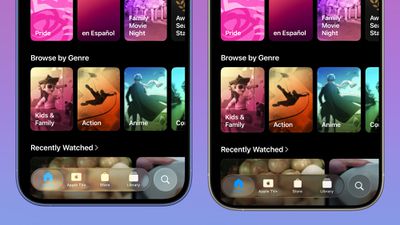
apple tv app ios 26 beta 3

Photos

For the Photos app, Apple tweaked the design in a similar way to the ‌Apple TV‌ app. The navigation bar is darker, but there's been little change to transparency.
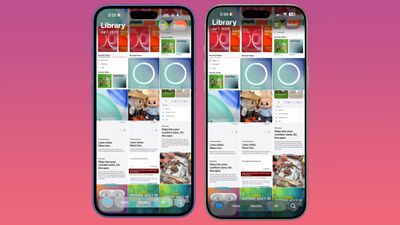
photos appios 26 beta 3

Calendar

Calendar's navigation buttons are more opaque, both in Light Mode and ‌Dark Mode‌.

ios 26 beta 3 calendar

Keyboard

The Spotlight Search keyboard is both more and less translucent. The keyboard itself has slightly more background visible, but the search bar is darker.
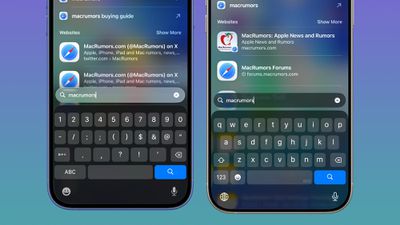
keyboard ios 26 beta 3

Dark Mode

‌Dark Mode‌ has retained more transparency than Light Mode for the most part, so you may see less of a difference if you have ‌Dark Mode‌ enabled permanently. Some menu bar elements are darker than before, but white text on a dark background is more readable so Apple had to increase the opaqueness less.
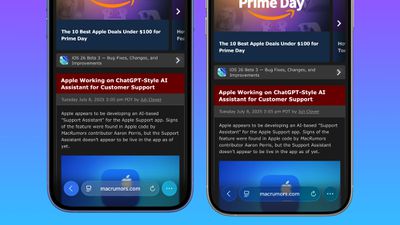
safari dark mode ios 26 beta 3
This isn't true for all apps, though, and there are areas with dark navigation bars that also have less translucency.

Color Dependency

The difference that you see between beta 2 and beta 3 can vary quite a bit depending on the color in the background. With some white backgrounds, it's hard to tell that the Liquid Glass has a more frosted appearance, and the updates are mostly noticeable with light colors.
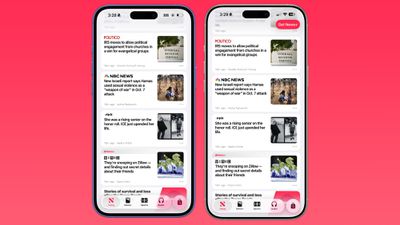
ios 26 beta 3 apple news
Over content that is are darker, navigation bars will often transition to their ‌Dark Mode‌ view that appears more translucent, as can be seen in the Safari screenshot below. This is the same effect you'll see with ‌Dark Mode‌ enabled.

safari dark ios 26 beta 3

Notifications, Lock Screen, and Home Screen

On the Lock Screen, the time is ever so slightly more opaque than it was before. With some background colors, notifications also have a darker background than before, but this isn't always noticeable. Home Screen and Control Center haven't changed much if at all.
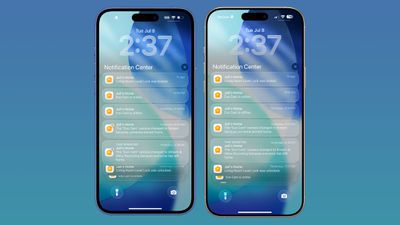
ios 26 b2 b3 comparison

For App Library, the search bar doesn't have blurred edges when scrolling, which makes it easier to see. Apple hasn't changed translucency.
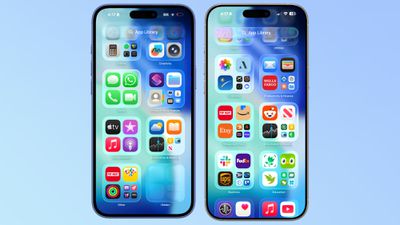
app library ios 26 beta 3

Other App Changes

Most of Apple's built-in apps have tweaked buttons and navigation bars in ‌iOS 26‌ beta 3, with repeats of the design changes listed above.

  • Weather - The buttons at the bottom of the app are much darker than before, and the search button is no longer translucent.
  • Camera - No noticeable change.
  • FaceTime - No noticeable change.
  • Messages - The search bar isn't as translucent, nor is the message compose bar. Popover buttons haven't changed.
  • Maps - Maps is actually more translucent, because it's using Liquid Glass for the turn-by-turn directions that are shown at the top of the app.
  • Mail - Buttons have less translucency.
  • Notes - The buttons and navigation bar in the Notes app already had little translucency, but it's been reduced further and is almost non-existent.
  • Reminders - When you're composing a Reminder, the toolbar has less translucency. The search bar and popover menus are the same.
  • Clock - No change.
  • Health - The Health app's navigation bar and search bar are a little less transparent, but it was already fairly opaque.
  • Wallet - Buttons aren't as transparent, so if you scroll over something with bright colors, it's no longer visible behind the button.
  • Settings - The Search bar is more opaque.
  • Find My - No change.
  • Stocks - The translucency of Top Stories is unchanged, but the search bar has increased opacity.
  • Home - Less opacity overall for navigation bar and home control buttons.
  • Books - Navigation menus and search have less translucency.
  • Fitness - Little change because the app uses a darker background, but the buttons are a touch darker than before.
  • Contacts - Less translucency for search.
  • Files - Less translucency for navigation bar and search.
  • Translate - No change.
  • Shortcuts - Less translucency for navigation bar. Keyboard translucency remains the same.
  • Calculator - History interface is more opaque.
  • Voice Memos - No change.
  • Compass - No change.
  • Passwords - Navigation bar and search interface lost translucency.
  • Games - Navigation bar is darker and less translucent.
  • Preview - No change.

What do you think of the changes that Apple made in ‌iOS 26‌ beta 3? Are you hoping for some of the Liquid Glass design to be reimplemented, or do you prefer the more opaque look? Let us know in the comments below.


Related Roundups: iOS 26, iPadOS 26
Related Forum: iOS 26

Popular Stories

iOS 27 Feature Dark

Apple Now Pushing iPhone Users Still on iOS 26 to Install iOS 27

Thursday October 8, 2026 1:17 pm PDT by
Starting today, iPhone users still running iOS 26 will see iOS 27.0.1 as the prominent software update in the Settings app under General → Software Update, with iOS 26.7.1 now relegated to a smaller "Also Available" section at the bottom. iOS 27 was released on September 14, but until now that update and later iOS 27.0.1 were shown under the "Also Available" section, with iOS 26.7 and...

bug security vulnerability issue fix larry

Apple Fixes Possibly Exploited CoreGraphics Flaw on Older iPhones

Tuesday October 27, 2026 5:16 am PDT by
Among the flurry of iOS 27.2 releases on Monday, Apple also pushed a wave of software updates for its older operating systems, including a fix for a CoreGraphics vulnerability that Apple says may have been exploited in targeted attacks. The releases include iOS 26.7.2, iPadOS 26.7.2, iOS 18.7.11, iPadOS 18.7.11, macOS Tahoe 26.7.2, macOS Sequoia 15.8.2, and tvOS 26.6.1. iOS 18.7.11 and...
iPhone Duo Display Cracking

Apple Alerts Stores to iPhone Duo's Display Cracking Issue

Friday October 30, 2026 3:20 pm PDT by
In a memo shared with Apple Stores and Apple Authorized Service Providers this week, and later obtained by MacRumors, Apple provided technicians with guidance on how to diagnose and address the iPhone Duo's inner display cracking issue. If a customer reports the issue, Apple advised technicians to inspect the iPhone Duo and repair or replace it in accordance with their standard procedures....

Top Rated Comments

GrassShark Avatar
17 months ago
Call me crazy but I think being able to read basic UI copy is a good thing.
Score: 83 Votes (Like | Disagree)
17 months ago
We all knew this would happen. All that blurry translucency was illegible.
Score: 55 Votes (Like | Disagree)
UncleGuido Avatar
17 months ago
Please, Apple, just make sure that there is a switch in Accessibility that lets me turn off this useless eye candy. I want UI elements that are contrasty and easy to read, regardless of what is behind them. In the WWDC keynote, Federighi bragged about how this new design "blurs the lines between software and hardware." He should have stopped at "blurs the lines."
Score: 51 Votes (Like | Disagree)
17 months ago
Is this really as good as it gets? Lifelong iPhone user and feeling distinctly underwhelmed.
Score: 40 Votes (Like | Disagree)
JaylenFast Avatar
17 months ago
For what it's worth I am in the design industry, and I am just flabbergasted at how the original state of Liquid Glass was passed and presented to millions of people, and ONLY NOW they see issues and make drastic changes. It doesn't take user feedback to realize it's legibility flaws.

It now leads me to believe that this entire iOS redesign was rushed and half-baked, and that animations were the priority. For a large company this is not the feeling I should have about their design process. They should want to be known for careful planning and innovation... scary times for Apple.
Score: 28 Votes (Like | Disagree)
piccolamela Avatar
17 months ago
liquid glass to dirty or foggy glass...

wonder how much of the design will be still around, once iPadOS 26 and IOS 26 are released.

What has gone wrong in testing and when it was green lighted that they did notice the overall readability and legibility as a big issue?

I'm ambivalent on this change, not fond of either the old nor the new design in particular. It was meh, it is meh, but as long as it's consistent and not outright user hostile it will do.
Score: 23 Votes (Like | Disagree)
Latest Stories
Apple Watch Ultra 4 Hits All-Time Low Price With Amazon's $99 Discount
13 hours ago
Reminder: Apple's Big Discount on Beats 360 Ear Cushions Ends Today
13 hours ago
Here's a New Tour of Apple's HomeView Software
13 hours ago
Apple Reveals New iPad Mini's Battery Capacity
15 hours ago
Top Stories: Apple's Big MacBook Pro, iPad mini and iMac Updates
16 hours ago
'Pluribus' Season 2 Reportedly Starts Production Today
23 hours ago
iPhone 18 Pro Sales Surge in China, Offsetting Decline in U.S. and Japan
23 hours ago
HomeView Software 27.2: Wallpapers, Control Center, and More
1 day ago
Apple Alerts Stores to iPhone Duo's Display Cracking Issue
1 day ago
iOS 27.3 Will Enable These Apple Intelligence Features in China
1 day ago
Apple Says iOS 27.3 Beta Coming Next Week
1 day ago
Apple's Flash Storage Suppliers Are Finally 'Getting Their Revenge'
1 day ago
14 New Things Your iPhone Can Do in iOS 27.2
1 day ago
iPhone Duo Review: One Week Later
1 day ago
Samsung Mocks iPhone Duo Display Cracks in New Ad Campaign
2 days ago
The MacRumors Show: OLED MacBook Pro, iPad Mini 8, and More
2 days ago
MacBook Pro With Touch Display: 15 More Details Revealed
2 days ago
Russia Places Apple on State Surveillance Registry
2 days ago
Halloween Weekend Brings Discounts on Apple Accessories and Pre-Orders
2 days ago
Apple Has Released More Than 25 New Products in the Past Two Months
2 days ago
Local Code Launches as Free, Private AI Assistant Tool for Mac
2 days ago
Apple Acquires Ascend.io
2 days ago
HomePod Mini 2 Launches Today: All the New Features
2 days ago
AirTag 2 4-Pack Drops to New Low Price of $69.99
2 days ago
Rian Johnson's iPhone Camera App Goes Viral
2 days ago
Where Did All the iPhone Duos Go? Mostly to Apple's Stores
2 days ago
Apple's Touchscreen MacBook Pro Could Ship 1.5M Units in 2027
2 days ago
New Apple TV 4K and iPad Mini: RAM Amounts Revealed
2 days ago
Apple Executive Comments on New iPad Mini Lacking 120Hz Display
2 days ago
Here's a Hands-On Look at HomePod Mini 2's New Two-Tone Colors
2 days ago

🔗 Related Apple News & Rumors

Stay updated with the latest Apple ecosystem news and verified rumors