iOS 26.1 Features: Everything New in iOS 26.1 - MacRumorsOpen MenuShow RoundupsShow Forums menuVisit ForumsOpen Sidebar
Skip to Content

iOS 26.1 Features: Everything New in iOS 26.1

iOS 26.1 is the first major update to the iOS 26 software that came out in September, and it's now available for everyone. There are some useful new features in iOS 26.1 that address complaints about Liquid Glass and fix a longtime Lock Screen irritation.

Subscribe to the MacRumors YouTube channel for more videos.

We've complied a list of all of the new features in iOS 26.1, down to the tiniest interface change.

Liquid Glass Transparency Toggle

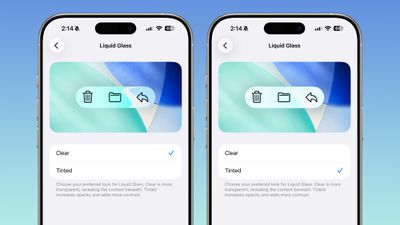
There is a new setting for customizing the look of Liquid Glass. You can now opt for a more tinted look that adds opacity.
ios 26 1 liquid glass opaque
Under Settings > Display and Brightness, there's a new option to switch between Clear or Tinted settings. Clear is more transparent and is the standard version of Liquid Glass that displays the background underneath buttons, menu bars, and other interface elements, while Tinted increases the opacity of Liquid Glass to improve contrast.

You'll see the most noticeable difference in apps and with Lock Screen notifications when Tinted mode is enabled.

Lock Screen Camera Swipe

Apple finally added a way to turn off the Lock Screen gesture that opens the Camera app, which means no more accidentally turning on the camera when your iPhone is in your pocket.
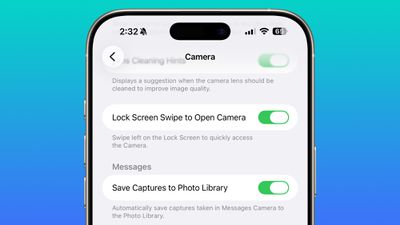
lock screen swipe disable camera
In the Camera section of the Settings app, there's a Lock Screen Swipe to Open Camera setting, and turning it off disables the left swipe that opens the Camera app.

There was previously no way to turn off Lock Screen camera activation without disabling the camera app entirely.

Phone Haptics

The Phone app includes a toggle to turn off haptic feedback when a call is connected or dropped, so if you find that little buzz irritating, you can now disable it.
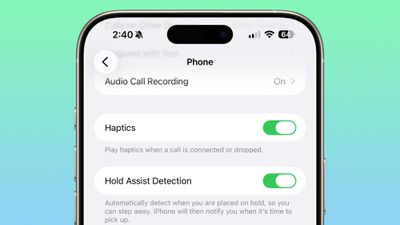
ios 26 1 phone haptics

Alarms and Timers

Apple updated the interface of alarms and timers in iOS 26.1. There's now a Slide to Stop bar on the Lock Screen instead of a tap to stop button.

ios 26 1 slide to stop

You can still snooze an alarm with a tap on the oversized button, but to turn it off entirely, you need to use a slide gesture that requires more dexterity.

If you've accidentally dismissed an alarm while trying to tap the snooze button and then overslept, this will be a welcome change. Unfortunately, there is no option to choose to stick with the tap to stop button.

New Apple Intelligence Languages

Apple Intelligence is now available in Danish, Dutch, Norwegian, Portuguese (Portugal), Swedish, Turkish, Chinese (Traditional), and Vietnamese.

The new languages join English, French, German, Italian, Portuguese (Brazil), Spanish, Chinese (Simplified), Japanese, and Korean, opening up ‌Apple Intelligence‌ to more people.

AirPods Live Translation Languages

AirPods Live Translation works with additional languages in iOS 26.1, including Japanese, Korean, Italian, and Chinese (both Mandarin Traditional and Simplified).

At launch, Live Translation was limited to English (US, UK), French (France), German, Portuguese (Brazil), and Spanish (Spain).

You can translate to and from all of the above languages with the AirPods Pro 2, AirPods Pro 3, or AirPods 4 with ANC.

Apple Music

There's a hidden Apple Music gesture in iOS 26.1. You can swipe on the music player in the ‌Apple Music‌ app to switch songs. Just slide a finger over where the song title is listed, and it'll go to the next song or back to the previous song.
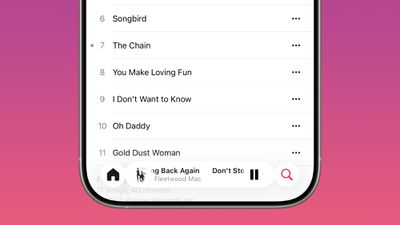
ios 26 1 apple music swipe

AirPlay

‌Apple Music‌ AutoMix now works over AirPlay, so you'll hear AutoMix transitions when playing music over ‌AirPlay‌ 2-compatible speakers.

Apple TV App

The Apple TV app has a new, more colorful icon that adopts the Liquid Glass aesthetic. The redesign coincides with Apple's decision to drop the "Plus" from its ‌Apple TV‌ streaming service. ‌Apple TV‌+ is now called ‌Apple TV‌ in the ‌Apple TV‌ app.

apple tv rebrand icon

Fitness App

You can now create fully custom workouts in the Fitness app on iPhone. There are options for selecting workout type, estimated Active Calories, effort, duration, and start time.
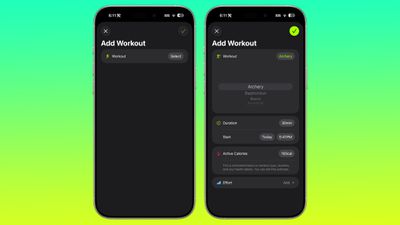
ios 26 1 custom workout

There were workout creation options before, but they were more structured than the open, custom creation options that are in iOS 26.1.

Settings App

Apple changed the alignment of icons and text in the Settings app. All settings with headers that feature text now have that text aligned to the left instead of center aligned. It's a small change that makes a big visual difference.
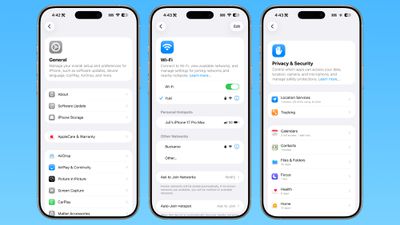
ios 26 1 left aligned settings
This includes General, Bluetooth, Wi-Fi, Cellular, Personal Hotspot, Accessibility, ‌Apple Intelligence‌, and more.

Home Screen Folders

When you tap into a folder on the Home Screen, the name of the folder at the top is left aligned instead of center aligned, matching the changes made in the Settings app.
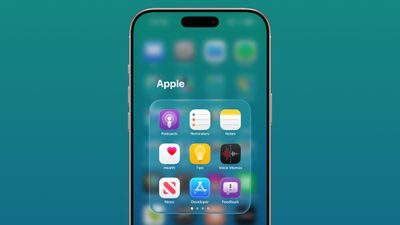
ios 26 1 folder alignment

Phone

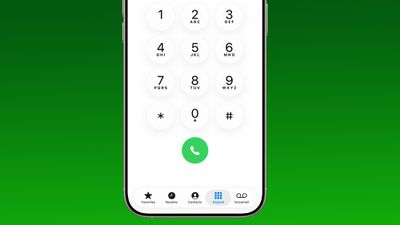
The Phone keypad now uses Liquid Glass for the numbers, fixing a visual issue present in ‌iOS 26‌.

ios 26 1 phone app keypad

Photos

The slider for scrubbing through videos in the Photos app has a new look.
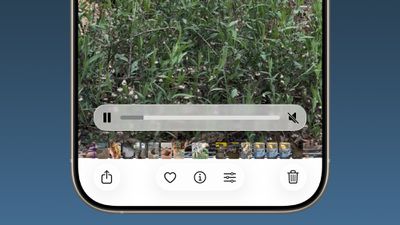
ios 26 1 photos app video

The ‌Photos‌ app navigation bar has a slightly more frosted look that makes it easier to see on light backgrounds.
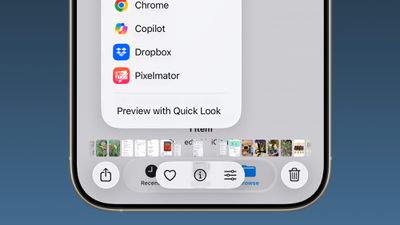
ios 26
The interface for managing multiple photos that you've selected has been tweaked slightly. Play as Slideshow, Favorite, and Hide have been relocated to the top of the menu.
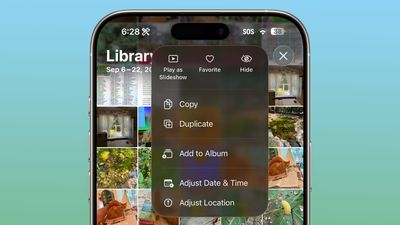
ios 26 1 photos app

Safari

The Tab Bar (Bottom) in Safari is wider with less padding around the edges, so there's less wasted space. In Reduce Transparency mode, there's more padding, so it no longer looks odd.
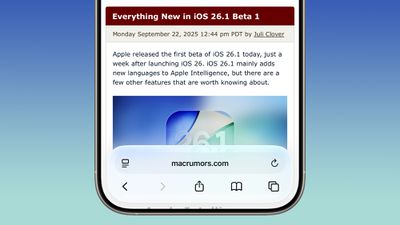
ios 26 1 safari bar

Background Security Improvements

The Privacy and Security section of the Settings app has a toggle to automatically download and install security improvements. It's a revamp of the prior Rapid Security Responses feature that allows Apple to provide security updates without having to offer a full new version of iOS.
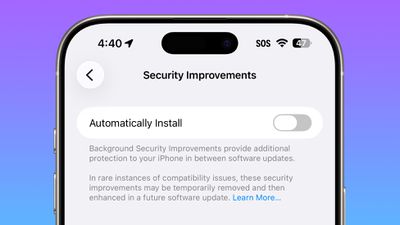
ios 26 1 security improvements

Display Settings

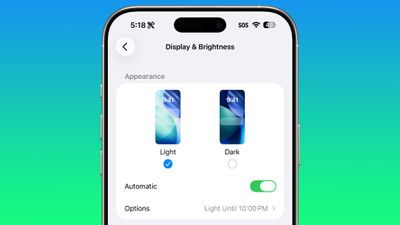
The Display section of the Settings app now has iOS 26-themed wallpaper instead of iOS 18 wallpaper, fixing an ‌iOS 26‌ oversight.

display brightness setting ios 26 1

Liquid Glass

The light refraction effect around apps is now more subtle with darker icon colors and background colors. It's a subtle change that most might not notice.

Wallpaper

When setting a wallpaper on the Lock Screen, instructions like Pinch to Crop show up momentarily and then disappear rather than being shown all the time, which gives a better view of your wallpaper when you're choosing how you want it to appear.
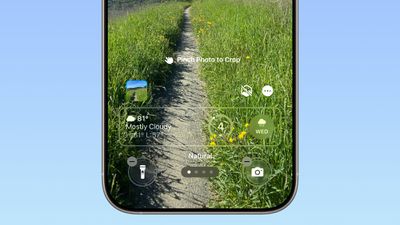
ios 26 1 wallpaper crop

Display Accessibility

Under the Display and Text Size section in the Accessibility settings, there is a "Display Borders" toggle. It adds a border to all buttons, and replaces the prior "Button Shapes" setting.

Local Capture Settings

There's an option to set a location in the Files app for audio and video recordings from calls. It's available by going to Settings > General > Local Capture.

External Microphones

There's an option to adjust input gain when using an external microphone with local capture.

FaceTime

FaceTime now supports improved audio quality in low-bandwidth conditions.

Communication Safety

Communication Safety and Web content filters that limit access to adult websites are not enabled by default for existing child accounts for ages 13-17.

iPadOS 26.1 - Slide Over

Many of the changes above are in iPadOS 26.1 too, and iPadOS 26.1 also includes major changes to multitasking. With iPadOS 26.1, Apple reintroduced Slide Over. Slide Over works alongside the window-based iPadOS 26 multitasking functionality, so you can have multiple windows open and still swipe over to quickly access a Slide Over app.
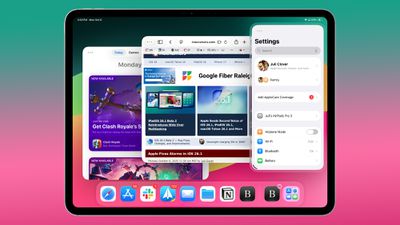
ipados 26 1 slide over
You can only have one Slide Over app at a time in iPadOS 26.1, and you can use the feature by tapping on the green window resizing button and toggling on Enter Slide Over.

The iPadOS 26.1 update also brings a Vision Pro app to the iPad.

Download iOS 26.1

You can get the update by opening up the Settings app, choosing the General section, and tapping on Software Update.

Compatibility

iOS 26.1 is available on all devices that are able to run ‌iOS 26‌, which includes the iPhone 11 and later along with the iPhone SE 2.

iPadOS 26.1 is available on all iPads able to run ‌iPadOS 26‌.

Related Roundups: iOS 26, iPadOS 26
Related Forum: iOS 26

Popular Stories

iOS 27 Feature Dark

Apple Now Pushing iPhone Users Still on iOS 26 to Install iOS 27

Thursday October 8, 2026 1:17 pm PDT by
Starting today, iPhone users still running iOS 26 will see iOS 27.0.1 as the prominent software update in the Settings app under General → Software Update, with iOS 26.7.1 now relegated to a smaller "Also Available" section at the bottom. iOS 27 was released on September 14, but until now that update and later iOS 27.0.1 were shown under the "Also Available" section, with iOS 26.7 and...
bug security vulnerability issue fix larry

Apple Fixes Possibly Exploited CoreGraphics Flaw on Older iPhones

Tuesday October 27, 2026 5:16 am PDT by
Among the flurry of iOS 27.2 releases on Monday, Apple also pushed a wave of software updates for its older operating systems, including a fix for a CoreGraphics vulnerability that Apple says may have been exploited in targeted attacks. The releases include iOS 26.7.2, iPadOS 26.7.2, iOS 18.7.11, iPadOS 18.7.11, macOS Tahoe 26.7.2, macOS Sequoia 15.8.2, and tvOS 26.6.1. iOS 18.7.11 and...
Apple MacBook Pro with PROLED XDR Display family lineup feature

Apple Announces OLED MacBook Pro With Touch Display

Wednesday October 28, 2026 10:11 am PDT by
Apple today announced a new high-end MacBook Pro, which is available in 14-inch and 16-inch sizes. The new device has a PROLED XDR display that supports touch gestures, and a glowing rear Apple logo. Pricing on the MacBook Pro starts at $2,899 for the 14-inch model and $3,399 for the 16-inch model. Apple says the MacBook Pro has the "world's best display in a pro laptop." The PROLED...

Top Rated Comments

sniffies Avatar
13 months ago
Nice changes, but I desperately need an option to make it super hard to trigger Home Screen edit wiggle mode.

Every time I handle my iPhone, it's somehow in the wiggle mode. Lost count of how many times I've accidentally rearranged or nearly deleted apps.

🤬

P.S. Lock Screen, too.
Score: 26 Votes (Like | Disagree)

13 months ago

This may shock you but implementing AI across 5 product lines and 2 dozen or so devices may be a process that takes a few years.

What people don't seem to understand is that Apple HAS shipped a ton of work on Apple Intelligence. The problem is almost none of it is user facing, and the stuff that is directly usable by end users is pretty lame. Now over the next few years they will build on that foundation and hopefully come up with something that's pretty good.
This may not shock you but Apple has failed for decades regarding Siri implementation across all their product lines. No once cares for their excuses. They are a 4 trillion dollar company for goodness sakes!
Score: 17 Votes (Like | Disagree)
13 months ago
iOS 26.1 is a cluster**** like usual! Apple should be embarrassed how bad their software development team has become.
Score: 12 Votes (Like | Disagree)
13 months ago
This screen shows you everything that is currently wrong with the glass design. It's a visual mess.

Who thought this was a good interface? Even when approached objectively, it’s hard to read, difficult to understand, and a real pain to use.

Icons overlap, text is truncated, documents appear as nanoscopic miniatures, and the branding is obscure and unnecessary. What the hell is Quick Look, and why do I need to know about it? Wouldn’t “preview” suffice?

Trying to solve the problem of limited screen space by layering multiple UI levels on top of each other makes no sense on a 2D display. It might work in a VR device like the Vision Pro, but even then the random apps, commands, and icons create pointless clutter.

It’s time Apple looks beyond its bubble and acknowledges the growing disconnect between its products and users.

Attachment Image
Score: 11 Votes (Like | Disagree)
13 months ago

If you've accidentally dismissed an alarm while trying to tap the snooze button and then overslept, this will be a welcome change. Unfortunately, there is no option to choose to stick with the tap to stop button.

Take a look at Settings -> Accessibility -> Touch -> Prefer Single-Touch Actions
Score: 11 Votes (Like | Disagree)
13 months ago
Got super excited for a minute when I saw Liquid Glass toggle. I was hoping it was a toggle to turn it off completely.
Score: 9 Votes (Like | Disagree)
Latest Stories
Apple Watch Ultra 4 Hits All-Time Low Price With Amazon's $99 Discount
5 hours ago
Reminder: Apple's Big Discount on Beats 360 Ear Cushions Ends Today
5 hours ago
Here's a New Tour of Apple's HomeView Software
5 hours ago
Apple Reveals New iPad Mini's Battery Capacity
7 hours ago
Top Stories: Apple's Big MacBook Pro, iPad mini and iMac Updates
8 hours ago
'Pluribus' Season 2 Reportedly Starts Production Today
14 hours ago
iPhone 18 Pro Sales Surge in China, Offsetting Decline in U.S. and Japan
15 hours ago
HomeView Software 27.2: Wallpapers, Control Center, and More
22 hours ago
Apple Alerts Stores to iPhone Duo's Display Cracking Issue
23 hours ago
iOS 27.3 Will Enable These Apple Intelligence Features in China
23 hours ago
Apple Says iOS 27.3 Beta Coming Next Week
23 hours ago
Apple's Flash Storage Suppliers Are Finally 'Getting Their Revenge'
1 day ago
14 New Things Your iPhone Can Do in iOS 27.2
1 day ago
iPhone Duo Review: One Week Later
1 day ago
Samsung Mocks iPhone Duo Display Cracks in New Ad Campaign
1 day ago
The MacRumors Show: OLED MacBook Pro, iPad Mini 8, and More
1 day ago
MacBook Pro With Touch Display: 15 More Details Revealed
1 day ago
Russia Places Apple on State Surveillance Registry
1 day ago
Halloween Weekend Brings Discounts on Apple Accessories and Pre-Orders
1 day ago
Apple Has Released More Than 25 New Products in the Past Two Months
1 day ago
Local Code Launches as Free, Private AI Assistant Tool for Mac
1 day ago
Apple Acquires Ascend.io
1 day ago
HomePod Mini 2 Launches Today: All the New Features
1 day ago
AirTag 2 4-Pack Drops to New Low Price of $69.99
1 day ago
Rian Johnson's iPhone Camera App Goes Viral
1 day ago
Where Did All the iPhone Duos Go? Mostly to Apple's Stores
1 day ago
Apple's Touchscreen MacBook Pro Could Ship 1.5M Units in 2027
1 day ago
New Apple TV 4K and iPad Mini: RAM Amounts Revealed
2 days ago
Apple Executive Comments on New iPad Mini Lacking 120Hz Display
2 days ago
Here's a Hands-On Look at HomePod Mini 2's New Two-Tone Colors
2 days ago

🔗 Related Apple News & Rumors

Stay updated with the latest Apple ecosystem news and verified rumors