iOS 17: What's New With Phone and FaceTime - MacRumorsOpen MenuShow RoundupsShow Forums menuVisit ForumsOpen Sidebar
Skip to Content

iOS 17: What's New With Phone and FaceTime

Apple's iOS 17 upgrade brings notable new communication features, adding functionality to the Phone app and the FaceTime app. The Phone app lets you customize what people see when you call them, while ‌FaceTime‌ gains video messages and the option to take ‌FaceTime‌ calls on the Apple TV.

iOS 17 FaceTime Feature
This guide highlights everything new with the Phone and ‌FaceTime‌ apps in iOS 17.

Phone

Contact Posters

Apple started letting you choose the name and photo that you want to share with others in the Messages app, and now sharing extends to the Phone app. You can create a Contact Poster that other people see when they call you.
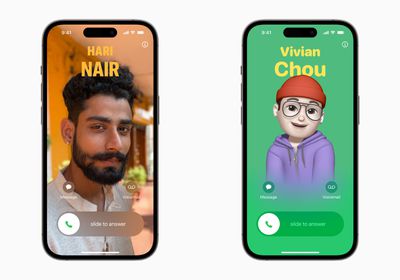
Contact Posters iOS 17
Contact Posters are created in the Contacts app by tapping on your own name, selecting the Contact Photo & Poster option, and tapping on the Edit button.

You can choose to share a photo, a Memoji, or just your initials, and this is what people will see when you call them. To go along with the photo, you can also customize font size, style, and color. Note that you cannot change your name from this interface - that needs to be done by changing your contact info.
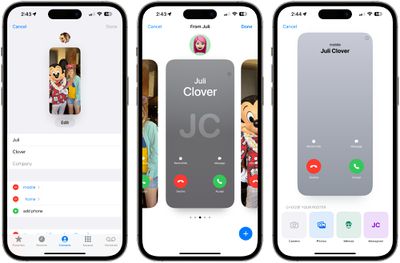
ios 17 contact posters
There are several filters that can be applied to images, including black and white, duotone, and color wash in the color of your choice. You can edit the crop of the photo, and customize your Contact Poster independently of your shared Messages image.

Contact Posters can be shared with your contacts automatically, or you can be prompted to share with anyone who calls you so no one sees your custom imagery without your permission.

Contacts App

To account for Contact Posters, the design of the Contacts app has been tweaked. When you tap on a contact, you'll now see that their contact image, Memoji, or initials take up a much larger portion of the screen. This also counts for contacts where you've assigned an image.
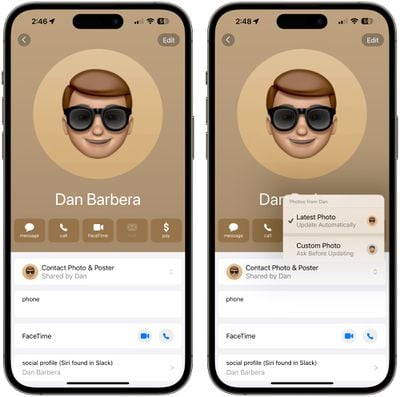
ios 17 contacts app
You'll have an option to tap on the Contact Photo and Poster option underneath the person's name to choose to update to the latest info automatically when your contact changes something like their profile photo, or turn on manual updates so you're prompted for the update.

Live Voicemail

Live Voicemail is a new feature that allows the iPhone to transcribe a voicemail as it's being left, so you can pick up the phone if it turns out to be something important.
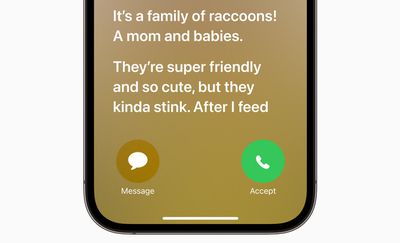
Live Voicemail iOS 17
The voicemail is displayed right on your Lock Screen as the person on the other end speaks, which can help you avoid missed calls if it turns out an unknown number is a call from your doctor or another important person.

Live Voicemail can be somewhat confusing to people who are not familiar with the feature. Apple's default Live Voicemail wording tells people that "the person you're calling may pick up," which has led to instances where people have called iOS 17 users and waited for several minutes for the person with Live Voicemail to answer. It's essentially not clear that it's a standard voicemail sequence.

This can be avoided with a custom greeting recorded by opening up the Phone app, tapping on Voicemail, and then tapping on Greeting to make a new recording.

Live Voicemail can also be turned off in the Settings app by going to Phone > Live Voicemail and toggling it off.

Updated Call Log

A small but useful update to the call log lets you know if a missed call resulted in a voicemail. If so, you can tap that voicemail from the Recents interface.
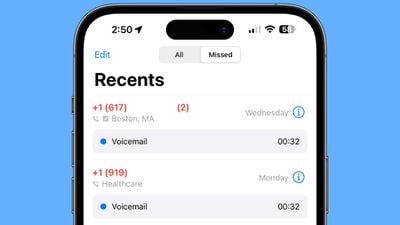
ios 17 call log

Dual-SIM Upgrades

Those who use the Dual-SIM feature now have an option to create different ringtones for each SIM, and choose a SIM when calling back an unknown number. There's also an option to sort incoming messages based on SIM.

FaceTime

Audio and Video Messages

When you ‌FaceTime‌ someone and they aren't able to answer, you can leave a video or audio message depending on the call method you used. If you were using ‌FaceTime‌ video, you can leave a video message, and if you were using ‌FaceTime‌ audio, you can leave an audio message.

facetime video messages ios 17
After the missed call, you'll see a "Record Video" option, which will allow you to create a message. You'll see a preview of your video, and the option to re-record if it didn't turn out well. Once sent, the video message is in the ‌FaceTime‌ missed call log, where the person can watch the video and call you back.

Note that there is an option for people to save video messages to their Camera Roll, so keep that in mind when sending a video to someone.

FaceTime Reactions

The Messages app has had reactions that trigger with certain words for some time now, and in iOS 17, Apple is bringing reactions to ‌FaceTime‌. Rather than being triggered by words, though, the reactions are triggered by gestures.

ios 17 facetime effects
Gestures trigger on-screen effects like hearts, balloons, confetti, fireworks, and more, with the effects flooding the display over the ‌FaceTime‌ window.

  • Heart - Heart emoji
  • Thumbs up - Thumbs up emoji
  • Two thumbs up - Fireworks
  • Single thumbs down - Thumbs down emoji
  • Two thumbs down - Cloud
  • Peace sign with one hand - Balloons
  • Peace sign with two hands - Confetti
  • "Rock on" sign with two hands - Laser

While the reactions are triggered with gestures, you can also long press on your picture in ‌FaceTime‌ to bring up a list of options.

These reactions work by default in ‌FaceTime‌, and third-party apps can adopt the effects as well.

FaceTime on Apple TV

With iOS 17 and tvOS 17, you can use ‌FaceTime‌ on the ‌Apple TV‌. There's a new ‌FaceTime‌ app on tvOS 17, but to use it, you need an iPhone running iOS 17 or an iPad running iPadOS 17 to serve as the camera because the ‌Apple TV‌ doesn't have its own camera.

facetime apple tv
You can start a ‌FaceTime‌ call on the ‌Apple TV‌ or start one on the iPhone and hand it off to the ‌Apple TV‌. It's basically the same as ‌FaceTime‌ on an iPhone, ‌iPad‌, or Mac, but with a much larger display. The iPhone will need to be placed near the TV for capturing your video, and the person you're FaceTiming with will be shown on the TV.

Center Stage is available to keep you in the frame as you move around, and you can handoff a call from the ‌Apple TV‌ to an iOS device if you need to move to another room, and vice versa.

Read More

More information on all of the new features in the iOS 17 update can be found in our iOS 17 roundup.

Related Forums: iOS 17, iPadOS 17

Popular Stories

iphone duo facetime

iPhone Duo's Hidden FaceTime Camera Takes 'Trash' Photos

Wednesday October 21, 2026 11:36 am PDT by
The iPhone Duo's inner screen has an under-display front camera that's largely hidden from view. It's the first time we've seen an under-display camera on an iPhone, and it turns out there's a reason Apple hasn't used the technology before. Apple said the camera offers 1080p video recording, but didn't mention photo quality. Gizmodo said it's a 4-megapixel camera and described the photos as...

iphone duo facetime

Why Can't iPhone Duo Users Make Eye Contact on FaceTime?

Monday October 26, 2026 3:49 pm PDT by
FaceTime's Eye Contact setting is missing on the iPhone Duo, MacRumors can confirm. The setting was first flagged as absent by MacRumors forum member TwoBytes, who noticed their eyes looking "a little off" during a call. Introduced in iOS 14, Eye Contact uses machine learning to subtly adjust your eyes during a video call to make it seem like you're looking into the camera lens, even though ...
iOS 27 and FaceTime Feature

iOS 27.2 Expands Dual Capture to Group FaceTime

Monday October 26, 2026 12:46 pm PDT by
The iOS 27.2 update Apple released today allows the FaceTime Dual Capture feature to be used in Group FaceTime calls. Dual Capture is a feature that lets you stream FaceTime video content from the front and rear cameras at the same time. On a compatible device running iOS 27, flipping the camera while on a FaceTime call automatically turns on Dual Capture. Dual Capture is available on...

Top Rated Comments

Crowbot Avatar
43 months ago

I remember when Apple first introduced FaceTime with iPhone 4. Indeed, it has come a long way.
I remember Apple ran an ad that ended with two deaf people signing to each other over FaceTime. I said to myself, this is huge.
Score: 11 Votes (Like | Disagree)
43 months ago
We really could have used FaceTime over Apple TV during the pandemic. Tried rigging up something with the laptop a few times and it was just too much trouble.
Score: 10 Votes (Like | Disagree)
TheYayAreaLiving 🎗️ Avatar
43 months ago
I remember when Apple first introduced FaceTime with iPhone 4. Indeed, it has come a long way.
Score: 9 Votes (Like | Disagree)
jz0309 Avatar
43 months ago
I really hope that we get toggles so we can choose whether or not to turn these "features' on ...
Score: 7 Votes (Like | Disagree)
surfzen21 Avatar
43 months ago
I hope we can turn off Contact Posters.

I want the ability to choose what I see pop up on my phone when someone calls, not the person calling me.

Imagine assigning a bad pic of your ex to her contact and then she calls and its a ****ing glam shot. No thanks
Score: 6 Votes (Like | Disagree)
jz0309 Avatar
43 months ago
the updated call log id very useful
Score: 6 Votes (Like | Disagree)
Latest Stories
Apple's HomeView Ships With Six-Month-Old Software
2 hours ago
Three New iPads Rumored to Launch in First Half of 2027
2 hours ago
Apple Offers Steps to Fix Daylight Saving Time Bug on Apple Watch
6 hours ago
Apple Watch Ultra 4 Hits All-Time Low Price With Amazon's $99 Discount
1 day ago
Reminder: Apple's Big Discount on Beats 360 Ear Cushions Ends Today
1 day ago
Here's a New Tour of Apple's HomeView Software
1 day ago
Apple Reveals New iPad Mini's Battery Capacity
1 day ago
Top Stories: Apple's Big MacBook Pro, iPad mini and iMac Updates
1 day ago
'Pluribus' Season 2 Reportedly Starts Production Today
1 day ago
iPhone 18 Pro Sales Surge in China, Offsetting Decline in U.S. and Japan
1 day ago
HomeView Software 27.2: Wallpapers, Control Center, and More
2 days ago
Apple Alerts Stores to iPhone Duo's Display Cracking Issue
2 days ago
iOS 27.3 Will Enable These Apple Intelligence Features in China
2 days ago
Apple Says iOS 27.3 Beta Coming Next Week
2 days ago
Apple's Flash Storage Suppliers Are Finally 'Getting Their Revenge'
2 days ago
14 New Things Your iPhone Can Do in iOS 27.2
2 days ago
iPhone Duo Review: One Week Later
2 days ago
Samsung Mocks iPhone Duo Display Cracks in New Ad Campaign
2 days ago
The MacRumors Show: OLED MacBook Pro, iPad Mini 8, and More
2 days ago
MacBook Pro With Touch Display: 15 More Details Revealed
2 days ago
Russia Places Apple on State Surveillance Registry
2 days ago
Halloween Weekend Brings Discounts on Apple Accessories and Pre-Orders
2 days ago
Apple Has Released More Than 25 New Products in the Past Two Months
2 days ago
Local Code Launches as Free, Private AI Assistant Tool for Mac
2 days ago
Apple Acquires Ascend.io
2 days ago
HomePod Mini 2 Launches Today: All the New Features
2 days ago
AirTag 2 4-Pack Drops to New Low Price of $69.99
2 days ago
Rian Johnson's iPhone Camera App Goes Viral
2 days ago
Where Did All the iPhone Duos Go? Mostly to Apple's Stores
2 days ago
Apple's Touchscreen MacBook Pro Could Ship 1.5M Units in 2027
2 days ago

🔗 Related Apple News & Rumors

Stay updated with the latest Apple ecosystem news and verified rumors