Everything New With Spotlight Search in iOS 16 - MacRumorsOpen MenuShow RoundupsShow Forums menuVisit ForumsOpen Sidebar
Skip to Content

Everything New With Spotlight Search in iOS 16

The iPhone and iPad have a built-in intelligent search feature called Spotlight, which is designed to search through apps, files, and the web to help you find what you're looking for. Apple improves Spotlight Search with every iteration of iOS, and iOS 16 is no exception.
iOS Search Guide Feature
This guide highlights everything that's new with Spotlight in iOS 16, available now, and iPadOS 16, coming in October.

Accessing the Spotlight Search feature is typically done by swiping down from the Home Screen to bring up the search interface, but Apple in iOS 16 decided to add another "Search" button.
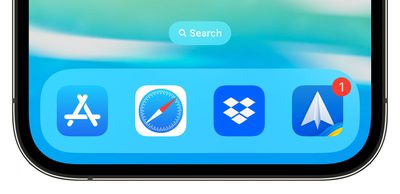
ios 16 search button home screen
You can now find a "Search" option available at the bottom of the ‌Home Screen‌, which can be tapped to enter the Spotlight Search interface. The Search button replaces the dots that were previously there to let you know how many app pages you have available.

The button is located just above the dock, but there is an option to disable it in the ‌Home Screen‌ section of the Settings app.

Spotlight can find locations, people, scenes, text, pets, objects, and more in images from Messages, Notes, and Files, in addition to the Photos app in iOS 16.
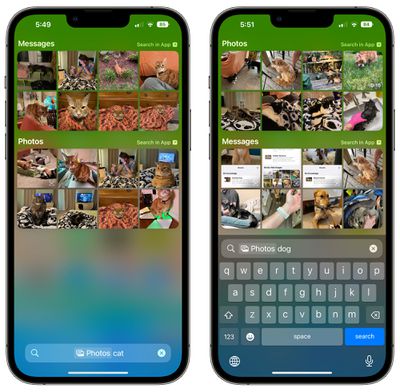
photos search spotlight

Quick Actions

Apple updated Spotlight to support Quick Actions, which are functions that can be done right from the search interface.
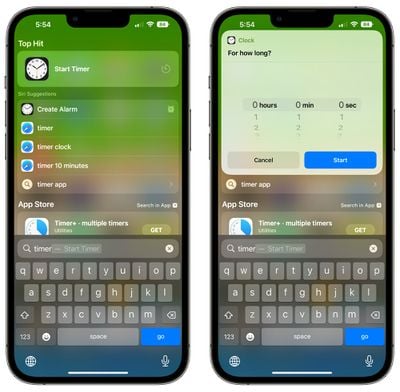
spotlight ios 16 timer
Some of the options:

  • Start a timer
  • Activate a Focus
  • Shazam a song
  • Run a Shortcut

Spotlight can also help you find the Shortcuts that are available for any app.

Siri Suggestion Improvements

Apple has updated Siri Suggestions to consider the context when offering up apps that you might want to use. This makes the suggested apps and actions in Spotlight more relevant to what you might be doing at the current time.
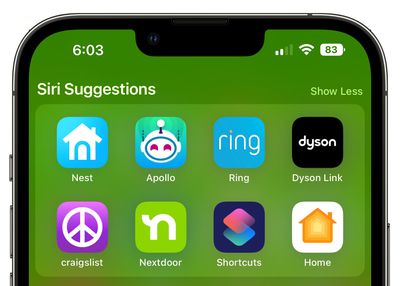
ios 16 siri suggestions
‌Siri‌ Suggestions can do things like suggesting directions when you have a meeting coming up, or offer a flight status check when you have a flight. It can also suggest that you call someone having a birthday, show your favorite apps you use at certain times of the day, or bring up your recent searches so you can get back to prior results more quickly.

Live Activities

When Apple launches Live Activities in the future, Spotlight will be able to be used to start a Live Activity that will show up on the Lock Screen. Live Activities are interactive notifications that stay up to date, allowing you to keep an eye on things happening in real-time right from the Lock Screen.
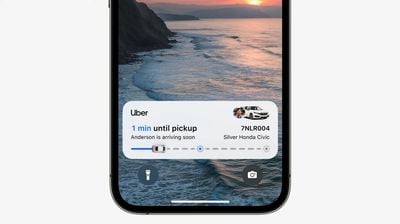
ios 16 live activities uber
If you're following a sports game, for example, you can see the updated score on the Lock Screen, or if you're waiting for an Uber ride, you can watch for your driver to approach.

Live Activities will not be available when iOS 16 launches, but will be coming in a future update.

Expanded Rich Results

Apple is improving the rich search results that show information like data on an actor when you search for an actor's name. The feature will now show additional information for businesses, sports leagues, and sports teams.
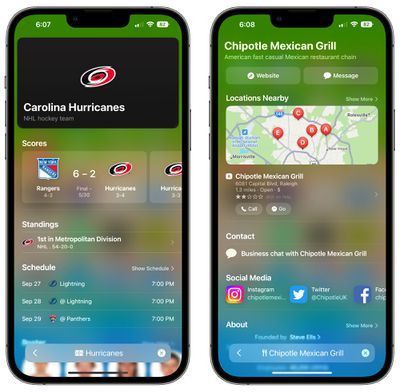
spotlight rich results ios 16

App Clip Improvements

App Clips are modified versions of apps that let you use limited app functionality without having to do a full install. Spotlight integrates with App Clips, offering up App Clip suggestions when you're in a relevant location.

In iOS 16, Apple uses precise location suggestions to improve App Clip suggestions in Spotlight, but Location-Based Suggestions can be disabled as always in the Privacy section of the Settings app.

Guide Feedback

Have questions about the Spotlight Search feature in iOS 16, know of a feature we left out, or want to offer feedback on this guide? Send us an email here.


Related Forum: iOS 16

Popular Stories

American Express Gold Apple Pay Feature

American Express Announces New Apple Pay Feature

Tuesday June 30, 2026 10:27 am PDT by
American Express today announced that you can now redeem Membership Rewards points when checking out with Apple Pay on the web and in apps on the iPhone and iPad. When checking out with Apple Pay on iOS 18 or iPadOS 18 or later, tap on your eligible American Express card (Platinum, Gold, Green, and others) and select the Membership Rewards points option. You can use points to cover all or...
Apple Acquires Award Winning App Play Feature

Apple Acquires Award-Winning App 'Play'

Monday June 29, 2026 7:39 am PDT by
In February, Apple notified the European Commission that it would be acquiring certain assets from and have the right to hire certain employees from Rabbit 3 Times, the company behind the award-winning app design tool Play. The notification was published on the European Commission's website this week, following a four-month waiting period. Play was a Mac and iPhone app that allowed designers ...
series 10 apple watch titanium digital crown

Report: Apple Watch Redesign Coming Next Year With New Band System

Tuesday June 30, 2026 8:45 am PDT by
A "major overhaul" of the Apple Watch's design is due to arrive next year with a new system for connecting bands, according to a known Weibo leaker. In a set of recent posts, the leaker known as "Instant Digital" linked the new claim to older rumors about an "Apple Watch X" model, which was said to introduce a fresh design and break compatibility with the existing watch band system. Citing...

Top Rated Comments

ghostface147 Avatar
50 months ago
I live by the search bar. Quick swipe down and I find my apps. Not a big fan of the search bar at the bottom.
Score: 17 Votes (Like | Disagree)
50 months ago
I wish they made it easier to get to Spotlight when you're not on the home screen.
Score: 10 Votes (Like | Disagree)
50 months ago
Minor comment to say that myself appreciate a lot these quick rundowns of incoming features. Sometimes discovery is either not there easily visible, undocumented or just plain too lazy to dig it and learn it.


I live by the search bar. Quick swipe down and I find my apps. Not a big fan of the search bar at the bottom.

I wish they made it easier to get to Spotlight when you're not on the home screen.
Potential useful tip, as I also live by swipe down and quick search EVERYTHING (also on iPad, but there it’s easier thanks to cmd space like on Mac when a keyboard is attached):

On accessibility settings you can put double tap on the back of your phone to trigger some actions, including Spotlight, allowing it to launch it even while out of the homescreen. I use it everyday now, I have never seen it autotrigger after months of use either.

Suppose you want to add a quick value at some bank bills payment app: double tap, type a basic math operation, swipe it out, continue, recall it at any time again (in case you forgot part of the number or need a new one) by physically double tapping with your finger on the back of your phone.
Score: 8 Votes (Like | Disagree)
contacos Avatar
50 months ago
has anyone actually ever seen AppClips out in the wild?
Score: 6 Votes (Like | Disagree)
50 months ago
I like the improvements to search here but I'm turning that search button off immediately.
Score: 5 Votes (Like | Disagree)
ajfahey Avatar
50 months ago
These Apple Media Events have been progressively less interesting as the become decreasing innovative.
Score: 5 Votes (Like | Disagree)

🔗 Related Apple News & Rumors

Stay updated with the latest Apple ecosystem news and verified rumors