

iOS 16 Messages Guide: Undo Send, Edit, and Other New Features - MacRumorsOpen MenuShow RoundupsShow Forums menuVisit ForumsOpen Sidebar
Skip to Content

iOS 16 Messages Guide: Undo Send, Edit, and Other New Features

With iOS 16, available now, Apple has made some major updates to the Messages app, introducing features that many people have been wanting for years. This guide highlights everything that's new with the Messages app in iOS 16, as well as iPadOS 16 and macOS Ventura coming in October, as many Messages features are cross-platform.
iOS 16 Messages Guide Feature

iMessage Editing

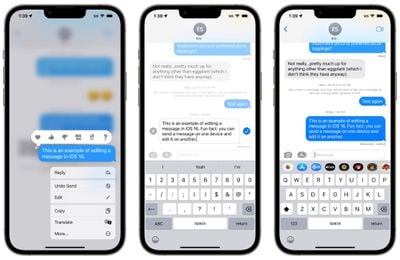
When you send an iMessage in iOS 16, you can edit for up to 15 minutes after it is sent. To edit an iMessage, you just long press on the message that you want to fix, add your edit, and then press the blue checkmark to resend.
imessage editing ios 16
There are some caveats to be aware of when using this feature. It only works with iMessages, not SMS messages, so both people need to have an iPhone for it to work effectively. Edited messages will be repeated for those who are not running iOS 16.

Using the message editing feature as it is intended requires participants to be using Apple's latest updates, including iOS 16, iPadOS 16, macOS Ventura, and watchOS 9. People who are running an earlier operating system or those on Android will see text that says "Edited to [text]" when receiving an edited iMessage.

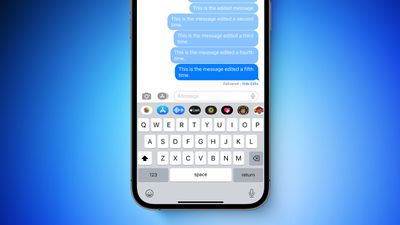
The Messages app provides a history of the iMessage that is edited, so the person on the other end will know what the change was if they tap on the "Edited" text. It's also worth noting that an iMessage can only be edited up to five times before the edit option disappears.
iPhone 13 Editable Messages Feature

iMessage Undo Send

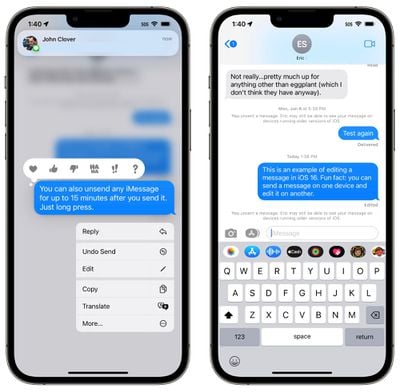
If you send an iMessage and then change your mind, you can use the undo send feature to retract it. You can unsend an iMessage for up to two minutes after sending it.
messages undo send ios 16
As with iMessage editing, iMessage unsending has limitations that you need to be aware of. If you use the undo send feature on a message sent to someone running an earlier version of iOS, it will not work and the message will not be unsent.

In this situation, the person on the other end will not see that you unsent it, even though it will disappear from your iPhone. If someone is running an earlier version of iOS, it will say the following:

"You unsent a message. [Person] may still be able to see your message on devices running older versions of iOS."

For undo send to work, participants need to be running iOS 16, iPadOS 16, macOS Ventura, and watchOS 9 on their devices. iMessage is required, as the feature does not work on SMS messages.

Mark as Unread

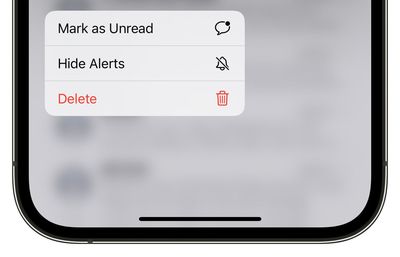
There is a new mark as unread feature in iOS 16, which allows you to mark an SMS message or iMessage as new, so it has the blue dot to remind you to return to it.
ios 16 mark as unread messages
Mark as unread is useful if you get a message and don't have time to read it or address it in the moment because it keeps it as a new message with a notification badge on the Messages app.

To mark a thread as unread, long press on the conversation and then tap on the "Mark as Unread" option.

Recover Deleted Messages

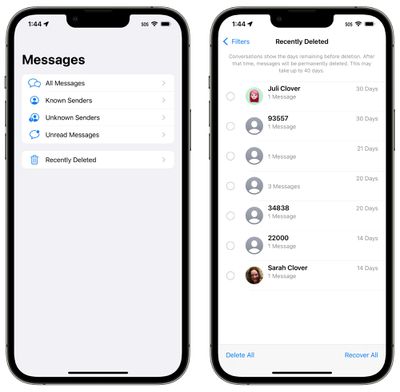
Under the "Filters" interface in the Messages app, there is a new "Recently Deleted" section that aggregates all of the texts that you've deleted. If you accidentally delete a message that you did not mean to delete, you can recover it here.
recently deleted messages ios 16
This interface has dedicated "Delete All" and "Recover All" options for dealing with all of the messages at once, or you can select an individual message and opt to delete it or recover it.

SharePlay Support

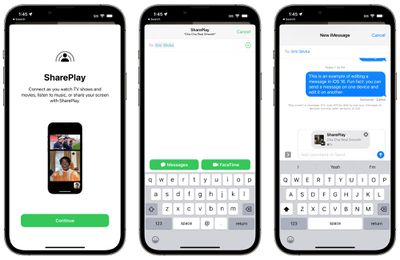
SharePlay, the feature that is designed to let you use apps, watch TV, listen to music, and more with friends and family over FaceTime, has expanded to the Messages app. In any app that supports SharePlay, you can opt to start a SharePlay session with the Messages app.
messages shareplay ios 16
The participants in the SharePlay experience can see the same content, discussing it through iMessage. This is handy for collaborating on various apps, playing games, working out, talking about TV shows and movies, and nearly every other SharePlay interaction. SharePlay is now compatible with both Messages and ‌FaceTime‌, so you can pick which method of communication you prefer.

Collaboration Integration

Collaboration is a new feature built into iOS apps. You can work together with colleagues, friends, or family in Files, Keynote, Numbers, Pages, Notes, Reminders, and Safari, sending an invite to collaborate through Messages.

When a Collaboration has begun, all invited participants will see Messages updates when the shared project in the app is edited. Collaborations can be initiated from Messages or ‌FaceTime‌.

Junk Message Reporting

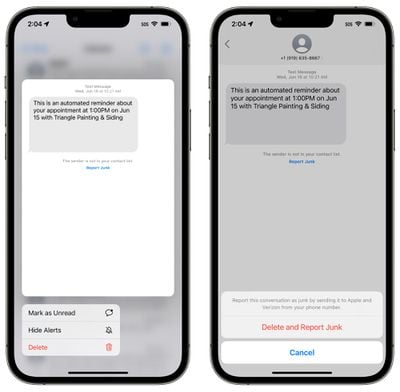
Apple is expanding the built-in "Report Junk" feature in the Messages app to cover SMS/MMS messages, allowing spam messages to be reported to select carriers in the United States.
report junk message ios 16
If you long press on an SMS/MMS message in the Unknown Senders section of the Messages app in ‌iOS 16‌, you can select the "Report Junk" option. Using this option lets you report a message as junk, sending it to Apple and Verizon and deleting the message.

The Report Junk feature was previously available for iMessage, but the option to report SMS/MMS messages to both Apple and carriers is new.

Developer APIs

Apple is making the Shared with You API available to developers, so they can build a dedicated Shared with You section into their apps, which will aggregate app content that you've been sent from friends into that app. So, for example, if a friend sends a Zillow listing, you might be able to see it in a new Shared with You section in the Zillow app.

This is opt-in for third-party apps, and it is an expansion of the Shared with You function that Apple introduced in iOS 15. Shared with You takes Safari links, photos, music, and more, and makes them accessible in the relevant app so you don't miss content from friends.

Apple also has a Messages Collaboration API to allow third-party apps to take advantage of the new Collaboration feature that allows users to communicate in the Messages app while working together in another app.

Guide Feedback

Have questions about the iOS 16 Messages app, know of a feature we left out, or want to offer feedback on this guide? Send us an email here.

Related Forum: iOS 16

Popular Stories

Apple HomeView lineup feature4

Apple Announces 'HomeView' Smart Home Hub

Tuesday October 13, 2026 6:00 am PDT by
Apple today announced the "HomeView," an all-new kind of smart home hub featuring a 7-inch Liquid Retina display and Siri AI. Apple's senior vice president of Worldwide Marketing Greg Joswiak said: Apple HomeView is designed to be shared by everyone in the home yet feel completely personal to each user. It recognizes your face to shift from a household screen to your own experience,...
Apple TV 4K 4th Generation Top View5

New Apple TV 4K Announced With A19 Chip, Updated Siri Remote, More

Tuesday October 13, 2026 6:08 am PDT by
Apple today announced the fourth-generation Apple TV 4K, with key features including an A19 chip, Siri AI support, an updated Siri Remote that has Find My support with Precision Finding, built in far-field microphones, support for surround sound with four HomePods in front and rear pairs, and more. The A19 chip in the new Apple TV 4K delivers up to 50% faster CPU performance and up to twice...

iOS 26 Home Feature

RIP, homeOS

Tuesday October 13, 2026 9:39 am PDT by
MacRumors was first to reveal the name "HomeView" last week, after discovering a trademark filing from a secretive shell company that we correctly suspected was linked to Apple. Apple was likely behind a "homeOS" trademark filing as well, but the company ultimately decided to stick with generic "HomeView software" naming, just like it refers to the HomePod's operating system as "HomePod...


Top Rated Comments

56 months ago
WHY THE HELL IS THE ICON STILL GREEN? IT'S IMESSAGE, ITS SUPPORSED TO BE BLUE!!!!
Score: 9 Votes (Like | Disagree)
56 months ago

release it already for Android. Nobody in the EU is using iMessage cos of that
Plenty of people in the EU are using iMessage.
Score: 6 Votes (Like | Disagree)
tgwaste Avatar
56 months ago
Report junk isn't done properly. You should be able to swipe on the entire conversation and "report junk". You shouldnt have to go it and select a msg in the thread (if any) and report it that way. Thats dumb.
Score: 5 Votes (Like | Disagree)
56 months ago
Also, I think a key question on "mark as unread" is: for those that allow read receipts, does it then change the message as unread for the other user. That would be an amazing feature IMO.
Score: 5 Votes (Like | Disagree)
56 months ago
And yet, still, no RCS support.

Apple: "Apple cares deeply about your security and privacy, more than any other vendor. We want you to have the most seamless, easy, magical experience. That's why we downgrade to SMS when you send messages to Android phones, because we really don't care about your messages anymore once they leave our walled garden. Just look at that green bubble. It means we don't care. Magical."
Score: 4 Votes (Like | Disagree)
56 months ago
With so many features with iOS16, I am sure I will skip this update till 16.2. It is going to be buggy as hell with 16 and 16.1
Score: 3 Votes (Like | Disagree)
Latest Stories
Didn't Pre-Order Apple's HomeView? Here's How Long the Wait is Now
2 hours ago
Apple's $79 iPhone Duo Case Sticks On With Adhesive
2 hours ago
Apple TV 4K and HomePod Mini Price Increases 'Much More Striking' Than New Features
4 hours ago
The MacRumors Show: Was HomeView Worth the Wait?
6 hours ago
Apple Refers to HomeView as 'HomePodDevice' in Legal Document
6 hours ago
Apple Pre-Orders Kick Off With First Discounts on HomeView and Apple TV 4K
8 hours ago
Developers Question Scope of Potential Apple Antitrust Settlement
8 hours ago
iPhone Duo Resold for $5,000 on eBay After Selling Out
8 hours ago
Massive Discounts Hit 2026 MacBook Pro With Up to $800 Off
8 hours ago
iPhone Duo is Sold Out for Christmas as Shipping Estimates Slip to 2027
9 hours ago
Didn't Pre-Order an iPhone Duo Yet? Wait Times Are Significant Now
9 hours ago
First Apple TV 4K Pre-Order Discount Arrives at Amazon
10 hours ago
iPhone Duo Pre-Order Deals: The Best Carrier Offers From AT&T and T-Mobile
10 hours ago
iPhone Duo Now Available to Pre-Order From Apple
10 hours ago
iPhone 18 Pro vs. iPhone Duo Buyer's Guide: Which Should You Choose?
12 hours ago
Apple Store Down Ahead of iPhone Duo Pre-Orders
12 hours ago
Oops, Apple's Website Just Hinted at iPad Mini 8
21 hours ago
OLED MacBook Pro Won't Get M7 Chips Until Late 2027
1 day ago
Apple Pledged $25 Million to Trump's White House Ballroom
1 day ago
Touchscreen MacBook Pro Could Launch on November 6
1 day ago
New Withings Users Must Pay $99/Year for Apple Health Syncing
1 day ago
Meta and Apple Bring Muse Spark Open AI Model to Mac Studio
1 day ago
iPad Mini 8: Apple Has Tested Both 60Hz and 120Hz ProMotion Displays
1 day ago
Apple TV 4K 2022 vs. 2026 Buyer's Guide: All Differences Compared
1 day ago
Apple CEO John Ternus on Early Foldables: 'Kind of Cheap and Crappy'
1 day ago
Greg Joswiak Says Apple Isn't Focused on Making AI for 'Lunatic Fringe'
1 day ago
Amazon Offers $120 Discount on AirPods Max 2, $50 Off AirPods Pro 3
1 day ago
Apple CEO John Ternus Featured on Cover of TIME Magazine: 'New Era'
1 day ago
Apple Announces Deadline to 'Get Ready' to Pre-Order the iPhone Duo
1 day ago
MKBHD is 'Not Convinced' About Apple's New HomeView, Here's Why
1 day ago

🔗 Related Apple News & Rumors

Stay updated with the latest Apple ecosystem news and verified rumors






































