Apple Maps: Complete Guide to iOS 13 - MacRumorsOpen MenuShow RoundupsShow Forums menuVisit ForumsOpen Sidebar
Skip to Content

Apple Maps: Complete Guide to iOS 13

Apple introduced updates to many of the built-in iOS apps in iOS 13, and Maps is no exception. The updated version of Maps has a long list of new features that are designed to make the Apple Maps app better able to compete with mapping apps from other companies.

There's a new Look Around street view level feature, a Collections feature for aggregating lists of your favorite places, a Favorites option for getting to your most frequently traveled places quickly, and some other smaller updates that are worth knowing about.


In this guide, we've highlighted all of the new features that are in the ‌Apple Maps‌ app in iOS 13.

Maps Redesign

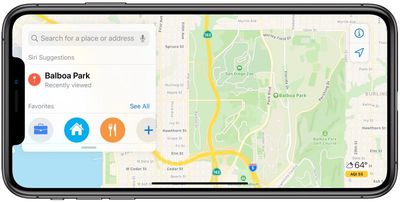
Apple in iOS 12 debuted a rebuilt, updated Maps app that uses an Apple-designed Maps engine to bring more detailed views of things like foliage, pools, buildings, pedestrian pathways, and more.

The work done in iOS 12 is continued in iOS 13 with Apple expanding the new Maps app to the entire United States as of January 2020. Apple now plans to bring the updated Maps app to Europe.
new maps app in iOS 13
Apple on stage when introducing iOS 13 mentioned these map updates and promised improved detailing for roads, beaches, parks, buildings, and more. Maps in iOS 12 overall looks similar to iOS 13 in states where new Maps have already rolled out, but there could be more detail coming in the future and there are some small changes worth pointing out.

Road Hazards and Traffic Conditions

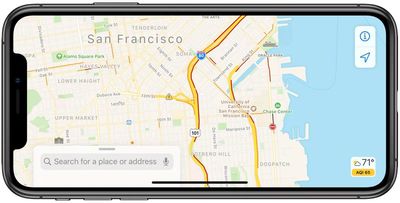
When viewing the main Maps interface, the app now displays road hazards and traffic conditions so you can see the route ahead at a glance. Previously, this information was available, but only when turn-by-turn directions were activated.
traffic conditions in maps in iOS 13
In iOS 13, traffic information is visible on the main map too.

Junction View

iOS 13 adds a Junction View option that's meant to help drivers avoid wrong turns and directional misses by lining them up in the correct lane before a turn or an elevated road.

Siri Directions

Siri gives more natural directions in iOS 13. Instead of saying something like "in 1,000 feet turn left," ‌Siri‌ might instead choose to say "turn left at the next traffic light," which is an easier instruction to follow since there's no distance estimation involved.

Venue Navigation Improvements

When you're navigating to something like a concert at a large venue, ‌Apple Maps‌ now offers up improvements that are better suited towards getting you to your end-point destination.

Real-Time Transit Schedules

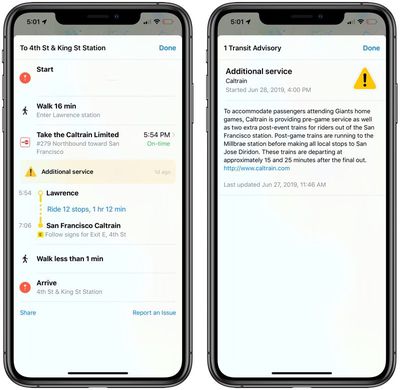
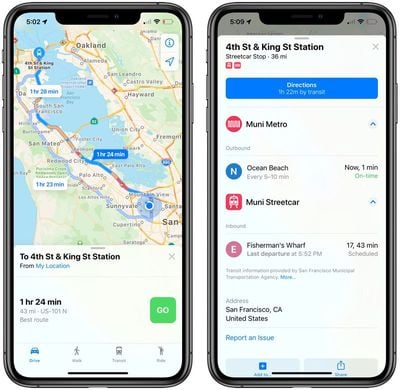
The Maps app now includes real-time transit schedules, arrival times, network stops, and system connections for transit directions to provide better overall route planning.
transit information in maps in iOS 13
Real-time information like outages, cancellations, and other changes are also listed in the ‌Apple Maps‌ app.

real-time notifications of traffic information in iOS 13

ETA Sharing

There's a new option to share your estimated time of arrival with friends, family, and coworkers. Your ETA will update dynamically, changing even when there's a significant traffic delay. This feature was removed from iOS 13 during the later betas, but could be re-added in the future.

Flight Status

Maps is now able to display up-to-the-minute information about flight terminals, gate locations, departure times, and more.

Place Cards for Businesses

Place Cards for businesses have been updated to be more helpful and easier to use. You'll see information like times of Today at Apple sessions when looking up an Apple Store, for example, or movie times when looking up a movie theater.

cards in maps in iOS 13

Look Around

Look Around is a new ‌Apple Maps‌ feature that's designed to be Apple's equivalent of Google Street View. Look Around offers up a street-level view of what's around you or a location you search for in the Maps app.
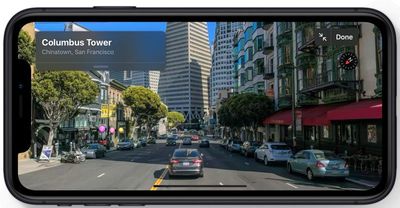
look around in maps in iOS 13
You can use Look Around in the main ‌Apple Maps‌ view whenever there's a pair of binoculars visible. Tapping on the binoculars icon delves into a close-up street level view of the location in a little card, which you can tap again to get to a full screen Look Around view.
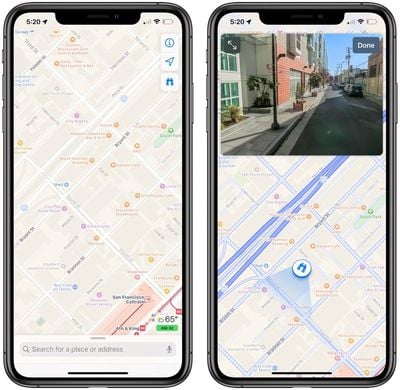
look around in maps in iOS 13
Look Around can also be brought up when searching for specific supported locations by tapping on the Look Around card in the search results.
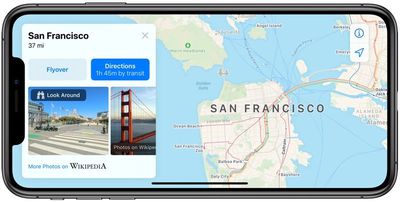
look around in maps in iOs 13
When in Look Around mode, tapping on the display lets you move through the Look Around area, and tapping a spot far off in the distance does a neat zoom in maneuver that's fun to watch.

In Look Around, all notable points of interest, like restaurants, businesses, parks, and more, are highlighted with identifying icons and place names so you can tell what's what.
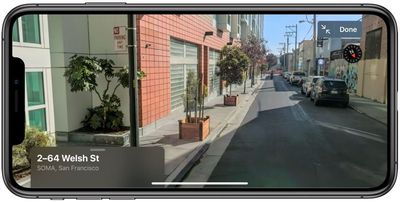
look around in apps in iOS 13
Look Around is limited to areas where a car can go because it's using data captured from a 360-degree camera on a vehicle. That means you can't zoom into areas like parks or beaches, for example, but you can see what's visible from the street.
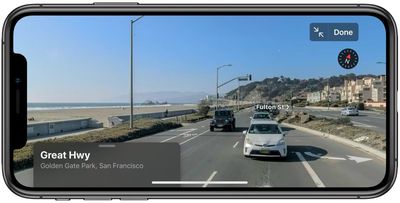
look around in maps in iOS 13
At launch, Look Around was limited to parts of California, Nevada, and Hawaii, but it has since expanded to Los Angeles, Houston, New York City, Boston, Philadelphia, and Washington, D.C. Apple plans to continue the expansion in 2019 and 2020.

Collections

Collections lets you search for and aggregate lists of different locations, such as restaurants you might want to try or places you might want to visit.
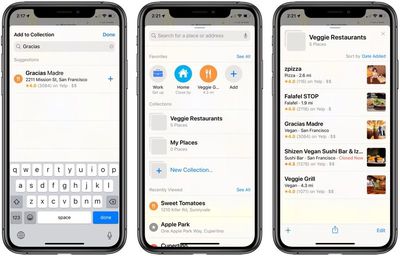
collections in maps in iOS 13
Collection lists can be shared, so you can make up lists of places for friends and family visiting you in your city and then share it with them, for example.

Favorites

Favorites is a new Maps feature that lets you search for specific places and then add them to a list. Favorites are meant for places that you visit frequently, and Home and Work are already added by default.
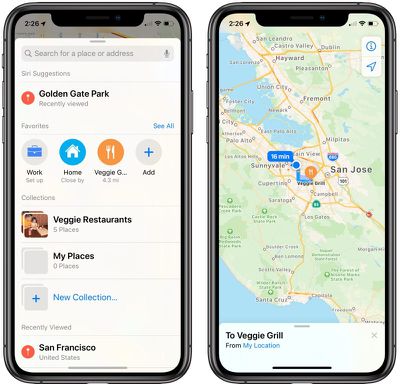
favorites in maps in iOS 13
You can add any place you go to often to the Favorites list, such as a favorite restaurant or coffee shop, or a friend's house. Tapping on one of your Favorites brings up directions to that spot right away, so think of it like a speed dial option for Maps.

Maps Feedback Form

Apple introduced a redesigned customer feedback interface in iOS 13, which is designed to make it easier for ‌Apple Maps‌ users to submit corrections for things like incorrect addresses, business locations, or operating hours.

CarPlay

All of the new features introduced in the Maps app in iOS 13, such as Favorites, Collections, and Junction View have been added to CarPlay. The Maps app in ‌CarPlay‌ also provides updated route planning, search, and navigation.

Guide Feedback

Have questions about Maps, know of an iOS 13 Maps feature we left out, or want to offer feedback on this guide? Send us an email here.


Popular Stories

Apple MacBook Pro with PROLED XDR Display family lineup feature

Apple Announces OLED MacBook Pro With Touch Display

Wednesday October 28, 2026 10:11 am PDT by
Apple today announced a new high-end MacBook Pro, which is available in 14-inch and 16-inch sizes. The new device has a PROLED XDR display that supports touch gestures, and a glowing rear Apple logo. Pricing on the MacBook Pro starts at $2,899 for the 14-inch model and $3,399 for the 16-inch model. Apple says the MacBook Pro has the "world's best display in a pro laptop." The PROLED...
iPhone Duo Display Cracking

Apple Alerts Stores to iPhone Duo's Display Cracking Issue

Friday October 30, 2026 3:20 pm PDT by
In a memo shared with Apple Stores and Apple Authorized Service Providers this week, and later obtained by MacRumors, Apple provided technicians with guidance on how to diagnose and address the iPhone Duo's inner display cracking issue. If a customer reports the issue, Apple advised technicians to inspect the iPhone Duo and repair or replace it in accordance with their standard procedures....


iPad mini OLED feature 1

Apple Executive Comments on New iPad Mini Lacking 120Hz Display

Thursday October 29, 2026 1:47 pm PDT by
While the new iPad mini has an OLED display, the device does not support ProMotion, meaning the display's refresh rate is limited to 60Hz instead of 120Hz. ProMotion support would have allowed for the iPad mini's refresh rate to automatically adjust from 10Hz to 120Hz depending on the content being displayed, but evidently Apple has kept the feature exclusive to the iPad Pro among iPad...

Top Rated Comments

ipedro Avatar
95 months ago
Look Around fills in the last piece that I occasionally still used Google Maps for. Apple not only matched Google but beats it in my opinion. The ease of use of navigating via Flyover and now Look Around is far superior to Street View.

It was all worth the growing pains. Apple owns a critical piece of the data and experience used throughout the entire Apple ecosystem.

Remaining at the mercy of their main competitor would have been a massive strategic mistake. Steve Jobs made the right call moving to an in house Maps app.
Score: 18 Votes (Like | Disagree)
jarman92 Avatar
95 months ago
Every year I SO want to use Apple Maps, but every year I'm disappointed. Currently running iOS 13 beta in Barcelona, and Apple doesn't have one iota of transit info. Haven't even tried POIs but I imagine they're equally terrible :(
Score: 13 Votes (Like | Disagree)
Jeremy3292 Avatar
95 months ago
Unfortunately, none of these features address the main problem which is lack of an extensive database of POIs like Google has. Anyone remember iOS SIX? 7 cycles later and still no dice. Carry on
Score: 12 Votes (Like | Disagree)
utwarreng Avatar
95 months ago
How about the basic ability to plan a trip that stops at multiple destinations? Google Maps has for years allowed me to say "let's go to A, then to B, then to C, then back home." Sometimes when I have a number of different destinations, I just want to put in a list of addresses and have Apple Maps spit back, "this is the most efficient route for you to drive to all of your destinations," or at least let me manually add multiple destinations.
Score: 10 Votes (Like | Disagree)
95 months ago
Outside the US (Heck even outside of California really) Apple Maps is a barren wasteland of nothingness and shouldn't even realistically be offered.
Apple puts zero effort on outside-US.
Score: 7 Votes (Like | Disagree)
95 months ago
I would really like to ditch google maps, but Apple Maps is still 5 years behind google...

* No support for cyclists - In Europe there are many dedicated routes for bikes and e-scooters. Entirely missing.
* POIs of any kind are missing, outdated and difficult to update. I had to send a request 3 times to have a friends business updated despite the obvious (!) wrong entry.
* No direct ratings within the App, relies on 3rd party only.

EDIT: Yeah... missed the most important... as Richard above stated... the missing stops make it a show stopper some use cases.
Score: 6 Votes (Like | Disagree)
Latest Stories
Apple Watch Ultra 4 Hits All-Time Low Price With Amazon's $99 Discount
7 hours ago
Reminder: Apple's Big Discount on Beats 360 Ear Cushions Ends Today
8 hours ago
Here's a New Tour of Apple's HomeView Software
8 hours ago
Apple Reveals New iPad Mini's Battery Capacity
9 hours ago
Top Stories: Apple's Big MacBook Pro, iPad mini and iMac Updates
10 hours ago
'Pluribus' Season 2 Reportedly Starts Production Today
17 hours ago
iPhone 18 Pro Sales Surge in China, Offsetting Decline in U.S. and Japan
17 hours ago
HomeView Software 27.2: Wallpapers, Control Center, and More
1 day ago
Apple Alerts Stores to iPhone Duo's Display Cracking Issue
1 day ago
iOS 27.3 Will Enable These Apple Intelligence Features in China
1 day ago
Apple Says iOS 27.3 Beta Coming Next Week
1 day ago
Apple's Flash Storage Suppliers Are Finally 'Getting Their Revenge'
1 day ago
14 New Things Your iPhone Can Do in iOS 27.2
1 day ago
iPhone Duo Review: One Week Later
1 day ago
Samsung Mocks iPhone Duo Display Cracks in New Ad Campaign
1 day ago
The MacRumors Show: OLED MacBook Pro, iPad Mini 8, and More
1 day ago
MacBook Pro With Touch Display: 15 More Details Revealed
1 day ago
Russia Places Apple on State Surveillance Registry
1 day ago
Halloween Weekend Brings Discounts on Apple Accessories and Pre-Orders
1 day ago
Apple Has Released More Than 25 New Products in the Past Two Months
1 day ago
Local Code Launches as Free, Private AI Assistant Tool for Mac
1 day ago
Apple Acquires Ascend.io
1 day ago
HomePod Mini 2 Launches Today: All the New Features
1 day ago
AirTag 2 4-Pack Drops to New Low Price of $69.99
1 day ago
Rian Johnson's iPhone Camera App Goes Viral
1 day ago
Where Did All the iPhone Duos Go? Mostly to Apple's Stores
2 days ago
Apple's Touchscreen MacBook Pro Could Ship 1.5M Units in 2027
2 days ago
New Apple TV 4K and iPad Mini: RAM Amounts Revealed
2 days ago
Apple Executive Comments on New iPad Mini Lacking 120Hz Display
2 days ago
Here's a Hands-On Look at HomePod Mini 2's New Two-Tone Colors
2 days ago

🔗 Related Apple News & Rumors

Stay updated with the latest Apple ecosystem news and verified rumors