iCloud Shared Photo Library: Everything You Need to Know - MacRumorsOpen MenuShow RoundupsShow Forums menuVisit ForumsOpen Sidebar
Skip to Content

iCloud Shared Photo Library: Everything You Need to Know

With iOS 16, Apple added an iCloud Shared Photo Library to make sharing photos with your friends and family easier than ever. You can create a shared library and then invite any of your friends with an Apple product to view photos, contribute photos, and edit photos.

iOS 16 iCloud Photos Guide Feature
This guide covers all of the features that you need to know about to use the ‌iCloud‌ Shared Photo Library feature.

Creating a Shared Photo Library

After updating to iOS 16.1 or later, you can set up a Shared Library either through the pop-up interface or through the Set-Up option in the Settings section of the Photos app.
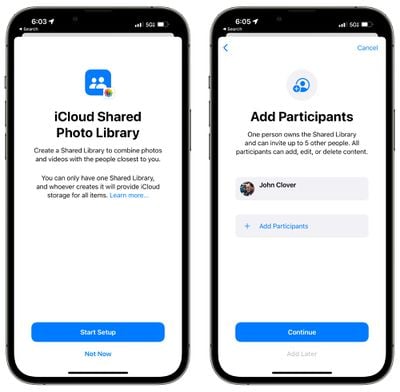
icloud shared photo library setup
Tap on "Add Participants" to select people to share with, inviting them through Messages or through a link.
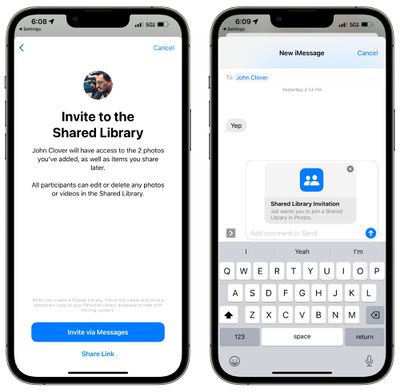
icloud shared photo library invitation
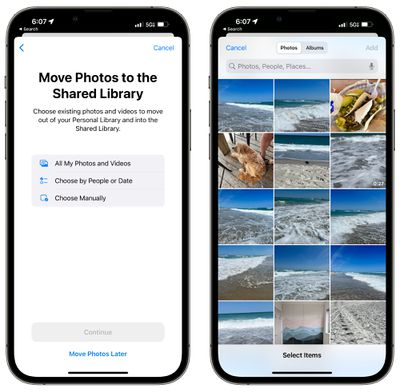
You can choose the images that you want to add to the Shared Library from your own iCloud Photo Library. Options include sharing all photos and videos, photos and videos by person or date, or manually selected photos.
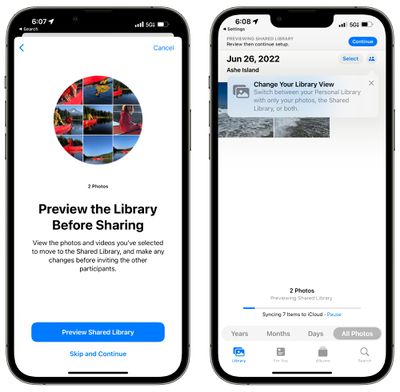
icloud shared photo library library view
You can then preview the content that you've added to the Library before opting to share everything. If it all looks good, tapping on the "Continue" button will create the shared library.

For those who do not have an iPhone or who prefer to work on a Mac or iPad, ‌iCloud‌ Shared Photo Libraries can be created on devices running iPadOS 16.1 or later or macOS Ventura or later as well. On the ‌iPad‌, the setup can be done by following the iPhone instructions, and on Mac, a Shared Library can be created by opening up the ‌Photos‌ app, selecting "Settings," and then choosing the "Start Setup" option.

iCloud Shared Photo Library Capabilities

Each person invited to participate in an ‌iCloud‌ Shared Photo Library can add, edit, caption, favorite, and delete photos, just as if it were their own photo library. There are no limitations, and all participants have the same permissions.

You can opt to get a notification when someone deletes images from the shared library, with the toggle available in the Shared Library heading in the ‌Photos‌ section of the Settings app. When an image is deleted, the person who originally shared the image has the option of moving the image to their personal library rather than having it deleted, and deleted images are stored in the Recently Deleted folder for easy retrieval.
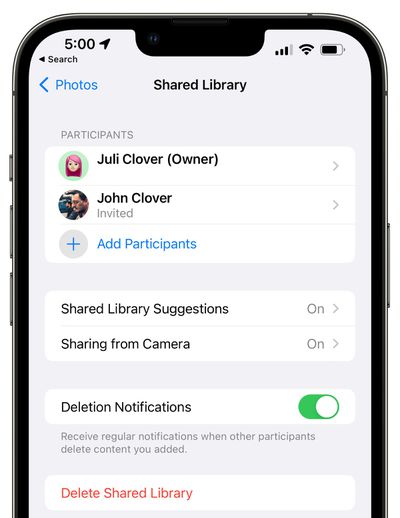
icloud shared photo library delete 1
All tags, metadata, and location information remain accessible on photos added to an ‌iCloud‌ Shared Photo Library, but albums do not transfer over.

iCloud Shared Photo Library Limitations

You can share an ‌iCloud Photo Library‌ with up to five other people, so six people in total can use one library. The person who creates the ‌iCloud‌ Shared Photo Library will be the "host," and their ‌iCloud‌ storage space will be used for the shared photos. You are limited to one ‌iCloud‌ Shared Photo Library and cannot participate in multiple libraries.
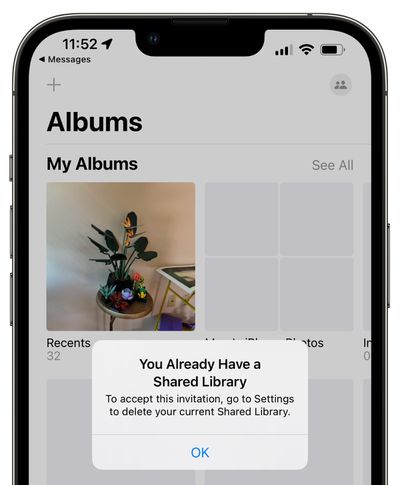
icloud shared photo library limitation
It's worth noting that when you add your personal photos from your library to the shared library, the images are moved from the personal library to the shared library, so ‌iCloud‌ storage space/device storage space is not taken up twice and photos are not duplicated. If you have Optimize Storage turned off, your device will download a copy of all shared photos so you can make a backup on a Mac if desired.

Sharing Photos From Camera

If you're at an event with someone who you share a library with, you can opt to share photos from the camera directly to the library, making all of your shots instantly available to all participants.
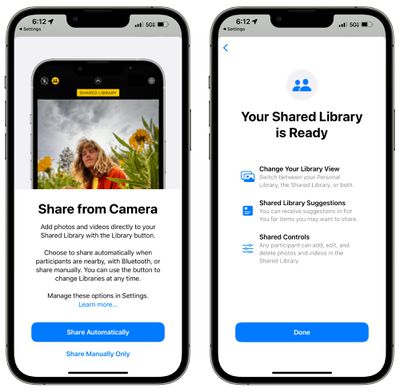
icloud shared photo library share from camera
In the Camera app, you can tap the icon that looks like two people to swap between automatic uploading to the shared library and your personal library.
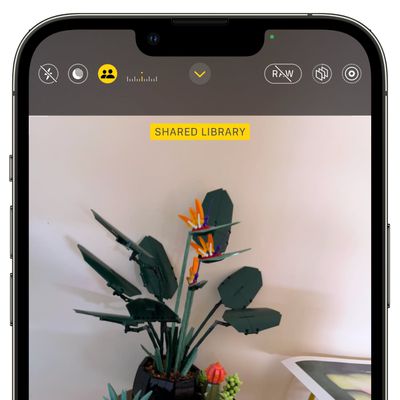
icloud shared photo library camera app

Sharing Options

Sharing can be enabled when participants are nearby using Bluetooth proximity, through the Camera app, or manually, with options available in the Settings app.
icloud shared photo library add images
The iPhone will also suggest content to share in the For You section of the ‌Photos‌ app, but you can turn it off if you want.

With the Settings app, you can turn off Sharing from Camera altogether to get rid of the toggle, or you can opt in to Sharing Automatically, which will automatically add all photos you take to the shared library. The automatic feature uses Bluetooth to determine when someone you share a library with is nearby, and it only uploads when you're with that person.

There's also an opt-in "Share When at Home" feature that always adds photos and videos from the Camera even when other participants are not there.

If you want to upload every photo that you take to the shared library even when not at home or not with a person you share with, there does not appear to be an option for it.

Swapping Between Personal and Shared Library

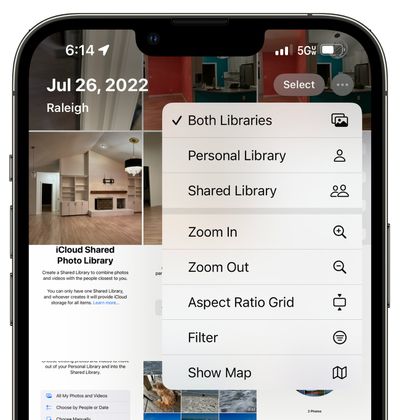
To swap from your main ‌iCloud Photo Library‌ to your Shared ‌iCloud Photo Library‌, you can tap on the three-dot icon in the upper right of the Library view in the ‌Photos‌ app.

icloud shared photo library selection
From there, you can elect to see your Personal Library, your Shared Library, or both at once.

Deleting a Shared Library

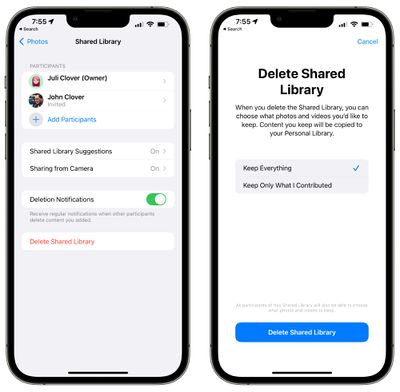
If you are the person who manages the Shared Library, you can opt to delete it in the Settings app. Just go to ‌Photos‌ > Shared Library > Delete Shared Library.
delete shared library
When a Shared Library is deleted, each person who contributed to the library will be able to keep the photos that they added or a copy of all the photos that were in the library at the time that it was deleted.

Shared Memories

‌Photos‌ from the shared library will show up in Memories, Featured ‌Photos‌, and the ‌Photos‌ widget.

Merging iCloud Libraries

Every person who participates in a Shared Library can upload their entire selection of photos and videos to the library, allowing both people to ultimately have the same images on their devices.

In this situation, if there were already shared photos sent by AirDrop or other means, the built-in iOS 16 "Duplicates" feature will detect the extra images and will provide you with an option to remove them. Duplicates are not removed automatically.

You can open up the ‌Photos‌ app on the iPhone and scroll down to the "Utilities" section to access the Duplicates album to merge photos in the Shared Library.

Shared Favorites

Images that are marked as Favorites in the ‌iCloud‌ Shared Photo Library by any participant will also be shown in the Favorites photo album in the ‌Photos‌ app, which is worth noting.

Device Requirements

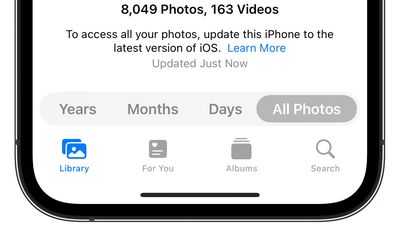
‌iCloud‌ Shared Photo Library requires a minimum of iOS 16, iPadOS 16, or macOS Ventura. On devices running earlier versions of iOS or macOS, ‌iCloud‌ Shared Photo Libraries will not be visible or accessible. If you move your current photo library to a shared library, it will no longer be accessible on older devices.
icloud shared photo library ios 15
On unsupported devices, you will see these message: "To access all your photos, update this Mac to the latest version of macOS" or "To access all your photos, update this iPhone to the latest version of iOS."

Guide Feedback

Have questions about ‌iCloud‌ Shared Photo Library in iOS 16, know of a feature we left out, or want to offer feedback on this guide? Send us an email here.


Related Forum: iOS 16

Popular Stories

iPhone Duo Display Cracking

Apple Alerts Stores to iPhone Duo's Display Cracking Issue

Friday October 30, 2026 3:20 pm PDT by
In a memo shared with Apple Stores and Apple Authorized Service Providers this week, and later obtained by MacRumors, Apple provided technicians with guidance on how to diagnose and address the iPhone Duo's inner display cracking issue. If a customer reports the issue, Apple advised technicians to inspect the iPhone Duo and repair or replace it in accordance with their standard procedures....


iPad mini OLED feature 1

Apple Executive Comments on New iPad Mini Lacking 120Hz Display

Thursday October 29, 2026 1:47 pm PDT by
While the new iPad mini has an OLED display, the device does not support ProMotion, meaning the display's refresh rate is limited to 60Hz instead of 120Hz. ProMotion support would have allowed for the iPad mini's refresh rate to automatically adjust from 10Hz to 120Hz depending on the content being displayed, but evidently Apple has kept the feature exclusive to the iPad Pro among iPad...
Pinched iPad Mini

Apple Avoids Showing Pinched Fingers on iPad Mini Page in South Korea

Thursday October 29, 2026 11:52 am PDT by
In the U.S. and most other countries, Apple's website shows the new iPad mini being held by pinched fingers, but this is not the case in South Korea. The new iPad mini shown with pinched fingers on Apple's website in the U.S. On its South Korean website, Apple simply shows an image of the iPad mini on its own. The new iPad mini shown without pinched fingers on Apple's website in South Korea ...

Top Rated Comments

56 months ago

ill stick with a shared album that doesn't count against my icloud storage limit, thanks
For what it’s worth this is saving me and my wife tons of space. 90% of our photos were duplicated. Shared library detects these and they only count against one users storage now.
Also, these are full quality. The old style shared albums severely degraded quality.
Score: 37 Votes (Like | Disagree)
antiprotest Avatar
56 months ago
The things in my Photos app make Siri blush. I'm not sharing anything, thanks.
Score: 20 Votes (Like | Disagree)
nutmac Avatar
56 months ago

ill stick with a shared album that doesn't count against my icloud storage limit, thanks
Assuming you and your wife are on the same iCloud account, iCloud Shared Photo Library shouldn't use extra storage space. As a plus, using the feature will detect duplicate photos and videos which can reduce the storage used.

I am personally not a fan of shared album as it significantly degrades the quality. iPhone takes photos at a resolution up to 4032 by 3024 (12 MP). This will be reduced to 2048 by 1536 (3 MP), 4 times reduction! Videos are reduced to 720p, limited to 15 minutes in duration.
Score: 13 Votes (Like | Disagree)
56 months ago
My wife and I started using Adobe Lightroom Cloudy a few years ago so that we could automatically have a common library of our photos and edits on all our devices. I will probably come back to Apple Photos when iOS16/macOS13 is available on all our devices.

The new Shared Library is certainly not for everyone, and doesn't replace shared albums, but there are a lot of people like me who are really looking forward to this, and have been missing it for years.
Score: 11 Votes (Like | Disagree)
56 months ago
No average user is going to figure out how to use this and understand what is going on. The idea a photo actually has to be “moved” from your own library into the shared library is ridiculous… a pointer should simply be used to the original. Even worse, anyone can delete your original content at that point and you wouldn’t have another copy.
Score: 10 Votes (Like | Disagree)
DeepIn2U Avatar
56 months ago
Thanks for sharing Apple's documentation.

MAJOR issue:
Apple's photo library currently has alias' pointing to the actual photo in YOUR library.
Allowing others to delete from SHARED library without SPECIFICALLY being clear if deleted photo from someone else does NOT affect the original photo from YOUR library is a terrible oversight!
Score: 10 Votes (Like | Disagree)
Latest Stories
Apple Watch Ultra 4 Hits All-Time Low Price With Amazon's $99 Discount
12 hours ago
Reminder: Apple's Big Discount on Beats 360 Ear Cushions Ends Today
12 hours ago
Here's a New Tour of Apple's HomeView Software
12 hours ago
Apple Reveals New iPad Mini's Battery Capacity
14 hours ago
Top Stories: Apple's Big MacBook Pro, iPad mini and iMac Updates
15 hours ago
'Pluribus' Season 2 Reportedly Starts Production Today
21 hours ago
iPhone 18 Pro Sales Surge in China, Offsetting Decline in U.S. and Japan
22 hours ago
HomeView Software 27.2: Wallpapers, Control Center, and More
1 day ago
Apple Alerts Stores to iPhone Duo's Display Cracking Issue
1 day ago
iOS 27.3 Will Enable These Apple Intelligence Features in China
1 day ago
Apple Says iOS 27.3 Beta Coming Next Week
1 day ago
Apple's Flash Storage Suppliers Are Finally 'Getting Their Revenge'
1 day ago
14 New Things Your iPhone Can Do in iOS 27.2
1 day ago
iPhone Duo Review: One Week Later
1 day ago
Samsung Mocks iPhone Duo Display Cracks in New Ad Campaign
1 day ago
The MacRumors Show: OLED MacBook Pro, iPad Mini 8, and More
1 day ago
MacBook Pro With Touch Display: 15 More Details Revealed
1 day ago
Russia Places Apple on State Surveillance Registry
2 days ago
Halloween Weekend Brings Discounts on Apple Accessories and Pre-Orders
2 days ago
Apple Has Released More Than 25 New Products in the Past Two Months
2 days ago
Local Code Launches as Free, Private AI Assistant Tool for Mac
2 days ago
Apple Acquires Ascend.io
2 days ago
HomePod Mini 2 Launches Today: All the New Features
2 days ago
AirTag 2 4-Pack Drops to New Low Price of $69.99
2 days ago
Rian Johnson's iPhone Camera App Goes Viral
2 days ago
Where Did All the iPhone Duos Go? Mostly to Apple's Stores
2 days ago
Apple's Touchscreen MacBook Pro Could Ship 1.5M Units in 2027
2 days ago
New Apple TV 4K and iPad Mini: RAM Amounts Revealed
2 days ago
Apple Executive Comments on New iPad Mini Lacking 120Hz Display
2 days ago
Here's a Hands-On Look at HomePod Mini 2's New Two-Tone Colors
2 days ago

🔗 Related Apple News & Rumors

Stay updated with the latest Apple ecosystem news and verified rumors