

Here's How Interactive Widgets Work in macOS Sonoma - MacRumorsOpen MenuShow RoundupsShow Forums menuVisit ForumsOpen Sidebar
Skip to Content

Here's How Interactive Widgets Work in macOS Sonoma

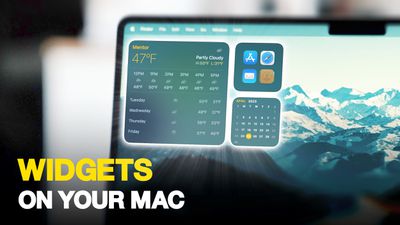
In macOS Sonoma, Apple has changed the widgets landscape. No longer do widgets have to be hidden offscreen and largely forgotten in the Notifications Center panel. Now they live right on your desktop – and they're interactive, too.
Widgets on Your Mac Thumb 3
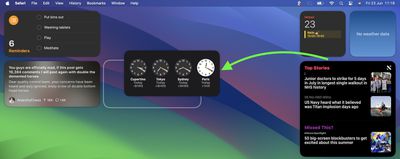
It's worth noting from the off that widgets can still be parked in Notification Center, but now they can also be dragged out onto the desktop. The first widget can be placed anywhere, then Apple provides placement guidance for subsequent widgets by displaying a widget-shaped outline, indicating where they can be snapped into position in relation to the others.
Screenshot 2023 06 23 at 11
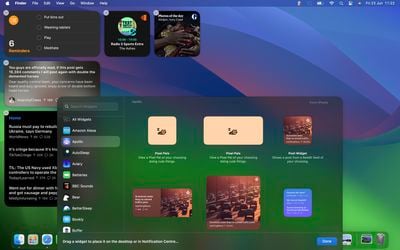
Alternatively, if you right-click on an empty space on the desktop, the menu that appears includes a new "Edit Widgets..." option. Selecting this brings up a widget gallery, which – thanks to a new Continuity feature between Apple devices – also includes widgets from your iPhone in all available sizes. So even if you don't have the corresponding Mac app, you can still use the iOS widget right on your desktop. Simply drag it from the gallery into an available space.
widgets macos
If you're running the macOS Sonoma beta, trying out iPhone widgets is a good way to get used to their interactivity until third-party developers have a chance to bake this into their Mac widgets. As it stands, only Apple's own widgets offer (sometimes buggy) interactions.

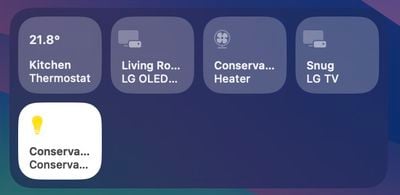
In the Home app widget, for example, you can control specific accessories by clicking the individual buttons to turn them on and off.
home widget
If you right-click a widget, any available customization options appear in the contextual menu. Widgets are available in Small, Medium, and Large sizes, and all include an option to "Remove Widget" if you want to get rid of it.
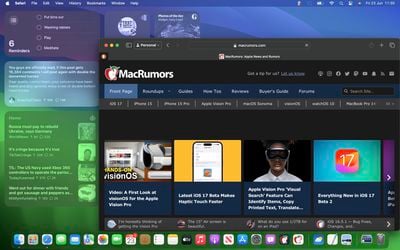
widgets fade
When not in use, widgets fade into the background by taking on the color of your wallpaper, so you can concentrate on the active app or window. There's also an option in System Settings to change the widget style to from full color to Monochrome, for a more uniform look.

Widgets have evolved in macOS Sonoma. By bringing them in from the dark and out into the open workspace of your desktop, users are actively encouraged to work alongside them. What are your thoughts on Apple's new take on Mac widgets? Are you more likely to use them in their new guise? Let us know in the comments.


Related Forum: macOS Sonoma

Popular Stories

iOS 27 Next to iPhone

Here's When iOS 27 Rolls Out Today in Every Time Zone [Update: It's Out]

Sunday September 13, 2026 3:00 am PDT by
Update 10:04 a.m.: iOS 27 is rolling out now, though it may take a bit for all users to see it, so keep checking! Apple is about to release iOS 27, which will finally deliver more advanced Siri AI capabilities as well as a variety of other refinements, improvements, and new features to iPhones. It's Apple's biggest software update of the year, and Apple announced at Wednesday's iPhone event...
iOS 27 Icon iPhone

iOS 27 Available Now With These 8 New Features

Monday September 14, 2026 9:00 am PDT by
Update — 10 a.m. Pacific Time: Apple has released iOS 27. During its iPhone 18 Pro and iPhone Duo event last week, Apple announced that iOS 27 will be released widely on Monday, September 14. iOS 27 should be available around 10 a.m. Pacific Time / 1 p.m. Eastern Time today via the Settings app, under General → Software Update. Below, we have highlighted eight new features and...
deep black iphone 18 pro

Apple Says iPhone 18 Pro Max Sold in U.S. Differs in One Way

Saturday September 12, 2026 3:27 pm PDT by
As noted by Nicolas Lellouche, who writes for the French tech website Numerama, Apple has updated its tech specs pages for the iPhone 18 Pro and iPhone 18 Pro Max to clarify which models are equipped with its new C2 cellular modem and where. Apple now says the iPhone 18 Pro has a C2 modem worldwide, while the iPhone 18 Pro Max uses the chip in every country except for the U.S. According...

Top Rated Comments

therunningman Avatar
42 months ago

I'm surprised it has taken Apple this long to bring back widget functionality on the Mac desktop.
Absolutely!


Attachment Image
Score: 36 Votes (Like | Disagree)

ratbastard Avatar
42 months ago
Sounds a lot like an updated version of Dashboard.
Score: 31 Votes (Like | Disagree)
contacos Avatar
42 months ago

I'm surprised it has taken Apple this long to implement widget functionality on the Mac desktop.

I'm surprised it has taken Apple this long to bring back widget functionality on the Mac desktop.
Score: 24 Votes (Like | Disagree)
gwhizkids Avatar
42 months ago

Stop cluttering my desktop.
Active Desktop went nowhere, I highly doubt this will go anywhere either.
Easy response: just don’t add any widgets. Problem solved.

Not sure why you would deny this to all the rest of us who actually like this feature though.
Score: 22 Votes (Like | Disagree)
TheYayAreaLiving 🎗️ Avatar
42 months ago
Seems like you can fill your entire desktop with Widgets on Sonoma!

Check it out! 👇


Attachment Image
Score: 14 Votes (Like | Disagree)
adrianlondon Avatar
42 months ago
What's good about these (and yes, they're available on Intel macs - it's what I have) is that they're widgets from my phone's apps.

They keep themselves updated by magic (I have Bluetooth turned off on my phone and laptop). OK, it's via iCloud of course.

For example, I have desktop widgets now from iOS apps Readdle Calendars and Pedometer. They keep in sync with the phone.

Hint: Turn on the monochrome mode for widgets in Settings. They look great. You can duplicate them (in colour) in the Notification Centre thing if you wish.


Attachment Image
Score: 13 Votes (Like | Disagree)

🔗 Related Apple News & Rumors

Stay updated with the latest Apple ecosystem news and verified rumors











































