How to Disable Apple's Performance Management Features in Older iPhones in the iOS 11.3 Beta - MacRumorsOpen MenuShow RoundupsShow Forums menuVisit ForumsOpen Sidebar
Skip to Content

How to Disable Apple's Performance Management Features in Older iPhones in the iOS 11.3 Beta

by

Starting with the second beta of iOS 11.3, Apple has introduced a new "Battery Health" feature that's designed to provide you with more information about the state of your battery and whether or not it's impacting device performance.

appleiphonebatteryicon
If your iPhone has a degraded battery that is leading to throttling issues, the "Battery Health" section will let you know about it, and it will provide an option to turn off performance management to put a stop to any throttling that's going on.

There are, however, some nuances to this feature that you need to know about, which we'll outline below.

When Installing iOS 11.3

When you first install the iOS 11.3 update, all performance management features that might have been enabled are automatically disabled. So when you first install the beta, you don't need to do anything because performance management is turned off.

You will, however, need to watch out for an unexpected shutdown that turns your device off, because if this happens and you have a bad battery, performance management will be turned back on. More on this below.

Accessing Battery Health

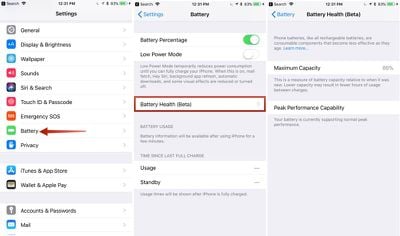
You can check out the status of your battery in the new Battery Health section, which will tell you the maximum capacity of the battery in your iPhone and whether or not it's running at peak performance capacity. Here's how to get to it:

  1. Open up the Settings app.
  2. Scroll down to "Battery" and tap it.batteryhealthsettings
  3. Tap on "Battery Health."

All the info you need to know about your battery is listed here. Maximum Capacity will let you know how your battery is performing overall, and it directly correlates to how long your iPhone will last on a single charge.

Peak Performance Capability will let you know if a degraded battery has resulted in performance slowdowns.

What it Looks Like When Your Device Running Normally

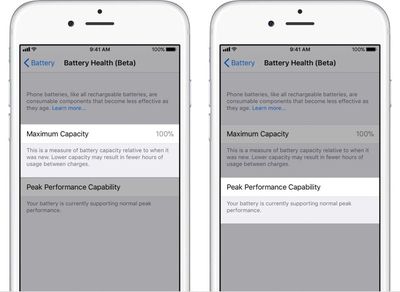
When your iPhone is running as normal, under the "Peak Performance Capability" section, it will say "Your battery is currently supporting normal peak performance."
batteryhealthnormal
You may still have somewhat degraded Maximum Battery capacity as this number slowly declines after charging cycles, but throttling does not kick in until the battery becomes severely degraded and can no longer offer enough power to support spikes in processor usage.

What it Looks Like if You Have a Bad Battery

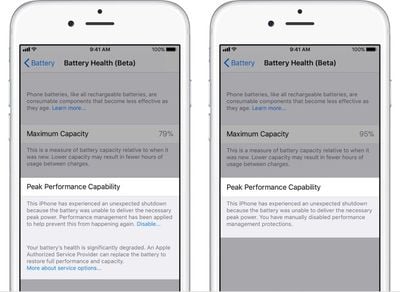
If you have a bad battery, it will say "Your battery's health is significantly degraded," and it will let you know that an Apple Authorized Service Provider can replace the battery to restore full performance.
batteryhealthtoggle
It will also tell you if performance management features have been turned on, and it will provide an option to turn them off.

What Happens When You Have an Unexpected Shutdown

As mentioned above, all performance management features are disabled automatically upon installing iOS 11.3. If your device has a bad battery and it shuts down because of it, performance management will be automatically enabled.

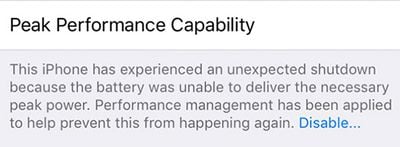
If this happens, you will see the following message under "Peak Performance Capability" in Battery Health.

"This iPhone has experienced an unexpected shutdown because the battery was unable to deliver the necessary peak power. Performance management has been applied to prevent this from happening again."
iphoneshutdown
If you have an unexpected shutdown AND your battery capacity is significantly degraded, you'll see a slightly different message suggesting an immediate battery replacement.
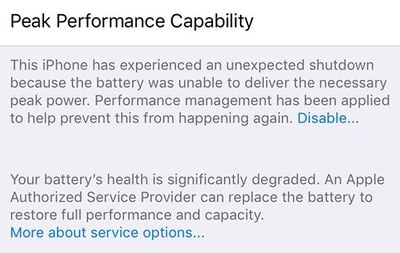
iphonedegradedbatterymessage

How to Disable Performance Management if Your Battery is Bad

After experiencing an unexpected shutdown, performance management is turned on automatically on your iPhone. You will, however, see a small "Disable" option when this happens, and if you tap it, you'll be given the option to disable performance management.
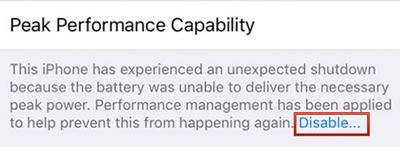
iphoneperformancemanagementdisableoption
Disabling performance management will turn off any throttling that's been applied, but it will leave your device vulnerable to future unexpected shutdowns.

You will not see the option to disable performance management until your device has experienced at least one unexpected shutdown, and once you disable it, there is no option to turn it on again.
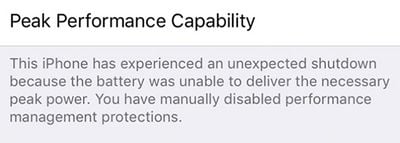
iphoneperformancemanagementdisabled
If your iPhone shuts down again while performance management is disabled, though, performance management will automatically turn it on again.

This means you will need to turn performance management off again each time your device experiences an unexpected shutdown, as Apple believes slower performance is preferable to sudden losses of power.

How to Permanently Disable Performance Management

If you have a device with a bad battery that is experiencing unexpected shutdowns and is subjected to Apple's performance management feature, the only permanent solution is to get a new battery.

Having your battery replaced will restore an older iPhone to full working order, with maximum capacity and performance capabilities.

Apple is offering $29 battery replacements for the iPhone 6 and newer through the end of 2018. Your battery does not need to be experiencing shutdowns to be replaced - you can also get a replacement for a battery that's not operating at maximum capacity, no questions asked. You can get one $29 battery replacement per device.

Newer devices like the iPhone 8, iPhone 8 Plus, and iPhone X that have a high maximum capacity near 100% don't need replacement, but at levels below 90%, it could be worth getting a new battery while Apple is still offering them at a discounted price. To get a battery replacement, contact Apple Support.

If you have AppleCare+ or are under your one-year device warranty and have a battery that's below 80 percent, you won't even need to pay the $29 fee -- that's considered a defective battery and Apple will replace it for free.
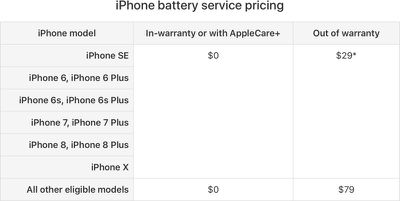
applebatteryservicepricing

Devices Impacted by Performance Management

Performance management features have been installed on the iPhone 6, 6 Plus, 6s Plus, 7, 7 Plus, and SE. On other iPhones, like the iPhone 8, 8 Plus, and X, you will be able to see readings for Maximum Capacity and Peak Performance Capability, but you won't need to worry about throttling or unexpected shutdowns.


Related Forum: iPhone

Top Rated Comments

114 months ago
For some reason, I just can't get past that this is all a bunch of BS.
Score: 11 Votes (Like | Disagree)
114 months ago
For some reason, I just can't get past that this is all a bunch of BS.
Are you a battery chemist?
[doublepost=1517955873][/doublepost]
Your phone is fine. The OS power management "feature" is not.

Next steps?

1. Implement user accessible fix
2. Manufacture more unexpected shut downs.

3. Require user to reset switch manually every time.
4. Sell more phones.

I'm no less cynical about this issue after seeing the work around.

Huh. Who would have thought that batteries wear out? Yeah it’s some Apple conspiracy to sell more phones because they are on the ropes financially, right? Come on.
Score: 10 Votes (Like | Disagree)
realeric Avatar
114 months ago
Apple is still doing it wrong. Unexpected shutdown is caused by defective hardwares but Apple is trying to cover it up with a software patch. Replace them all free, Apple. It’s a design defect.
Score: 10 Votes (Like | Disagree)
114 months ago
“...but throttling does not kick in until the battery becomes severely degraded”

Maybe I’ve just got a bad phone, but my battery health is 88%(info from Apple) and my iPhone 6s is throttled very often... To me, 88% shouldn’t warrant the kind of throttling that they are doing. It’s especially not “severely degraded.”

I get the optimal experience argument with the shut off issue, but it seems like the throttling is more prominent than they say it is and sugar coating their power issues is just letting them get away with it.
Score: 10 Votes (Like | Disagree)
keysofanxiety Avatar
114 months ago
“...but throttling does not kick in until the battery becomes severely degraded”

Maybe I’ve just got a bad phone, but my battery health is 88%(info from Apple) and my iPhone 6s is throttled very often... To me, 88% shouldn’t warrant the kind of throttling that they are doing. It’s especially not “severely degraded.”
It depends what you class as “throttled” when your battery performance is fine. No iPhone CPU, or mobile CPU for that matter, would run at the maximum frequency at all times when it’s not necessary, otherwise you’ll be burning through your battery in no time.

The OS will always have some features to maximise battery life if it’s on standby or not running intensive apps. Similarly, if you’re experiencing performance issues such as UI lag on a newer OS then this may not necessarily be remedied by higher CPU clockspeed: the bottleneck could be RAM, graphics, or simply the age of the hardware on a more resource-intensive OS.

Don’t take this as an apologist remark. It’s just a gentle reminder that clockspeed below the max frequency when using your phone doesn’t immediately mean it’s throttled. Think the max quoted frequency as Intel’s “turbo boost”. It’ll rarely hit that with normal usage.
Score: 6 Votes (Like | Disagree)
114 months ago
seems pretty comprehensive - looks like Apple got all the situations you would want to know about your battery.
Score: 5 Votes (Like | Disagree)

Popular Stories

iPhone Duo Display Cracking

Apple Alerts Stores to iPhone Duo's Display Cracking Issue

Friday October 30, 2026 3:20 pm PDT by
In a memo shared with Apple Stores and Apple Authorized Service Providers this week, and later obtained by MacRumors, Apple provided technicians with guidance on how to diagnose and address the iPhone Duo's inner display cracking issue. If a customer reports the issue, Apple advised technicians to inspect the iPhone Duo and repair or replace it in accordance with their standard procedures....
iPad mini OLED feature 1

Apple Executive Comments on New iPad Mini Lacking 120Hz Display

Thursday October 29, 2026 1:47 pm PDT by
While the new iPad mini has an OLED display, the device does not support ProMotion, meaning the display's refresh rate is limited to 60Hz instead of 120Hz. ProMotion support would have allowed for the iPad mini's refresh rate to automatically adjust from 10Hz to 120Hz depending on the content being displayed, but evidently Apple has kept the feature exclusive to the iPad Pro among iPad...
Pinched iPad Mini

Apple Avoids Showing Pinched Fingers on iPad Mini Page in South Korea

Thursday October 29, 2026 11:52 am PDT by
In the U.S. and most other countries, Apple's website shows the new iPad mini being held by pinched fingers, but this is not the case in South Korea. The new iPad mini shown with pinched fingers on Apple's website in the U.S. On its South Korean website, Apple simply shows an image of the iPad mini on its own. The new iPad mini shown without pinched fingers on Apple's website in South Korea ...
Latest Stories
Apple Watch Ultra 4 Hits All-Time Low Price With Amazon's $99 Discount
17 hours ago
Reminder: Apple's Big Discount on Beats 360 Ear Cushions Ends Today
17 hours ago
Here's a New Tour of Apple's HomeView Software
17 hours ago
Apple Reveals New iPad Mini's Battery Capacity
18 hours ago
Top Stories: Apple's Big MacBook Pro, iPad mini and iMac Updates
19 hours ago
'Pluribus' Season 2 Reportedly Starts Production Today
1 day ago
iPhone 18 Pro Sales Surge in China, Offsetting Decline in U.S. and Japan
1 day ago
HomeView Software 27.2: Wallpapers, Control Center, and More
1 day ago
Apple Alerts Stores to iPhone Duo's Display Cracking Issue
1 day ago
iOS 27.3 Will Enable These Apple Intelligence Features in China
1 day ago
Apple Says iOS 27.3 Beta Coming Next Week
1 day ago
Apple's Flash Storage Suppliers Are Finally 'Getting Their Revenge'
2 days ago
14 New Things Your iPhone Can Do in iOS 27.2
2 days ago
iPhone Duo Review: One Week Later
2 days ago
Samsung Mocks iPhone Duo Display Cracks in New Ad Campaign
2 days ago
The MacRumors Show: OLED MacBook Pro, iPad Mini 8, and More
2 days ago
MacBook Pro With Touch Display: 15 More Details Revealed
2 days ago
Russia Places Apple on State Surveillance Registry
2 days ago
Halloween Weekend Brings Discounts on Apple Accessories and Pre-Orders
2 days ago
Apple Has Released More Than 25 New Products in the Past Two Months
2 days ago
Local Code Launches as Free, Private AI Assistant Tool for Mac
2 days ago
Apple Acquires Ascend.io
2 days ago
HomePod Mini 2 Launches Today: All the New Features
2 days ago
AirTag 2 4-Pack Drops to New Low Price of $69.99
2 days ago
Rian Johnson's iPhone Camera App Goes Viral
2 days ago
Where Did All the iPhone Duos Go? Mostly to Apple's Stores
2 days ago
Apple's Touchscreen MacBook Pro Could Ship 1.5M Units in 2027
2 days ago
New Apple TV 4K and iPad Mini: RAM Amounts Revealed
2 days ago
Apple Executive Comments on New iPad Mini Lacking 120Hz Display
3 days ago
Here's a Hands-On Look at HomePod Mini 2's New Two-Tone Colors
3 days ago

🔗 Related Apple News & Rumors

Stay updated with the latest Apple ecosystem news and verified rumors