How to Use App Privacy Report in the iOS 15.2 Beta - MacRumorsOpen MenuShow RoundupsShow Forums menuVisit ForumsOpen Sidebar
Skip to Content

How to Use App Privacy Report in the iOS 15.2 Beta

Apple in the iOS 15.2 beta introduced App Privacy Report, a feature that was first shown off at WWDC. App Privacy Report is designed to provide users with information on how often apps are accessing sensitive info provided to them through privacy permissions, such as location, contacts, camera, microphone, and photos.
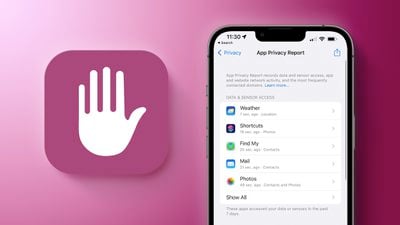
App Privacy Feature 2
Apple also displays network activity, letting you know which domains apps are contacting in the background.

How to Turn on App Privacy Report

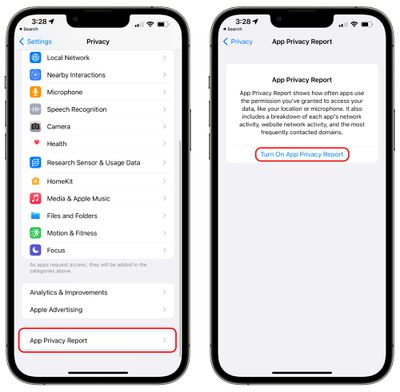
App Privacy Report can be enabled in the Settings app by following these instructions.

  1. Open up the Settings app.
  2. Scroll down and tap on Privacy.
  3. In the Privacy section of the Settings app, scroll down and tap on App Privacy Report. app privacy report turn on
  4. Tap on Turn on App Privacy Report.

If you already had "Record App Activity" enabled in the iOS 15/iOS 15.1 updates, App Privacy Report will be automatically on and it will already be populated with data. If you did not, you may need to use apps and websites for a few minutes before you start seeing data.

Using App Privacy Report

Apple shows data from the last seven days, and the app is split up into several sections to make it easier to get to what you want to know.
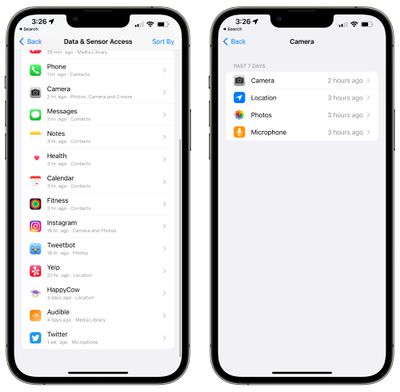
app privacy report camera

Data & Sensor Access

In this section, Apple provides a list of apps that have accessed sensors and data granted to them through privacy permissions, so your most sensitive information.
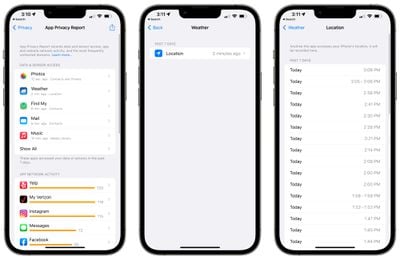
app privacy report data
Data & Sensor access will tell you when apps have accessed the following:

  • Contacts
  • Location
  • Photos
  • Camera
  • Microphone
  • Media Library

If you tap on an individual app and then tap on the permission that you want to view more about, App Privacy Report will give you a list of every time the app accessed the data in question.

App Network Activity

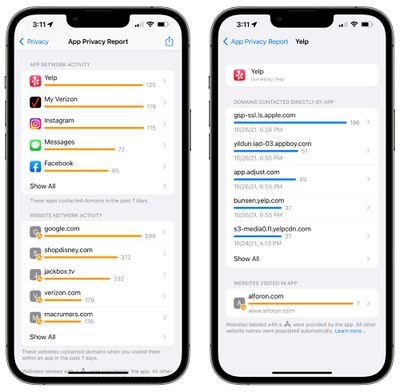
With App Network Activity, you can view a list of all of the different domains that your apps have contacted across the last seven days.
app privacy report app network
This includes various internal domains used by apps, but it also lets you see what third-party websites and services are accessed, such as tracking or analytics tools.

You can tap on any app in the list to see a rundown of all of the domains that have been contacted. If you have Instagram installed, for example, you'll see URLs for things like DoubleClock, Google Analytics, Google Tag Manager, and more, along with internal Instagram and Facebook URLs.

At the bottom of each app's data, you can also get a list of the web sites that you visited within the app.

Website Network Activity

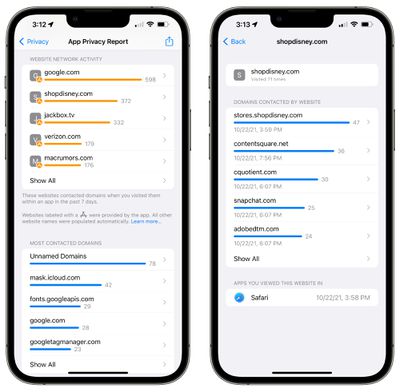
Website Network Activity is basically identical to App Network Activity, but it shows you all of the domains contacted by the websites that you visited in Safari and other apps.
app privacy report website network activity
This will show you all of the different trackers and analytics sites that websites are using.

Most Contacted Domains

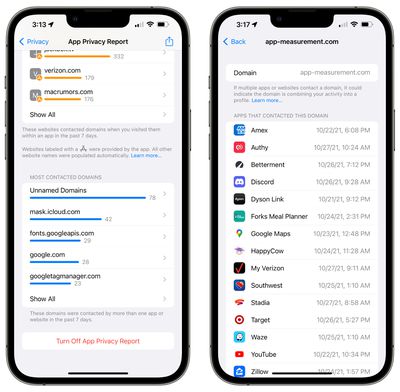
Most Contacted Domains is an aggregated list of the domains that apps have contacted most often, and it is usually populated by various trackers and analytics domains.
app privacy report contacted domains
In this section, you can tap on any of the domains in the list to see which apps or websites used that particular domain.

How to Turn Off App Privacy Report

If you don't want to use App Privacy Report, you can follow these steps:

  1. Open up the Settings app.
  2. Scroll down and tap on Privacy.
  3. In the Privacy section of the Settings app, scroll down and tap on App Privacy Report.
  4. Tap on Turn Off App Privacy Report.

Note that turning off App Privacy Report will delete all collected data. Once it's turned on again, Apple will again begin aggregating data from apps.

Guide Feedback

Have questions about App Privacy Report, know of a feature we left out, or want to offer feedback on this guide? Send us an email here.


Related Forum: iOS 15

Popular Stories

Apple HomeView lineup feature1

Apple Announces 'HomeView' Smart Home Hub

Tuesday October 13, 2026 6:00 am PDT by
Apple today announced the "HomeView," an all-new kind of smart home hub featuring a 7-inch Liquid Retina display and Siri AI. Apple's senior vice president of Worldwide Marketing Greg Joswiak said: Apple HomeView is designed to be shared by everyone in the home yet feel completely personal to each user. It recognizes your face to shift from a household screen to your own experience,...
Apple TV 4K 4th Generation feature4

New Apple TV 4K Announced With A19 Chip, Updated Siri Remote, More

Tuesday October 13, 2026 6:08 am PDT by
Apple today announced the fourth-generation Apple TV 4K, with key features including an A19 chip, Siri AI support, an updated Siri Remote that has Find My support with Precision Finding, built in far-field microphones, support for surround sound with four HomePods in front and rear pairs, and more. The A19 chip in the new Apple TV 4K delivers up to 50% faster CPU performance and up to twice...

iOS 26 Home Feature

RIP, homeOS

Tuesday October 13, 2026 9:39 am PDT by
MacRumors was first to reveal the name "HomeView" last week, after discovering a trademark filing from a secretive shell company that we correctly suspected was linked to Apple. Apple was likely behind a "homeOS" trademark filing as well, but the company ultimately decided to stick with generic "HomeView software" naming, just like it refers to the HomePod's operating system as "HomePod...


Top Rated Comments

BWhaler Avatar
65 months ago
Great feature. Thank you Apple.

Next release, please give us:

1. iCloud full encryption
2. IP filtering for apps, not just Safari and Mail
3. Make it impossible for Facebook and Google and the other dark data mining companies to fingerprint our devices.
Score: 9 Votes (Like | Disagree)
65 months ago
Does it tell us how often our iCloud photos are being examined?
Score: 5 Votes (Like | Disagree)
Populus Avatar
65 months ago
Hey, Juli, I wholeheartedly appreciate all this posts explaining this new privacy focused feature.
As I already said on another post, this will probably make me jump to iOS 15, as I don’t quite trust the Privacy sheets on the App Store. This -I assume- is much more reliable.

Thank you!
Score: 4 Votes (Like | Disagree)
NightFox Avatar
65 months ago
A good feature, but I think people are overestimating its impact. the vast majority of iPhone users either aren't going to know this feature exists or won't ever use it. Then there's the 'little knowledge is a dangerous thing' - does anyone remember when custom keyboard apps were first allowed and the panic the system access requests caused? It's not always readily apparent when an app legitimately needs access to a resource to work properly.
Score: 3 Votes (Like | Disagree)
zorinlynx Avatar
65 months ago
Holy crap, this is astounding. Aside from the privacy benefits, I can see this being good for helping people track down unusual battery drain. If there's stuff hitting the network in the background that would explain it for a lot of people.

I'm tempted to hop back on the beta train to try this, but will probably wait until b2.
Score: 3 Votes (Like | Disagree)
65 months ago

I tried using this when I first upgrade to iOS 15 but when it came time to checking the data, I had to export it. I didn’t know what application to open it with. And it looked like a bunch of garbled code. Did I do something wrong?
It's in a format called "json" which is the predominant format for exchanging data, can be read by many applications etc. But it's just data.

Now in 15.2, it seems like Apple added functionality that reads this same data and presents it in the GUI, so the set of features is evolving/improving.
Score: 3 Votes (Like | Disagree)
Latest Stories
Apple TV 4K and HomePod Mini Price Increases 'Much More Striking' Than New Features
40 minutes ago
The MacRumors Show: Was HomeView Worth the Wait?
2 hours ago
Apple Refers to HomeView as 'HomePodDevice' in Legal Document
2 hours ago
Apple Pre-Orders Kick Off With First Discounts on HomeView and Apple TV 4K
4 hours ago
Developers Question Scope of Potential Apple Antitrust Settlement
4 hours ago
iPhone Duo Resold for $5,000 on eBay After Selling Out
5 hours ago
Massive Discounts Hit 2026 MacBook Pro With Up to $800 Off
5 hours ago
iPhone Duo is Sold Out for Christmas as Shipping Estimates Slip to 2027
5 hours ago
Didn't Pre-Order an iPhone Duo Yet? Wait Times Are Significant Now
6 hours ago
First Apple TV 4K Pre-Order Discount Arrives at Amazon
6 hours ago
iPhone Duo Pre-Order Deals: The Best Carrier Offers From AT&T and T-Mobile
6 hours ago
iPhone Duo Now Available to Pre-Order From Apple
6 hours ago
iPhone 18 Pro vs. iPhone Duo Buyer's Guide: Which Should You Choose?
8 hours ago
Apple Store Down Ahead of iPhone Duo Pre-Orders
9 hours ago
Oops, Apple's Website Just Hinted at iPad Mini 8
18 hours ago
OLED MacBook Pro Won't Get M7 Chips Until Late 2027
20 hours ago
Apple Pledged $25 Million to Trump's White House Ballroom
21 hours ago
Touchscreen MacBook Pro Could Launch on November 6
23 hours ago
New Withings Users Must Pay $99/Year for Apple Health Syncing
23 hours ago
Meta and Apple Bring Muse Spark Open AI Model to Mac Studio
1 day ago
iPad Mini 8: Apple Has Tested Both 60Hz and 120Hz ProMotion Displays
1 day ago
Apple TV 4K 2022 vs. 2026 Buyer's Guide: All Differences Compared
1 day ago
Apple CEO John Ternus on Early Foldables: 'Kind of Cheap and Crappy'
1 day ago
Greg Joswiak Says Apple Isn't Focused on Making AI for 'Lunatic Fringe'
1 day ago
Amazon Offers $120 Discount on AirPods Max 2, $50 Off AirPods Pro 3
1 day ago
Apple CEO John Ternus Featured on Cover of TIME Magazine: 'New Era'
1 day ago
Apple Announces Deadline to 'Get Ready' to Pre-Order the iPhone Duo
1 day ago
MKBHD is 'Not Convinced' About Apple's New HomeView, Here's Why
1 day ago
Apple's Wall-Mounted HomeView Ships Without a Power Adapter
1 day ago
Rare Apple-1 With Steve Jobs Letter Sells for $1.15 Million
1 day ago

🔗 Related Apple News & Rumors

Stay updated with the latest Apple ecosystem news and verified rumors