

Following the release of macOS Catalina version 10.15.7, an increasing number of users have experienced an issue with a system process named "accountsd" showing very high CPU usage in Activity Monitor, causing their Mac to slow down.

One user in the Apple Support Communities shared a screenshot of "accountsd" with CPU usage above 400%, rendering their 2018 MacBook Pro "useless."
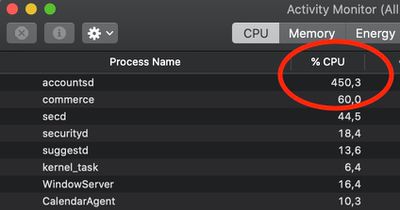
accountsd activity monitor
While this issue has popped up occasionally over the years, there has been a noticeable uptick in complaints across the Apple Support Communities, MacRumors Forums, Twitter, Reddit, Stack Exchange, and elsewhere since the release of macOS Catalina version 10.15.7, with users attempting to troubleshoot the issue.

What is accountsd?

Accountsd is a daemon, part of the Accounts framework. Apple's developer documentation says this framework helps users access and manage their external accounts from within apps, without requiring them to enter login credentials.

The Accounts framework provides access to user accounts stored in the Accounts database, which is managed by the system. An account stores the login credentials of a particular service, such as Twitter, and you use those credentials to authenticate with the service. When you integrate the Accounts framework into your app, you don't need to store account logins yourself. Instead, the user grants your app access to use their account login credentials, bypassing the need to type their username and password. If no account for a particular service exists in the user's Accounts database, you can let them create and save an account from within your app.

How to fix accountsd CPU usage?

Affected users have offered a wide range of potential solutions, but your mileage may vary.

Some users have managed to solve the issue by signing out of their Apple ID account under System Preferences > Apple ID > Overview > Sign Out, restarting their Mac, and then signing back in to the account, but this has not worked for everyone.

Some users have solved the issue by resetting their Mac's SMC and/or NVRAM.

One user on Stack Exchange believes the issue relates to a bug with file indexing on the Mac. Their solution involves resetting the indexing by navigating to System Preferences > Spotlight > Privacy and adding (+) your storage drive ("Macintosh HD" by default) to the "Prevent Spotlight from searching these locations" list. Then, remove (-) the drive from the list, and the Mac will begin reindexing. The indexing process can temporarily slow down your Mac, so these steps are recommended to be completed overnight.

As for more advanced troubleshooting, some users have had success with navigating to "~/Library/Accounts" and renaming the file "Accounts4.sqlite" to "Accounts4.sqlite.testbackup" or using more complex Terminal commands, but proceed with caution, as these solutions could impact your iCloud accounts or syncing.

Apple has yet to acknowledge this issue. Should a software update be released with a fix, we will update this article accordingly.


Related Forum: macOS Catalina

Top Rated Comments

trip1ex Avatar
70 months ago
buying a new mac always solves the problem and is the official solution straight from Apple HQ
Score: 21 Votes (Like | Disagree)
navaira Avatar
70 months ago
There is a bug in Catalina?

Unheard of.
Score: 16 Votes (Like | Disagree)
Internet Enzyme Avatar
70 months ago
This type of crap is so pervasive in macOS. . . Some stupid process like “photolibraryd” or something will just toss a plurality of your CPU into a bottomless pit
Score: 15 Votes (Like | Disagree)
aloshka Avatar
70 months ago
I think this has been happening for the last 2-3 years (including Mojave) for me anyway. If apple is aware of it, it’s not priority and probably will not be fixed.
Score: 14 Votes (Like | Disagree)
WannaGoMac Avatar
70 months ago
Yet another reason to stick with Mojave...
Score: 10 Votes (Like | Disagree)
Dr. James Avatar
70 months ago
Yep, happened to me with a 2015 Macbook Pro. The whole OS was useless. To fix it, I signed out of iCloud and then signed in. No restart required.
Score: 9 Votes (Like | Disagree)

Popular Stories

Aston Martin CarPlay Ultra Screen

Apple's CarPlay Ultra to Expand to These Vehicle Brands Later This Year

Sunday February 1, 2026 10:08 am PST by
Last year, Apple launched CarPlay Ultra, the long-awaited next-generation version of its CarPlay software system for vehicles. Nearly nine months later, CarPlay Ultra is still limited to Aston Martin's latest luxury vehicles, but that should change fairly soon. In May 2025, Apple said many other vehicle brands planned to offer CarPlay Ultra, including Hyundai, Kia, and Genesis. In his Powe...
Apple Logo Black

Apple's Next Launch is 'Imminent'

Sunday February 1, 2026 12:31 pm PST by
The calendar has turned to February, and a new report indicates that Apple's next product launch is "imminent," in the form of new MacBook Pro models. "All signs point to an imminent launch of next-generation MacBook Pros that retain the current form factor but deliver faster chips," Bloomberg's Mark Gurman said on Sunday. "I'm told the new models — code-named J714 and J716 — are slated...
Apple MacBook Pro M4 hero

New MacBook Pros Reportedly Launching Alongside macOS 26.3

Sunday February 1, 2026 5:42 am PST by
Apple is planning to launch new MacBook Pro models with M5 Pro and M5 Max chips alongside macOS 26.3, according to Bloomberg's Mark Gurman. "Apple's faster MacBook Pros are planned for the macOS 26.3 release cycle," wrote Gurman, in his Power On newsletter today. "I'm told the new models — code-named J714 and J716 — are slated for the macOS 26.3 software cycle, which runs from...
iOS 26

iOS 26.3 and iOS 26.4 Will Add These New Features to Your iPhone

Tuesday February 3, 2026 7:47 am PST by
We are still waiting for the iOS 26.3 Release Candidate to come out, so the first iOS 26.4 beta is likely still at least a week or two away. Following beta testing, iOS 26.4 will likely be released to the general public in March or April. Below, we have recapped known or rumored iOS 26.3 and iOS 26.4 features so far. iOS 26.3 iPhone to Android Transfer Tool iOS 26.3 makes it easier...
14 inch MacBook Pro Keyboard

Apple Changes How You Order a Mac

Saturday January 31, 2026 10:51 am PST by
Apple recently updated its online store with a new ordering process for Macs, including the MacBook Air, MacBook Pro, iMac, Mac mini, Mac Studio, and Mac Pro. There used to be a handful of standard configurations available for each Mac, but now you must configure a Mac entirely from scratch on a feature-by-feature basis. In other words, ordering a new Mac now works much like ordering an...














