Google Brings Vertical Tabs and Improved Reading Mode to Chrome
Google today updated its Chrome browser with support for vertical tabs, which are displayed in a sidebar instead of at the top of the browser.
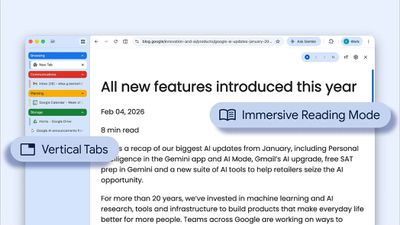
The tab layout can be changed by right clicking on any Chrome window and choosing the "Show Tabs Vertically" option. Sidebar tabs feature full page titles and make it simple to organize tab groups.
Google has also added a new full-page interface for reading mode. Right clicking on a webpage and choosing the "Open in reading mode" option will remove distractions and initiate a full-page viewing experience rather than the current side panel default.
Google says the two new features are rolling out on the desktop version of Chrome starting today, so they should be available for all users soon.
Popular Stories
Apple has launched a new "Switch to Safari" marketing campaign that encourages Chrome users to switch to Safari as their web browser of choice on the Mac.
"Safari is a more powerful and private browser than Chrome," says Apple.
Apple has a new "Switch to Safari" page on its website that outlines more than 10 reasons that Chrome users should switch to Safari, including faster performance...
Google today said it is making its SynthID Detector available to everyone for identifying content created using AI.
SynthID Detector first rolled out to members of the media last year, and it is now available worldwide in English. SynthID Detector is a website that lets users upload a photo, video, or audio file to determine whether it has a SynthID watermark that identifies it as...
South Korea has fined Apple 20.8 billion won ($15.5 million) and ordered it to let developers link to external payment options from their apps, The Associated Press reports.
The Korea Media and Communications Commission found that Apple and Google effectively require developers to use their payment systems, violating a 2021 law intended to allow alternatives. Google was fined 42.9 billion...