macOS Tahoe 26.4 Adds Slow Charger Indicator for MacBooks
macOS Tahoe 26.4 includes a new slow charger indicator that tells MacBook users when their charging setup isn't delivering full power.
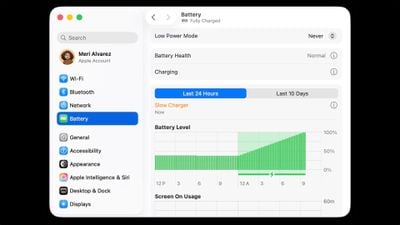
As described in an updated Apple support document, a "Slow Charger" label now appears in orange text in the battery status menu and above the Battery Level graph in Battery settings. The indicator is accompanied by an info button for more details.
Apple says that to charge more quickly, users should use a power adapter and cable that deliver at least the minimum wattage recommended for their MacBook model.
The feature is similar to one Apple added to iPhone with iOS 18, where periods of slow charging appear as an orange bar in the Battery section of the Settings app.
The slow charger indicator is one of two battery-related changes in macOS 26.4. The update also adds a Charge Limit feature that lets MacBook users set a maximum charge level anywhere from 80 to 100 percent, with the aim of preserving long-term battery health.
macOS Tahoe 26.4 is available now via System Settings ➝ General ➝ Software Update.
Popular Stories
Bloomberg's Mark Gurman has high expectations for Apple's first foldable iPhone.
In his Power On newsletter today, he said the foldable iPhone will be "the most significant overhaul in the iPhone's history."
"iPhone 4, iPhone 6 and iPhone X were clearly a big deal, but this is a whole new design," he said.
Like Samsung's Galaxy Z Fold 7, the foldable iPhone will reportedly open up like ...
iOS 26.5 is now available for developers, and while it doesn't include any new Siri capabilities, there are some major changes for the European Union, and smaller tweaks for features available worldwide.
Suggested Places
In the Maps app, there's a new "Suggested Places" feature that recommends locations to visit based on trending places nearby and recent searches. When Apple launches ads in ...
Apple has been celebrating its upcoming 50th anniversary by hosting surprise performances and other events around the world over the past few weeks, and now Bloomberg's Mark Gurman has revealed details about the company's grand finale.
In a social media post, Gurman said Apple's celebrations will conclude this week with a finale at its Apple Park headquarters for employees.
A special...
Popular Stories
Apple today confirmed that iPadOS 26.3.1 and macOS 26.3.1 are on the way. The updates will likely be released at some point this week or next week.
iPadOS 26.3.1 and macOS 26.3.1 are mentioned on the tech specs page for the new Studio Display and Studio Display XDR, which launch on Wednesday, March 11.
On a related note, both the new Studio Display and the Studio Display XDR are compatible...
Apple today released macOS Tahoe 26.3.1, a minor update to the macOS Tahoe operating system that came out last September. macOS Tahoe 26.3.1 comes three weeks after Apple launched macOS Tahoe 26.3.
Mac users can download the new software by opening up the System Settings app and navigating to the Software Update section.
According to Apple's release notes for the update, it adds support...
Apple today provided public beta testers with the third release of an upcoming macOS Tahoe 26.4 update for testing purposes. The public beta comes a week after Apple seeded the second beta.
After signing up for beta testing on Apple's beta site, public beta testers can download the updates using the Software Update section in the settings app for each update.
macOS Tahoe 26.4 includes...