

Apple Again Tests Background Security Updates in iOS 26.3 and macOS Tahoe 26.3 - MacRumorsOpen MenuShow RoundupsShow Forums menuVisit ForumsOpen Sidebar
Skip to Content

Apple Again Tests Background Security Updates in iOS 26.3 and macOS Tahoe 26.3

Apple is once again testing its new Background Security Improvement feature that first rolled out in iOS 26.1, iPadOS 26.1, and macOS Tahoe 26.1. Following a previous test earlier this week, developers and public beta testers who are running iOS 26.3, iPadOS 26.3, or ‌macOS Tahoe‌ 26.3 can now install a second Background Security Improvement update for testing purposes.
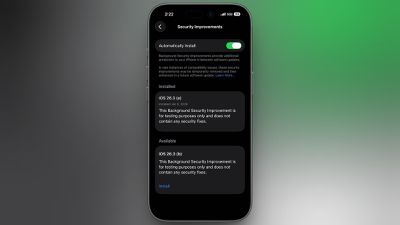
background security improvements 2
Apple says Background Security Improvements provide additional security protections between software updates for Safari, WebKit, and other system libraries.

Background Security Improvements can be installed by going to the Privacy and Security section of the Settings app, scrolling down to Background Security Improvements, and selecting the "Install" option. If "Automatically Install" is toggled on, Background Security Improvements will be automatically installed when they come out with no need to manually install them.

Apple says that users who opt not to install the Background Security Improvements will receive the updates in a standard software update.

Apple previously had a Rapid Security Response update feature for delivering security improvements, but it wasn't used often after it was introduced in iOS 16, and was ultimately phased out in favor of Background Security Improvements. At one point in 2023, there was a Rapid Security Response bug that prevented some websites from displaying properly.

Apple warns that Background Security Updates can result in "rare instances of compatibility issues." Should that occur, the updates may be temporarily removed and enhanced in a subsequent software update.


Related Roundups: iOS 26, iPadOS 26, macOS Tahoe
Related Forums: iOS 26, macOS Tahoe

Popular Stories

iOS 26 6 2

Apple Releases iOS 26.6.2

Tuesday September 8, 2026 10:47 am PDT by
Apple today released iOS 26.6.2 with a fix for "an issue that prevents downloading a software update over a cellular connection." The minor software update is rolling out now for the iPhone 11 series and newer. To update your iPhone, open the Settings app and tap on General → Software Update. It might take a few minutes for the update to be visible to everyone. iOS 26.6.2 arrives...



ios 26 7

Apple Releases iOS 26.7 With Security Fixes

Monday September 14, 2026 10:32 am PDT by
Alongside iOS 27, Apple today released iOS 26.7, an update to the existing iOS 26 software. Users who check for new software will see iOS 26.7 as the default update, with iOS 27 listed as an option at the bottom of the Software Update interface. According to Apple's release notes, iOS 26.7 includes security fixes, but it does not have any other features. Apple will eventually show iOS 27 ...
apple lock security bug vulnerability fix privacy

iOS 27 and iOS 26.7 Fix More Than 100 Security Bugs

Monday September 14, 2026 11:36 am PDT by
Today's iOS 27 update addresses over 100 security vulnerabilities, which is a good reason to install the new software. If you don't want to update to iOS 27 yet, Apple also released iOS 26.7 with over 80 security fixes. 75 of the fixes are shared across both updates, so iOS 26.7 addresses many of the same issues. There are multiple kernel fixes, including one that could allow a malicious...

Top Rated Comments

9 months ago

I'm sorry, but based on Apple's poor software quality I do NOT ever want a security update to happen in the background or without my specific authorization.

So… turn it off?
Also, they can be removed after they are installed just so you are aware.
Score: 14 Votes (Like | Disagree)
9 months ago

But Apple is just prepping for a time when there will not be any choice. They have a constant history of removing options.

So "turn it off" works for now, but what about later?
First of all, this feature has been an iOS for four years now and you’ve always been able to turn it off, even though Apple hasn’t really used it. And they specifically state you can remove the security updates in case of compatibility issues, and you will get the security update in the future software revision.
But also… Why are you worrying about some hypothetical that might maybe possibly but also might possibly not probably won’t happen someday?
For now, they are removable, and you can turn the feature off.
If that policy changes, cross that bridge when you get to it, literally absolutely no point in fixating on it today.
It’s like the complaints in 2010 that Apple was going to make macOS “AppStore only” and your finder and terminal and all of your cool computer things are going away. It’s been 16 years and you can still download apps to your Mac from the Internet and fly through Finder and use the terminal to your heart’s content. You can even do those things at the same time..
Score: 11 Votes (Like | Disagree)
9 months ago
I'm sorry, but based on Apple's poor software quality I do NOT ever want a security update to happen in the background or without my specific authorization.

My income is based on my Apple devices working, not being bricked when I need them most.
Score: 11 Votes (Like | Disagree)
9 months ago

So… turn it off?
Also, they can be removed after they are installed just so you are aware.
But Apple is just prepping for a time when there will not be any choice. They have a constant history of removing options.

So "turn it off" works for now, but what about later?
Score: 9 Votes (Like | Disagree)
RSmith2023 Avatar
9 months ago

First of all, this feature has been an iOS for four years now and you’ve always been able to turn it off, even though Apple hasn’t really used it. And they specifically state you can remove the security updates in case of compatibility issues, and you will get the security update in the future software revision.
But also… Why are you worrying about some hypothetical that might maybe possibly but also might possibly not probably won’t happen someday?
For now, they are removable, and you can turn the feature off.
If that policy changes, cross that bridge when you get to it, literally absolutely no point in fixating on it today.
It’s like the complaints in 2010 that Apple was going to make macOS “AppStore only” and your finder and terminal and all of your cool computer things are going away. It’s been 16 years and you can still download apps to your Mac from the Internet and fly through Finder and use the terminal to your heart’s content. You can even do those things at the same time..
Some people just don’t feel right in the morning unless they wake up complaining about hypothetical things.
Score: 6 Votes (Like | Disagree)
9 months ago

Make no mistake, they really wanted to do this.

But I think they realized it would have been the end of the Mac.
And your source is?
Or is this another “just trust me bro” straw man.
Score: 6 Votes (Like | Disagree)

🔗 Related Apple News & Rumors

Stay updated with the latest Apple ecosystem news and verified rumors









































