iOS 26.2 Adds Temporary AirDrop Access With Shareable Codes - MacRumorsOpen MenuShow RoundupsShow Forums menuVisit ForumsOpen Sidebar
Skip to Content

iOS 26.2 Adds Temporary AirDrop Access With Shareable Codes

iOS 26.2 beta 3 includes new iPhone AirDrop functionality, providing a way for two people to share files temporarily without having to add each other as contacts.
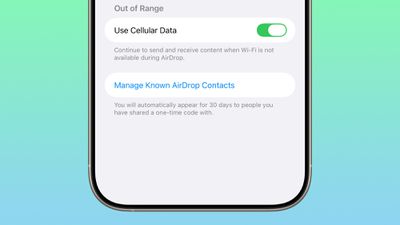
ios 26 2 airdrop
There is a new option to get an AirDrop code, which can then be shared with someone who is not in your contacts list. The code provides AirDrop access for a 30-day period, with options to remove access in the Settings app.

Share a secure code with people not in your contacts to use AirDrop. You will be able to find each other for the next 30 days. You can manage access in Settings.

When you generate a code, the person that you're planning to use AirDrop with can input that code so that your devices can communicate with one another.

There are already options to turn AirDrop off entirely, limit AirDrop to contacts only, or turn AirDrop on for everyone for 10 minutes. The code-based option provides a way to create a connection with someone you don't want to create a contact card for, while avoiding having to turn AirDrop on for all people nearby.

People you have shared a one-time code with can be managed by opening up the Settings app, selecting the General section, choosing AirDrop, and tapping on "Manage Known AirDrop Contacts."

Related Roundups: iOS 26, iPadOS 26
Related Forum: iOS 26

Popular Stories

iOS 26 6 2

Apple Releases iOS 26.6.2

Tuesday September 8, 2026 10:47 am PDT by
Apple today released iOS 26.6.2 with a fix for "an issue that prevents downloading a software update over a cellular connection." The minor software update is rolling out now for the iPhone 11 series and newer. To update your iPhone, open the Settings app and tap on General → Software Update. It might take a few minutes for the update to be visible to everyone. iOS 26.6.2 arrives...
ios 26 7

Apple Releases iOS 26.7 With Security Fixes

Monday September 14, 2026 10:32 am PDT by
Alongside iOS 27, Apple today released iOS 26.7, an update to the existing iOS 26 software. Users who check for new software will see iOS 26.7 as the default update, with iOS 27 listed as an option at the bottom of the Software Update interface. According to Apple's release notes, iOS 26.7 includes security fixes, but it does not have any other features. Apple will eventually show iOS 27 ...
apple lock security bug vulnerability fix privacy

iOS 27 and iOS 26.7 Fix More Than 100 Security Bugs

Monday September 14, 2026 11:36 am PDT by
Today's iOS 27 update addresses over 100 security vulnerabilities, which is a good reason to install the new software. If you don't want to update to iOS 27 yet, Apple also released iOS 26.7 with over 80 security fixes. 75 of the fixes are shared across both updates, so iOS 26.7 addresses many of the same issues. There are multiple kernel fixes, including one that could allow a malicious...

Top Rated Comments

11 months ago
I accidentally sent a freaking NSFW video to a family member because the stupid way Airdrop does not ask you if you are sure to send something to someone even if contacts because sometimes you could have multiple people close by and if they move around their icons goes away and the other persons icon right away takes over the spot the other people’s icon was at 😤 and if you use your phone too fast you would accidentally send something not meant for the other person close by.
I still to this day not sure if the thing went through 100% but I am scared.
So angry how Apple does not make us take extra steps for clicking the wrong thing.
One person moves out of the range the other person takes its place in the quick share thing.
Score: 12 Votes (Like | Disagree)

TheColtr Avatar
11 months ago
Cool feature. I’m trying to think of a situation where I would want to send/receive airdrop, but wouldn’t want to add them to my contacts, but also want to be able to airdrop with them for up to 30 days. If I’m with someone for longer than that one airdrop I probably know them well enough to add them to my contacts.
Score: 9 Votes (Like | Disagree)
11 months ago

I have no idea what the real-world use case for this is. There's no way this is faster than NameDrop then Airdrop (contacts only) would be.
This is a welcome addition for me working with my music students and not wanting to add contacts or another app. Setting up a temp code would help 'manage the transfer' of shared music files privately in a busy (and sometimes 'nosy') public studio space.
Score: 8 Votes (Like | Disagree)
11 months ago
at some point airdrop stops being convenient with all these changes since the beginning.
Score: 6 Votes (Like | Disagree)
11 months ago
I just want for AirDrop to reliably find nearby devices of my existing contacts.
Score: 5 Votes (Like | Disagree)
WarmWinterHat Avatar
11 months ago

Or idk... how about just make airdrop for everyone and in the actual airdrop receiving UI, have an option to turn it off?
iOS 16.2 butchered airdrop and now no one uses it.
Airdrop open to everyone by default was a bad idea from the beginning. I don’t want my phone’s name, and/or my name broadcast to everyone, by default.

I remember a year or so after AirDrop appeared and opening it up at the airport, just to see pages and pages of people. I randomly sent about a dozen people that pic of a sloth astronaut at LAX.

..and I remember creeps sending junk pics to random people. Yea, you might not have accepted it, but you still saw the thumbnail….


Attachment Image
Score: 4 Votes (Like | Disagree)

🔗 Related Apple News & Rumors

Stay updated with the latest Apple ecosystem news and verified rumors















































