

Everything New in iOS 26.1 Beta 2 - MacRumorsOpen MenuShow RoundupsShow Forums menuVisit ForumsOpen Sidebar
Skip to Content

Everything New in iOS 26.1 Beta 2

Apple released the second beta of iOS 26.1 and iPadOS 26.1, introducing useful changes to alarms, multitasking on the iPad, and more. There are also subtle tweaks to some of the Liquid Glass design elements as Apple continues to refine iOS 26.
iOS 26

Alarms and Timers

Alarms set using the Clock app now have a slide to stop button rather than a tap to stop button on the Lock Screen. To snooze an alarm, you can tap, but to turn it off from the Lock Screen, you need to use a slide gesture.

ios 26 1 slide to stop
The change makes it much harder to dismiss an alarm when you're trying to tap on the snooze button. Slide to Stop is also used for timers.

Background Security Improvements

The Privacy and Security section of the Settings app now has a toggle to automatically download and install security improvements. It's a revamp of the prior Rapid Security Responses feature.
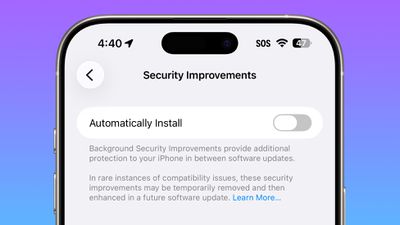
ios 26 1 security improvements

Fitness App

You can now create custom workouts in the Fitness app on iPhone. There are options for selecting workout type, estimated Active Calories, effort, duration, and start time.
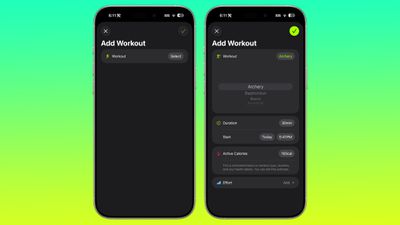
ios 26 1 custom workout

Settings App

Apple changed the alignment of icons and text in the Settings app. All settings with headers that feature text now have that text aligned to the left instead of center aligned.
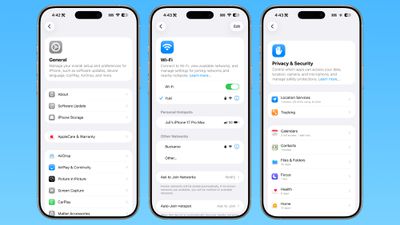
ios 26 1 left aligned settings
This includes General, Bluetooth, Wi-Fi, Cellular, Personal Hotspot, Accessibility, and more.

Display Settings

The Display section of the Settings app now has iOS 26-themed wallpaper instead of iOS 18 wallpaper.
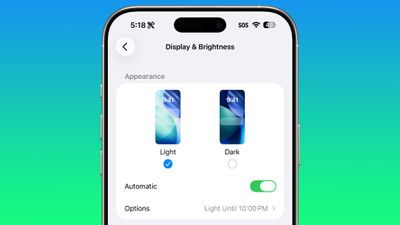
display brightness setting ios 26 1

Home Screen Folders

When you tap into a folder on the Home Screen, the name of the folder at the top is left aligned instead of center aligned.
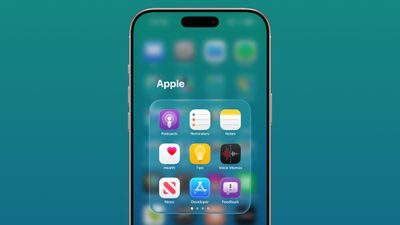
ios 26 1 folder alignment

iPadOS 26.1 Slide Over

With iPadOS 26.1 beta 2, Apple reintroduced Slide Over. Slide Over works alongside the window-based iPadOS 26 multitasking functionality, so you can have multiple windows open and still swipe over to quickly access a Slide Over app.
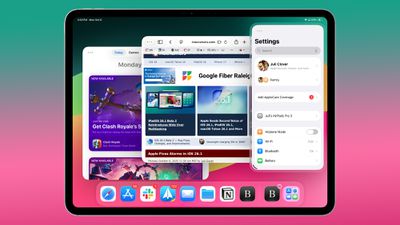
ipados 26 1 slide over
You can only have one Slide Over app at a time in iPadOS 26.1, and you can use the feature by tapping on the green window resizing button and
toggling on Enter Slide Over.

External Microphones on iPad

There's now an option to adjust input gain on the ‌iPad‌ when using an external microphone.

Liquid Glass

The light refraction effect around apps is now more subtle with darker icon colors and background colors.

Wallpaper

When setting a wallpaper on the Lock Screen, instructions like Pinch to Crop show up momentarily and then disappear, rather than being shown all the time.
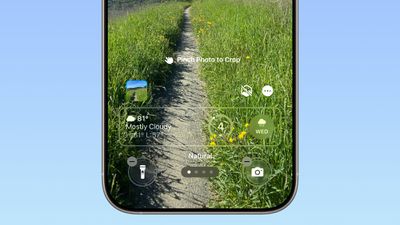
ios 26 1 wallpaper crop

Display Accessibility

Under the Display and Text Size section in the Accessibility settings, there is a new "Display Borders" toggle. It adds a border to all buttons, and replaces the prior "Button Shapes" setting.

Calendar

The Calendar app change that showed events with a full color background in iOS 26.1 beta 1 has been removed.

Photos App

The interface for managing multiple photos that you've selected has been tweaked slightly. Play as Slideshow, Favorite, and Hide are now at the top of the menu.
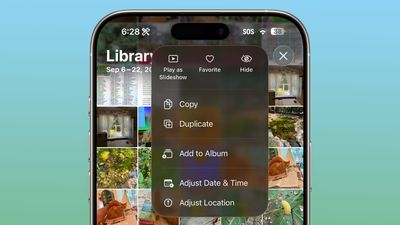
ios 26 1 photos app

More Features

Know of something new in iOS 26.1 that we missed? Let us know in the comments below.

Related Roundups: iOS 26, iPadOS 26
Related Forum: iOS 26

Popular Stories

Jon Prosser Rainbow

YouTuber Jon Prosser Responds to Apple's Lawsuit Over iOS 26 Leaks

Thursday July 2, 2026 6:42 pm PDT by
Jon Prosser today responded to Apple's lawsuit over iOS 26 leaks, with the YouTuber placing much of the blame on his acquaintance Michael Ramacciotti. As a refresher, Apple sued Prosser and Ramacciotti in July 2025 over alleged theft of the company's trade secrets. Apple alleged that the duo coordinated to break into former Apple software engineer Ethan Lipnik's development iPhone, in order ...
iOS 26

Apple Seeds Fourth iOS 26.6 and iPadOS 26.6 Betas to Developers

Monday July 6, 2026 10:17 am PDT by
Apple today seeded the fourth betas of upcoming iOS 26.6 and iPadOS 26.6 updates to developers for testing purposes, with the software coming a week after Apple seeded the third betas. Registered developers can download the betas from the Settings app on the iPhone or iPad by going to the General section and selecting Software Update. With iOS 27 set to launch in September, Apple is...
iOS 26

Apple Seeds Fourth Public Betas of iOS 26.6, macOS Tahoe 26.6 and More

Tuesday July 7, 2026 1:16 pm PDT by
Apple today provided public beta testers with the fourth betas of iOS 26.6, iPadOS 26.6, macOS Tahoe 26.6, watchOS 26.6, and tvOS 26.6, with the software coming a day after Apple seeded the betas to developers. After signing up to beta test the software updates on Apple's beta site, public beta testers can download the new software using the Software Update section in the Settings app on...

Top Rated Comments

11 months ago
I’ve been waiting for years for the folder name alignment thing. This is why I never bought an iPhone until now.

Score: 23 Votes (Like | Disagree)
swrobel Avatar
11 months ago
“Revamp of the Rapid Security Response feature they never used”
Score: 22 Votes (Like | Disagree)
sxbino Avatar
11 months ago
The left alignment on texts is actually hideous. Whoever approved that is not a designer for sure.

Score: 10 Votes (Like | Disagree)
What_Is_George Avatar
11 months ago
The fact the wallpaper wasn’t updated in display settings is actually disappointing for Apple standards
Score: 10 Votes (Like | Disagree)
11 months ago
Too bad about the calendar change. I actually liked it the way it was before.
Score: 7 Votes (Like | Disagree)
eoblaed Avatar
11 months ago

That's because Apple doesn't beta test anything anymore.
Of course they do. A lot. But given that iOS is one of their few schedule driven release cycles, they frequently have to make decisions on which bugs get resolved before release and which will be fixed over time.

Visual adjustments are going to be lower priority than functional issues... and with complete UX overhauls like we saw with iOS 7 and iOS 26, there are going to be lingering visual tweaks.
Score: 6 Votes (Like | Disagree)

🔗 Related Apple News & Rumors

Stay updated with the latest Apple ecosystem news and verified rumors











































